 @Carewind
edited
more from that month
@Carewind
edited
more from that month
Read.Cash: The Basics in Creating an Article
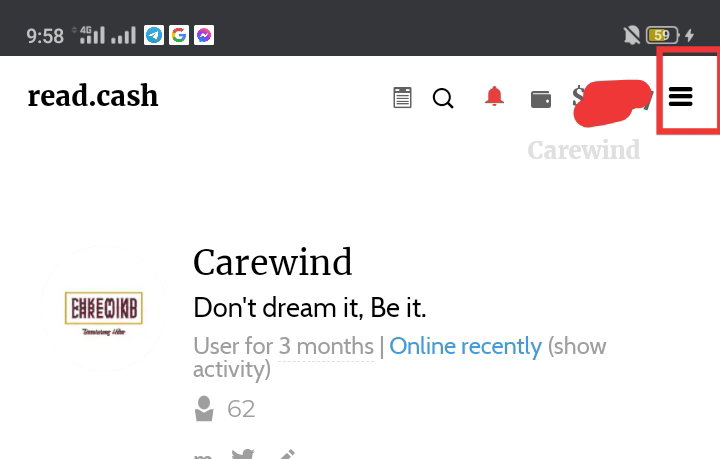
I was supposed to be taking a break from making an article today but I feel bored lying in bed, so here I am again guys. Since I got serious with read.cash last month, July 14 to be exact, I think this one simple yet special article will be helpful and handy. Since I can post article almost every other day now, many also ask me basics of how to make an article in read.cash platform. So here I am, I'll try my best to be able to help those aspiring content creator who really like to jump on board also. Without further ado, will go directly to the our content for today. The Header ***Note****: This is only starts at making article and the basic tools use in creating a more persuading article.* **First** and foremost, when you open the read.cash app, you'll be automatically on the home page. **Second** is, tap on the three vertical line in the upper right corner of the screen/monitor you're using.
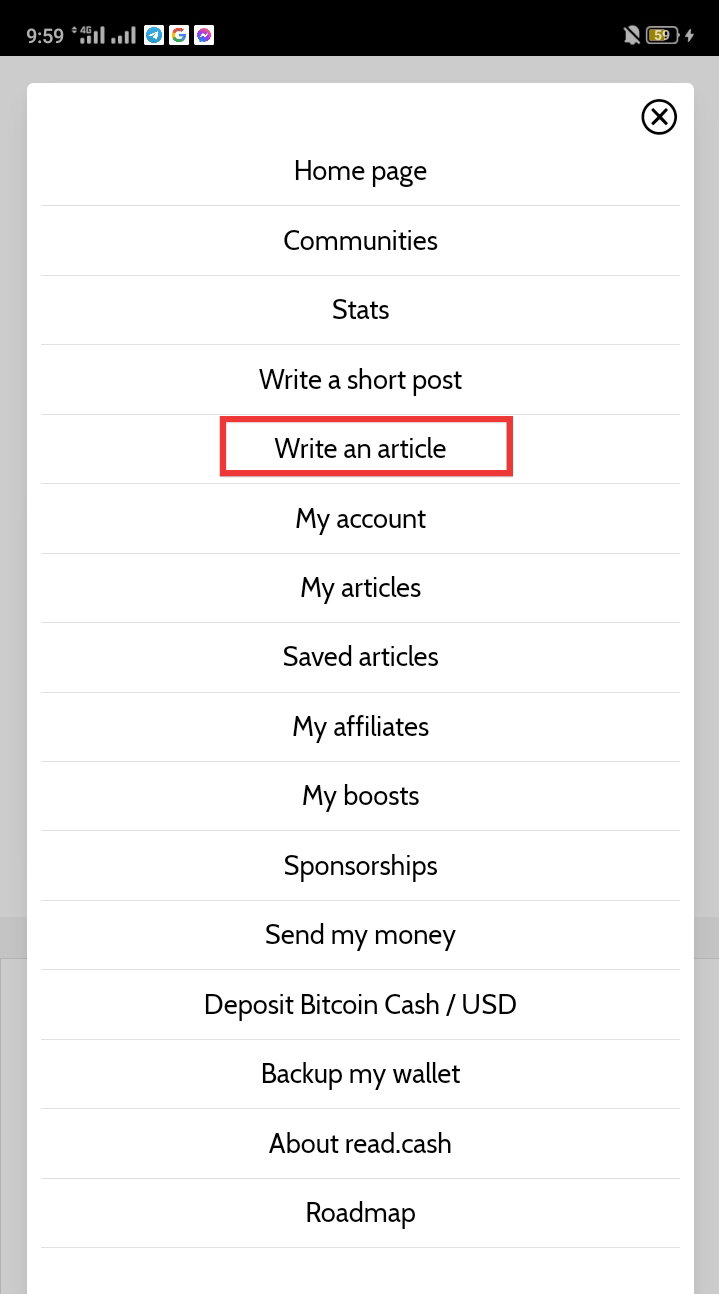
**Third**, after clicking/tapping on the three white vertical line, there will be a pop up box that will appear and of course, we tap/select on Write an article command box.
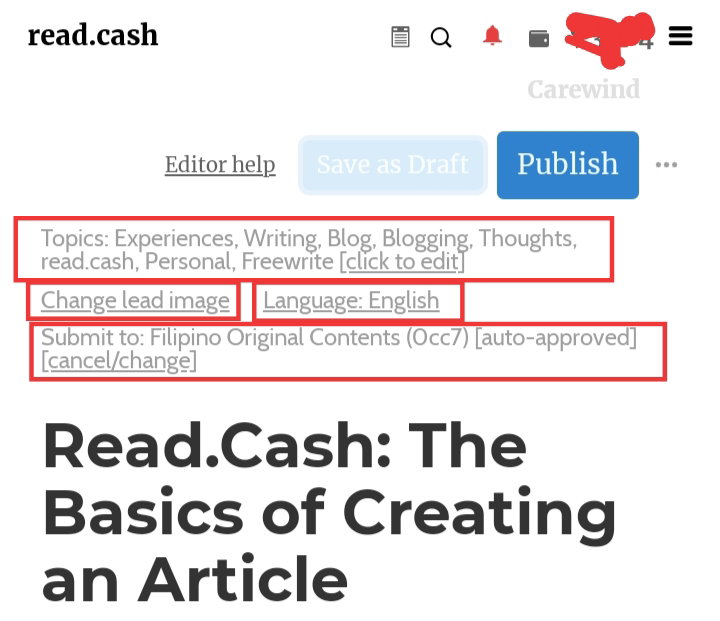
**Fourth**, after doing the third step, you'll be redirected to the main article maker that looks the same as the image below.
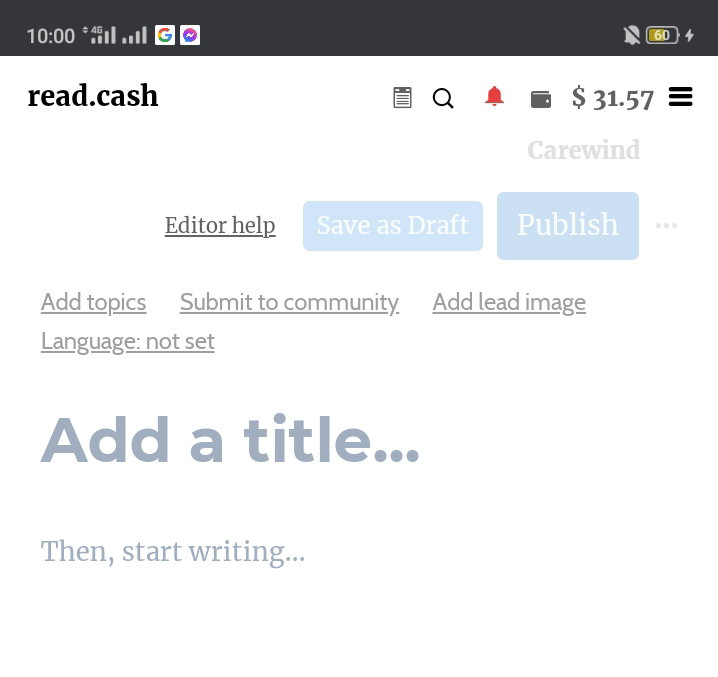
You need to **Add a title**, next to that is to **Add topics**, followed by **Submit to community, then Add lead image and last is Language.** ***Note****: Never forget to complete the header part, especially the* ***Submit to community,*** *make sure you select those auto-approved communities that are available. On the* ***add topics*** *also, you select up to ten topics****.*** *It will look like same as the image below after completing the header.*
**The Body and Basic Tools** For the main body of the article, we have eight (8) major tools in creating a more persuading and eye catching article guys, that will catch or hint your readers to continue reading down till the end. ***Let's begin listing this tools:*** Header 1 Header 2 Insert Image Insert Video/Audio Link Bullets List View Style Quote Box Style Tabloid View Style Sponsors Box ***See image below:***
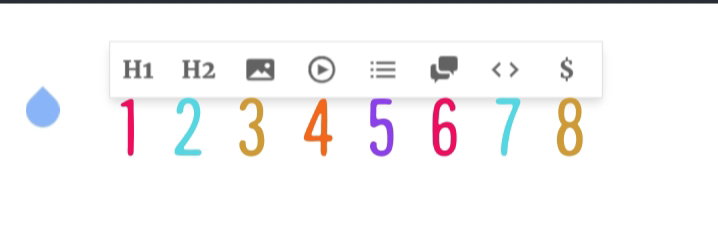
1 & 2. Header 1 and 2 When starting to write the body of the article, at your first tap, the basic tools will pop-up (***see image above with numbers***). The logo H1 and H2 are for Header 1 and 2. Header is for sub-titles, a title inside the main title. The only difference in this two is that H1 has bigger font size than H2. 3. Insert Image The third logo which is clearly has an image on it's icon, is the insert image tool. When adding an image, especially when the image is not ours, we must give credit and put the link to it (***Mind this always guys***) . There are three types or ways of how to add an image link into an article in read.cash: **First** and the most common one is adding the link below the image.

**Second** is, when your done inserting the desired image, you'll just name that picture the name you like and just add the link on the last part or ending portion of the article. Giving all the credits to the rightful owner just like this one for **example**: ***Step 1***: Insert image, add desired name

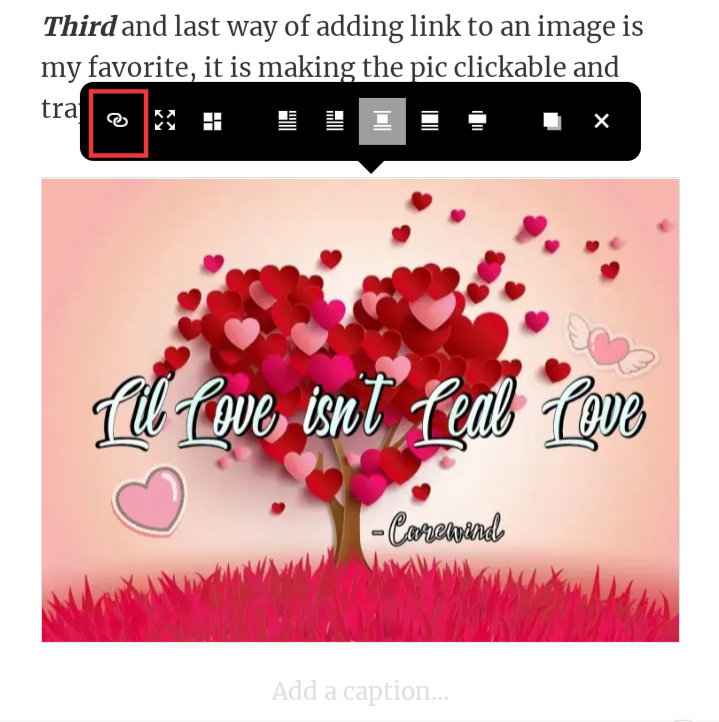
***Step 2***: Add this on the end part of the article. Credit to the rightful owners of the images: Image 1: https://pin.it/6XDli74 **Third** and last way of adding link to an image is my favorite, it is making the pic clickable and trappable. It only takes three steps to make it: ***Step 1***: Insert the desire image
***Step 2***: tap/click the inserted image, once tap/click it will pop-up another set of tools and settings that look like this image below, and just tap the link 🔗 icon, the one with a red box.
Step 3: After tapping the link 🔗 icon, it will pop-up again another box and then you just have to the paste the link of the image you selected, then click the ☑️. That's it.!
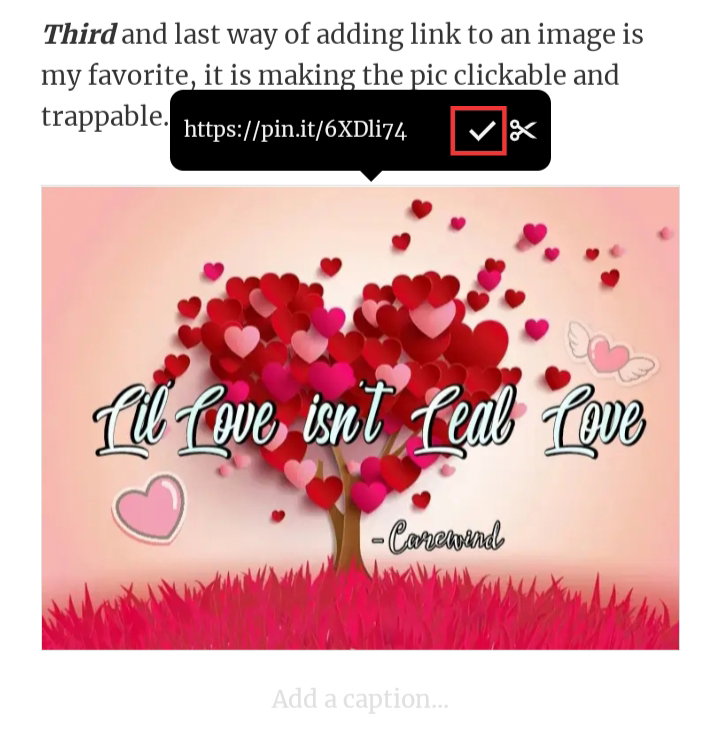
Now let's check and try the end result should be like this guys;
https://pin.it/6XDli74 4. Insert Video/Audio Link This tool is used when your adding a video or an audio to your article, as easy as adding image which I detailed above. https://youtu.be/Gyr1knwW_6U 5. Bullets List View Style It's an editing tool used to add listing with bullets on it, ***example***: Gorgeous & Beautiful Handsome and Masculine But just SINGLES. Hahaha, read it again singles! (Laughs) just for good vibes guys! Hehe 6. Quote Box Style This tool with icon of a message box is used for your messages and conversation if your sharing some from your own or from others. ***Example***: I love y'all my dear readers!!!! 7. Tabloid View Style This one tool also I used for prompts, commands, notes or reminders and even broadcast. There's two ways also how to use it, ***Example***: Tap the <> less than and greater than icon first in the pop-up tool box and then type the desired message you want to put in it and result would look like the black image below.

Reminder: Love Yourself To do this, type the desired word first then highlight the whole sentence you want to be eye catching and easily gets readers attention. It will look like the reminder you see below. `Reminder: Loving Yourself is always a must!` 8. Sponsors Box Lastly, that "$" is for your sponsors box, you just tap it ang put it anywhere you want it in your article and if you forget to add one, you don't have to worry, every article has a sponsorship box after every article before the comments section. The Most Common Editing Tools To finish this article, of course we'll never forget the most common tools used in editing your drafted article before prof-reading guys.

Maybe we are all familiar with these editing tool guys in microsoft. The first one is **BOLD**, the second one is *Italic*, the third one is **UNDERLINED** and the fourth one is ~~CENSORED~~. The other five icons are already tackled earlier on the article guys. Minimum Time Reading This one also is vital in making our article. The minimum length of time reading is at 4 minutes, it is around 600 (six hundred) plus words for your article to be qualified as good. This is how to check if your draft article already reach the minimum limit; Save first your drafted article so that your progress will be recorded. Tap the three (3) vertical lines in the upper right corner of the screen. Then select **My articles** See the photo below if the time inside the red box reach four (4) minutes and if it does, it's good to go for publishing.
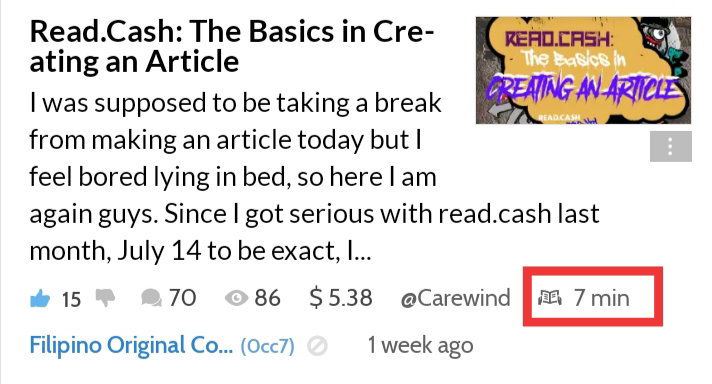
Grammar and Prof-reading Last but not the least, the most important of them all is the grammar. Me personally ain't good at it, but I'm my best to better my grammar to the top of my capabilities. Then, prof-reading come next before publishing. Checking out errors from periods to comas, and most especially the correct spelling of the words. **Closing Thoughts** I'm just sharing the basics guys, and if you have some questions about something that I didn't explain how it's supposed to be use, then feel free to ask me on the comments section below guys. Goodluck to all of us aspiring content creator, we keep doing what we doing in here y'all. Can't wait to see your next articles guys.!!! **Author's Quote:** `"You can start somewhere, somehow, with what you have and what you've learn, and the rest is experience and lessons learned."-` **Carewind**

Hello there buddy!!!!🙋🏽♂️ I'm glad you reach end again, thank y'all for always sharing your day with me, see you on the next one buddies, have a chill vibe day, stay hopeful cause better days are comin', Jah bless.!!! 🙏🙇 ***Adieux****!!!* Read.Cash: The Basics in Creating an Article Carewind - 20th Article August 10, 2021 - 09:13pm ***My latest Articles for the month:*** **Fighting against Anhedonia** https://read.cash/@Carewind/amping-galaxy-and-star-b0756bd3#bad-link **Seven for Sixteen** https://read.cash/@Carewind/amping-galaxy-and-star-b0756bd3#bad-link **Ain't a' Holy Grail; Natheless Aiming Stell** https://read.cash/@Carewind/amping-galaxy-and-star-b0756bd3#bad-link **Withstanding: My Kakorrhaphiophobia** https://read.cash/@Carewind/amping-galaxy-and-star-b0756bd3#bad-link **Lil' Love isn't Leal Love** https://read.cash/@Carewind/amping-galaxy-and-star-b0756bd3#bad-link **Chasing My Eleutheromania** https://read.cash/@Carewind/amping-galaxy-and-star-b0756bd3#bad-link Amping: Galaxy and Star ..





48 comments
I just do mine the @Bloghound style hehe.
Great, i just did this for those who are about to ask me and keep asking on our GC maam, so that I won't explain it to them, again, and again .jeje I'll try to check yours lods later. 😉
Very informative article lods. Ngayon ko lang na realize na pwede pala maglagay ng videos jusko 🤦
Thanks for appreciating lods, pwede naman, kahit gif's lods,!
May article ako na "Read.cash for beginners". Nag step by step instructions din ako dhn kung pano gumawa ng account dito tapos nilagay ko yung mga Frequently Asked Questions. Hahaha. Linked ko na lang tong sayo sa affiliates ko sa susunod.
Okay lods, walang problema sakin,.! Basta makatulong lang tayo maam,.!
Oo naman. Baka may bago kang affiliate pwede mong ipabasa article ko para tipid sa daldal. Hahaha, depende sayo.
Kaya nga gumawa ako neto lara less stress ayane! Haha
Hahaha, dami kasing tanong ng mga yun. Nakakainis minsan yung paulit ulit.
Haha kaya nga lods, di naman ako naiinis,. Sayang lang yung oras., Haha kaya gumawa na ako,. Haha
Haha ginawan ko din ng article to dati. Guide sa pagsusulat ng Article here is my link 😂 https://read.cash/@ExpertWritter/how-i-write-articles-the-guide-to-the-beginners-3987b467
Naol naka dalawampung dolyar lodi,., Baka naman, pa es pun sur dyan haha
Lol HAHA matagal na yan sinuwerte lang ako. 😂
Hope all swerte lods,! Sana sa pag-ibig na din.!
Yowwww!!! Thank you so much for these! Been looking for a detailed guide in maximizing read.cash 💯💯💯 keep it up! U got yourself a new subscriber
Thanks for appreciating jc,! Goodluck to us,. Keep writing,.!
sure :) padayon!
Agay, bisaya sad d i,. Kumbati ta dri dol,. Jeje
hehe uyy ka bisdak. kumbati gyud lods :D
Haha ayawg pada, dita mag saba dol, bawal kusgon haha
Salamat sa guide len. 🙂
Len, habaan mo yung mga comments mo sa susunod, para di ka ma spam, baka matulad ka sa iba.!
Aww sorry2 len. Nindot jud bitaw pagka hiluna len. Practisan ko ni pag ayo hehe
Oo, tyagaan mo len, para gumanda article mo, magaling ka naman sa grammar at english,. Hehe
Nahihirapan ako sa tagalog len uy. Bat mo ako ginaganyan.hehe.pero ikaw jud idol nako ani uy. Maka amaze jud kaayo
Haha,. Tagalog at english lang kasi pwd len,.. mahirap na ma is pam ang akawnt natin haha
Alam mo kung anong hindi ko pa alam dyan bhe? Yung video at censored 🤣 Paano ba censored parang ibublurred? ganun ba? galing galing ah., tagal ko na nagsusulat di ko alam yun ah 🤣🤣
Mag line lang yun sa word bhe, di ko rin naman guinagamit yun bhe., Haha yung clickable na image alam mona pala yun bhe?
hindi ko pa na try bhe, hindi ko pa neexplore lahat ang hirap kase baka biglang magulo ang article.
Okay bhe, kaya yan, pag my time kana lang,.!
You forgot two of the most important things with any article: proper grammar and proper proofreading.
I don't forget about it maam, hehe i put it in the last paragraph but I deleted it because I'm not also good at it, hehe baka ako din mabalikan hehe
Sige, Maa. Very important, though. Good luck.
I'll just edit it later this evening lods,. Hehe I'll add it back again,.hehe
Soooo helpful nito, Kuyaaa. Lalo na sa mga newbies natin dito. Pero sanaol gorgeous at beautiful, ako kasi is SINGLE lang. HAHAHA! 😂 Pero paano n'yo nagagawa 'yung may mga colors na letters sa tabloid view style?
Haha sabi na nga ba kakagat yung single , haha we're all beautiful in our own ways lodi, about naman sa colors, automatic lang yan pag gumamit ka ng semicolon and colon, or even dash and slash lods.
halaaa thankyouu pooo ditoo. newbie langgg ako natataranta ako sa pagsusulat kahapon ng first article ko dahil nakakaalien yung tools HAHAHAH 🤣
Walang anuman lods,. Ito talaga purpose ng article natu makatulong sa iba.,
This helps me a lot since I'm a newbie here..thank for this one .po.. And ..sana ol may $30+😅Goodevening po.
Anung newbie ha, ehh ang gaking mo nga.,! Sponsor ka nga sakin ehh,. Liit lang yan lods, 9 articles na yan sa iba halos double digits per article hehehe
😅Still learning palang po ..madami naman po mababait dito kaya mabilis natututo..gaya mopo. kaya nga po ..pero nageffort din din sila para maging ganun articles nila .kaya laban lang tayo ..fighttuuuu💪
Yes lods, buti ka may time ka dun sa gc, kami di pinanpansin dun,. Haha bihira lang, magkakakilala kasi halos sila lahat dun mga nauna., Hehe
Thanks a lot po.malaking tulong po to lalo na samin mga newbie nito. Keep sharing 🥰🥰🥰
Welcome to the flatform my friend, keep engaged and read others articles. Just keep on grinding in here . Hehe
Thankie lodz may natotonan ako sa tools na yan, minsan nakakataranta lalo na kung bigla na lang nawawala yong gawa ko.
Madali lang yan lods, ikaw pa,! Thanks for apreciating lods.
This is very helpful para sa mga new users lods. Good job.
Thanks for appreciating lods, matagal nato at yun talaga aim ko neto kasi nung malakas pa read.cash madami nagtatanong kaya guinawan ko nang. Hehe