 @HappyBoy
more from that month
@HappyBoy
more from that month
Random readcash hints
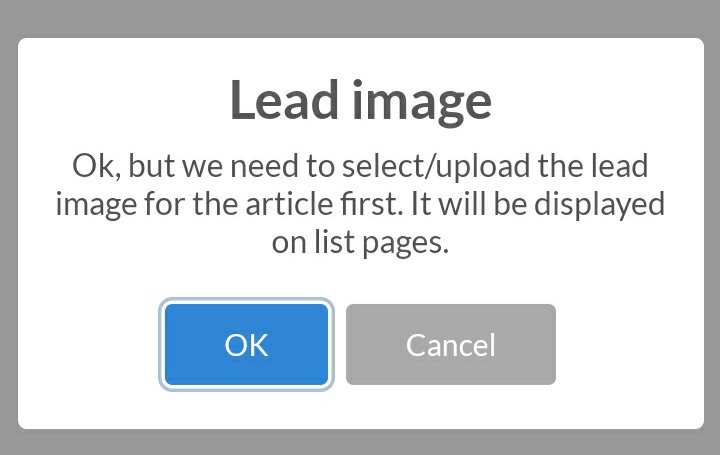
As the title implies this is going to be a random post. I'm going to touch different aspects. I started writing this a long time ago but i haven't been chanced to complete it. But after answering some questions from friends on WhatsApp about some of these things I decided to complete the piece. Let go straight down to business... Sponsorship link I need not go over the benefits of sponsorship again. I did that in this article. Most of us here don't have another website to promote, so we promote our readcash and noisecash accounts. This is understandable and a nice thing to do since we've got no personal site to advertise or promote. https://read.cash/@HappyBoy/sponsorship-is-more-than-advertisement-2e10e802 However, it appears some of us are missing the how to set the link. The URL for both noise and read has their unique style. If you are adding a link to your readcash page it can be two ways read.cash/@HappyBoy read.cash/r/happyboy While for noisecash it is noise.cash/u/Valour But on the sponsorship page, you're required to add " https:// " before either of the two. I've seen people put links to one of their articles while some put the homepage. I hope this helps. Saving Drafts and mistakes in publishing When Moderating a community I noticed some of the articles published are always lesser than 2 minutes read and when I try to proofread them, I realised the post looks like it wasn't intended to be published yet. I wondered why it keeps on reoccurring until I started drafting articles for later use. There is a probability of clicking the "Publish Article" button instead of the "Save as Draft" button. Most likely that's the error most people make. The solution to this is "Don't add a lead image to your draft" without the Lead image, whenever you mistakenly click publish button, a notification appears like this-
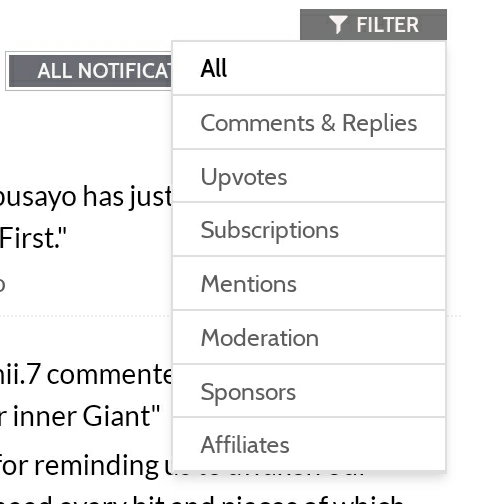
Sorting out Notifications When I got back, I met over 2000 unattended notifications. Where to start from became a problem. -notifications of affiliate payments -Expired sponsorships -Moderation -Mentions -Comments and replies -Upvotes -Posts from those I subscribed to I can't start marking all as read. If I'm to do that, I will miss some important notifications and it is also stressful, for the notification page shows 10 notifications per page. 2000 divided by 10. Do the maths. The solution was to use the "Filter" in selecting the ones I wanted. It will be bad if I don't check out my mentions to see if there is something I'm missing or that requires my attention. I still haven't cleared all notifications, but I've been able to sort out some.
Sourcing Most people know this already but for the sake of the few that doesn't, I'm adding it. As we all know referencing is very important on the website. Plagiarism and the use of illegal content is a great offence, so when using pictures from a website or citing parts of a written text, it's advisable to put the link. How to go about this Copy the link to the picture or text to your clipboard. Then come to your drafted article and highlight the part you want to house the link. After highlighting it the picture below appears. Click the 6th icon (the 2 rings laying on top of each other) and paste the link there. Click "go" or "enter" on your keyboard depending on if it's the phone or system you're using.

Adding Topics to your article This is a part I'm guilty of in time past. After writing an article, it's normal to add Topics it is related to. After clicking the "Add Topic" button, the system suggests topics to you based on two things: Trending Topics Recent articles you read Don't just click each suggested Topic. Click those related to your post alone and if none relates to it, type what you want and add. I once picked Topics that affected an ongoing story by another user on the site. I innocently picked the suggested topics not knowing I'm interfering with an ongoing series. Communities To add to a community, you must join the community first. Note your article must relate to what the community is all about...don't break the rules of the community. If your article isn't related to the goals of the community, it will be rejected. That doesn't mean your Article won't receive any audience. The people that subscribe to you will still see your post even if it isn't accepted into the community you wanted. Sometimes it takes a few minutes, hours or days before your article will be approved into a community. If the admin notices that you constantly post your content to the community and your posts are reliable and meaningful, that is -you can be trusted not to break the community rules, he/she gives you automatic permission to post to the group anytime. However, if one of your posts is deleted from the community by the admin, you lose your exclusive rights to post to the community without moderation. Let's stop here for today. Till next time guys... Thanks for reading!✍💚🧠

40 comments
Same, I can't also mark all because of the new published articles that I really need to read. But I'm too busy so I'm planing to have 5-10 articles per day or lower than that ;-;
Thanks for taking your time to explain these things to us. Concerning people accidentally publishing an article, I've seen that a lot of times, I've also seen some articles without lead images, I find it a bit weird. Well, n o one is above making mistakes. I had issues with the referral link yesterday, a certain person wanted to register read.cash via my link but I guess I made a mistake and the affiliate wasn't added. My loss; unfortunately.
That's painful...the system will automatically attach the affiliate to another person. Hopefully you'll get more affiliates with time
Where have you been? You abandoned me. 🤣🤣 I know you're writing exams.
No vex brother, i was nowhere and Everywhere for 1 week. I only visit post I'm mentioned in due to obligation and maybe few links i saw on WhatsApp or TG. I'm back now, i won't miss any of your wonderful articles again. Trust me
Same here, brother!
Muntik ko rin ma publish ginagawa kong article, pero buti nalang wala pang lead image hahha
You know that read cash is new. So many things were unknown to me. After reading your post, I came to know a lot of new things.thanks for wonderful help.
You're welcome Jakson20
This is a one stop guide for read :) Thank you and kudos to you for this work :)
Thanks Farmgirl 🙏
I have actually made that mistake of publishing an incomplete article because I mistakenly clicked on publish instead of save draft, but I immediately unpublished it. And I also didn't know about filtering notification (I have seen the filter button before but I haven't thought about using it). Thanks for explaining these things 🤗
I'm glad it was of help...
Thanks for the tips. Very useful for me that I have been reading for 8 days. I am glad to be part of the community and that many have welcomed me and liked my articles. I try to be as professional as I can in them and write them with the best possible quality. Have a great day.
I hope it isn't too late to welcome you. I will check your page out ...
It is never too late my friend. As they say it is better late than never. Thanks for going through my profile. I hope you find my content interesting. A hug.
This is absolutely a very helpful tips/guide for those newbies in this platform. Thanks for this bro💕
2000 notifications could be quite scary! LOL Good hints here!
That's how it is. Although I would be delighted to have them. LOL. I review the profile of everyone I follow and I always try to comment on their post, to be of help, even a little bit. Good day.
Thank you very much for this vital information this will help a lot for the new comers
Thank u for hints..
I learned the hard way on bot adding a lead image before the article is ready to be published HAHA. Anyway, your compilation of hints will surely help newbies on their journey. I think I will recommend this article to some of my affliates since you explained your points well.
Thank you for this HappyBoy. This is a guide and helps us a lot especially to the newbie. This is really informative and nice article from yours. ❤️
That's why I always put my lead image to the last because, that's also my doing hihi. This one ia good for the newbie. I always use that filters when I read Articles from other user. Or to reply.
Thanks for these hints, I learnt from it 🙏
That filter button really needs the sort from oldest to newest notifications. :)
Haha I always do all of that. 🤣 But this article is good for the newbies. So thankyou for sharing this knowledge, i think after they will read this article of yours they can learn more about writing here.
Now I have an idea how can I avoid publishing my drafts mistakenly. Don't put lead image yet thanks to this :) indeed it is very helpful.
When I'm making drafts, I'll make sure to put the lead image in the end so even if I accidentally press the publish button, it won't work because there is no image.
Thank you so much for the hints the sponsorship hint help me since I am new and just stated sponsoring writer as well thanks for the enlightenment. About the notification as well, I didn't know I could have use the filter rather than clicking continuously and non-stop the next page like forever 😂 thank you so much. This writing really helps me. 🥰 Keep writing.
Great hints here. Most times, when an idea flash through my mind, in just scribble it in my draft and edit it later before posting. That draft is a good feature on the platform.
I love the one of the notification hint,I will try using that anytime I am really busy and can't make it to much articles
This is a great article happyboy for it will help a lot to newbie In this platform, thank you for sharing it. Even though I'm having a headache your article is easy to understand. Applause for you
I hope you're feeling better now
Thank you for this great insight. I appreciate...
Thanks for this, it's a really big help to us, beginners.
the loaded notifications is one of my big problem before. Wondering how will I finished reading those. But then I found out that most of my notifs are just upvotes that causes hundreds of notifications. Right now, I already practiced reading all articles and clearing notifs that aren't published articles. Now it's easier for me to read articles even those 1 day ago articles
This is a best guide for newbies and even for those who are still facing these problems. The idea of adding the lead image at the end sounds good because it will save us from publishing article before its completed .
Very good step to guide others who's facing difficulties to get rusty every single and little thing matters
Same! I also don't add Lead Image too, so whenever I accidentally click Publish, I don't have much problem. And I also use that filter feature so much! I am now sweeping off notifs under subscription actually. 😂