 @kli4d
Software and Websites I Use in Writing **August 11, 2021**
Hello, everyone! I’ve been writing here for a year now but I think I never mentioned the tools that I used on making my articles. Today, I decided to create this article to show the softwares and websites that I often use to make my work justifiable to the readers. First on the list is... *insert drum roll*
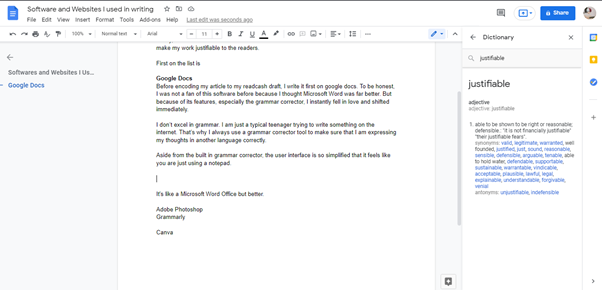
**Google Docs** Before encoding my article to my readcash draft, I write it first on google docs. To be honest, I was not a fan of this software before because I thought Microsoft Word was far better. But because of its features, especially the grammar corrector, I instantly fell in love and shifted immediately. I don’t excel in grammar. I am just a typical teenager trying to write something on the internet. That’s why I always use a grammar corrector tool to make sure that I am expressing my thoughts in another language correctly. Aside from the built-in grammar corrector, the user interface is so simplified. Here’s the UI if you use your laptop or personal computer.
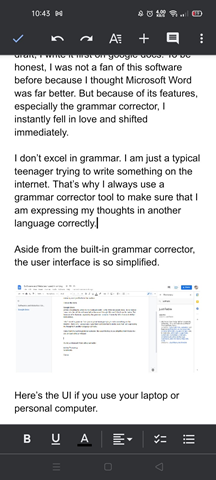
Here's the UI if you use your smartphone. To be frank, it looks like a notepad hahaha. But don't get me wrong! I like it very much.
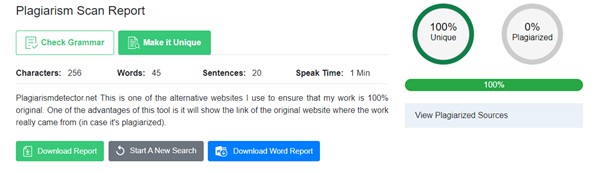
On the other hand, if *accidentally leaving the app without saving your file* has already happened to you, you might consider using this because it automatically saves what you input. Actually, I can close this tab without saving this draft and yet I can still access it later on. The other good thing why this is my favorite is because I can edit this document on any device as long as you are using the same google account. For instance, the first sentence of this paragraph is written on my computer, but this sentence is already typed on my smartphone. **Grammarly** Since I am a fan of grammar correcting tools, Grammarly is top on my list. Grammarly lets you be confident in your work by tweaking some of your english sentences. This tool can be accessed on your personal computer by installing its extension to your browser or visiting its website. They also have an application on both IOS and Android as a form of keyboard. You just need to enable Grammarly as your keyboard, and let it do its work. Aside from that, Grammarly offers a paraphrase tool on its website. This is a great way to make sure your work is 100% original. However, this feature is not totally free. **Plagiarismdetector.net** This is one of the alternative websites I use to ensure that my work is 100% original. One of the advantages of this tool is it will show the link of the original website where the work really came from (in case it's plagiarized).
**Adobe Photoshop** This is one of my favorite editing software on computers. I had the chance to learn the basics of it when I took a computer subject when I was in junior highschool. We also learned how to code HTML and create our own website. I think this is also the reason why I became interested in programming. Anyways, my recent thumbnails are all created on Photoshop.
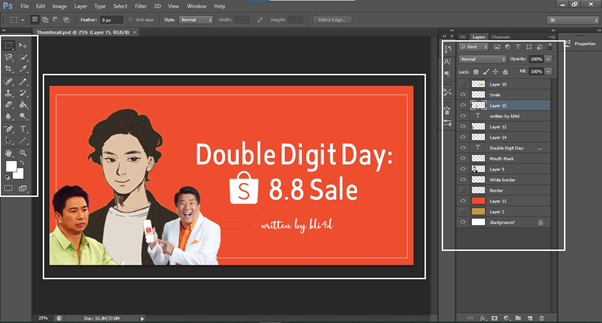
Pretty lame as I am not good at designs, but yeah, I am proud of the fruit of my hard work. Adobe Photoshop is also available on smartphones but has limited features. It's more on filters and simple text input, something like that. **Canva** Well, if Adobe Photoshop is one of my favorite editing software on computers, Canva is top on my list on smartphones. Canva offers several ready to edit templates that you manipulate for free! Back then, when I was too lazy to open my Photoshop for creating a lead image, I would just open my Canva and just search for the template that will suit the topic of my article. I believe several users here are also using Canva. If you're one of the Canva users, comment down below what are the features that you like from it. **Ending remarks...** Thanks for reading my article. If you use different tools aside from the things I mentioned above, kindly share it on the comment section :)). Until next time, bye!
**You can read my recent articles...** **Double Digit Day: 8.8 Sale** https://read.cash/@kli4d/double-digit-day-88-sale-a64e053e ****7 days of uninterrupted grind**** https://read.cash/@kli4d/7-days-of-uninterrupted-grind-67b89446 ****Instead of Tumblr and WordPress why not these two?**** https://read.cash/@kli4d/instead-of-tumblr-and-wordpress-why-not-these-two-475caaff ****My Tips to Stay Longer & Be Successful on this Platform**** https://read.cash/@kli4d/my-tips-to-stay-longer-be-successful-on-this-platform-b73fc274 ****What Pushes us to Write?**** https://read.cash/@kli4d/what-pushes-us-to-write-610cdb14



16 comments
I use all the tools that you have mentioned except google docs, it's always very tiring to use it on my phone because of the interface. I only use Google docs when I want to check word count, so I type elsewhere, copy paste that work, and use the view word count option on google docs to knowing the number of words I have written It's nice to hear that you are interested in programming, I hope you are still learning coding?
Maybe I'll use Canva for my lead Image, I think it's better than getting photos on pexel and other non-copyright websites for photos. Maybe I'll start tomorrow, while grammarly is already installed on my phone however I'm not familiar on the keyboard cause it's too big and I mistype what I want to write but my phone has its auto correction, that's why I stick into it.❤😅
Thanks for sharing. They also have an application on both IOS and Android as a form of keyboard. You just need to enable Grammarly as your keyboard, and let it do its work.---- may ganto pla. hehe Di ko marunong gumamit ng adobe photoshop. I just recently use CANVA. :)
I use ibis paint for my image and also grammarly to correct my grammar I will try to use canva parang mas madali doon haha
Wow haha to be honest, I don't check my grammar 🙈🙈, this post reminds me to check my grammar 😆😆! I used paint from microsoft for my cute green paragraph separator and I use the readcash platform for my drafts. Hehe.Images are sometimes from my own photographs but 99% was from usplash 😆😆
Andami ginagamit haha kahit na minsan tinatamad ka magsulat eh yan pala ang sekreto mo kaya pala ang galing padin 😂 hahah ako kasi eh kung ano na nasulat ko yon na lol. Nitamad ako mag edit minsan ag diko na checheck sa plagiarism checker kasi naman ang mahal sa Mb pero bet ko yung adobe photoshop
Ang dami naman Clipuuuuuuu, hassle sakin kaya di ako gumagamit ng kung ano ano. Dati mejo nag eedit ako sa PicsArt,kaso ni drop ko na nakakataamad lang kasi talaga ahahaha. Tapos sa grammar naman, halata naman din na waka akong ginagamit, hahaha. Ewan basta nakakatamad. Naintindihan pa rin naman nila ahahah.
Ako tinatamad minsan magcheck ng grammar hahahaha naglalag kasi phone ko lagi tapos diretso na akong magsulat sa read.cash para maayos na kagad format.
Hindi po talaga ako magaling sa english kaya mostly tagalog article yung sinusulat nagtry ako sa grammarly may bayad pala...doon sa google docs website ba siya?
Masyadong hassle yung ganyan sa akin hayup haha o tamad lang akong tao. Anyway, gusto ko yung app na grammarly. However, may bayad siya as you said, and I can't access all their feature. Pero try ko pa rin hehe.
Di ko pa yan na try yung google docs😆. Ako din dati canva rin ginagamit ko. Pero di ko ginagamit yung template Kaya sng pangit haha. Pero ngayon ginamit ko na yung mga template
Ang sipag mo namaaaaan!! Hahaha. Well, kitang kita naman sa ayos ng article mo worth it ang time na ginugugol mo. Gusto ko din gawin yan kaso likas na tamad ako e. Haha
Ako I am using grammarly na and I want to try plagiarisms checker na din.. User friendly ba ang canva?
I am using grammarly kapag nagsusulat.. By the way, user friendly ba ang canva?
We use the same grammar correcting tool and plagiarize checker. :"> Ang di ko lang magamit ay yang adobe photoshop and canva kasi di ako marunong and I am not actually a techy person. And tamad din talaga akong aralin kung pano yan gumana. HAHAHAHA. Anyway, you can use quillbot kung naghahanap ka ng paraphrasing tool.
Thank you for sharing. It would really be helpful on your reader's article.