 @gertu13
edited
more from that month
@gertu13
edited
more from that month
Computer Problems. Hello my dear read.cash friends. Today instead of a story, like the ones you’ve probably grown accustomed to coming from me, I’ll be talking about the problem I’ve had with my laptop, since our dear friend @Infinity wanted to see in detail what my problem was. It all started on September 29th when, for reasons beyond my control, a new currency exchange rate would arrive in my country. When September 30 arrived, my laptop no longer let me access the platforms, none of the 3 platforms where I make cryptographic life.

Suddenly in one night I wanted to enter two of the other platforms and I could only enter one of them. I still have not been able to enter the other one because I get the same error that I got to enter this platform. In view of so much inconvenience my son was able to connect me to read.cash through my cell phone and from here I can check the posts and notifications of all the users I joined and follow. To make my posts I just go to my son's computer. My son works with his computer and also studies with it, so he helps me by lending me his computer for a moment while I post and then he can continue with his homework. So far, this has been the problem I have with my computer and ever since September 30 I have been unable to enter read or noise cash. At first I had believed it to be something that the government did, like blocking those sites or something, but I quickly found out this wasn’t the case, as my son was able to access both from his own computer. From there, he spent most of the day sitting in front of my little computer, looking for any way to solve its problem.
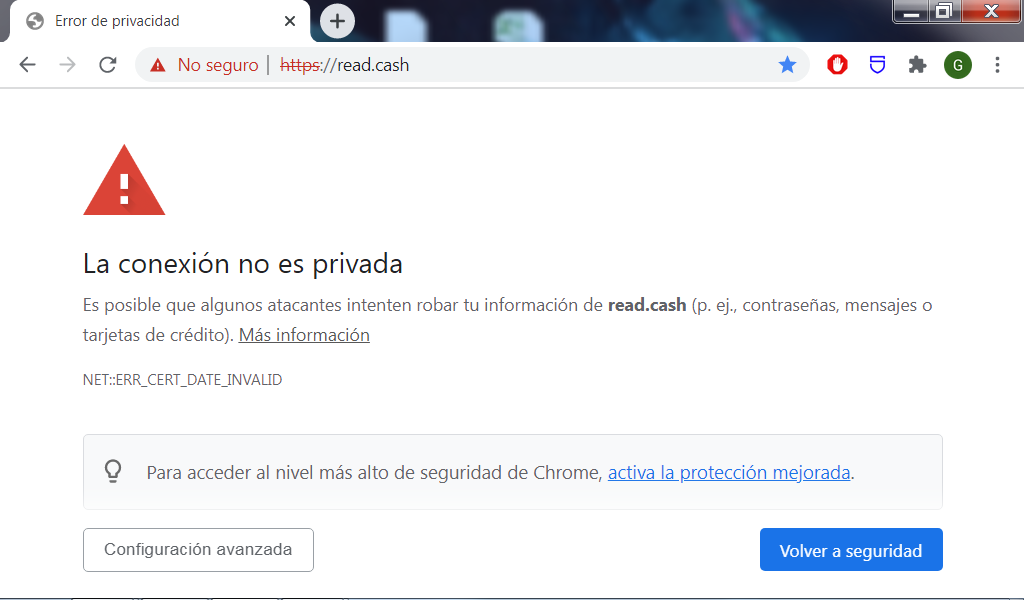
According to him, so far he has tried to deactivate chrome’s protection (to be able to enter the sites, to no avail since they don’t load at all), he updated *Google Chrome*, then uninstalled it when that didn’t work in order to install it again, he tried to see if Firefox could be an alternative to Chrome, to see if chrome itself was the problem, but that didn’t work either, as *Firefox* just made my *Canaima* freeze. Eventually, he took it to a friend’s house in order to diagnose the problem. According to my son, he gave it more RAM and both of them determined the problem (or at least they believe they did) to be a certificate that expired on old Operative Systems. His friend says that the only solution would be to upgrade my Windows with a newer version. When he came back he started downloading a newer version of windows, Windows 10 to be specific but he wasn’t completely sure that it would fix the problem, seeing as Windows 10 is very heavy on his computer’s RAM and mine has currently half of what his has. So I decided I would contact an expert so that they could fix it with all the necessary tools at hand. As of now, I’m doing this post thanks to my dear friend @Infinity, who was interested in my problem and wanted to know the specifics of it. Thanks to my friends and readers, especially to Infinity, for his interest on this problem of mine. A big thank you to my sponsors, for always being there.








76 comments
Voy en español para ir mas directo, jaja. Mira, el error es bien comun hoy en dia. Te recomiendo este video que vi ahora mismo. https://www.youtube.com/watch?v=hSFfZeYzwP0 Podria escribirlo, pero una imagen dice mas que mil palabras, trata de hacer estos pasos al pie de la letra. Cuando los hagas me dices que tal te fue. Si no funciona vamos con otro tratamiento (pueden ser varios)
Ok. Thanks
Me estoy quedando sin idea. Ahah. Casi todo lo que dice en Internet para solucionarlo lo hemos hecho. Solo queda actualizar o reinstalar el sistema operativo. Prueba a ver si tiene un punto de restauración y restaurala a ese punto.
Thank you, We'll try to do that tomorrow since it's getting kinda late right now and we're all sleepy...
Well, we tried it. But system restoration doesn't work right because the computer won't restart properly... I guess I'll have to try reinstalling the Operative System, once I back up my data.
I'm really sorry. Install the operating system again. Something was left in the waste that is preventing you from entering. Let me know later. Greetings.
My son did what the video explains, but when he got to the step where it says to delete the certificates, it turns out that there are none to delete. We were left the same, we could not solve it with this video.
La computadora tiene la fecha y hora bien?, desactiva el antivirus. Prueba el primer paso de este video, donde escribe como si fuera en el aire en el navegador esta palabra "thisisunsafe". Me dices. Espero tu respuesta.
The computer's date is correct. My son tried the "thisisunsafe" thing and we can enter the site but everything is "broken" inside. Posts and images won't load and the site also says that I can't use my wallet in it.
en Google Chrome, presiona Ctrl + H y borra la cache, las cookies y todo lo demas, deja limpio esto. Cierra el navegador y vuelvelo a abrir despues.
He did it, but it remains the same...
Si tocas en Configuracion Avanzada, el boton donde esta el error, no dice: Continuar al sitio aunque sea de forma insegura?
Yes, that button is there. But if he clicks it, it just does the same thing as if he typed "thisisunsafe" and leads to the same broken page.
Conecta el celular a la pc por el cable. Comparte la conexión de tu celular mediante un hostpot con tu pc en ajustes del celular. Desactiva la conexión de Internet que tienes en la laptop actualmente. Ahora vas a coger el Internet del celular. Después prueba entonces. Incluso con Firefox.
We tried, the problem is still there and the pages wont load right.
I wonder what happened to your computer Ger. But I hope it will be fixed as soon as possible. Good thing you write about it here. Some of my friends might have solutions.
Yes, I hope so. Thank you.
Hi Aunt, As told you before, I've got a solution for you: Linux!... Greetings.
Dear that's too complicated for your aunt's poor technology.
I hope it will be fixed too soon. I think you have to enable cookies.
This just got tough now.
Let's just pray for the better. Well keep on our fingers cross for that my friend
Thank you.
Try to reformat your computer maybe it could help but reformatting the computer will reset all the settings and you need to configure it again.
We are trying to do something other than reformatting.
Before I reformatted anything, I would run (after downloading) Advanced System Care). It's entirely free and cleans your computer quickly (about 10-12 minutes).
My son thinks the problem is very different from having to format the computer.
If I had 30 minutes on it, I could figure it out.
Really? Ok. My son went out to do some shopping. As soon as he gets here I'll text you to see if you can make it. I'm excited. I'm excited. Thanks. I don't know what time it is where you are, it's 9:52am here.
Hi Did you get it fixed? It is 5:42 am in Asia where I am.
Hola. @Scotty17 estás desocupado para ingrsar a la laptop por favor.
I hope that you will be able to fix it soon. It's difficult to have our devices break as it's already part of our lives.
You delete some unnecessary files there to save some RAM.. I hope it will be fixed soon gertu
I'm hoping that your problem in your laptop will be fixed as soon as possible. While reading I have some suggestions in my head like, updating chrome or update your window however you already wrote it in your article so yeahh.
I hope that it will be fixed after the update.😊
So sorry about that unfortunate encounter madam. What i see is the problem is that you are making use of the older version of chrome that's the reason why it is not coming up anymore. For a better result, i will advice you update your chrome from google play store rather than deactivating its protection and it will surely work perfectly well.
Thanks for your commemt, But it is more than that.
This is bad to see. Your son tried using read.cash from his PC using the same IP (I mean the same internet source as you)? Maybe some kind of service used as anti-spam has marked the IP as spam. I mean since you took all these steps and nothing worked. I'm sure you tried cleaning the browser cookies and leftover internet files and rebooted your modem/router. Another thing, when I come across similar pages, it could be what you though, that the government has blocked access to these websites. In this case you can test downloading Opera browser, and use its vpn service (which is basically a proxy), just to check if the website loads.
Thank you my friend. My son is trying to do all the suggestions. He is out shopping now. When he comes back I will see if he is available to start again and then we will do it.
I think I have had this kind of problem before but I'm not sure what I did but most probably I reformatted it and it was okay. I tried some youtube tutorials which worked for a short period of time. By the way, I am using Brave as my browser. Maybe Brave will work? Or any browser won't help?
My son is in charge of the technological side of the equipment we have. He has tried different ways. We were up late yesterday trying to fix this and couldn't and I will start with him again today. Thanks for your support.
Not that computer savvy but I am glad your son is there to help. I hope everything will be fixed as you will be using the computer, ma'am.
Thanks my friend.
Oh! I'm not techy too, but how about using another browser. That is really a headache, my friend. I hope everything will be sorted out.
Thank you. I hope too.
OMG we had the same computer problem. I spent 2 days tryna figuring it out!
Lol. How good you are. I've been on since Sept 30 and nothing my son has done will do. But today I will try something with another user here when my son comes back.
It's a pain in the butt :( I downloaded another browser instead hehe
Very witty.lol
I hope this gets sorted dear as I know nothing about computer/technology. Tia could know more about me. How funny is that?
More comments