 @elrikpiro
A cute baby Source: Instagram https://www.instagram.com/p/B864oPwozjr/?igshid=2h9jznwe3lyy

Joined 30 November 2019 · 17 posts
Computer Engineer, Software Architect and proud Libertarian
120 KT
0 KT · $34.53 received · 0 KT · $2.26 given
@elrikpiro
A cute baby Source: Instagram https://www.instagram.com/p/B864oPwozjr/?igshid=2h9jznwe3lyy
@elrikpiro
Advanced BCH Monitoring with Tasker (Part 6: Bitcoin Cash SDK for tasker) Previous part 5: Notifying price quotes on your phone https://read.cash/@elrikpiro/advanced-bch-monitoring-with-tasker-part-5-notifying-price-quotes-on-your-phone-dc674911 The Bitcoin Cash SDK for Tasker As we saw in part 1, the main goal for all the interfaces and implementations we've been developing is to offer a common software development kit for tasker users to automatize their BCH-related routines and develop new ones. https://read.cash/@elrikpiro/advanced-bch-monitoring-with-tasker-part-1-refactoring-bd14f24e The configure call The goal of this call is to set the basic information the SDK needs to work on. entry: ( . . . ) function_configure: VariableSet(Name="%parameters", To="%par2"); VariableSplit(Name="%parameters", Splitter=";"); VariableSet(Name="%ADDRESSES", To="%parameters1"); VariableSet(Name="%CACHED_ADDRESSES", To="%ADDRESSES"); VariableSet(Name="%API_KEY", To="%parameters2"); VariableSet(Name="%CURRENCY", To="%parameters3"); Return(Value="SUCCESS", Stop="On"); function_loadBalance: ( . . . ) Step by step: Split the three semicolon-separated parameters into the `%parameters` Array Set the constants `%ADDRESSES`, `%API_KEY` and `%CURRENCY` Set the `%CACHED_ADDRESSES` constant with the `%ADDRESSES` value (we'll explain this later) Return when everything is done Loading the balance data The goal is to load and return the current balance with a simple call. entry: ( . . . ) function_configure: ( . . . ) function_loadBalance: PerformTask(Name="BlockChairBlockExplorerAPI", Parameter1="function_load", Parameter2="%CACHED_ADDRESSES;%API_KEY", ReturnValue="%retval"); Return(Value="ERROR At TaskerBchSdk : %retval", If="%retval !~ SUCCESS"); PerformTask(Name="BlockChairBlockExplorerAPI", Parameter1="function_getTotalBalance", ReturnValue="%retval"); Return(Value="%retval", Stop="On"); function_loadCurrencyValue: ( . . . ) Step by step: Call the load function with the configured parameters Check if there was an error and stop the task if so Retrieve the total balance value Return that value to the caller Load preferred currency quote The goal is to load the BCH - CURRENCY exchange ratio and return it to the caller. entry: ( . . . ) function_configure: ( . . . ) function_loadBalance: ( . . . ) function_loadCurrencyValue: PerformTask(Name="CoinGeckoExchangeAPI", Parameter1="function_load", ReturnValue="%retval"); Return(Value="ERROR At TaskerBchSdk : %retval", If="%retval !~ SUCCESS"); PerformTask(Name="CoinGeckoExchangeAPI", Parameter1="function_getTotalBalance", Parameter2="%CURRENCY", ReturnValue="%retval"); Return(Value="%retval", Stop="On"); function_computeCache: ( . . . ) Step by step: Call the load function with the configured parameters Check if there was an error and stop the task if so Retrieve the current currency exchange value Return that value to the caller Computing the cache Our Addresses list can grow to be really long if we use many BIP39 wallets, usually having tons of addresses that do not contain any UTXO at all, we already created a function at the Block Explorer interface that gives us a list of addresses with funds and we are going to use it to update the `%CACHED_ADDRESSES` variables, effectively reducing the querying cost. https://read.cash/@elrikpiro/advanced-bch-monitoring-with-tasker-part-4-retrieving-your-data-from-the-block-explorer-api-29af674a entry: ( . . . ) function_configure: ( . . . ) function_loadBalance: ( . . . ) function_loadCurrencyValue: ( . . . ) function_computeCache: PerformTask(Name="BlockChairBlockExplorerAPI", Parameter1="function_load", Parameter2="%ADDRESSES;%API_KEY", ReturnValue="%retval"); Return(Value="ERROR At TaskerBchSdk : %retval", If="%retval !~ SUCCESS"); PerformTask(Name="BlockChairBlockExplorerAPI", Parameter1="function_getFundedAddresses", ReturnValue="%CACHED_ADDRESSES"); Return(Value="SUCCESS", Stop="On"); function_checkCache: ( . . . ) Step by step: We load all of our addresses (`%ADDRESSES`) on the block explorer Return if there's an error Compute the funded addresses and store it ( `%CACHED_ADDRESSES` ) Return Checking if it's necessary to compute the cache There are several ways where the number of funded addresses could be rendered obsolete: When a transaction is performed on an unused address the cache won't catch it, as it's happening on one of the addresses that we are ignoring When one address that had funds spends all of them, going to zero balance To solve the first one we can schedule a periodic call to `computeCache` and to solve the second, one could be tempted to just remove the address, that would be ok in all cases where spending all funds implies sending them to another person, but actually the most common case is to have some change as a leftover and sending it to another address (usually dedicated for receiving change) in our wallet, that's why we would be checking, with the following function, if one of our addresses was depleted. entry: ( . . . ) function_configure: ( . . . ) function_loadBalance: ( . . . ) function_loadCurrencyValue: ( . . . ) function_computeCache: ( . . . ) function_checkCache: VariableSet(Name="%current_cache", To="%CACHED_ADDRESSES"); PerformTask(Name="BlockChairBlockExplorerAPI", Parameter1="function_getFundedAddresses", ReturnValue="%latest_cache"); VariableSplit(Name="%current_cache", Splitter=","); VariableSplit(Name="%latest_cache", Splitter=","); Return(Value="TRUE", Stop="On", If="%current_cache(#) eq %latest_cache(#)"); Return(Value="FALSE", Stop="On"); function_notifyChanges ( . . . ) Step by step: Copy the current cache and the latest list of funded addresses to local variables (`%current_cache` and `%latest_cache` respectively) Split both variables by comma Return TRUE if both arrays have the same length Return FALSE otherwise Notifying function The goal is to get both balance and value and calling the notification service we made at part 5. The calling format will be `%balance;%value` https://read.cash/@elrikpiro/advanced-bch-monitoring-with-tasker-part-5-notifying-price-quotes-on-your-phone-dc674911 entry: ( . . . ) function_configure: ( . . . ) function_loadBalance: ( . . . ) function_loadCurrencyValue: ( . . . ) function_computeCache: ( . . . ) function_checkCache: ( . . . ) function_notifyChanges VariableSet(Name="%params", To="%par2"); VariableSplit(Name="%params", Splitter=";"); PerformTask(Name="PushNotificationGui", Parameter1="function_updateValue", Parameter2="%params2"); PerformTask(Name="PushNotificationGui", Parameter1="function_updateBalance", Parameter2="%params1"); PerformTask(Name="PushNotificationGui", Parameter1="function_notify"); Return(Value="SUCCESS", Stop="On"); Step by step: copy the parameters and split them by ";" Update the value an then the balance at the notification object, respectively notify the changes to the user Return Use case example **Sdk_configure** This code will prompt you to input the addresses you are going to use, the currency and the API key if applicable. This is meant to be used whenever you want to change one of these settings, but at least once before start using this SDK. VariableQuery(Title="input addresses", Variable="%addresses"); VariableQuery(Title="input api key (if any)", Variable="%api_key"); VariableQuery(Title="input currency", Variable="%currency", Default="usd"); PerformTask(Name="TaskerBchSdk", Parameter1="function_configure", Parameter2="%addresses;%api_key;%currency"); **Sdk_routine** This code will load the balance, load the currency quotes, notify the changes and update the cache if necessary, this code is meant to be used as a periodic task (i.e: every thirty minutes) PerformTask(Name="TaskerBchSdk", Parameter1="function_loadBalance", ReturnValue="%balance"); Popup(Title="ERROR", Text="%balance", If="%balance ~ ERROR"); PerformTask(Name="TaskerBchSdk", Parameter1="function_loadCurrencyValue", ReturnValue="%value"); Popup(Title="ERROR", Text="%value", If="%value ~ ERROR"); PerformTask(Name="TaskerBchSdk", Parameter1="function_notify", Parameter2="%balance;%value"); PerformTask(Name="TaskerBchSdk", Parameter1="function_checkCache", ReturnValue="%retval"); If("%retval ~ FALSE"); PerformTask(Name="TaskerBchSdk", Parameter1="function_computeCache", ReturnValue="%retval"); Popup(Title="ERROR", Text="%retval", If="%retval ~ ERROR"); EndIf(); **Sdk_cache** Finally, This code will refresh the cache, this code is meant to be used once a day, to avoid orphan addresses with funds. PerformTask(Name="TaskerBchSdk", Parameter1="function_computeCache", ReturnValue="%retval"); Popup(Title="ERROR", Text="%retval", If="%retval ~ ERROR"); "Dude, I pass on implementing this here... Where can I download it?" You can access the Sdk on this link. (You need to have tasker installed) or download the import XML directly from Github. https://taskernet.com/shares/?user=AS35m8kIBt7YDTyExrs93%2BepaSFltAx90KDg%2FEJ4WmANtc0PAvKb3JlbMqJgBA5RZ3ydCfijigTPWdo%3D&id=Project%3ABCH-Monitor https://github.com/ElrikPiro/taskerBchSdk/tree/master [sponsors] https://blockchair.com/ *Special thanks to* *Blockchair.com* *for providing the API key* *Don't forget to subscribe, feedback will be appreciated!* Expect future updates! Requests are accepted at comments.


+6 more
@elrikpiro
Mmmm delicious
 @elrikpiro
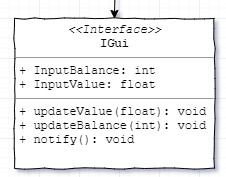
Advanced BCH Monitoring with Tasker (Part 5: Notifying price quotes on your phone) Previous part 4: Retrieving your data from the block explorer API https://read.cash/@elrikpiro/advanced-bch-monitoring-with-tasker-part-4-retrieving-your-data-from-the-block-explorer-api-29af674a The IGui API This interface will allow us to raise any kind of notification with our account and balance. It needs two variables to keep the most recent balance and value quotes. Its functions are as follows: `updateValue()` : updates the last BCH value in the preferred currency. Might also notify relevant changes. `updateBalance()` : updates the last BCH balance retrieved from querying the blockchain. Might also notify relevant changes. `notify()` : Notifies the user about the current balance and it's value in the preferred currency. entry: Goto(Type="Action Label", Label="function_updateValue", If(%par1 ~ "function_updateValue"); Goto(Type="Action Label", Label="function_updateBalance", If(%par1 ~ "function_updateBalance"); Goto(Type="Action Label", Label="function_notify", If(%par1 ~ "function_notify"); Return(Value="ERROR", Stop="On"); function_updateValue: VariableSet(Name="%value", To="%par2"); VariableSet(Name="%InputValue", To="%value"); Return(Value="SUCCESS", Stop="On"); function_updateBalance: VariableSet(Name="%value", To="%par2"); VariableSet(Name="%InputBalance", To="%value"); Return(Value="SUCCESS", Stop="On"); function_notify: Return(Value="SUCCESS", Stop="On"); Implementing the interface, the native android push notification case There are tons of devices that have tasker integration, millions of ways to notify the user, and many creative ways to show the user how are his assets going. Here we will develop the native push notification for Android devices, which is the most accessible option. The steps and implementation behavior here can be adjusted to your convenience. Let's start with the classic Interface clone: `IGui` to `PushNotificationGui.` Updating currency value quotes The goal is: updating the last value quote and notifying differences greater than 5%. entry: ( . . . ) function_updateValue: VariableSet(Name="%value", To="%par2"); VariableSet(Name="%delta", To="%value - %PushNotificationGui_InputValue", DoMath="On", If="%PushNotificationGui_InputValue is Set"); VariableSet(Name="%growth", To="( %delta * 100 ) / %PushNotificationGui_InputValue", DoMath="On", If="%PushNotificationGui_InputValue is S e t"); Notify(Title="ALERT: BCH grew %growth %", Text="BCH to USD \n $%value ( $%delta )" If="%growth > 5 || %growth < -5"); VariableSet(Name="%PushNotificationGui_InputValue", To="%value"); Return(Value="SUCCESS", Stop="On"); function_updateBalance: ( . . . ) function_notify: ( . . . ) Step by step: We calculate the difference between the current value and the last value (if any) and store it on the `%delta` variable We calculate the percentage of growth between the current and last value and store it on the `%growth` variable Then we notify the price movement if the growth is greater than 5% Updating account balance The goal is: Notifying when the balance changes more than 546 satoshis. I will also show the units in @Read.Cash Ror. https://read.cash/@Read.Cash/let-bitcoin-cash-ror-5e217c81 entry: ( . . . ) function_updateValue: ( . . . ) function_updateBalance: VariableSet(Name="%value", To="%par2"); VariableSet(Name="%delta", To="%value - %PushNotificationGui_InputBalance", DoMath="On", If="%PushNotificationGui_InputBalance is _Set "); VariableSet(Name="%ror", To="%delta / 54600", DoMath="On", If="%PushNotificationGui_InputBalance is _Set"); VariableSet(Name="%usd", To="(%delta * %PushNotificationGui_InputValue) / 100000000", DoMath="On", If="%PushNotificationGui_InputBalance is _Set"); Notify(Title="BCH Tx %ror Ror ($%usd)", If="%delta < -546 || %delta > 546"); VariableSet(Name="%PushNotificationGui_InputBalance", To="%value"); Return(Value="SUCCESS", Stop="On"); function_notify: ( . . . ) Step by step: We calculate the difference between the latest known balance and the new balance and store it in the `%delta` variable. We translate this difference from satoshis to Ror (`1 Ror = 54600 satoshi`) and store it in the `%ror` variable. We translate the difference from satoshis to USD ( `%delta * %...InputValue / 100000000` ) and store it in the `%usd` variable. Finally, we push an alert if the movement is greater than 0.01 Ror (or 546 satoshis) Updating the permanent notification The goal is to have a permanent notification where we can check with a single glance the most recent state of our addresses and the value of our assets. The main advantage of using a permanent notification is that the notification silently updates without triggering vibration nor notification sounds. entry: ( . . . ) function_updateValue: ( . . . ) function_updateBalance: ( . . . ) function_notify: VariableSet(Name="%usd_balance", To="%PushNotificationGui_InputValue * ( %PushNotificationGui_InputBalance / 100000000 )", DoMath="On"); VariableSet(Name="%ror_balance", To="%PushNotificationGui_InputBalance / 54600", DoMath="On"); Notify(Title="BCH Balance", Text= "Balance: $%usd_balance Ror: %ror_balance BCHUSD $%PushNotificationGui_InputValue", Permament="On"); Return(Value="SUCCESS", Stop="On"); Step by step: Calculate the equivalent balance in USD with the formula `( value * (satoshi / 100000000)` and store it on the local variable `%usd_balance` Calculate the balance in Ror (more readable than BCH fractions) and store it on `%ror_balance` Notify the user with a permanent notification. Testing the notification builder Time to test! (actually I use to write tests first and develop later, the thing is called Test Driven Development, leave a comment if you are interested in the matter!) PushNotificationGui_setValueTwice_notifyOnce: VariableClear(Name="%PushNotificationGui_InputValue"); PerformTask(Name="PushNotificationGui", Parameter1="function_updateValue", Parameter2="100", ReturnVariable="%retval"); PerformTask(Name="PushNotificationGui", Parameter1="function_updateValue", Parameter2="200", ReturnVariable="%retval"); PushNotificationGui_setBalanceTwice_notifyOnce: VariableClear(Name="%PushNotificationGui_InputBalance"); PerformTask(Name="PushNotificationGui", Parameter1="function_updateBalance", Parameter2="100000000", ReturnVariable="%retval"); PerformTask(Name="PushNotificationGui", Parameter1="function_updateBalance", Parameter2="200000000", ReturnVariable="%retval"); PushNotificationGui_notify_notify: PerformTask(Name="PushNotificationGui", Parameter1="function_notify", Parameter2="", ReturnVariable="%retval"); The first test will show a notification telling you that BCH grew 100%, it's even useful to cheer up after a bad day trading. The second test will show a notification telling you that one of your addresses was credited 1 BCH (1831.50 Ror) and the third one will pop up the permanent notification. In the next part we will be implementing the SDK for allowing you to use all this software we've been developing on any other tasker routine! [sponsors] Special thanks to Blockchair.com for providing an API key. *Don't forget to subscribe, feedback will be appreciated!* Part 6: *Bitcoin Cash SDK for tasker* https://read.cash/@elrikpiro/advanced-bch-monitoring-with-tasker-part-6-bitcoin-cash-sdk-for-tasker-8fc68a52


+3 more
@elrikpiro
Advanced BCH Monitoring with Tasker (Part 4: Retrieving your data from the block explorer API) Previous part 3: Recovering price quotations from an exchange data API https://read.cash/@elrikpiro/advanced-bch-monitoring-with-tasker-part-3-recovering-price-quotations-from-an-exchange-data-api-b15cbbcc The IBlockExplorer API This interface will allow us to query information about anything related to the addresses we manage. It needs three variables to keep its state, the last JSON retrieved, the balance in satoshis and a list of funded addresses, the last two are meant to cache results so we don't need to recalculate them once we already have it. Its functions are as follows: `load()` : gets a list of addresses and an API key (if needed) as a parameter and will retrieve information of those addresses from the REST API and save it in the `lastJson` variable. `getTotalBalance()` : after calling load this will return the total balance from the queried addresses. `getFundedAddresses()` : a utility function that returns a list of the addresses that have UTXO, it will serve a purpose on later posts. https://en.wikipedia.org/wiki/Unspent_transaction_output entry: Goto(Type="Action Label", Label="function_load", If(%par1 ~ "function_load"); Goto(Type="Action Label", Label="function_getTotalBalance", If(%par1 ~ "function_getTotalBalance"); Goto(Type="Action Label", Label="function_getFundedAddresses", If(%par1 ~ "function_getFundedAddresses"); Return(Value="ERROR", Stop="On"); function_load: ArrayClear(VariableArray="%args"); VariableSet(Name="%args", To="%par2"); VariableSplit(Name="%args", Splitter=";"); VariableSet(Name="%input_addresses", To="%args1"); VariableSet(Name="%input_apikey", To="%args2"); VariableSet(Name="%lastJson", To=0); VariableClear(Name="%balanceSat"); VariableClear(Name="%fundedAddresses"); Return(Value="SUCCESS", Stop="On"); function_getTotalBalance: Return(Value="%balanceSat", Stop="On"); function_getFundedAddresses: Return(Value="%fundedAddresses", Stop="On"); *What the fuck is happening in function_load?* As the Perform Task action only gets up to two parameters we will separate different parameters with the semicolon character '`;`' and use the `%args` variable to store the `%par2` content and split it in an array where each element will have one parameter. This pretty much sums up the first five actions, that get the %par2 parameter and turns it into two different local variables: `%input_addresses` and `%input_apikey`. Implementing the interface, the BlockChair case Blockchair is one of the most used block explorers and has a very professional and convenient REST API, that makes retrieving information from the Blockchain really easy. The steps used to retrieve information using the Blockchair API may be different on other Block Explorer API, but the idea behind it remains the same: Querying the sum for each UTXO value for each address under monitoring. The first step will be cloning the `IBlockExplorerAPI` task into a new `BlockChairBlockExplorerAPI` task. Retrieving your address information As many BCH users use to have more than 20 addresses on their wallets thanks to the BIP39 address derivation, retrieving the information could be a very cumbersome task even programmatically, because of that pre-loading the JSON data once and treating it later is the most efficient strategy to follow. entry: ( . . . ) function_load: ArrayClear(VariableArray="%args"); VariableSet(Name="%args", To="%par2"); VariableSplit(Name="%args", Splitter=";"); VariableSet(Name="%input_addresses", To="%args1"); VariableSet(Name="%input_apikey", To="%args2"); HttpRequest(Method="GET", URL="https://api.blockchair.com/bitcoin-cash/dashboards/addresses/%input_addresses?key=%input_apikey"); Return(Value="ERROR : HTTP %http_response_code", Stop="On", If="%http_response_code > 299"); VariableSet(Name="%BlockChair_lastJson", To="%http_data"); VariableClear(Name="%BlockChair_balanceSat"); VariableClear(Name="%BlockChair_fundedAddresses"); Return(Value="SUCCESS", Stop="On"); function_getTotalBalance: ( . . . ) function_getFundedAddresses: ( . . . ) Step by step: An HTTP Request to the `https://api.blockchair.com/bitcoin-cash/dashboards/addresses/` endpoint, to query a list of comma-separated CashAddr addresses `%input_addresses` using an (optional if you are just doing your own experiments) API key `?key=%input_apikey` Like in the last chapter, a conditional return if the HTTP response is an error The Request data assignment to the JSON variable Getting your account's balance As soon as we have the JSON loaded we can start getting information from it, in this case, we are going to query and cache the balance in satoshi from the JSON. entry: ( . . . ) function_load: ( . . . ) function_getTotalBalance: If( %BlockChair_balanceSat !Set) JavaScriptlet(Code={ var balance = JSON.parse(global('BlockChair_lastJson')).data.set.balance; setLocal('%BlockChair_balanceSat', balance); }); EndIf Return(Value="%BlockChair_balanceSat", Stop="On"); function_getFundedAddresses: ( . . . ) Step by step: If the `%BlockChair_balanceSat` isn't set... We run a JavascriptLet action that will retrieve the total balance from all addresses and set it into the variable. Finally, we return the variable value. Note that every time we load a new JSON, we unset the variable, so after loading a JSON the variable will need to be recalculated calling this function again. Listing all addresses with UTXO The Blockchair API, and in general, any other block explorer APIs have a consumption rate that can lead your IP to be blacklisted, temporarily blocked or if you have a paid subscription, charged for requests. Because of that and because some of the APIs need to call each address individually you might want to know which addresses are funded. entry: ( . . . ) function_load: ( . . . ) function_getTotalBalance: ( . . . ) function_getFundedAddresses: If( %BlockChair_fundedAddresses !Set) JavaScriptlet(Code={ var utxo = JSON.parse(global('BlockChair_lastJson')).data.utxo; var addressList = ""; for(var i = 0 ; i < utxo.length; i++) { if(addressList.localeCompare("") == 0) { addressList = addressList.concat(","); } addressList = addressList.concat(utxo[i].address); } setGlobal('%BlockChair_fundedAddresses', addressList); }); VariableSplit(Name="%BlockChair_fundedAddresses", Splitter=","); ArrayProcess(VariableArray="%BlockChair_fundedAddresses", Type="Remove Duplicates"); VariableJoin(Name="%BlockChair_fundedAddresses", Joiner=","); EndIf Return(Value="%BlockChair_fundedAddresses", Stop="On"); Step by step: If `%BlockChair_fundedAddresses` isn't set Run JavaScriptlet action that generates a list of addresses contained in every UTXO at the JSON and separate it by a comma. As one address may contain more than one UTXO some duplicated may be found, so the variable is split, processed to eliminate duplicates and joined back again Finally, we return the comma-separated list of addresses with UTXO Testing our implementation Time to write some tests to check how is this working. BlockChair_functionLoad_success: VariableClear(Name="%BlockChair_lastJson"); PerformTask(Name="BlockChairBlockExplorerAPI", Parameter1="function_load", Parameter2="%ALL_ADDRESSES;%APIKEY", ReturnVariable="%retval"); Return(Value="ERROR : %retval", Stop="On", If="%retval !~ SUCCESS"); BlockChair_getBalance_success: PerformTask(Name="BlockChairBlockExplorerAPI", Parameter1="function_getTotalBalance", ReturnVariable="%retval"); Return(Value="ERROR : %retval", Stop="On", If="%retval eq 0 OR %retval !Set"); Notify(Title="Balance in satoshi", Text="%retval"); BlockChair_getFundedAddresses_success: PerformTask(Name="BlockChairBlockExplorerAPI", Parameter1="function_getFundedAddresses", ReturnVariable="%retval"); Return(Value="ERROR : %retval", Stop="On", If="%retval eq 0 OR %retval !Set"); Notify(Title="List of funded addresses", Text="%retval"); The first test will load a JSON and check if returns SUCCESS, the second one will raise a push notification with your balance in satoshi, the third one will raise another notification with the list of funded addresses. In the next part, we'll be preparing a notification builder object. [sponsors] *Special thanks to* *Blockchair.com* *for providing an API key.* *Don't forget to subscribe, feedback will be appreciated!* Part 5: Notifying price quotes on your phone https://read.cash/@elrikpiro/advanced-bch-monitoring-with-tasker-part-5-notifying-price-quotes-on-your-phone-dc674911


+3 more
@elrikpiro
Local bad boy bites his wounds and goes lamp 1 tip = 1 prayer

 @elrikpiro
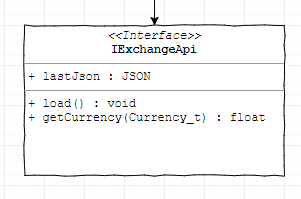
Advanced BCH Monitoring with Tasker (Part 3: Recovering price quotations from an exchange data API) Previous part 2: How to prepare an interface in tasker https://read.cash/@elrikpiro/advanced-bch-monitoring-with-tasker-part-2-how-to-prepare-an-interface-in-tasker-46363bc0 The IExchangeApi interface This interface is from which we are going to get the most recent exchange rate from our preferred currency against BCH. It needs a variable to store the last JSON retrieved from the API and two functions: `load()` : retrieves a JSON from the exchange API with the most recent exchange rate quotes. `getCurrency()` : Queries the last retrieved JSON for the currency passed as a parameter and returns the exchange rate. entry: Goto(Type="Action Label", Label="function_load", If(%par1 ~ "function_load"); Goto(Type="Action Label", Label="function_getCurrency", If(%par1 ~ "function_getCurrency"); Return(Value="ERROR", Stop="On"); function_load: VariableSet(Name="%lastJson", To=0); Return(Value="SUCCESS", Stop="On"); function_getCurrency: VariableSet(Name="%input_currency", To="%par2"); VariableSet(Name="%output_value", To=0); Return(Value="%output_value", Stop="On"); Implementing the interface, the CoinGecko case https://www.coingecko.com/ Among all the exchange rate quotes providers, the most known is CoinGecko, as it is used on many projects as data providing API. The good news is they have a very nice and easy REST API and the quotes they provide are updated with the proper frequency. The steps we are going to follow are very similar for every other REST API capable to provide this information, so if you feel like using others or having many to avoid having no quotes if CoinGecko is down, you are free to do it! We'll start cloning the `IExchangeAPI` task and calling it `CoinGeckoExchangeAPI`. Loading the JSON data So, to avoid calling the REST API every single time we want to get a quotation, we have two different functions, `function_load` and `function_getCurrency` that we described before. entry: ( . . . ) function_load: HttpRequest(Method="GET", URL="https://api.coingecko.com/api/v3/simple/price?ids=bitcoin-cash&vs_currencies=usd,eur,btc"); Return(Value="ERROR : HTTP %http_response_code", Stop="On", If="%http_response_code > 299"); VariableSet(Name="%CoinGecko_last_json", To="%http_data"); VariableSearchReplace(Variable="%CoinGecko_last_json", Search="-", ReplaceMatches="On", ReplaceWidth="_"); Return(Value="SUCCESS", Stop="On"); function_getCurrency: ( . . . ) Step by step: We do an HTTP Request to the `https://api.coingecko.com/api/v3/simple/price` endpoint to query BCH exchange rates (`ids=bitcoin-cash`) on United States Dollars, Euro and Bitcoin Core (`vs_currencies=usd,eur,btc`) We check if the HTTP Response Code is greater than 299, meaning that it's 300 or more, codes usually used to inform the user that something went wrong. If something went wrong we'll return an ERROR so the caller can know that this happened https://restfulapi.net/http-status-codes/ We save the JSON result on a global variable so we can use it later. We replace all '-' on the response by '_' as the first is a reserved character meant for subtract operations Returning `SUCCESS` as if we reach this instruction no error happened Getting the exchange rates Once we have the JSON loaded we can query it to retrieve the exchange rate quotes, usually one at a time. entry: ( . . . ) function_load: ( . . . ) function_getCurrency: VariableSet(Name="%input_currency", To="%par2"); JavaScriptlet(Code={ var curr = JSON.parse(global('CoinGecko_last_json')).bitcoin_cash[local('input_currency')]; setLocal('%output_value', curr); }); Return(Value="%output_value", Stop="On"); Step by step: We get the parameter that tells us which currency are we going to retrieve. Then we must rely on a short JavaScript snippet The first line parses the JSON and queries the exchange rate for the currency asked by the caller. The second one sets the `%output_value` local variable with the result Finally, we return this value Testing time In order to check if everything works properly, we are going to write a new task to test that everything works CoinGecko_load_validJson: VariableClear(Name="%CoinGecko_last_json"); PerformTask(Name="CoinGeckoExchangeAPI", Parameter1="function_load", ReturnValue="%retval"); Return(Value=-1,If="%retval ~ ERROR"); CoinGecko_getCurrency_getsValidCurrency: PerformTask(Name="CoinGeckoExchangeAPI", Parameter1="function_getCurrency", Parameter2="usd", ReturnValue="%usdbch"); Return(Value=-1,If="%usdbch ~ ERROR"); Notify(Title="%usdbch"); Running this task will clear the last JSON loaded (if any) and load a new one, will return if anything goes wrong and will show a push notification with the BCH to USD exchange rate if everything goes all right. Let's try this... **What!? 358.46??!! Wow!!!!** [sponsors] https://blockchair.com/ *Special thanks to* *Blockchair.com* *for providing an API key.* *Don't forget to subscribe, feedback will be appreciated!* Part 4: Retrieving your addresses data from the block explorer API https://read.cash/@elrikpiro/advanced-bch-monitoring-with-tasker-part-4-retrieving-your-data-from-the-block-explorer-api-29af674a


+3 more
@elrikpiro
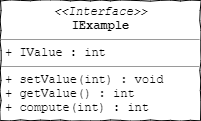
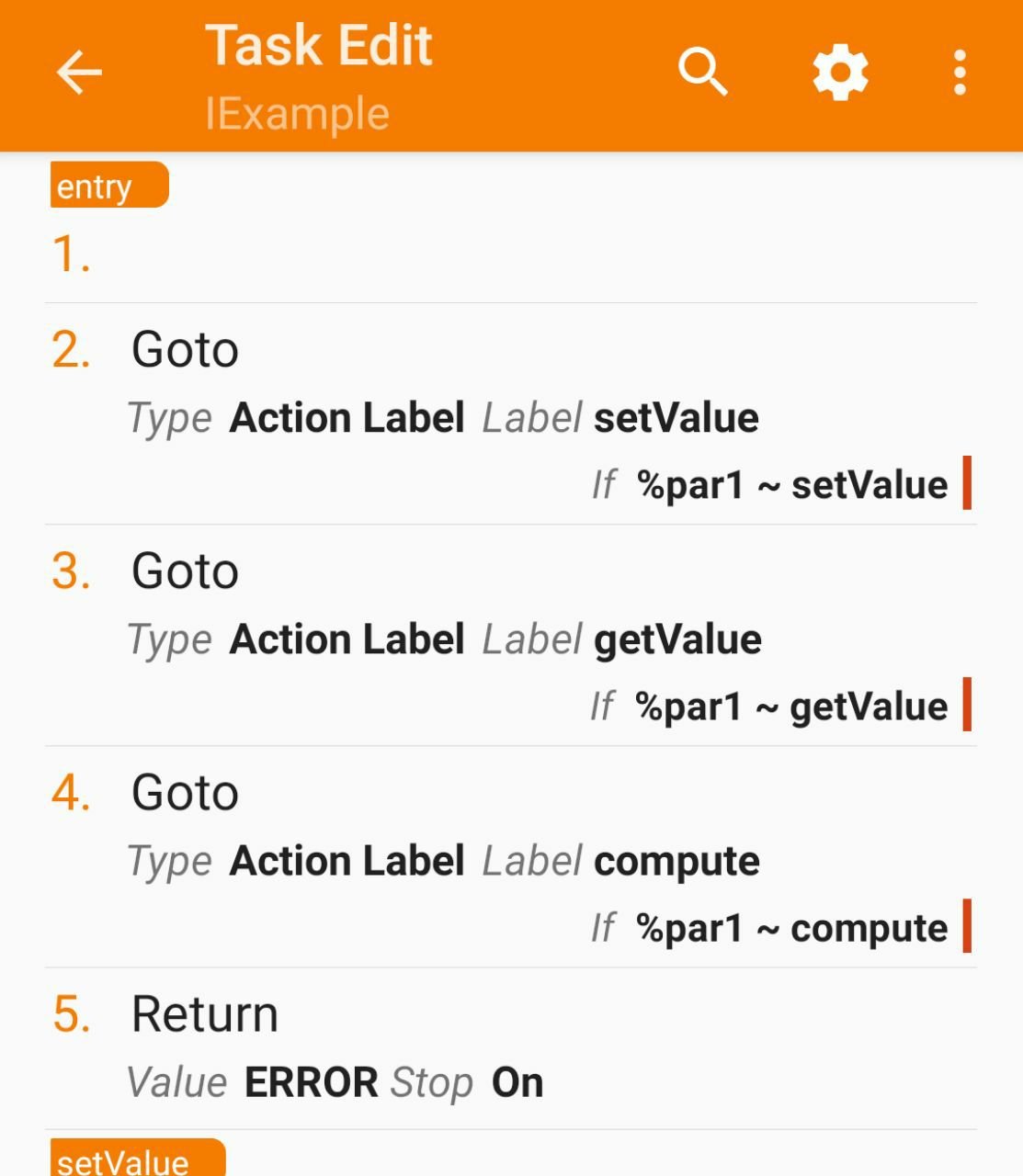
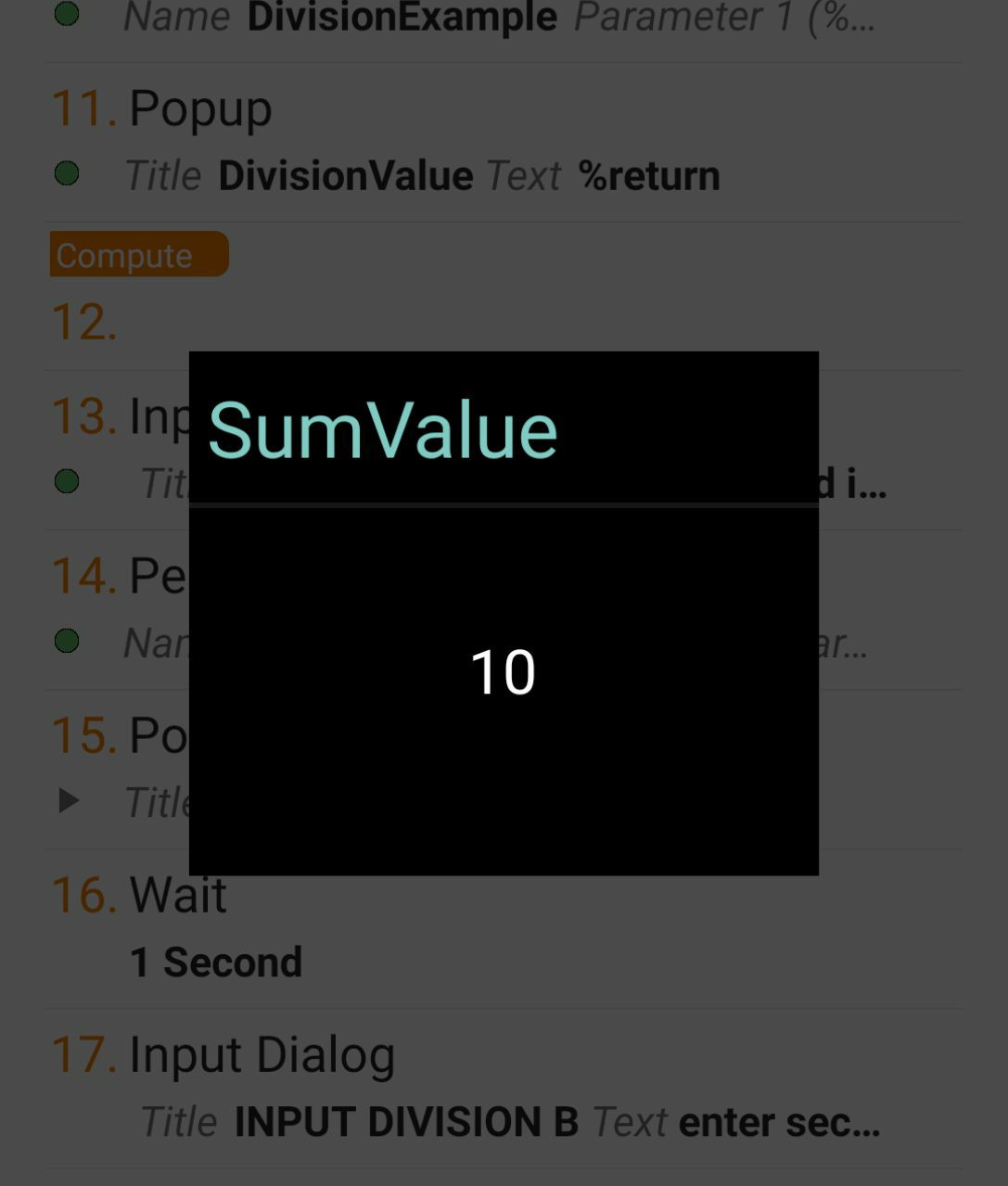
Advanced BCH Monitoring with Tasker (Part 2: How to prepare an interface in tasker) Previous part 1: Refactoring https://read.cash/@elrikpiro/advanced-bch-monitoring-with-tasker-part-1-refactoring-bd14f24e Why would we prepare an interface? Our intended structure as mentioned in the previous article needs modularization so we can mutate it easily, adding new features, solving bugs or swapping between different services and all of it, keeping the code maintainable and readable. Of course, we can create lots of independent tasks and call them as we need it, but that would clutter up our task list on relatively small projects, imagine on the big ones. For those cases, it's better to group tasks inside tasks so we can have a few bigger but well-sorted tasks instead of many unordered small tasks. Tasks inside tasks? Yes, thanks to the Perform Task action we can pass up to two parameters to a task, combined with the **Anchor** action and the flow control capabilities of Tasker we can create callable functions inside the task. https://tasker.joaoapps.com/userguide/en/help/ah_index.html Let's see this with an example: figure 1 represents an example interface we are going to prepare, it will have a variable called `IValue`, and three sub-tasks: `setValue`, `getValue` and `compute`. We'll see about them later. Preparing the interface In order to prepare an interface, we will create for anchor actions, an anchor action is just an action that does nothing but serves both as a label to jump with control flow actions and to sort out code sections : `entry` `setValue` `getValue` `compute` Preparing the `entry` anchor **Why the** `entry` **anchor?** As for calling a task we use the *Perform Task* action and it does not give us the chance to set an anchor as the preferred entry point, we'll use this anchor to jump into the other anchors. **How do we prepare it?** The *Perform Task* action can be set up to two parameters that will be accessible inside the task as the `%par1` and `%par2` local variables. Our intent is to use the first parameter to point out which anchor we want to access and use the second parameter to pass the rest of the actual parameters. What we want is to call IExample with, the first parameter set as "`setValue`" and having our control flow jump to that anchor, this snippet of pseudocode shows how are we going to do that with the `Goto` action: entry: Goto(Type="Action Label", Label="setValue", If(%par1 ~ "setValue")); Goto(Type="Action Label", Label="getValue", If(%par1 ~ "getValue")); Goto(Type="Action Label", Label="compute" , If(%par1 ~ "compute" )); Return(Value="ERROR", Stop="On"); setValue: ( . . . ) We added the return to halt the task execution if we pass something unexpected on the first parameter, without it, that case would keep the flow running until the next action, usually with undesired behaviors. . . . On the figure 2, we can see how does this looks at the Task's action list and compare it to the upper code section. Keep it in mind, from now on I'll show code with the upper code section because as you can see, it's a more efficient way to show code. . . . . . Preparing the rest of anchors The anchors that we are going to prepare are just getting the structure ready to start implementing. `setValue` and `compute` will receive a single integer parameter so for preparing it we will set `%par2` into the local variable `%input_value.` *(note that tasker interprets any lowercase-named variable as local, and just having an uppercase character on a variable name turns it into a global)* `getValue` and `compute` will return an integer, so we will prepare a `%retval` variable and pass it into a **Return** action. `setValue` returns nothing so we will have it return `"SUCCESS"` instead. The whole interface, prepared entry: Goto(Type="Action Label", Label="setValue", If(%par1 ~ "setValue")); Goto(Type="Action Label", Label="getValue", If(%par1 ~ "getValue")); Goto(Type="Action Label", Label="compute" , If(%par1 ~ "compute" )); Return(Value="ERROR", Stop="On"); setValue: VariableSet(Name="%input_value", To="%par2"); Return(Value="SUCCESS", Stop="On"); getValue: VariableSet(Name="%retval", To=0); Return(Value="%retval", Stop="On"); compute: VariableSet(Name="%input_value", To="%par2"); VariableSet(Name="%retval", To=0); Return(Value="%retval", Stop="On"); Now we have this interface, that actually does nothing, but, as Tasker does not implement Object Oriented Programming (without calling the built-In Java and Javascript related actions, that would complicate things even more than this) we are going to use this as a template to create new classes. Sum and division examples We are going to create two new classes copying the Task IExample in the project list and renaming it as `SumExample` and `DivisionExample`. In both of them `setValue` will push the passed value to the `%SumValue` and `%DivisionValue` variables respectively and `getValue` will return the last pushed value. The difference comes on `compute` that will run the operation that gives name to our examples, adding up its parameter on the `SumExample` class and dividing the parameter by the `%DivisionValue` variable on the `DivisionExample` class. SumExample entry: Goto(Type="Action Label", Label="setValue", If(%par1 "setValue")); Goto(Type="Action Label", Label="getValue", If(%par1 "getValue")); Goto(Type="Action Label", Label="compute" , If(%par1 ~ "compute" )); Return(Value="ERROR", Stop="On"); setValue: VariableSet(Name="%SumValue", To="%par2"); Return(Value="SUCCESS", Stop="On"); getValue: VariableSet(Name="%retval", To="%SumValue"); Return(Value="%retval", Stop="On"); compute: VariableSet(Name="%input_value", To="%par2"); VariableSet(Name="%retval", To=(%SumValue+%input_value), DoMath="Yes"); Return(Value="%retval", Stop="On"); DivisionExample entry: Goto(Type="Action Label", Label="setValue", If(%par1 "setValue")); Goto(Type="Action Label", Label="getValue", If(%par1 "getValue")); Goto(Type="Action Label", Label="compute" , If(%par1 ~ "compute" )); Return(Value="ERROR", Stop="On"); setValue: VariableSet(Name="%DivValue", To="%par2"); Return(Value="SUCCESS", Stop="On"); getValue: VariableSet(Name="%retval", To="%DivValue"); Return(Value="%retval", Stop="On"); compute: VariableSet(Name="%input_value", To="%par2"); VariableSet(Name="%retval", To=(%DivValue+%input_value), DoMath="Yes"); Return(Value="%retval", Stop="On"); Testing our examples In order to test if our examples work properly, we are going to write an interactive test task and run it. Setters: InputDialog(Title="INPUT SUM A", Text="enter first input", DefaultInput=0, InputType=12290); PerformTask(Name="SumExample", Parameter1="setValue", Parameter2="%input", ReturnValueVariable="%return"); InputDialog(Title="INPUT DIV A", Text="enter first input", DefaultInput=0, InputType=12290); PerformTask(Name="DivisionExample", Parameter1="setValue", Parameter2="%input", ReturnValueVariable="%return"); Getters: PerformTask(Name="SumExample", Parameter1="getValue", ReturnValueVariable="%return"); Popup(Title="SumValue", Text="%return"); Wait(Seconds=1); PerformTask(Name="DivisionExample", Parameter1="getValue", ReturnValueVariable="%return"); Popup(Title="DivisionValue", Text="%return"); Compute: InputDialog(Title="INPUT SUM B", Text="enter second input", DefaultInput=0, InputType=12290); PerformTask(Name="SumExample", Parameter1="compute", Parameter2="%input", ReturnValueVariable="%return"); Popup(Title="SumResult", Text="%return"); Wait(Seconds=1); InputDialog(Title="INPUT DIV B", Text="enter second input", DefaultInput=0, InputType=12290); PerformTask(Name="DivisionExample", Parameter1="compute", Parameter2="%input", ReturnValueVariable="%return"); Popup(Title="DivisionResult", Text="%return"); Testing it . . . if you want to get this example project, you just have to follow this link from your android device. https://taskernet.com/shares/?user=AS35m8kIBt7YDTyExrs93%2BepaSFltAx90KDg%2FEJ4WmANtc0PAvKb3JlbMqJgBA5RZ3ydCfijigTPWdo%3D&id=Project%3AExamples I hope you enjoy it and see you in the next part! . . . . . [sponsors] https://blockchair.com/ *Special thanks to* *Blockchair.com* *for providing an API key.* *Don't forget to subscribe, feedback will be appreciated!* Part 3 : Recovering prices from an exchange data API https://read.cash/@elrikpiro/advanced-bch-monitoring-with-tasker-part-3-recovering-price-quotations-from-an-exchange-data-api-b15cbbcc
+1 more
@elrikpiro
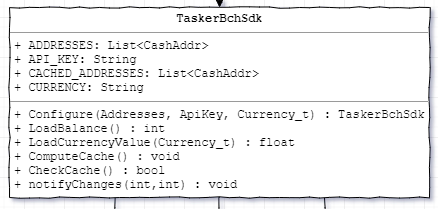
Advanced BCH Monitoring with Tasker (Part 1: Refactoring) "If life give you lemons, mint a token." *keepBitconFree.org (Circa 2019)* Previous series: Monitoring a BCH address with Tasker https://read.cash/@elrikpiro/monitoring-a-bch-address-with-tasker-f63dcd79 Sometimes projects just keep growing What started being just a DIY project to be updated about your addresses transactions and crypto-to-fiat conversion, might be growing too much, is on those cases where you must stop and think about preparing your projects for growing up further. Thousands of ideas are passing through my head: caching funded addresses to reduce bandwidth consumption, support to several REST API services for availability, error handling, SLP token support... But the last project structure is improvised and as an improvised structure, it does not scale well. Planification for a new structure So I've been scratching a structure that allows us to add more features in the future, but it's also ok, to begin with, the UML diagram is just pretending to follow the standard, but as long as it is understandable for a software developer, he'll be able to code this into any programming language that can work properly with this kind of structures. https://en.wikipedia.org/wiki/Unified_Modeling_Language The represented structure is made as if it was for C++ because it is the language I'm using every day but as I told before, it can be implemented in any other compatible language and, with several limitations, Tasker it's one of those. https://en.wikipedia.org/wiki/C%2B%2B The structure explained What we can see on the structure is that there is a Class named as `TaskerBchSdk` meaning "*Tasker Software Development Kit (SDK) for Bitcoin Cash (BCH)*" and it's methods are as it follows: https://en.wikipedia.org/wiki/Class_(computer_programming) `Configure(...)` : Will be the configuration method, we'll call it on the first run to prepare our software with the essential information to start working. `LoadBalance()` : Will query the current balance for all our addresses `LoadCurrencyValue(...)` : Will query how much is BCH on the passed currency `ComputeCache()` : A new feature! To be explained on future episodes ;) `CheckCache()` : Part of the caching feature `notifyChanges(...)` : Will notify for changes (ex: Push notification, Mi Band) We also see three interfaces representing different blocks of logic: https://en.wikipedia.org/wiki/Protocol_(object-oriented_programming) `IExchangeApi` : We'll code this interface to retrieve information from an Exchange or a Trade information REST API, mainly to get to know the market price of our assets (i.e: CoinGecko) `IGui` : This one will be updated with relevant data and use it to notify the user (i.e: Tasker native push notifications, 3rd Party notification services) `IBlockExplorer` : Finally, this interface will be used to retrieve information from the blockchain (i.e: Blockchair) In the next part, we'll learn how to structure our Tasker tasks into programming interfaces so we don't have to deal with large lists of tasks. [sponsors] https://blockchair.com/ *Special thanks to* *Blockchair.com* *for providing an API key.* *Don't forget to subscribe, feedback will be appreciated!* Part 2 : How to prepare an interface in tasker https://read.cash/@elrikpiro/advanced-bch-monitoring-with-tasker-part-2-how-to-prepare-an-interface-in-tasker-46363bc0

 @elrikpiro
Shhh... Merry Christmas ;) Keep it quiet, Fujur is taking a nap ^^
 @elrikpiro
Being the good boy to gift the good boys Link to Instagram. https://www.instagram.com/p/B6Je7IkIZUn/?utm_source=ig_web_copy_link
 @elrikpiro
Europe Central Bank Issuing its own crypto *"FUCKING NORMIES GET OUT OF MY CHAIN, REEEEEEEEEEEEEEEEEEEE"* **Bitcoin Messiah Formerly known as Satoshi Nakamoto** (Circa 2017) As @jpthor_ explains on his Twitter thread the ECB will Issue its own version of the groundbreaking blockchain technology. https://twitter.com/jpthor__/status/1207079167436578816 Stop shaking and listen to the newest TOTALLY NOT ORWELLIAN idea from the *Wannabe a Continental State* bank NOT INTENDED AT ALL to subvert all its citizens to democratic-disguised fascist surveillance: The same UTXO model as Bitcoin Wallets cannot be generated without the intervention of the centralized party Ability to control wallet access from a centralized party The intermediary needs to be online if you want to spend Transactions must be approved by a central party My questions are... What is the added value for citizens with those conditions? Why would I choose to use CBDC instead of BCH or BTC? Will the ECB issue an ICO o will impose us to give up our fiat euro and use their CBDC? How much time until they forbid crypto exchanges and start closing web sites related to crypto? Guess the added value it's not privacy as they claim it to be. https://www.ecb.europa.eu/paym/intro/publications/pdf/ecb.mipinfocus191217.en.pdf Regards,
@elrikpiro
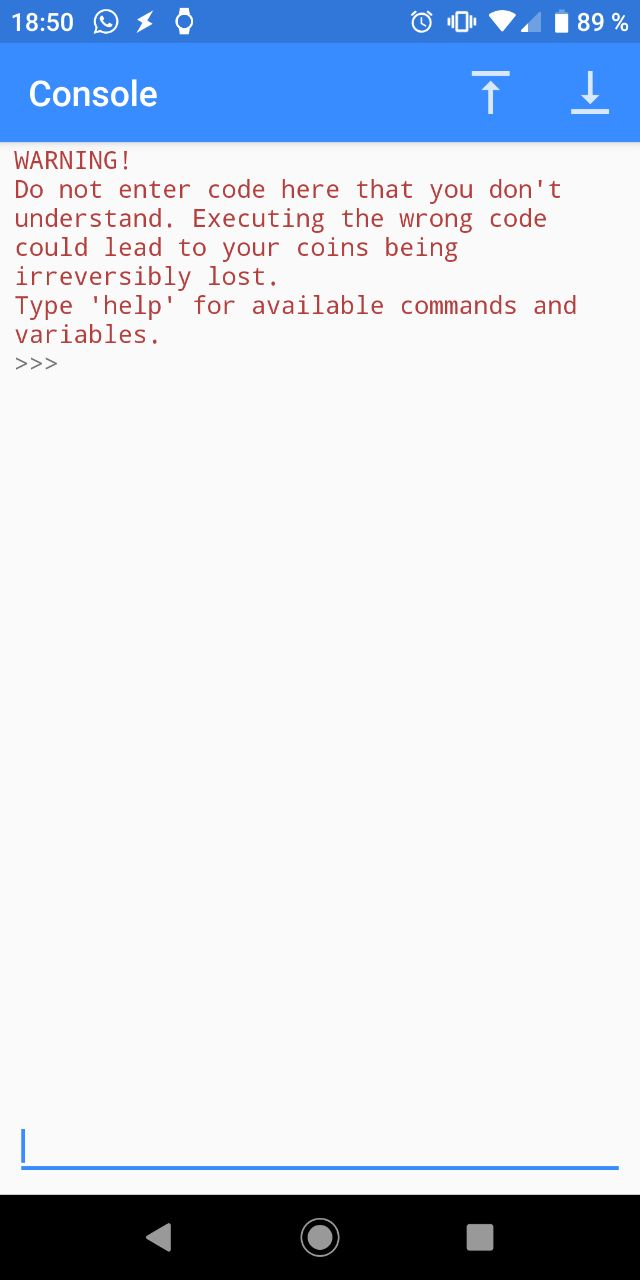
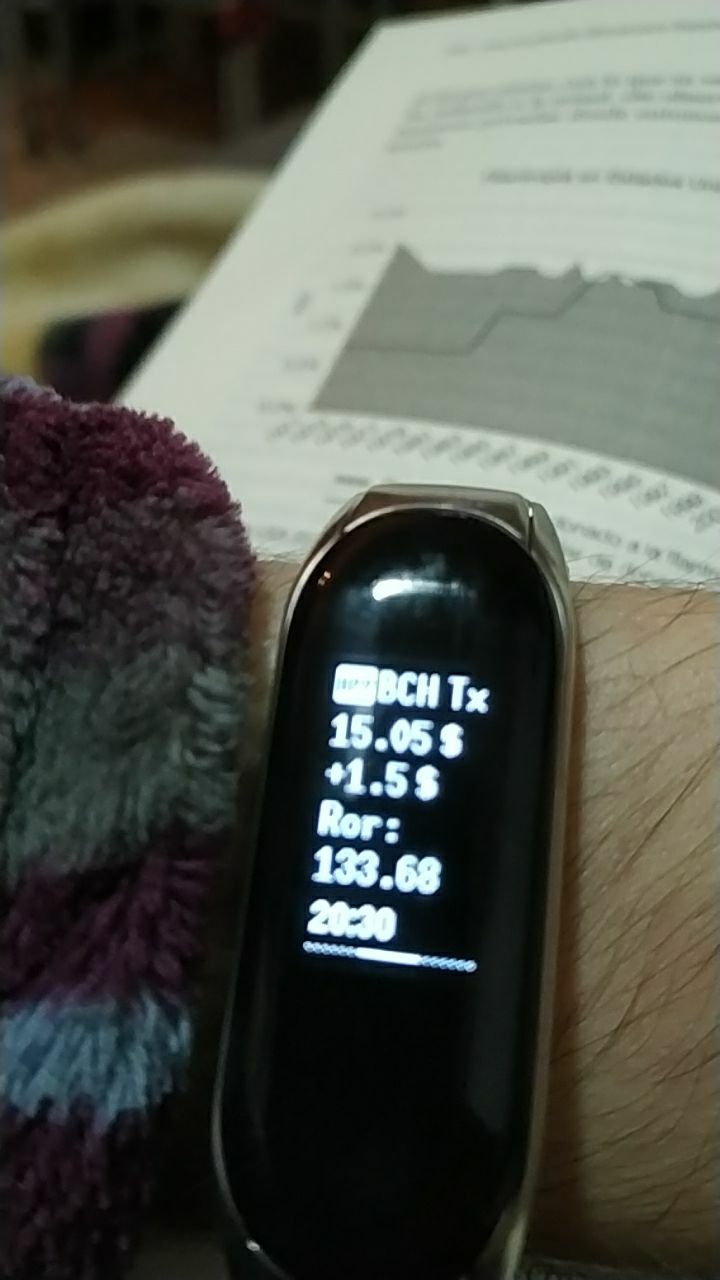
Monitoring a BCH address with Tasker (Part 3: Showing Different Units) *Link to* *Part1* *Link to* *Part2* https://read.cash/@elrikpiro/monitoring-a-bch-address-with-tasker-a4800a09 https://read.cash/@elrikpiro/monitoring-a-bch-address-with-tasker-part-2-now-with-more-addresses-f84a7ee7 Let's continue improving our little project, some of you reached me privately and told me that if the Smart Band notification has an 8x4 character area plus a scrolling title I could have trouble showing up big numbers. On the other side, some people told me that it is pretty much a very laborious work to add all the addresses on a wallet, as you must copy and paste around forty addresses in the request URL. In this article I'll propose both of the solutions I adopted for those problems. Improvement #2 : the `%ADDRESSES` variable and how to fill it In order to add and remove addresses easily we can modify the **HTTP Request** like this: **HTTP Request** (Method: `GET`, URL: `https://api.blockchair.com/bitcoin-cash/dashboards/addresses/%ADDRESSES` As you can see, the `%ADRESSES` global variable must be set with all of those you are going to monitor, separated by a comma and without any space. Having this on a variable will enable us to easily add a new address or a new bunch of addresses. In order to get a list of addresses that you can paste into your global `%ADDRESSES` variable you can easily get a comma-separated list if your ledger has a Python Console (I use electron cash). https://electroncash.org/ Attention: **DON'T USE THE CONSOLE WITHOUT KNOWING WHAT ARE YOU DOING IF YOU WANT TO TEST CODE DO IT ONLY ON READ-ONLY WALLETS** In order to get a comma-separated list of all the addresses on a wallet you can use the next line: `','.join(listaddresses())` That is the Python witchcraft dialect for "*get a list for all addresses on this wallet and join them all using a comma*" The output is something like this: 'qqsewpgv4lh27eg6d72kdu6cwf3ds4kltqazfktj2s,qpfplgltv76sxnd7d8v3p8s2d9weuh6udvcvl358cv,qz5qe9dz8wyrdk5r8mj0peqzmud63wmaeu7l83lrws,qq84zn8056l9kv0qvu95ljfh0s8qv6fjyvaxk2g4ye,qrjwaw5ajrfl9apxtq5j69gy7uc7epqd65fyp8zlcj,qre2sl93v3vn2fkafwwa0pppfpesrxjctv0ls4lxw8,qql44kwaqrpfs9dyv7dn9kttel8xm9sfs558f0k96m,qrz0ylrxx38akez9xew85epgzs7yvvyxtvdl8deflw,qz5j8fh2cehlfvuh7rvd6hrxalxkcy0gkg9hyykc5p,qp08aqlkxz2qmtval3gm3ws6kclg298cvvw6syqeqm,qq2z7fux4zd3yx3eqy469pmj9h2v6vzt9sh9c6kjzv,qpy4hydkheam7jcanpfphknh34cvpk73ask30ky6td,qr6l5vhwd2m6tya2xxhchylxdj878khxqserfgrrhs,qzxpt3rvexeyxe0ym3ajkh2p7885yt48pv2eqyj6wv,qrjm0ncfe709ha6n3qvmpw605lsn2rnpxyjt97xkzt,qq3dlxzp375u8cay442tj4sazkx6x35zhqwmkkq9d6,qzgfge3gjxjt0ydgs9q2xqq9ewwjd0ye2gdv2s3kmy,qpql0z67aa9u28w9v6v9vzl0r3jazuq07gwlyxefwg,qrx7d57c72ju6xj3myacvsu4wf9yzm4q0unxjnu6qj,qrecuvzrpek4jzzeh8xcwwcapqlt2dupnqwnnuprju,qrar8ndlk5jxrpwl0gqgf68kzut2y8mwsq5s9lgf28,qq9dzw307k360y45ggsp6t6ksfkec6ezlcwk007qhz,qzp5vlpnt6x4pgnfptnel778nljs9p9fmyxfvt9wp8,qz4eq98dkf5jlvcymw64ql327lup592ewy2445cv8k,qpwhna9kfrgs07g6nh9zx3d8k7wxgtlatulay94hf2,qpgj8j4g30y8wsewlznnqhxj0hf5majetuwnhkpca0,qp2yhapqevvp8qm8c5hsl6dr9d2ddj23pvjytw4um9,qzz895aymqpzvvvnjw76jmky2nv6mg54wuc20g6v8f,qpn6rv2qydmmxlzhpy4wuz0laf7dcmetsyjx9gegjx,qq94nxevjrx6arzh8q5n3zjpvvehvhzm5q5fhncwgz,qz9vklg00sd9jj44eklj4n0qmpdhy8gkuy5pjup32z,qpha29rse87gwq4lap6zgwpdd64hxl94hgfa2kwq58,qq47yzk849f2hp2x5sypwsx357980v5k6cl5ssvxdc,qrc23w67v98gazjs2g9h5yujqn4p6248pg47y0qas7,qrd5e0f8wz278h2h5ctq3yju46v5uelnpc8hshqqwc,qznmz4qv4d0jp5tyuse72nzyl7jnt9xaccg88pz6mz,qqw4tzr5d0vv8zmjnav9rcthu7yk94l9ryjg7gp5s0,qqm4sk8pu965whpa2l5hrkktplr4c469jcryr6xd3g,qp8qtpdxd7e6y50pakj3naw9azycjw044ckc26af39,qq547q9ysfu0ewr9aqq6q5qg6j529s0uag9udq5v9g' Well, Wasn't that was faster than copying each address individually? Now you just have to paste this in your `%ADDRESSES` Variable and you'll have the whole wallet balance on your watch. Improvement #3 : fitting units efficiently at the Mi Band 3 Let's refresh how is our script doing: **HTTP Request** (Method: `GET`, URL: `https://api.blockchair.com/bitcoin-cash/dashboards/addresses/%ADDRESSES` **Variable Set** (Name: `%JSON` To: `%http_data`) **JavaScriptlet** (code: `var balance = JSON.parse(global('%JSON')).data.set.balance;` `setGlobal( "%BALANCE",balance );` `var usd = JSON.parse(global('%JSON')).data.set.balance_usd;` `setGlobal( "%BALANCE_USD", Math.round(usd*100)/100 );` ) **If** (Condition: `%BALANCE neq %LAST_BALANCE`) **Variable Set** (Name: `%USD_DIF` To: `%BALANCE_USD - %USD` Do Maths: `Checked` ) **Variable Set** (Name: `%LAST_BALANCE` To: `%BALANCE`) **Variable Set** (Name: `%USD` To: `%BALANCE_USD`) *Notification* **Else If** (Condition: `%USD neq %BALANCE_USD`) **Variable Set** (Name: `%USD_DIF` To: `%BALANCE_USD - %USD` Do Maths: `Checked` ) **Variable Set** (Name: `%USD` To: `%BALANCE_USD`) *Notification* So, right now we are only showing the balance in pure satoshi, but, you know, if your screen is only 8 characters wide, you can represent accurately (with a $200 per BCH) from $0.00 to $6,906.36. If we were to use BCH instead with a fixed amount of zeroes (let's say 2) we could represent from $2 to $19,999,998. The logical path here is to use satoshi when the balance is lower and use BCH when the balance is higher and that's is what we're going to do! But... with another optional improvement: I'll be using read.cash's (provisional name) Ror Unit. https://read.cash/@Read.Cash/let-bitcoin-cash-ror-5e217c81 I'll use this unit as a 2 decimal fixed-point unit as it allows me to represent spendable amount of BCH (the 546 dust limit, near $0.001) as the smallest unit (a Ror cent) and it escalates to 99,999.99 Ror (around 5,459,999,454 satoshis, 54.60 BCH or $10,920) as the highest representable value. As I am committed to becoming stingy rich blogging on read.cash ( :P ) someday I'll add a 2 decimal fixed-point BCH representation as a fallback when Ror isn't enough to represent the values at my wallet and I'll worry later on my first-world problems on being unable to represent more than 19 Million dollars worth of BCH. Before: **If** (Condition: `%BALANCE neq %LAST_BALANCE`) **Variable Set** (Name: `%USD_DIF` To: `%BALANCE_USD - %USD` Do Maths: `Checked` ) **Variable Set** (Name: `%LAST_BALANCE` To: `%BALANCE`) **Variable Set** (Name: `%USD` To: `%BALANCE_USD`) *Notification* After: **If** (Condition: `%BALANCE neq %LAST_BALANCE`) **Variable Set** (Name: `%USD_DIF` To: `%BALANCE_USD - %USD` Do Maths: `Checked` ) **Variable Set** (Name: `%LAST_BALANCE` To: `%BALANCE`) **Variable Set** (Name: `%USD` To: `%BALANCE_USD`) **If** (Condition: `%LAST_BALANCE > 5459999454` ) **Variable Set** (Name: `%UNIT` To: `"BCH"`) **Variable Set** (Name: `%FORMAT_BALANCE` To: `%LAST_BALANCE / 100000000`Do Maths: `Checked` Max Rounding Digits: `2` ) **Else** **Variable Set** (Name: `%UNIT` To: `"Ror"`) **Variable Set** (Name: `%FORMAT_BALANCE` To: `%LAST_BALANCE / 54600`Do Maths: `Checked` Max Rounding Digits: `2` ) *Notification* Now we are talking :) Subscribe if you enjoyed it and comment if you have any requests! More updates soon! [sponsors]
 @elrikpiro
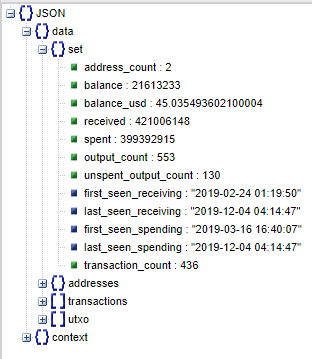
Monitoring a BCH address with Tasker (Part 2: Now with more addresses!) This is the second part of the Tasker BCH address monitoring tutorial since I wrote the first one several ideas came up and after implementing then I thought it would be nice to share it with you. *Link to* *Part 1* https://read.cash/@elrikpiro/monitoring-a-bch-address-with-tasker-a4800a09 Improvement #1: What if I want to check more than one address? Monitoring a single address has its uses, sure, but many of us have wallets like Bitcoin.com or Electron Cash, or both a memo.cash and a read.cash address. https://electroncash.org/ Calling the REST API once per address to aggregate it's information might be tedious and demotivating... We are lucky to have REST endpoints for aggregating information from multiple addresses! https://dev.to/asrar7787/rest-api-what-is-the-difference-between-endpoint-and-resource-3l1p Before: **HTTP Request** (Method: `GET`, URL: `https://api.blockchair.com/bitcoin-cash/dashboards/address/{your address here}` After: **HTTP Request** (Method: `GET`, URL: `https://api.blockchair.com/bitcoin-cash/dashboards/addresses/{address1,address2,...}` So as we can see at the figure on this section, Blockchair's API will return us a new data member called "set" that will give us all this information. So we can now take the `balance` and `balance_usd` fields and have all the information we need to monitor our addresses. Do you remember that in part 1 we used two **JavaScriptlet** commands to get this information? Well, today we are going to use just one. https://read.cash/@elrikpiro/monitoring-a-bch-address-with-tasker-a4800a09 Before **JavaScriptlet** (code: `var balance = JSON.parse(global('%JSON')).data.{your addres here}.address.balance;setGlobal( "%BALANCE",balance );`) **JavaScriptlet** (code: `var usd = JSON.parse(global('%JSON')).data.{your address here}.address.balance_usd;` `setGlobal( "%BALANCE_USD", Math.round(usd*100)/100 );`) After **JavaScriptlet** (code: `var balance = JSON.parse(global('%JSON')).data.set.balance;` `setGlobal( "%BALANCE",balance );` `var usd = JSON.parse(global('%JSON')).data.set.balance_usd;` `setGlobal( "%BALANCE_USD", Math.round(usd*100)/100 );` ) The rest of the code remains the same and everything will work fine. And that's it! Future Work Showing different BCH units at the notification when a Tx happens. (Satoshi, Bits, Ror, mBCH, BCH...) Create a UI for making it easier to manage addresses *Accepting suggestions at the comment section!* Thanks for reading! [sponsors] Link to part 3 https://read.cash/@elrikpiro/monitoring-a-bch-address-with-tasker-part-3-showing-different-units-9d1eaa15
 @elrikpiro
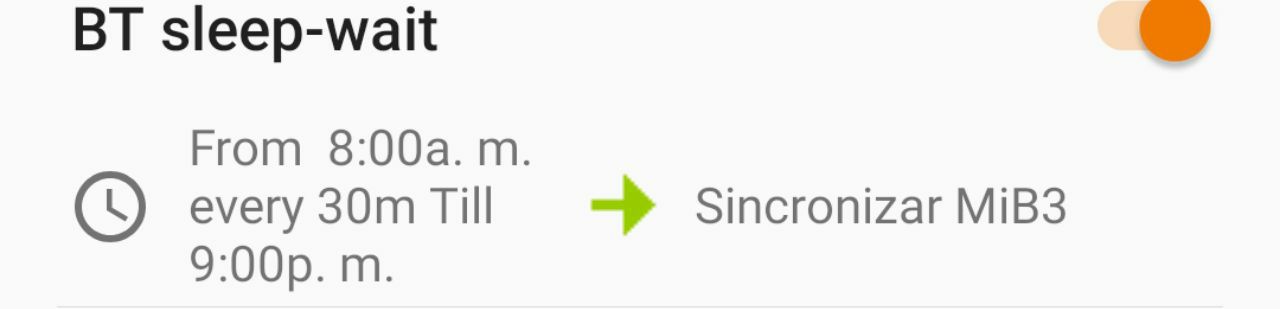
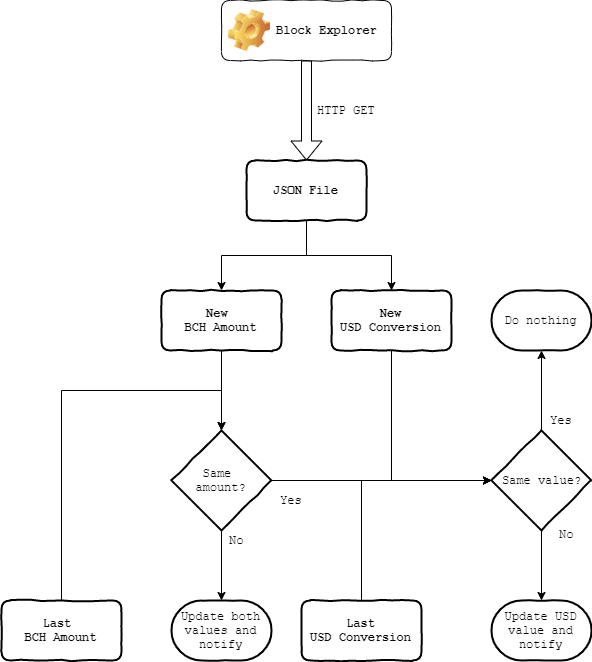
Monitoring a BCH address with Tasker `"You can use this to check if somebody tipped into your account!"` Introduction Sometimes we need to put our knowledge to work in order to consolidate it, at least it is my case, during my daytime, I don't like to be constantly checking the phone and bought a Smart Band from Xiaomi. As the few features on the device are pretty limited I got a copy of the Tasker app a friend of mine recommended and then the fun began. Prior work Do you know how much energy consumes a phone with Bluetooth activated? I won't get too specific on details and I'll summarize it with: "*enough to kill your battery before lunch*". Do you know how many days is the smart band's battery supposed to last and how much it lasts if the user has always Bluetooth ON? "*Not enough to compensate it's price/quality ratio*". One of my first hacks with tasker was activating the Bluetooth only one minute each half an hour between 08:00 AM and 09:00 PM both user experience and battery usage improved (reduced spam notifications and made battery footprint for both the smartphone and the smart band unnoticeable). The idea After being invited to a congress where they'll be speaking about blockchain as a solution for my organization, I wanted to be able to speak and debate properly about it then I decided to update my knowledge about blockchain. After spending some weeks studying about cryptocurrency and blockchain technologies, I found great ideas and websites like this and fell in love with them, they are a great idea that shows how blockchain is much more than virtual and highly volatile assets. Thanks to that my motivation boosted. Then, the idea just came out yesterday speaking with a friend: "*I could automate checking an address balance and notifying changes in order to, for example, get a notification if somebody tips my account*" and this morning woke up and thought: "*why not?*". The concept Look, block explorers like Blockchair have a REST API so everything you can look into that web page is also able to be queried by a REST Client (any HTTP browser or network-enabled device can issue a request!) to get a JSON. https://blockchair.com/api/docs https://www.json.org/json-en.html A Blockchair JSON looks like this (ugly huh?) but is extremely useful to computer programs as you can parse it and extract any information already available on the human-readable website. https://api.blockchair.com/bitcoin-cash/dashboards/address/qpsct8mq4dn22syza8gyt3cal6453h629qfe3xpslu https://blockchair.com/bitcoin-cash/address/qpsct8mq4dn22syza8gyt3cal6453h629qfe3xpslu In this case, I will use BCH addresses and with the JSON used to represent BCH addresses on Blockchair, we can get two useful values for our application: BCH amount in satoshis and USD conversion of that amount. Then I can implement the algorithm shown on the diagram leading this section with two kinds of notifications: Your balance has changed The value of your assets changed (significantly) The implementation Tasker makes implementing automation on your smartphone pretty straightforward with a GUI that does most of the typing job for you, but once in a while, you'll have to deal with declarative code like Javascript. Anyway, I'll share the ¿snippet? with you, each line is a step option you can choose on the Tasker menu: **HTTP Request** (Method: `GET`, URL: `https://api.blockchair.com/bitcoin-cash/dashboards/address/{your address here]` **Variable Set** (Name: `%JSON` To: `%http_data`) **JavaScriptlet** (code: `var balance = JSON.parse(global('%JSON')).data.{your addres here}.address.balance;setGlobal( "%BALANCE",balance );`) **JavaScriptlet** (code: `var usd = JSON.parse(global('%JSON')).data.{your address here}.address.balance_usd;` `setGlobal( "%BALANCE_USD", Math.round(usd*100)/100 );`) **If** (Condition: `%BALANCE neq %LAST_BALANCE`) **Variable Set** (Name: `%USD_DIF` To: `%BALANCE_USD - %USD` Do Maths: `Checked` ) **Variable Set** (Name: `%LAST_BALANCE` To: `%BALANCE`) **Variable Set** (Name: `%USD` To: `%BALANCE_USD`) *Notification: Check down* **Else If** (Condition: `%USD neq %BALANCE_USD`) **Variable Set** (Name: `%USD_DIF` To: `%BALANCE_USD - %USD` Do Maths: `Checked` ) **Variable Set** (Name: `%USD` To: `%BALANCE_USD`) *Notification: Check down* Set a profile to run this task every 30 minutes (or any other time configuration you might consider). About the notification, I left it open because I use Mi Band Tools and explaining how it works could lead to another full post, but you can use the native **Notification** tool from tasker, where you can even set a permanent push notification in your phone that lets you check the address balance just by looking at your notification bay. How does it look in action? Well, it's not the prettiest thing and needs more polishing, but not bad being aware that it just took me 20 minutes to set up. Also, I'll try to make the message shorter and aware of the 8 characters per line limitation from the smart band so it looks prettier. Translation: Your BCH balance changed to 0.57 $ Final thoughts I know this is something that might not be useful having many widgets that do the same and very much easier, anyway I believe this solution, at least, is cheaper on energy cost and safety. Anyway, I had fun doing it and I am already thinking about much more features and improvements I'll sure post them here if I can get some time to. Thank you for reading! [sponsors] Link to Part 2 https://read.cash/@elrikpiro/monitoring-a-bch-address-with-tasker-part-2-now-with-more-addresses-f84a7ee7

+1 more
@elrikpiro
Hey you! Stop scrolling! Relax, Fujur is just trying to make you smile :) Did he make it? Comment below! Instagram: https://www.instagram.com/elrikpiro/
 @elrikpiro
Preguntas frecuentes (FAQ) de los comerciantes sobre la aceptación de Bitcoin Cash (BCH) 1. ¿Que es Bitcoin Cash (BCH) y como puede beneficiar a mi negocio? BCH es una moneda digital rápida, barata y fiable que no tiene fronteras ni riesgo de cancelación. Para los comerciantes es mucho mas barato aceptar BCH que tarjetas de crédito o débito [1]. Al igual que con el dinero en efectivo, los comerciantes reciben su dinero inmediatamente [2]. 2. ¿Como puedo comenzar a aceptar BCH como medio de pago? Es muy fácil. Tan solo necesitas de 1 a 5 minutos para preparar una aplicación que te permita comenzar a cobrar en BCH. Puedes usar tus propios dispositivos, como por ejemplo tu smartphone o una tablet [3]. 3. ¿Que coste tiene? Aceptar BCH como comerciante no tiene ningún coste adicional, sin embargo, si decides utilizar un procesador de pagos automático para convertir el BCH en tu divisa local, la tasa puede ascender a un 1% [4], dependiendo de el país en el que te encuentres, estas tasas pueden competir holgadamente con las tarjetas de crédito [5]. Los comerciantes con márgenes de beneficio más ajustado como pequeños comercios o restaurantes pueden beneficiarse enormemente de las reducidas tasas de BCH. 4. ¿Como puedo convertir BCH en mi divisa local? Debido a las diferencias en la legislación de cada país, se puede realizar esta conversión dependiendo del país en el que desarrolles tu actividad [3][6]. 5. Dado que el precio del BCH es volátil ¿Existen riesgos? En el caso de que conviertas los BCH en tu divisa local al instante, no deberías percibir ningún riesgo por volatilidad. También existen beneficios por mantener la criptodivisa sin conversión. Podrías generar beneficios por su revalorización, utilizarla en negocios que también las acepten, ahorrar hasta un 30% en la compra en tiendas online como Amazon a través de webs como Purse.io etc. Aun con todo, suelo recomendar a los nuevos adoptantes que no tomen riesgos y conviertan los BCH en sus divisas locales salvo que sepan lo que hacen y estén dispuestos a asumir riesgos manteniendo sus BCH como inversión. También puedes tomar esta decisión más adelante. 6. ¿Va a atraer muchos clientes? Actualmente el uso de criptodivisas para el pago de bienes de consumo no está muy extendido, por lo que es poco probable que una estampida de usuarios de BCH se manifieste en tu negocio de repente si decides adoptar los pagos en criptodivisas. Si bien es cierto que atraerá visitas de los usuarios locales de BCH y algunos turistas o viajeros pueden aparecer en tu negocio de tanto en tanto (es dinero sin fronteras, así que es perfecto para viajeros). Además, **tu negocio contará con la ventaja de, con una inversión extremadamente reducida, estar preparado para cuando el uso de criptodivisas se extienda** y muchos mas usuarios estén interesados en usarlas. Si te estás preguntando por que utilizar BCH frente a otras criptodivisas, puedo decirte que Bitcoin Cash es la criptodivisa más frecuentemente utilizada en comercios minoristas. Es más utilizada incluso que Bitcoin (BTC) debido a que es más rápida, barata y por ello, más útil como dinero [7]. BCH además tiene una fuerte comunidad con muchos individuos entusiasmados con la idea de que los comerciantes adopten su uso. Cabe destacar que muchas webs y aplicaciones publicitarán tu comercio gratuitamente si aceptas BCH [8]. 7. ¿Es legal aceptar criptodivisas como pago? Depende de tu legislación, pero parece que está permitido en muchos países [9]. Mi recomendación es investigar al respecto o preguntar a los individuos que apoyan el uso de esta tecnología al respecto del estado legal de las mismas. Que no exista ninguna ley que las prohíba expresamente probablemente significa que no existe regulación al respecto todavía. 8. ¿Como declaro mis ventas en criptodivisas para pagar impuestos? [10] Normalmente es tratado del mismo modo que ventas en tu divisa local si conviertes tus BCH de forma instantánea (de este modo no estás generando beneficios por mantener la criptodivisa y convertirla cuando suba). En este caso declara las ventas tal cual lo harías con otros métodos de pago. Esto depende del lugar en el que desempeñes tu actividad comercial, así que por favor, mantente informado sobre las regulaciones vigentes. **Referencias y notas del traductor:** [1]: Datos de coste del uso de tarjetas de crédito en España, mientras el coste de transacción de bitcoin cash ronda los 0.000002$ por byte en diciembre de 2019, no llegando como norma general a un kilobyte por transacción. https://cincodias.elpais.com/cincodias/2015/05/12/autonomos/1431422354_689443.html [2]: Desde enero de 2018 hasta Diciembre de 2019 el tiempo de minado de los bloques ha sido de una media de 10 minutos pudiéndose resolver hasta 32 MegaBytes en transacciones por bloque. https://bitinfocharts.com/comparison/bitcoin%20cash-confirmationtime.html [3]: https://medium.com/@akaneyokoo/how-to-accept-bitcoin-cash-bch-payments-at-a-physical-store-and-cash-out-in-local-currency-7fe4371cc09c (enlace en inglés) [4]: https://coingate.com/accept/bch/bitcoin-cash (enlace en inglés) [5]: Dado que existen países donde los costes de uso de tarjetas de crédito o débito son más reducidos, las afirmaciones de AkaneYokoo en su entrada original no son siempre aplicables, por lo que he decidido cambiar el texto por algo más adecuado. [6]: Se pueden utilizar procesadores de pago, acudir a una web de intercambio de criptomonedas como *coinbase* o buscar a personas dispuestas a comprar BCH en persona, en algunos países se pueden encontrar cajeros que te permitan cambiar tus criptomonedas por tu divisa local. https://www.coinbase.com/ [7]: Bitcoin Cash para principiantes, principales diferencias https://es.cointelegraph.com/bitcoin-cash-for-beginners/btc-bch-differences [8]: Herramientas para comerciantes **https://www.bitcoin.com/merchant-solutions/brick-mortar/** **(enlace en inglés)** [9]: NdT: Al ser una tecnología emergente no hay demasiados precedentes de estados tratando de prohibir completamente su uso, no obstante, se espera la entrada de intentos de regulación en los próximos años. https://cincodias.elpais.com/cincodias/2019/11/13/legal/1573629056_929110.html [10]: Los impuestos son robo. (enlace en inglés) http://exploreistaxationtheft.com/ Traducción libre del FAQ de **AkaneYokoo** https://read.cash/@AkaneYokoo/faq-for-merchants-about-accepting-bitcoin-cash-bch-e0f8f6b0