 @bmjc98
more from that month
@bmjc98
more from that month
Enough With That Boring Cover Photos And Level Up Your Style With Canva Are you tired of using the same plain photo over and over again for your lead image? Why not level up and start making your own lead image to add an extra personal touch to your article. Know any idea how? Then don't skip this article, and I'll show you around. As for this article, I'm going to highlight my new favorite 3-in-1 app that will surely make you fall in love. Meet Canva. **Canva** is a *graphic design, video collage, and logo maker app* that lets you create something with a little touch of your personality for free. With its all-in-one editing features, you don't need to settle for less now for your cover photo or any other social media posts. It is not only perfect for your next Insta stories but also for cards, flyers, bookmarks, or photo collages. It's easy to use that even those who aren't into editing can still create one. Are you excited? Let's begin! Download the app first. Here's the link for Android users. Then don't forget to sign up, and that's it! It's time to explore the app. **Home** For mobile users, here is what you see on your home page.

At the bottom are your Home, Designs, and Menu tab. The photo above is your Home page, where you see all the designs you could use to start your creation. There are so many options to choose from. Tag, Instagram Post, Poster, Animated Social Media are just among them. **Designs** This is where you can see all the designs you created. Allow me to show you mine.

**Menu** I think this one is self-explanatory so no need to talk much about it here. Let me just show you what's on the menu though.

Now that you know how Canva looks like in your phone, let's begin with creating our own lead image. Honestly, I'm not a good creator so excuse me for my basic editing skills. But I'm just going to show you the basic steps, and it's up to you to explore further and create the style you want. Here's what you need to do: Go to the **Home** page. Choose **Tag** design. (Because it's perfect for the size of the lead image) Pick your **template** or just go for a blank canva.

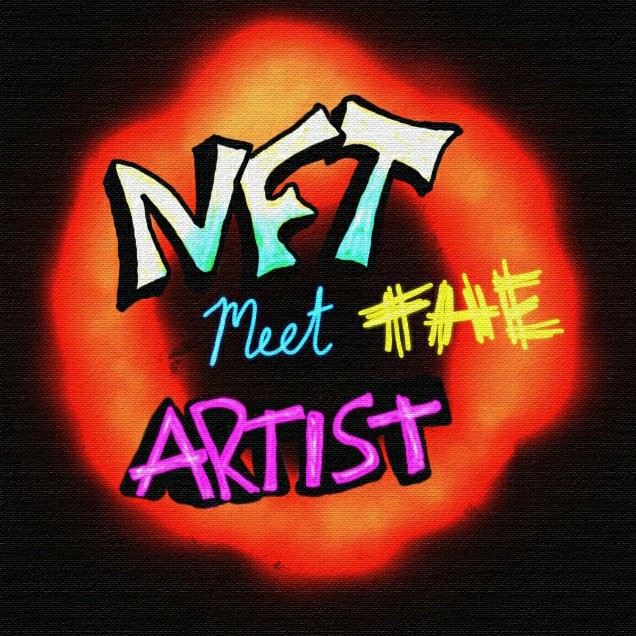
Now, you can **start editing**. Remove what's needs to be removed and add what you want to add. The editing part is really easy so I know you can figure it out by yourself. I believe in you. Anyway here's a sample I made just for this.

Once you are done, you need to convert this file into a GIF. I used the GIF maker-editor app and voila! https://play.google.com/store/apps/details?id=com.media.zatashima.studio

Told you I only know the basics. Lol. But I'm sure you can do better than this so feel free to explore the app. *Closing thoughts* The best thing about the app is that it **has lots of free stuff** you can use, from designs and templates to stickers and GIF to filters and effects, and of course, the animation and all. Plus, it's simple and user-friendly. So instead of just posting a simple photo as for your lead image, why not add something like stickers, gift, and cute text, and turn it into something creative and eye-catching for your readers.






44 comments
I must try this one Ma'am..😊 Thanks for sharing it to us.. Good day!☺️
You're welcome and yes, why not give it a try. Mag eenjoy ka kaka edit.
Yes po! lalo pa't gusto ko rin i.improve yung editing skills ko haha😂🤭
You are very right. We also need to be creative. I don't know why I am so lazy to use the canva app now. I always use it when I was on an online platform then and I really enjoyed doing something I love to do and bring out my skills. I have the app and I think I will go back to it instead of downloading pictures online. Though I might still be doing that but I need to be perfect using Canva. Thank you
Yuh, you can do both. I mean, a free stock photo and then enhance it using canva. It's really nice to have something that you can considered as your trademark.
Wow thank you dito ;)
You're welcome.
Nagagandahan talaga ako sa app na yan. Diyan ako lagi nag eedit since dati para sa school works like posters, collage etc. Curious din ako sa ginagamit niyo pong app tsaka sa iba, dati pa. Yan pala. Interested talaga ako sa gif ng mga read. cash user like you dati pa. Inuninstall ko na yan dati pa huhu. Wala nakong storage huhu. Kailangan ko isacrifice iba kong file. Nakakasawa na nga mga lead image ko. Thank you po dito.
Nakakasawa nga. Recently lang din naman ako sinipag pag ganito. Tas na enjoy ko naman so eto na gamit ko.
Yan din ginagamit ko dati pang edit
Ngayon ano na gamit mo?
Picsart po
Was so curious how you guys do it. Huhu thank you so much for sharing.
Yay. Now, you can try it na. Have fun editing.
Di ko ma click yung link nang app na canva hehe.
Talaga? Galing yun sa play store. Check ko ulit. Thanks sa feedback.
I was looking for this info coz I don't know how you guys are making gif and will try this for sure thank you !!!
Yay! Glad I posted this then. Don't forget the gif maker.
I'm also using Canva but I'm too lazy to edit. Hahaha, that's why I often resort to looking for pictures on Unsplash and Google.
Time-consuming din kasi to pero maganda naman kasi yung me mga kaartehan sa photos. Hehe
Oo, hahaha. Nag-eedit lang ako nang pang profile picture ko.
Yan pla sekreto mo 😁
Hehe. Nag fefeeling sa editing. Ikaw, ano ba gamit mo?
i love canva..been using it for years.. did you know that the CEO is a Filipina?
For real? Didn't know that. Anyway, I've just recently used this app for my NFT.
May nagbigay sakin ng premium account ng canva dati kaya sinisipag ako mag edit edit dati ng mga thumbnail pero ayon nag expired na kaya tinamad na sa paggawa hahahaha. Pero legit na magandang pang edit yang canva. Buti nga ang sisipag nyo mag edit 🤧
Sinisipag. Natuwa lang kasi ako dito. Gusto ko yung me gumagalaw. Sayang lang, paulit ulit lang yung animation niya. Di ko afford yong pro kasi.
Masubukan nga din to. Pra matry pag may time gumawa at d laging sa free image umaasa.. thanks for sharing
THank you din. And enjoy editing. :) Mag eenjoy ka talaga dito. :) Feel ko lang.
Oh, naysuuuu. Sakin Picsart gamit ko. Di Ako gaanong maalam sa art kaya add photo lang gawa ko saka caption, wahaha.
Okay na rin yan. Ako nga rin. Walang ka talent talent kaya picture and title lang with kunting drama. HEHEH
ang cute naman nito. matry nga din .hehe :) Thanks sa pag share :)
You're welcome. Mas magiging cute pa yan pag me artistic side ka talaga. Ako kasi, wala talaga. HAHAH
kaso wala akong ganung side. haha
Thank you for this, I will try this on my next article :)
Yay! And you're welcome. :) Enjoy editing!
I tried one already on my footer image hehe thanks.
yay! na curious ako bigla. hanapin ko. :)
Hehe sure po :)
I love using Canva on my articles and school works too. Aside from that, most elements are free but I personally recommend using the pro version because there are better options there. Nonetheless, the platform/application had helped to edit conveniently instead of photoshop. Aside from that, I also use it for business matters of mine. Thanks for sharing this article!
I checked the pro version but it's kinda pricey so I'll just settle for the free version for now. And you're right, it's more convenient than photoshop. :)
Giving away your secrets. I do see your colourful creations and wondered how you made them. I forgot all about Canva. Salamat for sharing.
Sharing is caring, and you're welcome.
Thanks to @Hart05, I found out about this article! An app for me to explore further. Thank you for the intro.