 @Khing14
edited
@Khing14
edited
How to Redeem Cheque from checkbook.cash using Metamask browser I saw the below tweet from CashCatsBCH informing about the free airdrop as part of the Checkbook dApp audit completion celebration. There are 500 $CATS gift from Dr. Wang and 2 $EBEN from Ben.

So I just simply clicked on the link from twitter and used metamask browser to open it. However, I am receiving the below error.

So while I am trying to resolve my problem, I shared the tweet from some of my TG friends who are also been my constant chitchat and friends here in noise.cash and read.cash. Luckily @Eries28 is online and responded right away. And she had already received the cheque. I told her that I am receiving an error upon opening the link using despite using my metamask browser. And instantly, she didn't hesitated to send me a simple yet straight forward steps.

How to Claim Cheque Using Metamask Browser **Pre-requisite:** You should have metamask wallet installed and set-up in your phone. Make sure you have BCH balance in your metamask wallet which is needed for the gas fee. Step by Step procedure on Claiming Cheque Launch you Metamask Applicaiton. On the left pane of your screen, you will see the menu shortcut. Click on it.

Click on Browser.
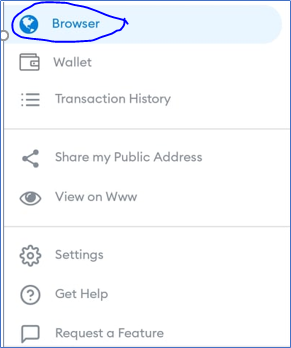
Click on Home icon if you've been redirected to the url that you have browsed previously.

You should be redirected to the below screen.
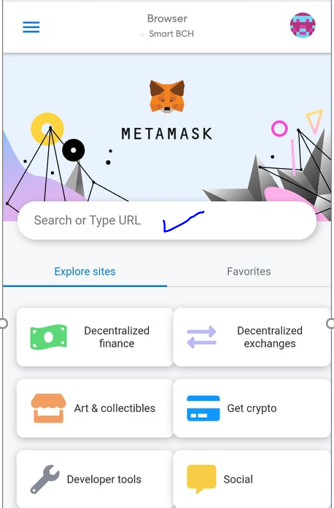
**In the search bar, type in app.checkbook.cash. Make sure not to put http:// in front. Press enter.**

You will now be redirected to the cheque page. Click on "**List check sent to me"** button.
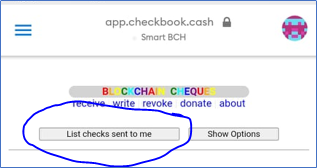
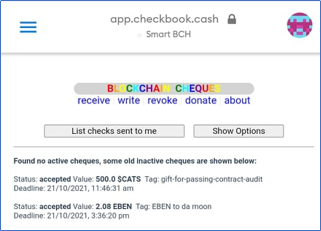
You should be able to see the list of cheques available and pending your acceptance. Click on "**Accept all active checks without passphrases**" button. And then it will prompt you to confirm the gas fee. Once done, wait for a while and check if you have received the tokens by checking your metamask wallet.
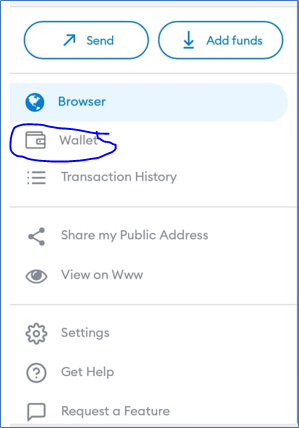
You may alsolaunch **app.checkbook.cash** from your metamask browser. When you click on "**List check sent to me"** button, you should be able to see like below.
I hope this helps for those who are struggling to claim the cheque from app.checkbook.cash. Without @Eries28 maybe I am not able to claim mine as well. Many thanks sis for your prompt help :). Eto na ginawan ko na ng "how to". *Note: The aforementioned steps are for mobile users. If you're on a desktop and above steps didn't worked for you, please try the "how to" article shared by* @k1ll1van1ll1 here. https://read.cash/@k1ll1van1ll1/howto-redeem-cheques-on-checkbookcash-b88d9e50





39 comments
Ayan sis malinaw na malinaw na hehe. Sayang din kasi makaclaim din ang iba.
yes sis. Ako nga nabobo kanina eh..ahahaha...
Paano yan gusto ko din yan matutunan pero wala aKong metamask saan paano ba gawin ,wallet ba yang metamask na yan or nasa trust wallet din siya?
May mga tutorials din sis about metamask.. Try mo magsearch.. Dito ko lang din natutunan magset up nyan
Sige sis alamin ko yan ,may time ako mamaya subukan ko mag seacrh,thanks sa advice
Ou sis.. Medyo mahaba yung procedure eh
Well done, thank you!
My pleasure.. Hope it helps
I made an FAQ for desktop users, now with your mobile guide as well everybody should be able to manage it. :) I will link it to my guide!
wow!..that's cool ...I struggled earlier hence when I figured out how to do it correctly, I made this article to help those who are struggling as well.
I am sure you have been able to help. Keep going educate others, this is the key to success!
and the one you created for desktop users should be helpful too..let me check it out and link it here as well if you don't mind :)
Sure feel free to do so. Education should always be free
Sayang naman sissy wala akong ganyan, mahina kasi aqo pagdating ng ganyan haha
sayang sis...free lang din yang mga yan
Mahina kasi ako sa mga ganyan sissy, bch lang alam ko haha
Ahaha.. Sabagay.. Ako din sis minsan hindi din masyado makasunod.. Hahaha
Hehe, can you believe this you explained each and everything like me. like, I also explained everything like this in my article even I use the screen shot same like you and is already written hehe and I was about to publish it and then I thought before publishing I should read your article hehe, now am going to edit my article.
oh!...ahahaha..good thing you checked first :)..but I'm sure our wordings are still different :).
I claimed mine when I saw miss @Jane post on noise.cash which is the second way of claiming. I just launched the app. To meta mask browser, the one that you last stated and it goes well. Anyways, thank you for sharing, others may use it for guide.
good thing it worked for you. I also tried that direct launch via metamask browser earlier but no luck. I am receiving the error that I've stated above.
Maybe because I'm just using mobile phone hehe
I already have a metamask wallet but theres no BCH in it, I guess I will have to transfer some BCH from my binance wallet. Thanks for this guideline ma'am 😊
You are welcome. I believe you need to use coinflex first.. Transfer bch to coinflex and thhen from coinflex to metamask.. There are some tutorials here in read.cash as well oublished by the other writers on how to transfer bch to your metamask wallet.
Yeah, there is a tutorial about it by Jane, I will check it out. Thanks ma'am
I find this very informative, a noise.cash member once told me how to use the wallet and I think coupled with this info, I will be able to know everything I need to know. Thank you very much.
That's cool..go and claim yours now.
Is the token still on or it has ended.
that I am not sure...
Got mine kahapon 😁
nice..ako din ate :)..
Ganyan din nung una kong click sa link sis, error sya kaya I copy the link then paste sa MetaMask browser.. Nakuha ko na din yung free.
nice..congrats sa ating mga abangers ng mga libre ahahaha
Nawala ako sa mundo kahapun sis hehe kaya nalimutan ko na lang to sayang meron sana akong wallet sa metamask.
sayang sis..nitry mo now? baka open pa? 2 $EBEN saka 500 $CATS din yun.
Wala na sis try ko ngayon we weren't able to load na ang nakalagay.
ayyy...sayang naman sis.
Ndi ko nagawa yan sis, ang hirap kapag ndi mo masyado alam:)
awwwtss..sayang naman sis.