Bch Satoshi Or Sats Conversion BASIC BCH TO SATOSHI CONVERSION 1 SATOSHI = 0.00000001 BCH 10 SATOSHI = 0.0000001 BCH 100 SATOSHI = 0.000001 BCH 1,000 SATOSHI = 0.00001 BCH 10,000 SATOSHI = 0.0001 BCH 100,000 SATOSHI = 0.001 BCH 1,000,000 SATOSHI = 0.01 BCH 10,000,000 SATOSHI = 0.1 BCH 100,000,000 SATOSHI = 1 BCH Satoshi conversion is a total of 8 decimals after bch decimal point 10,000,000 satoshi = 0.1 bch So for easier conversion when you have any amount you just add remaining zeros in your mind to complete 8 e.g. For 4 decimals add 4 zeros after decimal 3745 satoshi is 0.00003745 For 3 decimals i add 5 zeros 256 satoshi is 0.00000256 bch E.t.c
@Phace
Joined 10 June 2020 · 5 posts
120 KT
0 KT · $6.03 received · 0 KT · 51¢ given
Posts
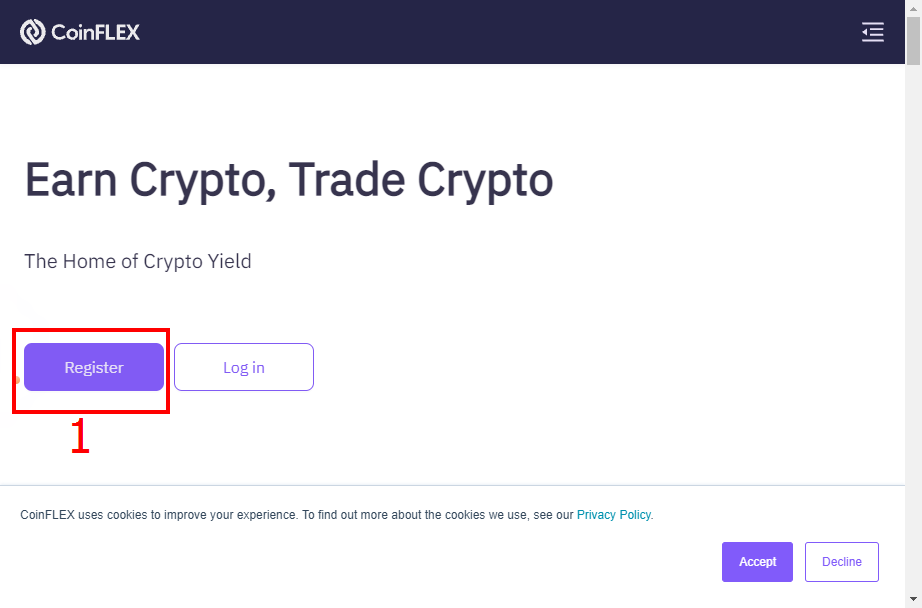
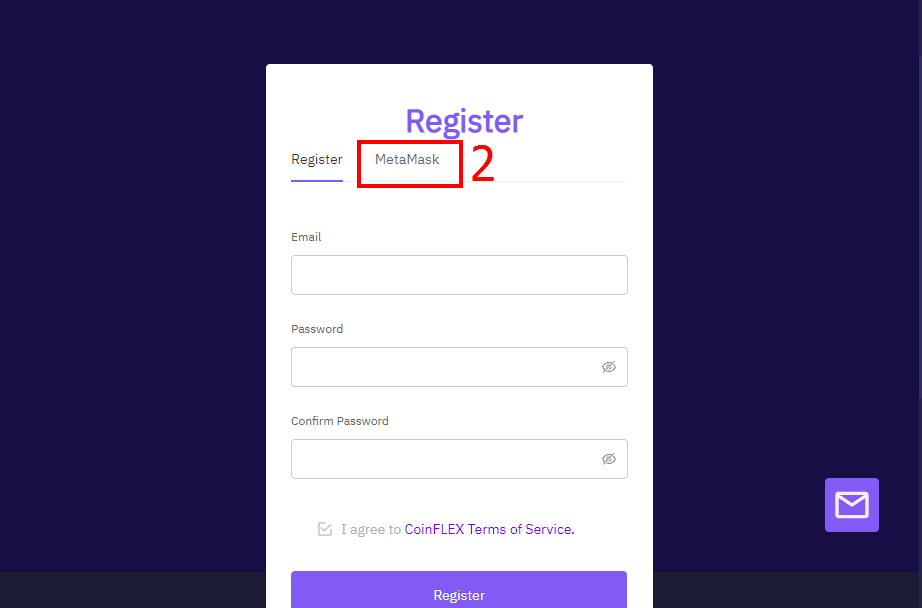
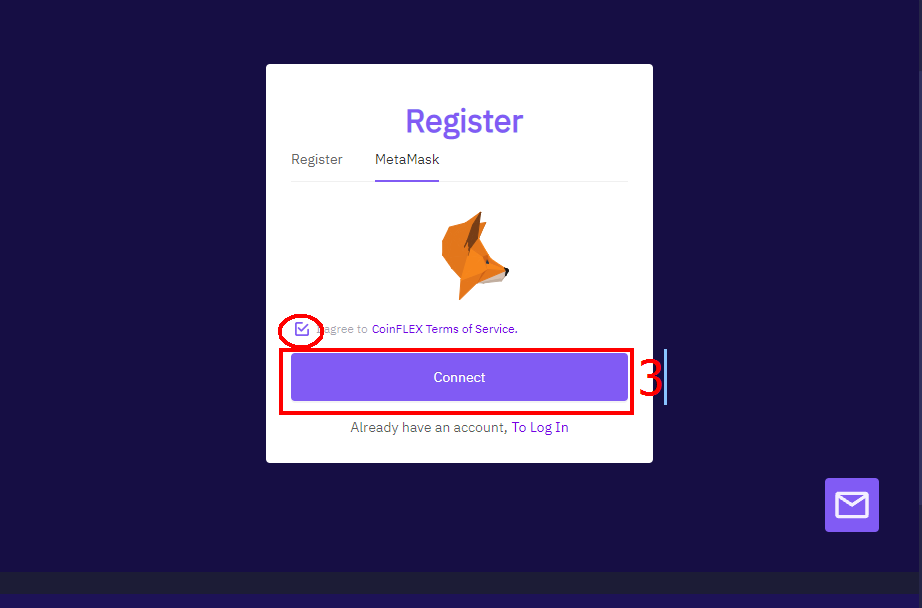
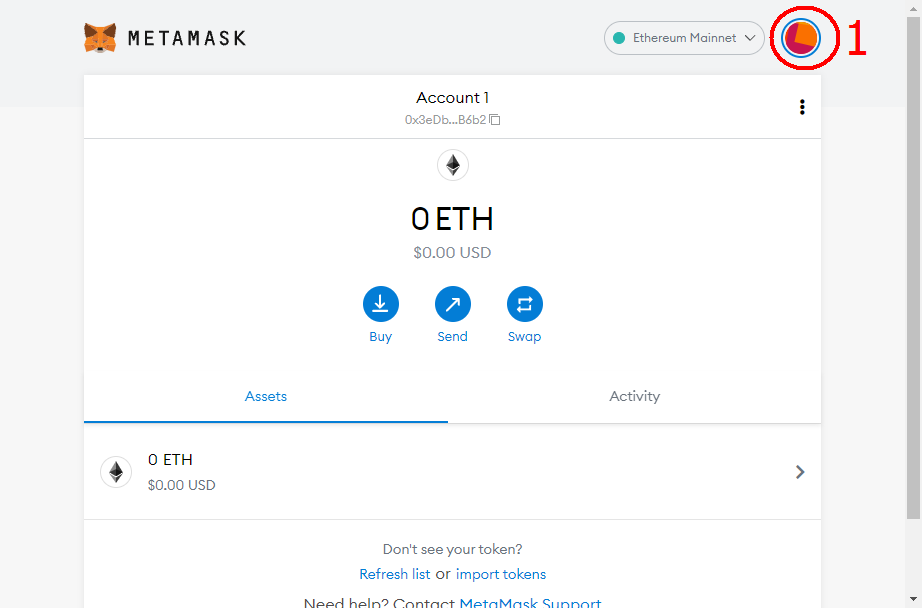
How to create a Coinflex Account using SmartBCH Account and Convert BCH to SmartBCH Hi there, actually there are two ways to create a Coinflex account, one is by the use of email which is a normal procedure, while the other one is by using Metamask on pc. You can register with link below coinflex.com/user-console/register?shareAccountId=WRRQWaZP **Firstly, click on "Register" and select "Metamask**." **Select "Connect" and click on "Next," make sure you're already logged into your Metamask on your PC.** **Then Click on "Connect" which will be prompted two different times, after click on "Sign."** **To verify, drag circular object with 3 vertical lines to move the missing piece into its space.** **Then, after a successful login, you can now fund your account with Bitcoin Cash (BCH), by clicking on "deposit" and copying your BCH address.** **Then, just send the BCH using any wallet that supports Bitcoin cash, i used bitcoin.com wallet to send 5 USD.** **The next is** ***How to convert BCH to SmartBCH*****. Which is simply by clicking on "withdraw," then changing the default currency which is USD to BCH.** **After changing currency, you then select "SEP20."** **Its preferable metamask is open in a new tab. To do so, click on the "metamask icon" at top right corner, then click on "three dotted vertical lines," then select "expand view."** **Now you can copy your SmartBCH address which is found below the account name.** **Go back to previous tab in Coinflex to paste your address, then input amount and click submit and confirm withdrawal.** **After, SmartBCH should drop in few minutes, with no withdrawal fees.** **To convert SmartBCH back to BCH, the same procedure is required but in reverse, so you deposit SEP20 BCH on coinflex which is sent from Coinflex, Then you withdraw BCH to BCH address**.
+17 more
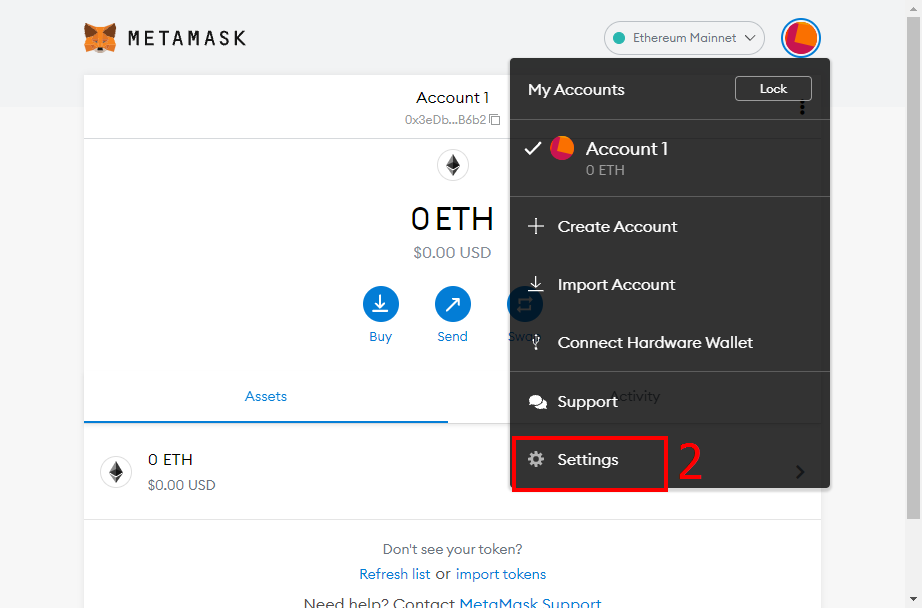
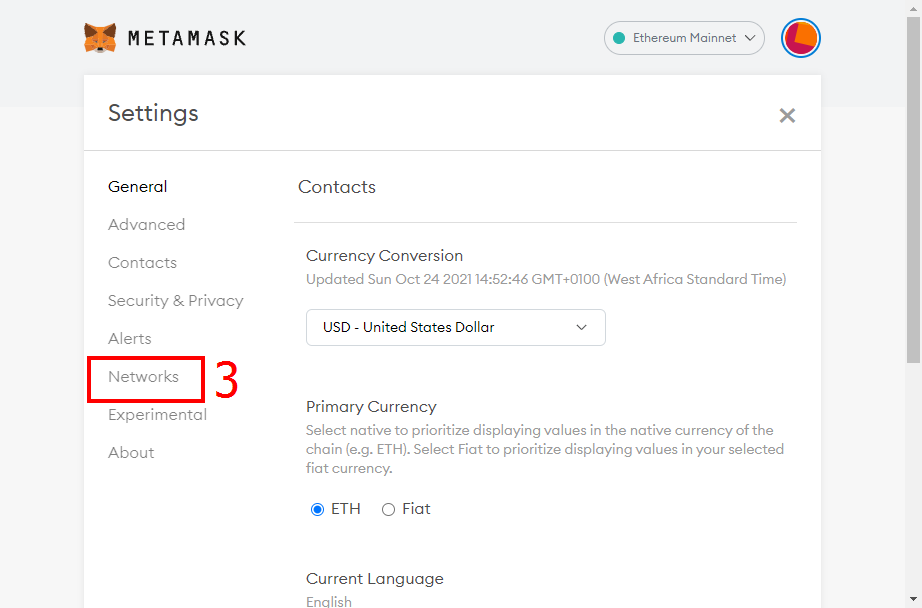
How to setup a SmartBCH account on metamask for PC HELLO, this short guide shows how a metamask account can be created on a PC using Chrome Browser. Lets get started. **Firstly, click on the highlighted icon at top right corner, then select "settings."** **Next is to select "Networks," then click on "Add Network."** **Then input the following details as seen in the picture below.** Network Name: SmartBCH RPC URL: **https://smartbch.fountainhead.cash/mainnet** Or **https://smartbch.greyh.at/** Or **https://global.uat.cash** Chain ID: 10000 Symbol: BCH Block Explorer URL: **https://smartscan.cash** Afterwards, its all setup. For more information on SmartBCH, kindly visit the site below using desktop mode for better experience on the site. **https://helpme.cash/** Also smartBCH link is **https://smartbch.org/**
+2 more
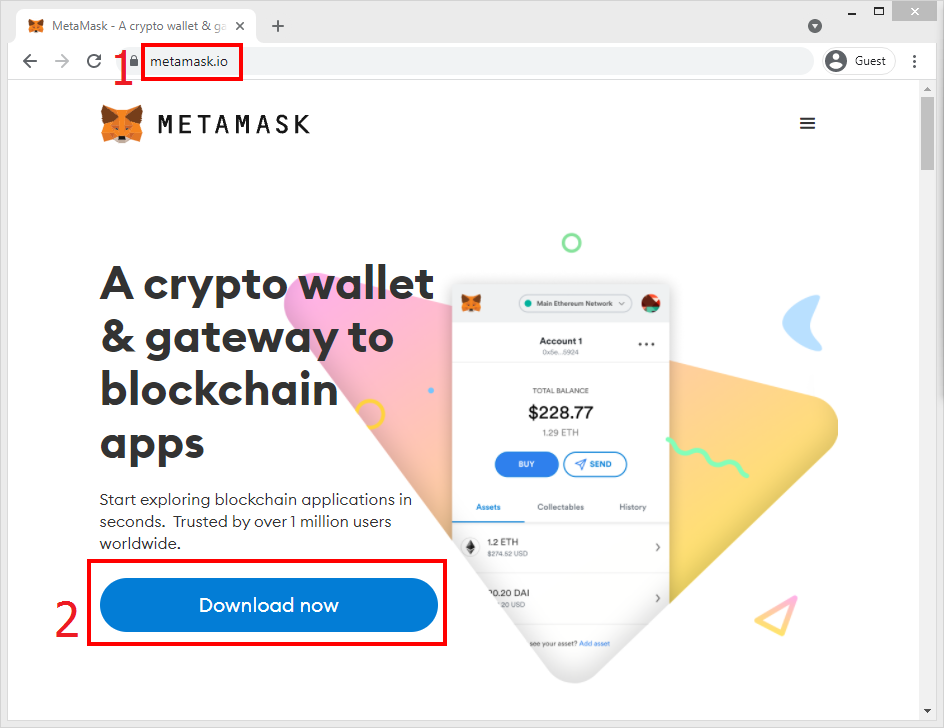
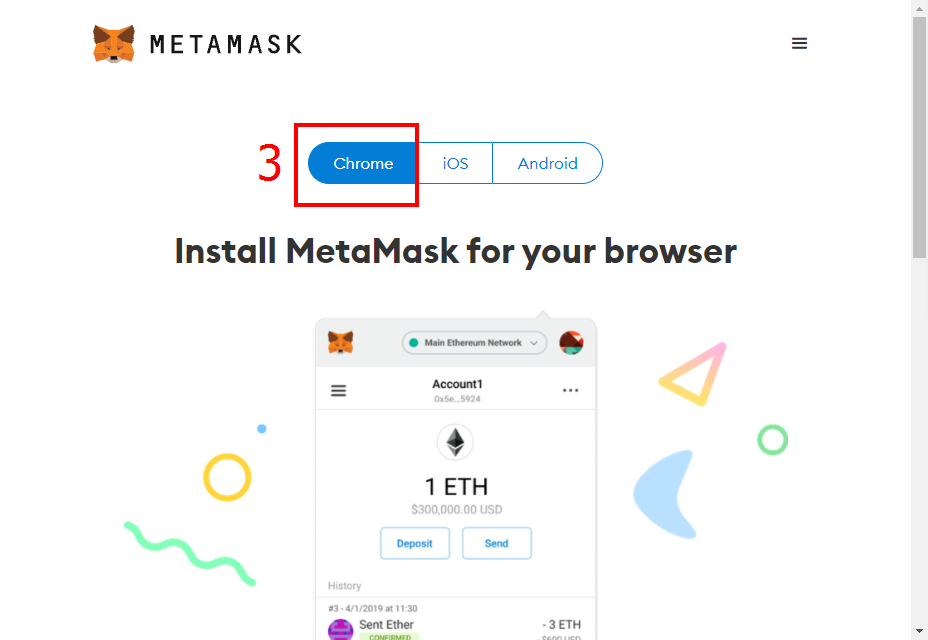
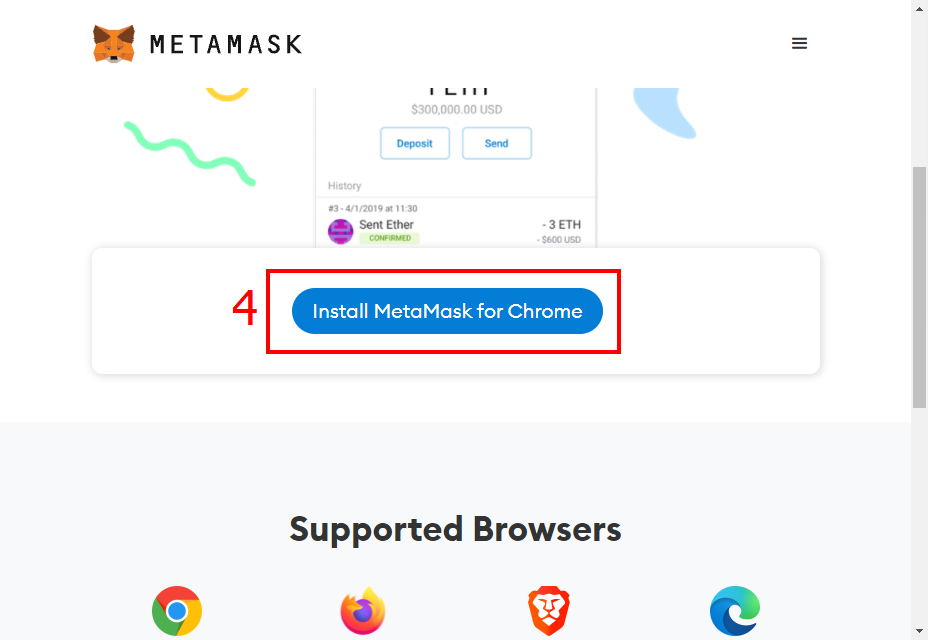
How To Setup Metamask on Desktop PC HELLO, If you're new to cryptocurrency or you've never come across metamask wallet and you're wondering how to get started on your pc, well this is the right place, i have a detailed guide, so lets get started. **First is to goto** **https://metamask.io** **on your Chrome browser and click "download now".** **Next is to choose browser which is on "chrome" by default, then click on "install metamask for chrome."** **It directs you to Chrome web store, click "Add to Chrome," then click on "Add extension," wait for extension to install.** **Select "Get Started," and choose "Create a wallet."** **Read how to Improve Metamask, Then choose "I Agree."** **Create a password you will never forget and keep safely away from others. After checking on terms, you can Agree and Click "Create."** **If this is your first wallet, you will need to watch video on what a Secret recovery phrase means,then click on "Next."** **Your secret recovery phrase will be displayed, please keep it in a secret place and never disclose to anyone, this was only shown for learning purpose. Then select "Next."** **To confirm you have truly written down the phrase in the correct order, all you have to do is click on each word in their correct order. If correct you can select "confirm."** **Then click on "All Done."** **You can click "Read more" to know more about security phrases or just close it.** **This is what a newly opened wallet looks like**
+13 more
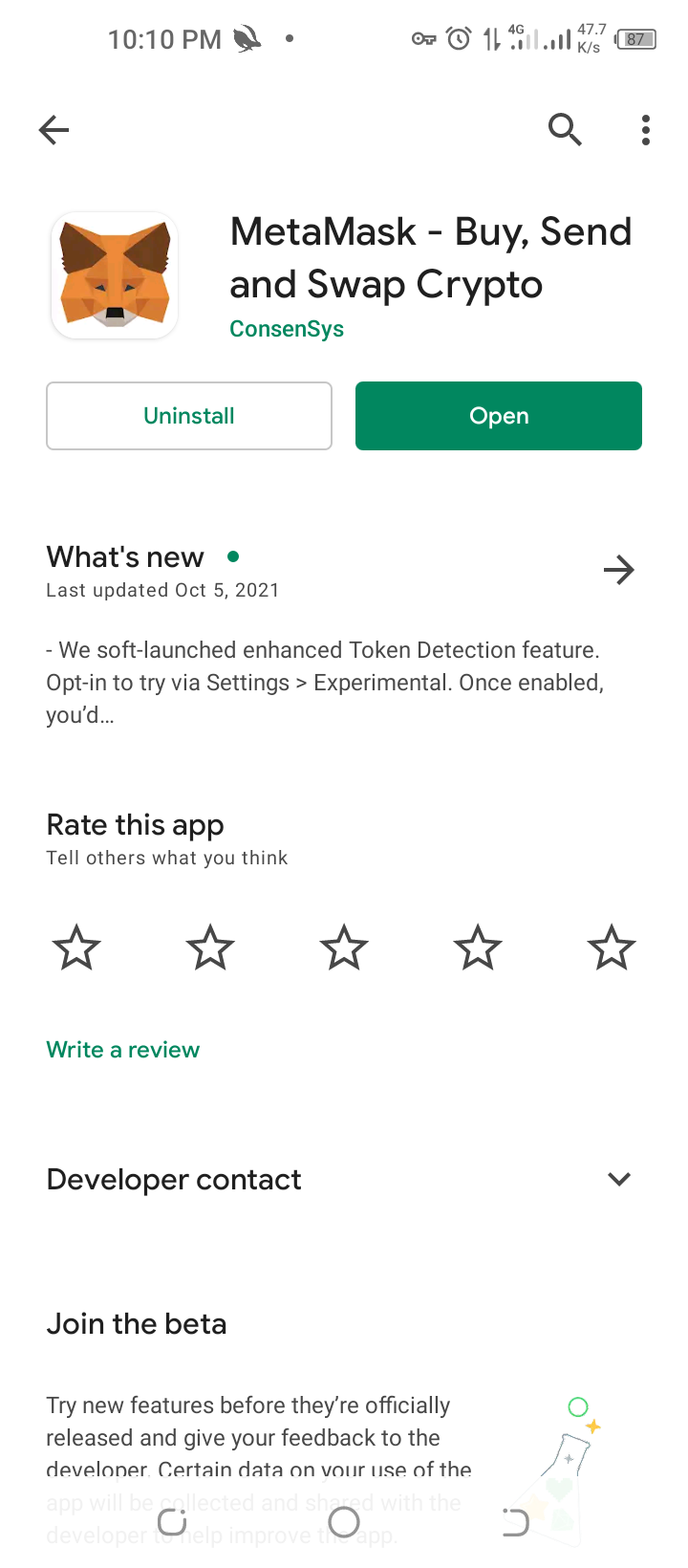
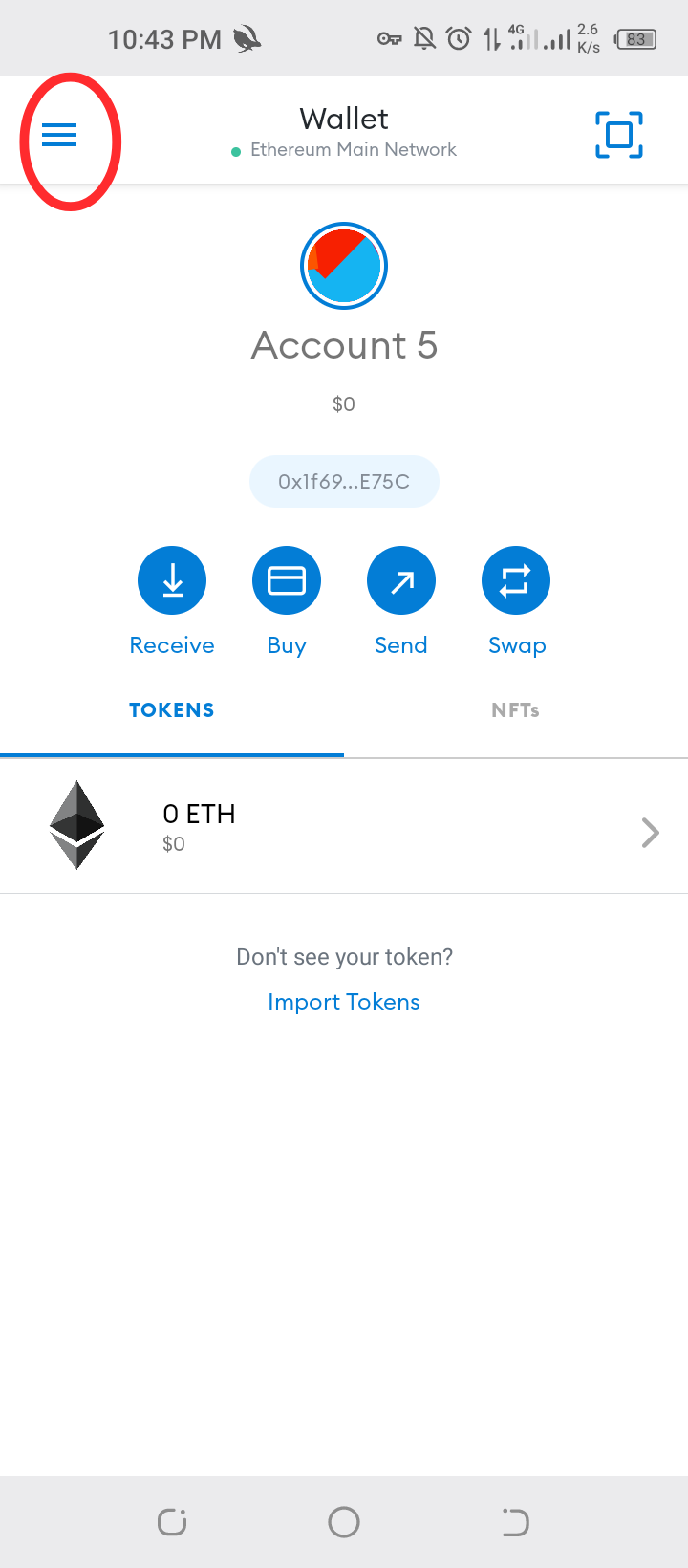
How To Setup A SmartBCH Account on Metamask For Android To begin with, you have to download Metamask from Google Play store and set it up by creating a new account or importing your secret recovery phrase, don't forget to backup your secret recovery phrase, You'll be on Ethereum network by default. Next is how to add smartbch network ****Click on 3 horizontal lines on top left corner**** ****Click on settings**** ****Click on networks**** ****Click on add network**** ****Input details as seen in picture**** Network Name: Smart Bitcoin Cash RPC URL: https://smartbch.fountainhead.cash/mainnet Or https://smartbch.greyh.at/ Or https://global.uat.cash Chain ID: 10000 Symbol: BCH Block Explorer URL: https://smartscan.cash ****If there's need to switch between networks, heres how**** For more information on SmartBCH, kindly visit https://helpme.cash/ use desktop mode for better experience on the site. Also smartBCH link is https://smartbch.org/
+6 more