 @TheCryptoGambler
Would this be a good network setup? Well I do work in the IT for whole my life, my network related knowledge is below par. The oldest son already is complaining for a long time with the lag on his PS4. This due to the fact that it is connected through wifi. I know not the best option. Probably today the Playstation 5 for the youngest will arrive, so it is time to take some action and set-up a LAN network. Lan network is a big word, because I am only planning to pull some cables to their bedrooms. So, in the past days I have been reading a lot about these things and this is probably what/how I am going to do it. Cables! Currently both have a COAX cable in their bedroom but I do assume that this wont be used a lot. Even when they are older I doubt that they will watch TV like I did when I was young(er). So my idea is to replace that cable with a network cable. Due to the fact that the cable still has to pulled to those rooms, I do have the freedom to select the cable I do want. Quickly it was obvious that if I would pull a Cat5e cable, I would start immediately with creating a technical depth! So that wouldn't be smart. Also the Cat7 cable probably is to overpowered. So I will have to choose between Cat6 and Cat6a. It is also clear that it is best to take shielded cables. Also because I probably will install it in the living room behind the TV, where it will run in a tube next to a COAX cable. So I will purchase some CAT6a SFPT cable, which should do the trick and be a little bit future proof. Of course I will go for the solid version. Patch panel vs Keystones! Another decision I had to make if I did need a patch panel. In first instance this did look obvious but all/most patch panel are build for a server rack, which of course I don't have at home. Then I did stumble on the Keystone thingies. So in stead of a patch panel I will use keystones, there are small boxes where I can combined all starting cables in one box. So from the Ethernet Switch I will use some Cat6a Patch cables and connect those via keystones to the solid Cat6a cable, which are them pulled towards the desired rooms. Also a benefit from keystones is that I can buy a wall mount where I can easily add one network cable and a coax cable connector, which is ideal for the living room. Set-up
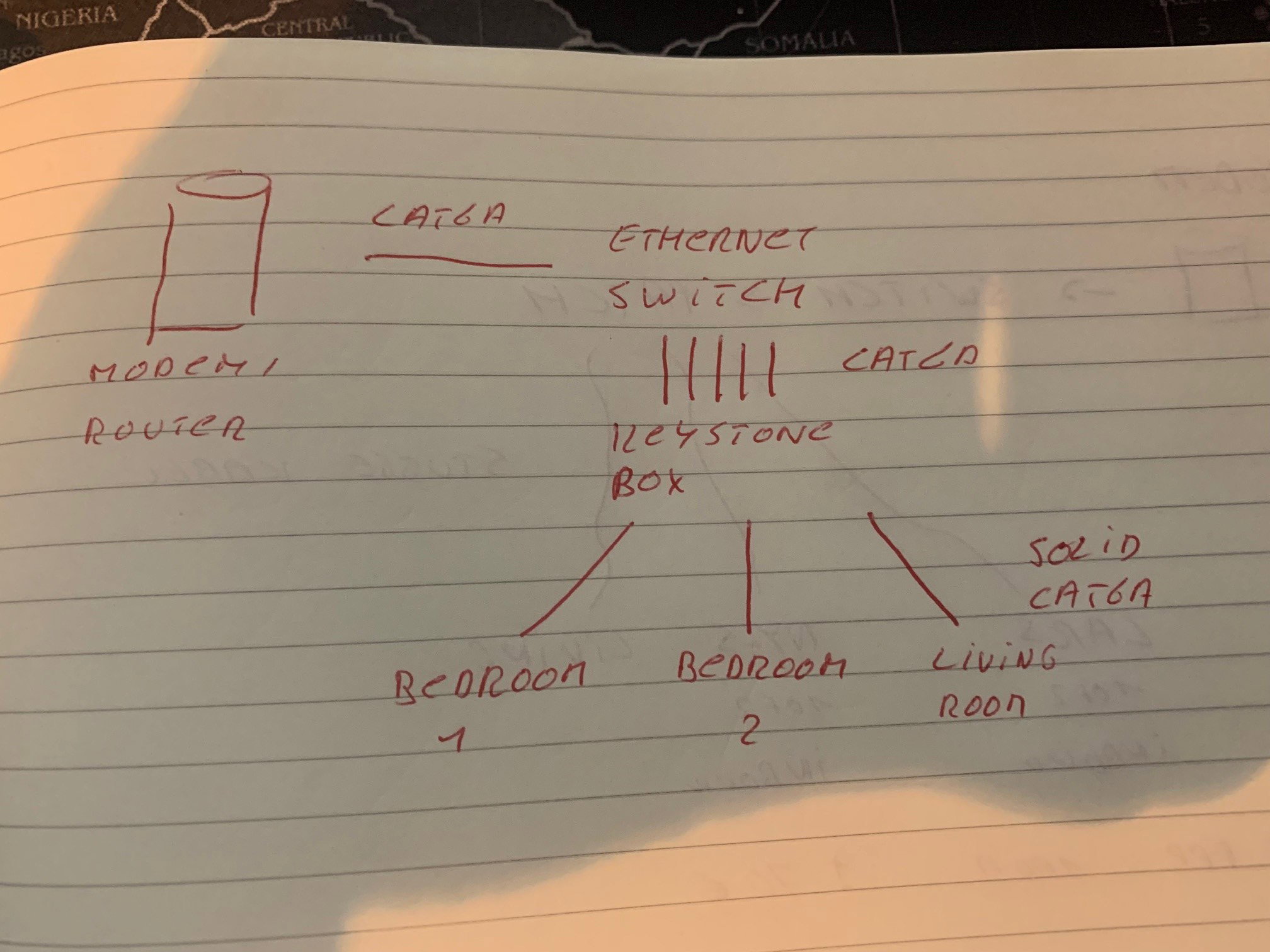
So in a nutshell this should be the result. The only thing I did need to decide is if I will pull 2 cables per bedroom or just 1 and work with a hub or other switch. So here are the questions: Will this work? Did I miss anything? Is there any other solution I will have to take in mind? Thanks, Peter


4 comments
I think the keystones are the weakest point in this plan. Those keystones (the ones i remember) do nothing except allow 2 ethernet cables to be connected to each other to form a single cable as long as the the two cables. I think you're better off going for an extra router. So you'd get: Modem -> Ethernet Router (usually those are combined into one box) -> (one cable from ethernet router to lan router) Lan router -> cables to destination. Those routers cost next to nothing these days, and give you more options and flexibility than keystones. (imho) And no, those routers aren't server rack sized (unless you want a 32 port router) https://supply-essentials.classwallet.com/187580-large_default/8-port-gigabit-vpn-router-8-lan-1-wan.jpg
Thanks for the feedback. The problem with a router like you describe is that I do want to work with a solid core. It is hard to connect those to a RJ45 connector. Keystones have evolved these days, they now also have wallmounts. So the idea was to pull the solid cable through the wall and at the end use a Keystone adapter so that a RJ45 connector can be connected to the wallmount.
I'm not a fan of solid core to be honest. At least not in a small lan environment. Sure solid core is more durable and perfect for things like backbones and the like, but in a home the benefits of using solid core are negligible. I have yet to experience building a network using solid and not having to do the terminating myself, and me and that rj45 tang don't get along! LOL! But in your own home the most important features of the network is that is is built the way you're comfortable with, and if it's worth the extra hassle to you, go for it. Like i said, in a home situation the performance difference are practically non-existent. Good luck!
Thanks, will write a post when it is finished and how big the hassle was.