 @JLoberiza
edited
more from that month
@JLoberiza
edited
more from that month
How to Make Your Articles Easy To Read How to Make Your Articles Easy To Read. Have you ever opened an article with an interesting title, but you can hardly understand the content because of the highly technical or sophisticated content? What did you do? *Hello, readers. In this post, I will share with you some tips on how to make your articles easy to read, based on what I learned from using Yoast SEO.* There are several factors involved in Search Engine Optimization. However, I will focus only on one of those factors. The readability score. **What** is a Readability Score? A high readability score means your article is easy to read. The readability analysis scans your content for several factors. Which I will discuss later.

**Why Do You Need To Make Your Articles Easy To Read?** Making your articles easy to read is important in SEO, but the more important reason is, with a higher readability score, your article is easier to understand. If your article is easy to understand, the wider your audience is. Writing for an online platform like Read-Cash one means you have readers from different parts of the globe coming from different levels of understanding of the English Language. And you want to reach out to as many readers as you could.
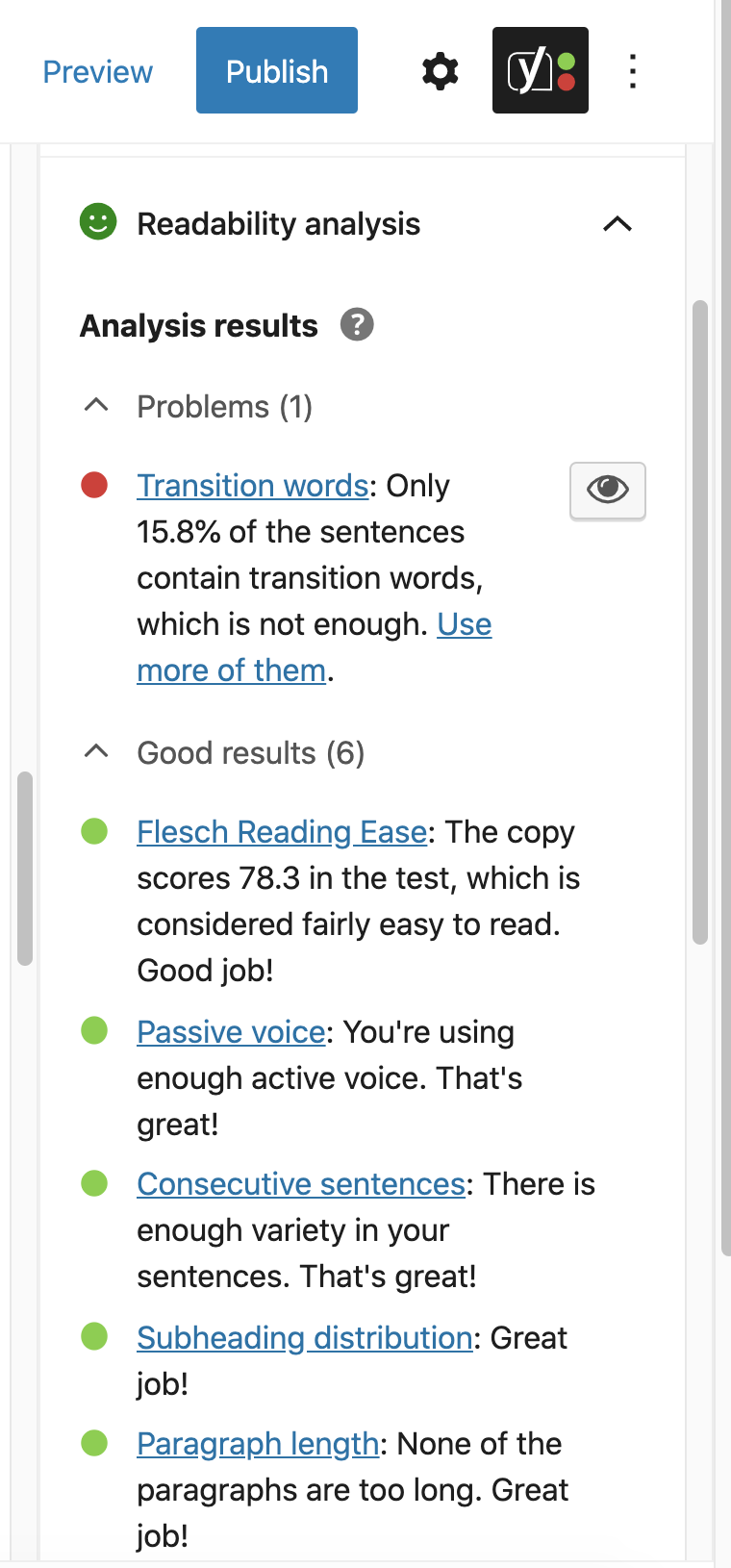
Image source: https://yoast.com/yoast-seo-readability-analysis/ These are the things that Yoast SEO checks Number of words per sentence Number of a sentence per paragraph or the paragraph length Sectioning (Subheading) and length of each section. Use of passive voice Use of transition words Sentence beginning Flesch Reading Ease Now Let Me Discuss Them One By One. Before I continue, a little disclaimer. I haven't used WordPress for a long time. But what I will share is based on what I have learned from using the Yoast SEO plugin. Sentence Length (Number of Words Per Sentence.) I used to make a lot of long sentences. Most are compounded sentences. Meaning, I write a sentence that can be divided into two. **Compounded sentences** are oftentimes hard to understand or even confusing **Shorter sentences** are direct to the point, therefore, easier to understand. So make your sentences simple and short. A sentence with about 20 words is long. **Number of sentences per paragraph or the paragraph length** Like a sentence, each paragraph should contain one common thought or a single idea. If I remember it right, three to five sentences per paragraph are just about the right length. Each paragraph will hint to your readers that you are about to start another idea. So keep your paragraph short. Sometimes you can even use one or two sentences per paragraph. Sectioning (Subheading) and length of each section. Use sectioning or sectioning '`<H2>`' often. If your article has multiple sub-topics, emphasize those sub-topics by dividing your article into several sections. Create a title for each section or sub-topic and emphasize it with an `H2` tag. And *keep each section short.* Each section should contain no more than 300 words. Take note of how I divide this article into several short sections. Use of Passive Voice Passive voice is indirect and wordy. It focuses more on the action than the doer. Using too much passive voice will make your sentences harder to understand. Use as much active voice as possible. Sometimes it can't be avoided, though. Just keep the passive voice at about 15% or less. Learn more about active voice and passive voice here. **https://www.merriam-webster.com/words-at-play/active-vs-passive-voice-difference** **Use of Transition Words** *Transition words or phrases help the reader to progress from one idea (expressed by the author) to the next idea. Thus, they help to build up coherent relationships within the text.* **Source:** **https://www.smart-words.org/linking-words/transition-words.html** Some examples of transition words and phrases are: like therefore thus but In addition of course. Learn more about transition words here; **https://www.smart-words.org/linking-words/transition-words.html** **Sentence Beginning** Be aware of how you start your successive sentences. Make sure that they don't begin with the same word to avoid redundancy. Flesch Reading Ease Let me go back to my opening question. *Have you ever opened an article with an interesting title, but you can hardly understand?* Will you continue reading or move on to the next article? Now if you are the author, do you want your readers to continue reading? Or you don't care if they leave after reading the first two or three paragraphs? The question is, how do you test if your article is easy to read or not? Fortunately, there is an online tool for that. **https://www.webfx.com/tools/read-able/check.php**. Go to '**TEST BY DIRECT INPUT'** and copy the text you want to test. Then, hit the '**CALCULATE READABILITY'**. You will see the result like this;
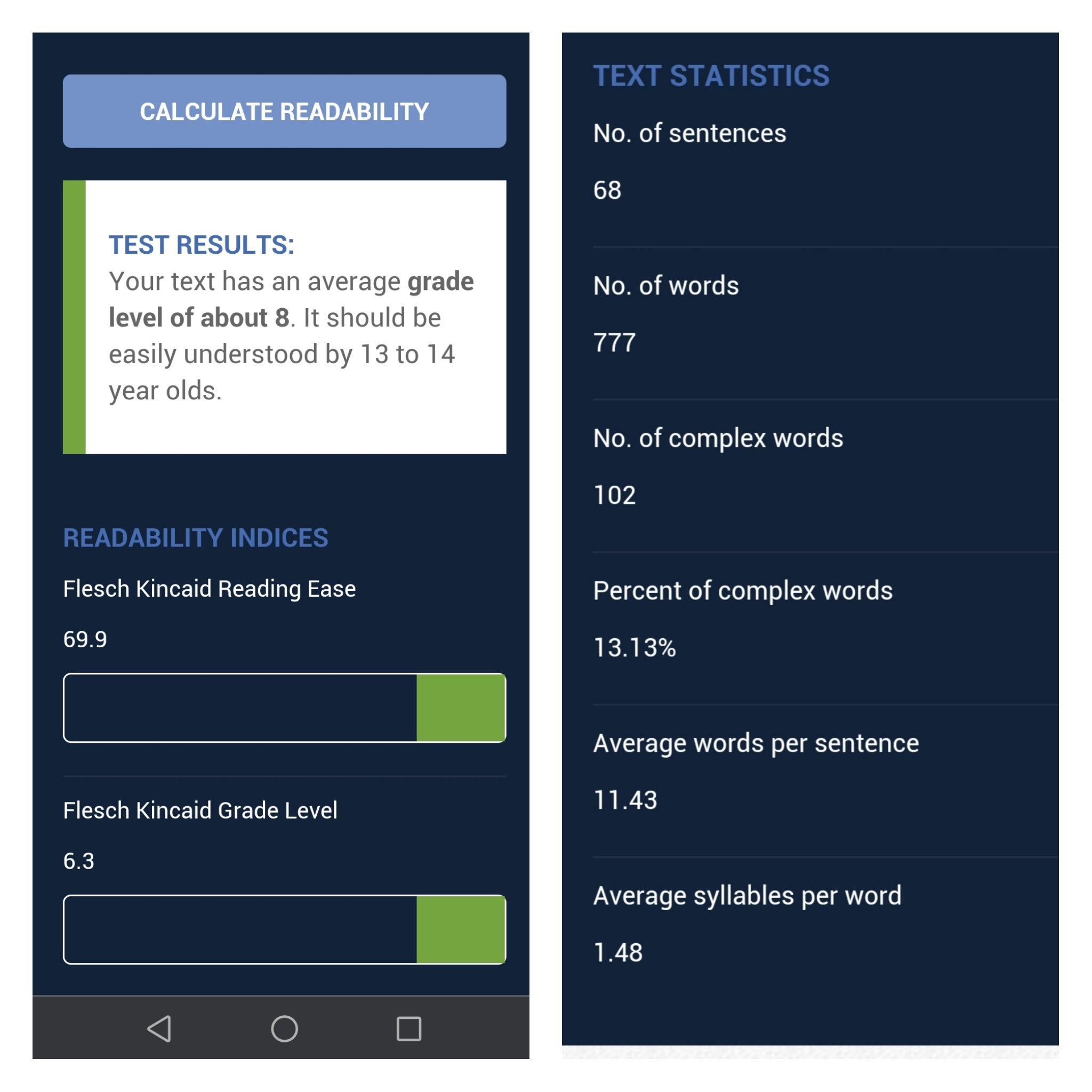
Image source: **https://www.webfx.com/tools/read-able/check.php** This means the Flesch Reading Ease score, for this article, is **69.9**. Which can be easily understood by **13-14** years old. The score is from 1 to 100. The lower the score means the harder it is to understand. **How Much Reading Ease Should We Aim For?** Our readers come from different countries with different levels of reading comprehension. Aiming for a reading ease score between 60-80 means your article is fairly easy to read. If your article is a bit technical, aim for a score above 50. If your score is lower than 30, then probably only those who already know your topic can understand your article. **How to Make Your Articles Easy To Read?** When you compose your article, always think of your readers. It's not how much information you can put in your article, it's how much you readers can understand.

Always keep in mind the key points listed above. But to sum them up, here are a few tips. Write in short sentences and paragraphs. Use simple words as much as possible. Avoid words with more than three syllables. Always use subheadings and bullets. Test your text for the Readability Ease score using this web page: **https://www.webfx.com/tools/read-able/check.php**. However, if you are a WordPress user, use the Yoast SEO plugin to guide you. If your score is less than 60, edit your article and try to improve your score. Bottom line is, always think of the KISS principle. **Keep** **It** **Simple and** **Short.** **Happy writing!** Thanks for Reading Check out my other posts in **Read.Cash** https://read.cash/r/JLoberiza Check out my other Articles in **Publish0x.com** https://www.publish0x.com/?a=YRdG5RZyaD Follow me in **Noise.cash** https://noise.cash/u/JLshub Follow me in **Twitter** https://read.cash/@JLoberiza/my-painful-ordeal-continued-5113f2db#bad-link







15 comments
Ukie, magandang simulain for me 😂. Puro non sense mga article ko. Puro kwento 😂. Kuya, akala ko Wala Ng bluefire.
You can always have a fresh start. Soon susubakan kong ginawa ng post about sa lugar namin. Yup. Wala na ang Bluefire. 😭 Waahh.. Hindi ko natangal ang link. Sa lumang post ko pala na kopya ang mga links. Salamat.
Hey, thanks for this. Very, very useful.
Yay! This will help a lot. I've been inactive here because I do not have anything to right and publish. I am afraid that my articles would not be good enough to some readers who might read it. Then this came up. I'll make sure to learn from this and make good articles soonest. ☺️
Wow this work is awesome, I should not read this one time we must review this time to time. The content makes the whole article perfect. Thank you.
I'm grateful that you find this article useful. And Thanks for the upvote.
I still misuse passive voice often. Maybe it will help reading a few books during the summer. Thanks for this very useful post. It is giving valuable information to the reader.
One thing I like reading your articles is they are fairly easy to understand even when you are discussing about cryptocurrency. Most authors would use so many technical and complicated terms that always give me a headache... And to think I'm working in the field of ICT. And I appreciate it that you find this post helpful.
You know, often those that use all the fancy words and don't explain them, they don't actually understand the subject they discuss. When I find myself half taught over a subject, I drop it and try again later when I've done enough research. Thanks for the kind words once again!
You are welcome. Yeah, I agree with you about those who use fancy words but don't explain them. I remember a group of students who took me as an adviser for their research. I told them before they faced the panel... "If you can't explain the technical term, don't use it".
I like the KISS part lol! Thanks for these! This will help a lot of writers here!
Thank you. And yes, I hope this helps. And of course, help the readers too. 😁
Hahahaha. Nacurious ako sa Flesch Reading Ease score ko. 😅
Hehe. Nung una bagsak score ko dyan mga nasa 40-50+ lang yata. Hehe
Umm gonna works hard more consequential stuffs. It's all about habitats, gonna try next time for sure