 @BCHPleaseOrg
How-to use CashFusion with the Bitcoin.com wallet
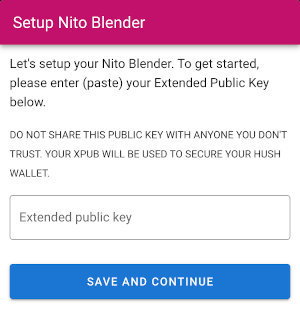
After a year of research and development, our team is proud to present a first-look at how **CashFusion** will work using the **Bitcoin.com mobile wallet**. https://cashfusion.org https://wallet.bitcoin.com/ Introducing Nito Blender (formerly **HushYourMoney**) https://github.com/BCHDEVCON3/hush-your-money **"Not Your Keys. Not Your Coins." —** Nito Blender is 100% non-custodial. You ALWAYS maintain 100% control of your private keys and the Bitcoin Cash associated to them. https://open.lbry.com/@APECS:3/CashFusion-First-Look_1080p_2:8 **Coming to your phone or tablet in Q1 2021 🥳** Nito Blender is still in its early stages of development. Today, access is ONLY available using the Bitcoin.com "development" wallet *(a special wallet that allows you to manually enter webapp URLs)*. **NOTE:** Blender works with ALL Badger plugins too. However, the private "seed phrase" will be required at the time of setup, as there is no easy way to access the wallet's xPub. Step-by-step guide with pictures Step #1 — Initialization / setup Begin by connecting Nito Blender to your Bitcoin.com wallet. Today, that is done by entering your Extended Public Key (xPub) on the first screen. **NOTE:** This tedious step will be removed after updates *(a few new methods)* are added to the **Bitcoin.com Link API**. https://developer.bitcoin.com/bitcoincom-link/docs/getting-started/
Once connected, Nito Blender will automatically scan each of the "active" addresses in your Bitcoin.com wallet, performing a thorough privacy & anonymity analysis. **Next on the Roadmap** Develop the ability to review the full privacy history of your wallet from creation to present; and generate pretty PDFs for your convenience. Step #2 — Transfer coins into Blender Nito Blender will start by presenting you with a **Wallet Summary** and your overall privacy score A (best) thru F (worst).
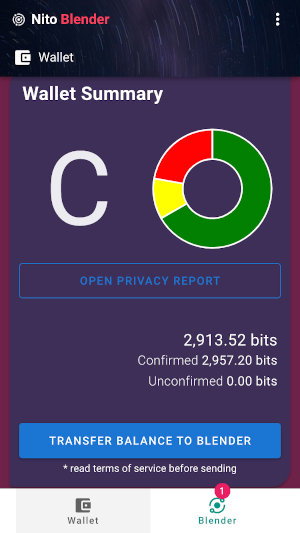
Each of your wallet's coins *(aka UTXOs)* are scored individually using an advanced heuristics process similar to **Blockchair's Privacy-o-meter**. https://blockchair.com/api/docs#link_M6 Any coin that doesn't score an **"A"** is automatically flagged for transfer to the Blender. **Next on the Roadmap** Users are currently required to transfer their entire balance into the Blender. We're working closely with the Bitcoin.com wallet team to soon allow users to select individual coins for transfer into the Blender. Step #3 — CashFusion processing A new Blender session is automatically created when you first initialize the application.
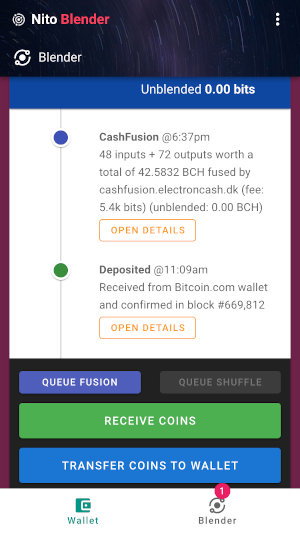
Users can create unlimited sessions, allowing them to customize a privacy solution that best suits their individual needs. Each Blender session is also segregated, using a unique derivation path; this insures that the privacy of your wallet is NEVER compromised. Any coin(s) that fail the blending process are automatically sent to a special "**Housekeeper"** session for further processing. **Next on the Roadmap** Allow your coins to provide liquidity to the entire community by automatically recycling your blended coins on a preset schedule. **NOTE:** Nito Blender also supports the older **CashShuffle** privacy protocol. To understand why, please read: **To Shuffle or Fuse, Why Not Both?** https://cashshuffle.com/ https://read.cash/@nyusternie/to-shuffle-or-fuse-why-not-both-156ad9ac **Step #4 — Send your coins ANYWHERE, FEARLESSLY!** At the click of a button, your newly blended coin can be sent to an "unused" address in your Bitcoin.com wallet or ANY Bitcoin Cash wallet.
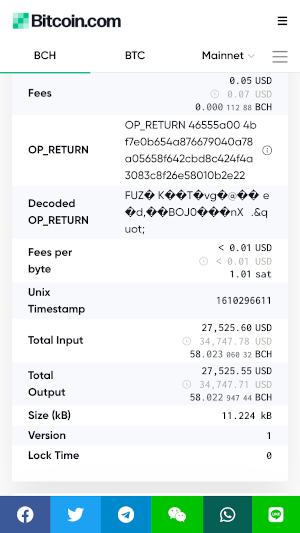
From this point, it's now safe to spend your freshly blended coins. There is virtually NO possibility for anyone *(incl. on-chain analysis companies)* to associate your next transaction to any of your past transactions. **FUN FACT:** CashFusions cost each participant just a fraction of a penny, but offer "priceless" anonymity for each of its holders. **Next on the Roadmap** Fine control of the outputs generated, allowing users to set the value of each individual coin produced by the CashFusion process. Use cases *"Technology is ONLY as valuable as its most popular application."* *- Anonymous* During the **CoinParty hackathon**, our team (@georgedonnelly and @nyusternie) will be showcasing the **Bitcoin Apps** project by developing several specific use-cases meant to demonstrate the power of the CashFusion protocol: https://devpost.com/software/bitcoin-apps **Trading Post (demo only) —** Trade anything for anything **Nightlies —** Explore tonight's live entertainment If you'd like to support the team at **Bitcoin Please** and our continued work improving Bitcoin's privacy, we warmly welcome contributions to our "official" **donation address**. https://bchplease.org https://explorer.bitcoin.com/bch/address/bitcoincash:qqvl7fwcthhhntsew056t8007pw55k258vmlm053fy **bitcoincash:qqvl7fwcthhhntsew056t8007pw55k258vmlm053fy** https://explorer.bitcoin.com/bch/address/bitcoincash:qqvl7fwcthhhntsew056t8007pw55k258vmlm053fy And.. don't forget to check out **MyCoinParty** to pickup some **MCP tokens****.** Earn your 2x rewards before it's too late! https://mycoinparty.org https://explorer.bitcoin.com/bch/token/fcc68073e8c70c70386fd41c51b61a74897e953d1c774d281dcc9127dc97221c








9 comments
This looks awesome! Thanks for your hard work.
thanks for checking this out!
Hi Shomari.. Nice article! I tried purchasing MCP tokens but the button "make payment request" does not seem to do anything. I then sent 1$ to the address in the QR code. :)
thanks man! > the button "make payment request" does not seem to do anything it only works if you're using one of the __[Badger browser plugins](https://badger.bitcoin.com/)__ (Chrome or Firefox). it's also possible that the page failed to initialize, which is what enables that button. > I then sent 1$ to the address in the QR code this should have worked, but the server was disconnected. rebooted and you should now receive your MCP tokens. (sent you $1.00 if you wanna give it another go) thanks sooo much for bringing this to my attention! 🙏 really appreciate you! 😉
received both, thank you. also, bought a bunch more. I am an MCP whale now!
> I am an MCP whale now! sweet! lol 😁 thanks for the support! 🙏
Hello Shomari, I sent my MCP tokens for voting but never received them back. They were sent to the MUL8 SLP address as per the website. Please help.
hi @Omar. thanks for the feedback and your support is very much appreciated. still processing tickets manually, about every 24hrs. you will see tickets back in your wallet by end-of-day. fyi, new marketplace demos are coming soon...
OK! thank you.. and great news about the demos!!