Levi Ackerman Glow Art
Hello guys😃
It's my first art post here after months of inactivity. I decided to post one of my glow artwork processes here as a new start. So let's not waste any time and start making our boy Levi glow.
First of all, we need a line art of Levi Ackerman. I did this months ago but it was kinda lost for some time when I cleaned my room. I found it last week luckily and drew the lineart with a gel pen to make it more visible.
The condition of the paper is bad because of the folds. However, I fixed it after importing it to Ibis paint x app. By increasing the brightness and contrast of the picture I got a pure white background for editing. I used dip pen hard with white paint to draw over the folds to mask it. I also cleared some unwanted marks on it too.
It looks better now and is ready for the glow art technique. For a person to see the glow the background or the area surrounding the character must be dark.
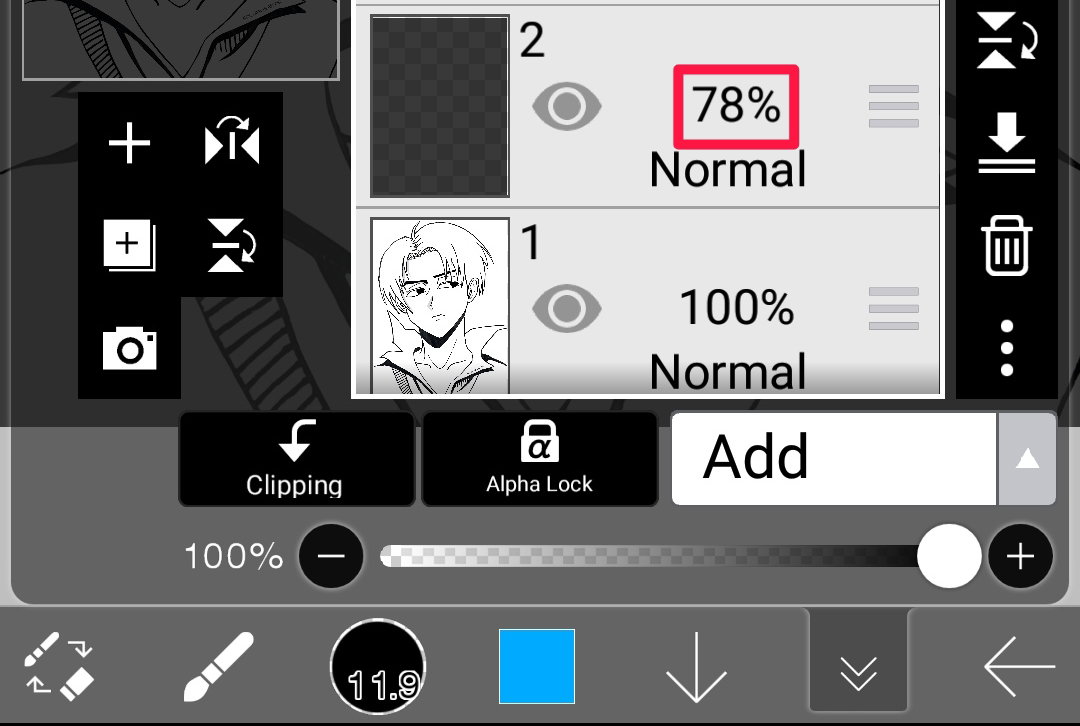
I'm making another layer on top of the picture and filling it with black paint with opacity kept at 45%. Don't reduce opacity below 40% as it will be hard to notice the glow. The ideal range is to keep the opacity between 45-70%. The range varies between these values based on the artist.
After creating the said layer the outcome will look like this.
The next thing is to choose the source of light. I chose to do an eye glow with Levi here but you can choose to do the source of light from any part of the body.
The next step is to create an ADD layer on top of this and draw the light source. Always make sure that the colours you select are bright. I'm going for a blue coloured eyes here so I'm starting to fill the eyes with dip pen with blue paint.
Once that's done create a normal layer on top of this and clip it. I'm gonna use Air brush with dark blue colour to create a gradient effect on top of his eyes. Clipping will help to control the spill.
Now I'm gonna make some patterns on the pupils with fade pen to make it look more interesting. You can add different patterns on the eyes based on your liking. As long as you follow the same on other eye you are golden.
It's important to clip each layer used for eye patterns to the first eye layer. To avoid mistakes i used 4 layers for each eye patterns.
The following with be the result.
The eyes looks like marbles now haha. Next comes the best part of the painting.
Now select Airbrush and increase the size to 50 per cent. Create another ADD layer on top and just tap on the eye area twice for both eyes. It will create the illusion that light is coming out from the eyes.
This light is gonna fall on the front side of his hair so I'm gonna draw some blue lines on the edges of his hair, under the eye brows and on top of his nose using pen fade brush.
I also added a much more thicker airbrush light fall under the pupils. We are almost done here guys. Now I'm just going to add a simple whitish highlight on his hair with pen fade brush. Once that's done the next step is to paint the hair edges with a very light airbrush stroke to make it look more realistic.
I want to increase the darkness of the artwork here just to make the glow look more obvious. You can use blur to direct a person's attention to the glow area so I'm combining both to create the final output.
Well, what do you think guys? I think Mikasa is gonna leave Eren when she see Levi with these angelic eyes xD. I had fun making these so I'm looking forward to see your reaction in the comments section.
Thanks for reading guys and I will see you soon with my next post 😇.
How I found light in the darkness.
Darkness, one of the things that people hate in the world. It means mystery, uncertainty and fear for some and for others it's a place where they find peace and answers.
Is it true that people are afraid of the darkness or are they afraid of the possibility that they may never see light again?
Well, my story of darkness is a bit different. How it enabled my family to connect as human beings again even for a short time as we will cherish this moment and in a way it has changed our perception of life.
Since last week, there has been heavy rainfall in my state. I was never a person who liked cold weather, not because of the weather but what follows when it happens.
I always expect something whenever there is a downpour. That is the dreaded powercut, How much I hated it before.
I remember calling the authorities multiple time, frustrated to know when they are turning the power back on.
How it disrupted my daily TV shows that i loved to watch every day.
Since last week I ended up in a realisation that maybe this temporary darkness was not a curse after all. It completely woke me up from the life I was living until now.
It's 2021 May 17 today
It is a time where our species are at the top of technological development. Whether we liked it or not the world was changing and we were merely adapting to it without knowing what we're losing in the process.
Everywhere you go, you see people busy scrolling through their phones for hours without blinking, talking, not even sharing a gaze with people near them, ignoring their loved ones.
It started to feel like we have turned into emotionless machines. We became colder over the years busy with our daily life surrounded by technology.
We make time for people online rather than with the people who are sitting near us, breathing waiting for you to notice, to simply exchange a few words but we are blind even with the light.
The digital age has become a blessing as well as a curse to us. But us humans, we only find the truth at the brink of destruction. We always find the truth too late.
I remember the time when my family was making conversations during dinner time, checking about our well-being. we shared our experiences, emotions and memories at that table.
Now everyone is busy living in their virtual world, surfing the web even at the dinner table disrespecting the food we eat.
Social media was invented to connect people across the world and now it's a tool to boost one's ego by measuring the number of likes and followers they get and as a weapon to spread hate among people.
Today a person's worth is measured by his popularity. Technology was supposed to make our life better but instead, it made people more distant than ever before. I can't remember the last time we visited our relatives in person.
Since last week our area has regular power cuts in the evening because of rainfall. Once the power was gone my mother found an old candle and lit it.
By that time our phones were dead. So we gathered around the candle like we used to gather around at the dinner table.
There, I heard it again.
My father asked, "How was your day son?"
I thought I was dreaming. His call brought back my childhood memories. We gradually started sharing everything that's been happening in our life for a while.
I saw my family laugh after a long time. It was a genuine smile I saw on their faces. Then I realised that this temporary darkness has brought my family closer than ever.
I had mixed feelings. I never thought I'll be able to get this feeling again in my life and it happened and it happened right in front of me.
I thought to myself, is this a dream?
Is my mind trying to deceive me?
No, this was real. The feeling of warmth that was long lost, I was able to find it again.
The joy of sharing your feelings and emotions with someone you love gives you true happiness. This is what connects us as human beings.
It felt like once I started sharing my problems with them, I felt a relief that my issues no longer weigh me down.
I felt like I could finally escape the prison that I created in the mind with their support. I was finally free, free from the worries that once shackled my mind.
I asked myself "Did this darkness once again reminded us of what it was meant to be a family?".
What it meant to share your pain, sorrow, joy and fear with your family so that they could hold you tight in their arms and whisper in your ears that everything is going to be okay.
At that moment, we feel protected, safe in their arms. In that moment I found peace.
I'm thankful that I got a loving family who accepted who am I, with all my flaws. After all, it only makes us human right?
The inevitable happened soon, the power was back and I saw their faces. **They were sad**. This means that they were feeling the same thing as did. We didn't want it to end. I will never forget this.
I always thought that light was the bringer of happiness but this time I am questioning myself. Did I find happiness in the light?
People say light shows us the way but I say darkness helped me to gain more clarity to the life I was living until now.
It helped me to obtain a new perspective of life in the most unexpected way, which reminds me of this famous quote.
"You only live once, but if you do it right, once is enough.” — Mae West.
This article is important to me. it's personal and I hope you guys understand the message I was trying to convey. I thought I should share it so that people who are lost can find the strength to share a message to their family so that it reminds them what they are now and to understand the potential of what they can be.
FIN
I would love to see your thoughts and opinions about this story in the comment section😋.
Image credit: unsplash.com
6 Methods to cool down an overheating laptop
Is Your laptop overheating?🔥 Then this guide is for you.
Hello there, I'm going to tell you about some methods or tweaks that you can use to cool down an overheating laptop. (you can do these on a desktop PC too)😇.
Before that, we need to know something.
What causes a laptop to overheat?
1:Buildup of dust over time. (smokers and pet owners are more affected)
2:Dried up thermal paste over time. (explanation ahead)
3:Blocking laptop ventilation
4:Virus
5:Overclocking without proper cooling.
6:Heatsink fail or Damaged CPU or GPU.
7:Unwanted addons on browsers, random software that get installed with other software.
How does the laptop cooling system work?
There are three things inside the laptop that we can call as the cooling system collectively. They are as follows.
a: Cooling fan
b: Heatsink
c: Thermal Paste
Ventilation also helps but these are the three important things.
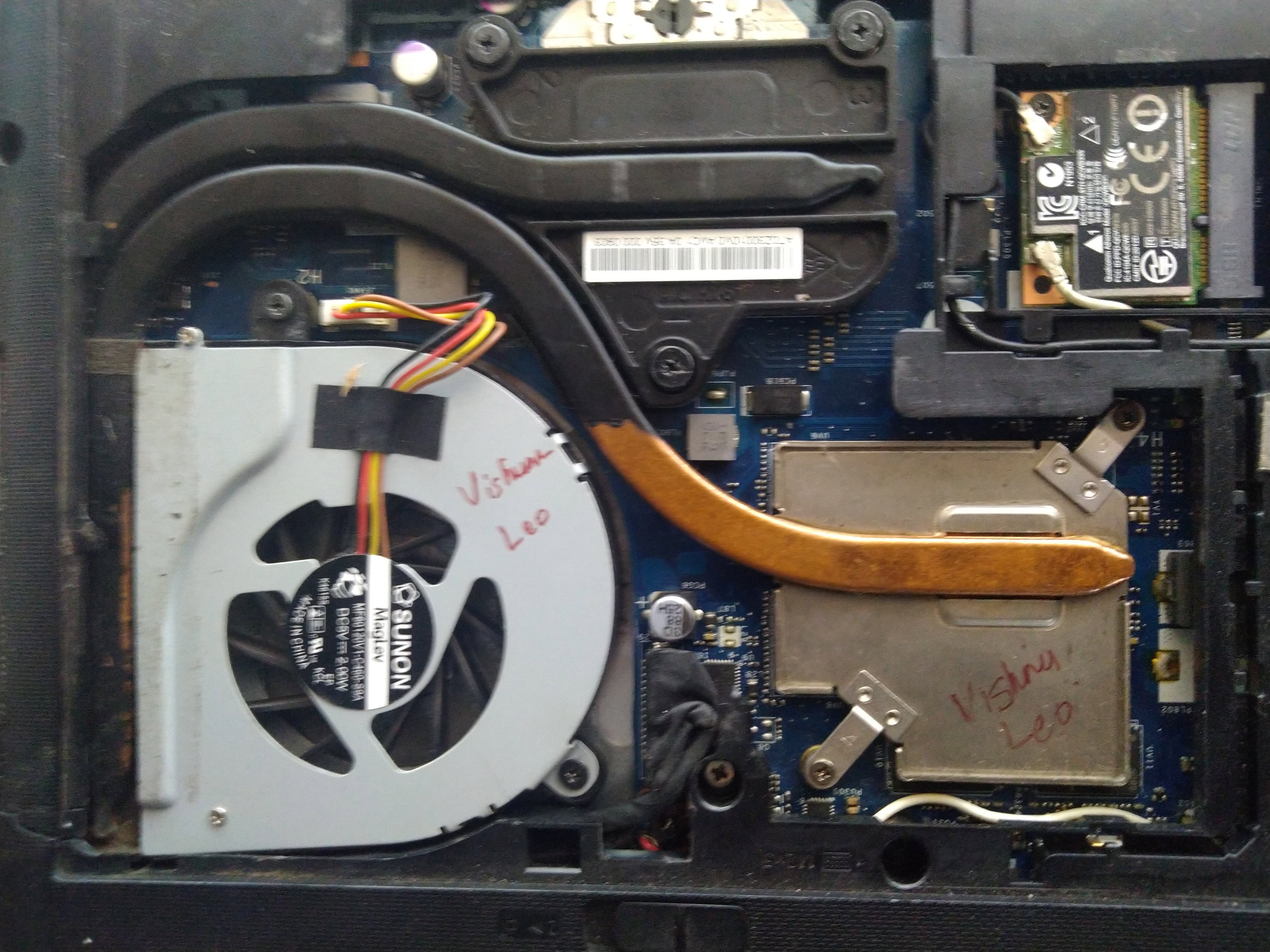
As you can see it's a picture of my laptop cooling system which comprises of a cooling fan, heatsink(That curved metal with black and brown colour). You can't see the thermal paste because it is sandwiched between the CPU die and heatsink.
Why does a laptop need a proper cooling system?
The CPU and GPU inside a laptop produce heat while they run tasks. **If a proper cooling system is not provided by laptop manufacturers, the CPU and GPU will melt because of the heat** and can cause permanent damage to the motherboard.
**Replacement of a motherboard is a very costly process**. so it's better to understand why they need a proper cooling system.
One of the worst symptoms of an overheating laptop is thermal throttling
**Thermal throttling** is a phenomenon that occurs when the temperature rises, the CPU or GPU underclocks itself to a lower speed to save the CPU or GPU from melting.
This will save the CPU or GPU at the cost of performance. You will notice lags after heating because of long time use.
**An overheating laptop reduces the longevity of the laptop**. They are very costly so it's better to take proper care so that it may last longer.
I just explained the basic stuff to get a rough idea about the cooling system of a laptop. Hope you understood something 😁.
SOLUTIONS
Method 1 : "Vents"
Difficulty: Very easy
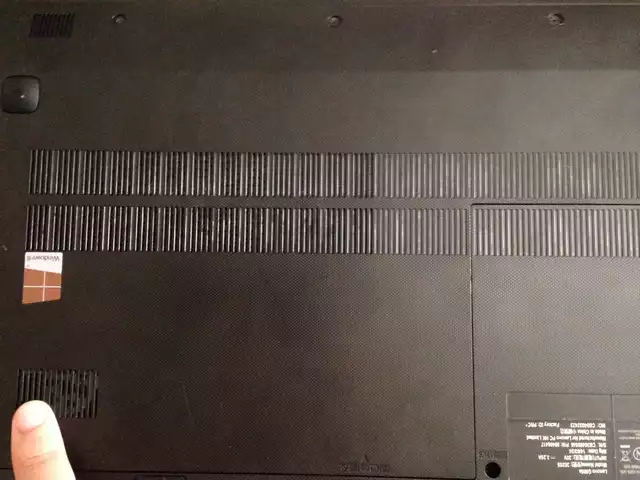
See those small parallel vertical holes, they are the vents. Almost every laptop have these at the bottom or on the sides.
They help to maintain proper temperature inside the laptop by sucking in cool air from the outside and transfer it to all the components inside with the help of a heatsink and cooling fan and blow out hot air through the sides.
**So make sure you are not blocking these vents by putting them on the bed, blocking those vents with your legs or clothing.**
Continuous usage by blocking the vents leads to overheating and sometimes leads to emergency shutdowns.
Method 2 : "Power management tweak"
Difficulty: Easy
No need to install additional software. All the things you need is in windows OS.
Right click on the battery icon and click on power options. There you can see 3 power modes such as power saver, balanced and high performance.
I'm using balanced mode(You can use this tweak in other modes too).
See that "**change plan settings**" next to balanced mode, click on that a window will open like below.
Now, see that advanced power settings option highlighted in the red rectangle. Click on that and you will get a window like this below.
Tap on the **+** icon next to "processor power management" to open up that option. Now you can see "**maximum processor state**".
Again tap on **+** sign to open it up and it will show 2 modes. one is" **on battery**" and the other is"**plugged in**".
Now click on the blue value next to it to edit it and set it to 60% on both modes. Hit apply and ok. You will notice that the laptop starts to cooling down after a while.
**So will it decrease performance?**
A little bit
**Is it noticeable?**
For hardcore gamers-Noticeable
For normal users-Not so much
I recommend trying this method. If u don't like it you can always restore it to the "**default setting"** option which is available in the power section.
Method 3 : "Cleaning"
Difficulty: Medium
It's better to clean your laptop once a year so that it won't cause problems in the future.
Once you removed the screws of the back panel of the laptop, try to remove dust using compressed air can which is easily available online.
**I don't recommend you using brushes with plastic bristles as it may cause static electricity to build up while cleaning and may short circuit the components inside.**
When you use compressed air, blow the air in such a way that the dust goes outside of the laptop through the vents.
Dust buildup is mostly seen in fan leaf and heatsink. so clean them properly. This will reduce heating and improve the laptop's overall performance.
**Caution❗: If you never opened a laptop in your life and not comfortable to do on your own it's better to seek the help of a professional. They won't charge you much(it also depends upon the region and the professional)**
Method 4 : "Thermal paste"
Difficulty:Medium-hard
**So what is a thermal paste?**
Thermal paste is a paste-like substance that is used between a heatsink and CPU and GPU die for better heat conductivity.
Different types of thermal pastes are available for use. **Good quality pastes provide better heat conductivity but are rather costly**.
Laptop manufacturers usually use standard paste which is not that great in conductivity. So buyers have an option to re-paste it with high quality thermal thermal pastes available online.
But in all laptops, these thermal pastes gradually get dried up after years of use so it will reduce conductivity and cause overheating.
So it's better to re-paste it every two years so that the performance won't degrade and increase laptop longevity. It's better to seek the help of a professional to do this since it's a little advanced for some users. Don't worry it's cheap (1$)and some will clean your laptop too while they re-paste it.
**Tip: Don't use liquid metal thermal paste on aluminium heatsinks as it will damage the heatsink.**
My laptop heatsink CPU masking area is made of copper and the other area is made of aluminium. So I can use the liquid metal paste on mine. Better check with the laptop technician to find out what yours are made of.
I can assure you, repasting or repasting with high-quality thermal paste will definitely reduce temperature. **Expect a 10°c-15°c reduction in temperature** 😎.
There is also another alternative to thermal pastes since they are a bit messy to use. They are called "**graphite thermal pads**".
**Pros of using thermal pads:** You will never need another repasting as this one will last very very long and is very easy to use.
**Cons**: costly.
Method 5 : " Undervolting"
Difficulty: Hard
**Undervolting** is the process of reducing the voltage of CPU or GPU and other related things using manufacturer's software or 3rd part software to reduce heating by reducing voltage used.
Softwares that are used for undervolting intel CPU's are "**Intel extreme tuning utility"** and "**Throttlestop"** by Techpowerup. These software only supports intel processors.
For AMD users
Old processors need "**AMD overdrive software "** and new Ryzen processors require "**Ryzen master"** software for undervolting.
**So is undervolting safe?**
Yes, it's safe and won't damage the CPU. The worst thing that can happen is that the computer reboots and changes the values to default.
I'm not explaining how to undervolt step by step because it's a very long process and it's better to see someone doing it so that you won't do any mistakes. There are a lot of tutorials on YouTube about undervolting. Go check that out if you are interested in undervolting.
Oh, I almost forgot, **Undervolting increases battery life**. This is another reason why people do it.
Method 6 : "Antivirus software"
Difficulty: easy
We browse through a lot of websites online and sometimes while browsing or downloading sometimes our laptop might get infected with a virus.
**These viruses running in the background can cause a heavy load on the CPU** and can make it run at full speeds all the time and cause unwanted heating.
**So it's better to stay away from piracy sites, porn sites** etc and use antivirus software protection to clean your PC of viruses. Most of the antivirus software is free to download and has most of the functions you need.
*For better longevity and performance, you can combine all these methods for ultimate efficiency*😋.
Use good temperature monitoring softwares like "**Hardware monitor**" or "**Core temp**" to check the temperature difference before and after trying these methods.
Finally, always be aware of what you are downloading and installing from the internet. **Read the setup wizard carefully before installing a program so that you won't install unwanted softwares that comes with it**.
I hope your laptop stops breathing fire🔥 after this😆. I would love to hear your opinions after trying out these methods.
If this post helped you understand anything in anyway,feel free to like and subscribe for more content you guys😋.Thanks for reading.
 @solumvis