How to use SmartBCH-specific JSON-RPC methods in Python
If you know something about Python and SmartBCH, then very probably you know about web3py. It's a powerful tool to develop SmartBCH-related projects using Python, but do you know that SmartBCH has their own methods not supported by web3py? https://read.cash/@ClearSky/basic-use-of-smartbch-with-python-web3py-663aa53f
Although Ethereum methods works, there are interesting methods available only on SBCH, you can take a look at the specs here: https://docs.smartbch.org/smartbch/developers-guide/jsonrpc#sbch
I hope this can be useful for beginners, it's also a good way to learn how queries works.
The code:
import requests
import web3
class SBCH:
ID = 0
headers = {'Content-type': 'application/json'}
payload = {"jsonrpc": "2.0",
"method": "undefined",
"params": [],
"id": ID}
session = requests.Session()
topics = {"Transfer": web3.Web3.keccak(text="Transfer(address,address,uint256)").hex(),
"Approval": web3.Web3.keccak(text="Approval(address,address,uint256)").hex(),
"MinterAdded": web3.Web3.keccak(text="MinterAdded(address)").hex(),
"MinterRemoved": web3.Web3.keccak(text="MinterRemoved(address)").hex()}
def queryTxBySrc(self, address, start, end, txs_limit = 0):
address = web3.Web3.toChecksumAddress(address)
if type(start) == int:
start = hex(start)
if type(end) == int:
end = hex(end)
if type(txs_limit) == int:
txs_limit = hex(txs_limit)
self.payload["method"] = "sbch_queryTxBySrc"
self.payload["params"] = [address, start, end, txs_limit]
self.get_response()
def queryTxByDst(self, address, start, end = 'latest', txs_limit = 0):
address = web3.Web3.toChecksumAddress(address)
if type(start) == int:
start = hex(start)
if type(end) == int:
end = hex(end)
if type(txs_limit) == int:
txs_limit = hex(txs_limit)
self.payload["method"] = "sbch_queryTxByDst"
self.payload["params"] = [address, start, end, txs_limit]
self.get_response()
def queryTxByAddr(self, address, start, end = 'latest', txs_limit = 0):
address = web3.Web3.toChecksumAddress(address)
if type(start) == int:
start = hex(start)
if type(end) == int:
end = hex(end)
if type(txs_limit) == int:
txs_limit = hex(txs_limit)
self.payload["method"] = "sbch_queryTxByAddr"
self.payload["params"] = [address, start, end, txs_limit]
self.get_response()
def queryLogs(self, address, start, topics_array = [], end = 'latest', txs_limit = 0):
address = web3.Web3.toChecksumAddress(address)
if type(start) == int:
start = hex(start)
if type(end) == int:
end = hex(end)
if type(txs_limit) == int:
txs_limit = hex(txs_limit)
if topics_array == []:
topics_array = [SBCH.topics['Transfer']] # Get Transfer events logs by default
self.payload["method"] = "sbch_queryLogs"
self.payload["params"] = [address, topics_array, start, end, txs_limit]
self.get_response()
def getTxListByHeight(self, block_number):
if type(block_number) == int:
block_number = hex(block_number)
self.payload["method"] = "sbch_getTxListByHeight"
self.payload["params"] = [block_number]
self.get_response()
def getTxListByHeightWithRange(self, block_number, start_tx_index, end_tx_index = 0):
if type(block_number) == int:
block_number = hex(block_number)
if type(start_tx_index) == int:
start_tx_index = hex(start_tx_index)
if type(end_tx_index) == int:
end_tx_index = hex(end_tx_index)
self.payload["method"] = "sbch_getTxListByHeightWithRange"
self.payload["params"] = [block_number, start_tx_index, end_tx_index]
self.get_response()
def getAddressCount(self, query, address):
# query must be "from", "to" or "both"
address = web3.Web3.toChecksumAddress(address)
self.payload["method"] = "sbch_getAddressCount"
self.payload["params"] = [query, address]
self.get_response()
def getSep20AddressCount(self, query, contract_address, address):
# query must be "from", "to" or "both"
address = web3.Web3.toChecksumAddress(address)
contract_address = web3.Web3.toChecksumAddress(contract_address)
self.payload["method"] = "sbch_getSep20AddressCount"
self.payload["params"] = [query, contract_address, address]
self.get_response()
def get_response(self):
self.response = self.session.post('https://smartbch.fountainhead.cash/mainnet', json=self.payload, headers=self.headers).json()
def __init__(self):
SBCH.ID += 1
self.payload["id"] = self.ID
This is the code. As you can see, you need to import requests to make the requests and web3.
Requests is used to make the request to the RPC server.
Web3, because we need to utils:
Web3.toChecksumAddress(address), we need addresses to be in checksum format and the script takes care of it.
Web3.keccak(text=string), this gives us the hash of a string, and it's needed for topics (more on this later).
Every instance has an unique ID, which you can see with my_instance.ID. If you want to see how is built the payload which is sent to the RPC server, just type my_instance.payload.
Using the code: getSep20AddressCount example
As you can see, there's a class called SBCH. Instead of directly running functions, we instantiate the class to get an instance.
getSep20AddressCount returns the times addr acts as a to-address or from-address of a SEP20 Transfer event at some contract.
Let's say you want to say how many times there's was a transfer from the LAW token smart contract to your address. LAW contract address is 0x0b00366fBF7037E9d75E4A569ab27dAB84759302
You have to do this once you have loaded the former code:
my_transaction = SBCH()
my_transaction.getSep20AddressCount("to", "0x0b00366fBF7037E9d75E4A569ab27dAB84759302", "0x0thisismyadress000000000")
my_transaction.response()
In this case, we obtain this response:
{'jsonrpc': '2.0', 'id': 1, 'result': '0x1'}
The result is given in hexadecimal and means 1. The RPC server loves hexadecimals numbers: the script has to convert integers to hexadecimal, like block number.
You can store the result in a new variable as an integer:
result = int(my_transaction.response["result"], 0)
Using the code: sbch_queryTxByAddr
This method returns the information about transactions requested by address (sender or recipient) and block range. What you get are the transactions hash, later you can query more information about every transaction using this info.
If you want to get a list of all the transactions related to your address from block 600,000 to the latest one:
my_transactions = SBCH()
my_transactions.queryTxByAddr("0x0thisismyaddress00000",650000)
Check 2 things:
If you don't specify otherwise, the end block by default is latest.
Also, the number of txs returned is set by default to 0, which is the default limit and I don't know exactly how many txs are.
If you're afraid of hitting the limit, you can query the current block height and iterate from 0 to the latest one.
Using the code: queryLogs example
This method query logs by address, topics and block range. Every event type has a topic associated to it. For example, for Transfer, the topic is 0xddf252ad1be2c89b69c2b068fc378daa952ba7f163c4a11628f55a4df523b3ef. Where does this comes from? This is the Keccak 256 hash of the string "Transfer(address,address,uint256)". You can see inside the class a dictionary containing some common topics.
If you want to see the transfer events from the LAW token smart contract from block 600,000 to the latest one, just run:
law_transfers = SBCH()
law_transfers.queryLogs("0x0b00366fBF7037E9d75E4A569ab27dAB84759302", 600000)
By default, the end block is the latest and the topic is transfer. I tried to pass an array of topics with no success. Remember when passing a custom topic, pass it as a list, for example:
law_approvals = SBCH()
law_approvals.queryLogs("0x0b00366fBF7037E9d75E4A569ab27dAB84759302", [SBCH.topics["Approval"]],600000)
If you're not comfortable working with instances, you always can use the functions by themselves, just don't forget to remove the "self".

[HOWTO] Airdrop BCH or tokens to shareholders in SmartBCH
Lately I've been busy developing smartindex.cash, a project that I invite you to know. I need a tool that allows me to airdrop BCH or a given token to $SIDX token holders, proportionally to the amount of tokens they have. https://smartindex.cash/
The initial purpose to this was to make a "dead man switch": if something happens to me, a trusted 3rd party will receive the private keys of the managed portfolio, and using this tool can simply convert all the assets in the portfolio to BCH and distribute it to token holders. Another advantage is that know token holders can vote: if they want a reward to be distributed this way instead of buying back and burning $SIDX, now it will be possible.
There are several tools in SmartBCH for making an airdrop, but as far as I know, no one to distribute rewards in a proportional way. So I developed a small Python program to take generate a list with token holders address and their corresponding reward and then pass it to https://airdrop.squidswap.cash/.
Upgraded: added support for 1BCH (2nd Dec).
Upgraded: added detection of liquidity pools in all the farms currently available on SmartBCH (27th Nov).
Upgraded: added detection of liquidity pools in Benswap farms (25th Nov). Other farms coming soon.
Upgraded: automatic detection of liquidity pools (19th Nov)
Upgraded: now added support for liquidity tools and detection for smart contract which ask for allowance
The first thing is to download the latest release. https://github.com/kratatomi/airdrop_tool_sbch/releases/tag/v0.3.2
You need to have installed Python3 to run this little app, the shell script is made for Linux but you can simply run the Python files manually if you use Windows.
So let's get started with this example: you are the AxieBCH admin and want to airdrop 1 BCH to any address holding, at least, 10 AxieBCH tokens. This is want you need to change:
Changes on sbch_eventscanner.py
Open the sbch_eventscanner.py file and change these 2 parameters:
Line 432: put the address of your token smart contract. In this case, AxieBCH smart contract address.
Line 453: put the block number where the contract was deployed. As you can see, by default is 714671, where AxieBCH was deployed.
Changes on get_airdrop_list.py
Now open get_airdrop_list.py and make the following changes:
Line 6: target_token_address is the smart contract address of your contract, AxieBCH in this case.
Line 7: in ignored addresses, you can put addresses you don't want to airdrop. For example, if you're the admin of a project, you can add your own address, so you don't airdrop yourself. The syntax is: ignored_addresses = ["address1", "address2", "address3"].
Line 10: amount to share. In this case, is 1 because is 1 BCH. If you're want to airdrop 100 SIDX tokens, change it to 100. It doesn't matters the kind of token it is.
Line 11: airdrop threshold: only addresses holding 10 AxieBCH tokens or more are qualified to get an airdrop, so it's set to 10.
Line 12: LP_CA_list is the list that contains the addresses for LP contracts. You don't have to do nothing here as the program will find it automatically. But if some liquidity pool is missing, you can add it manually. This can happens if one new exchange comes to SmartBCH and the tools hasn't been updated yet. How to get them? Simply, go to TokenTransferScanner and insert the address of your token smart contract. This tool will give you a list of LPs contract addresses. http://smartbch.tuxpaper.nu/TokenTransferScanner/
We are ready to go
Now in a terminal, go to the folder where the app is and type:
chmod +x get_airdrop_list.sh
./ get_airdrop_list.sh
This will take a while the first time, as it has to scan the blockchain to get all transfer events for our token. Once it finishes, you'll get a confirmation:
Done, airdrop list available in airdrop_list.txt
So we now have a file called aidrop_list.txt in the app folder. This list contains a list of every address and the amount of BCH/token it has to get, separate by a space:
address1 airdrop_balance_1
address2 airdrop_balance_2
address3 airdrop_balance_3
...
Now open aidrop_list.txt and copy the content. Paste this content to https://airdrop.squidswap.cash/. You'll see ETH instead of BCH, but don't worry, it will work.
One thing to keep in mind: fees! Fees on SmartBCH are low, but airdropping to a lot of addresses can get somewhat expensive. One solution is to withdraw fees from the amount to share. If you want to share 1 BCH but Metamask tell you that fees are 0.01 BCH, change the "amount to share" parameter to 0.99.
Disclaimer
This tool is offered with no guarantee. Please, test it with low amounts! It can fail while detecting some smart contract addresses, or people who has their LPs locked in farms. Feedback to solve this issues is appreciated!
Time to build!

[HOWTO] Get usage statistics from tokenbridge.cash (SmartBCH bridge to/from ETH and BSC)
If you're a SmartBCH fan, maybe you already know what tokenbridge.cash is. It's a bridge based on RSK token bridge that allows moving assets from/to SmartBCH and Ethereum/Binance Smart Chain. KoingFu's bridge is also based on RSK token bridge. https://tokenbridge.rsk.co/ https://testnet.cashbridge.org/
Bridges are going to be one of the keys for SmartBCH success, so there's interesting to get usage statistics of them. Sadly, RSK didn't build any tool for that.
Introducing tokenbridge_stats
Recently, @ClearSky write here about Web3py, a tool for interacting with EVM-compatible blockchains, like SmartBCH, using Python. Despite I'm not a developer, Python makes building apps very easy, so I developed tokenbridge_stats. https://read.cash/@ClearSky/basic-use-of-smartbch-with-python-web3py-663aa53f
This small tool allows to get basic usage data about tokenbridge.cash and can be easily used for other RSK bridges, like KoingFu's. The code is available here. https://github.com/kratatomi/tokenbridge_stats
How does it works?
Using Web3py, this script request data from a Ethereum RPC node and reads events from the bridge smart contract. Two kind of events are stored in a JSON file, called ETH_tokenbridge_events.json:
Cross: this event means an asset crossed from Ethereum to SmartBCH. Contains information like date, token type or amount.
AcceptedCrossTransfer: this event signals for an asset crossing from SmartBCH to Ethereum. Like the former one, it also contains useful information about the swap.
The next step is to request the same data but from a Binance Smart Chain (BSC) RPC node, so we can know cross-transactions between SmartBCH and BSC. The events stored follow the same structure as the Ethereum bridge, and the data is stored in a file called BSC_tokenbridge_events.json.
The final step is to process the data stored in those 2 files. Anybody is free to play with the data, the script I wrote is very easy and just gives the amount of assets that crossed from and to SmartBCH and the number of transactions for each asset.
Running it
You need Python3 install in your computer. Then, install the dependencies if needed:
pip3 install web3
pip3 install tqdm
Next, make the shell script executable and run it:
chmod +x get_stats.sh
./get_stats.sh
Actual tokenbridge.cash stats
This is the output of running tokenbridge_stats:
These are the tokens moved from Ethereum to SmartBCH:
{'AAVE': {'Amount': 0.10978,
'No. of txs': 1,
'Price': 303.5505,
'Value': 33.32377389},
'BCH': {'Amount': 1.30476524,
'No. of txs': 2,
'Price': 631.7703430538077,
'Value': 824.3119832794837},
'BTC': {'Amount': 0.00079681,
'No. of txs': 2,
'Price': 61589.7997,
'Value': 49.075368298957},
'DAI': {'Amount': 19.96,
'No. of txs': 1,
'Price': 1.0020257994852833,
'Value': 20.000434957726256},
'ETH': {'Amount': 0.0050898,
'No. of txs': 1,
'Price': 3882.8844,
'Value': 19.76310501912},
'LINK': {'Amount': 1.00798,
'No. of txs': 1,
'Price': 27.0711,
'Value': 27.287127378000005},
'SUSHI': {'Amount': 1.00798,
'No. of txs': 1,
'Price': 11.1215,
'Value': 11.21024957},
'UNI': {'Amount': 1.00798,
'No. of txs': 1,
'Price': 25.9846,
'Value': 26.191957108000004},
'USDC': {'Amount': 19.96, 'No. of txs': 1, 'Price': 1, 'Value': 19.96},
'USDT': {'Amount': 58.688694999999996,
'No. of txs': 3,
'Price': 1,
'Value': 58.688694999999996}}
Total value moved: 1866.80
These are the tokens moved from SmartBCH to Ethereum:
{'BCH': {'Amount': 1.30738,
'No. of txs': 2,
'Price': 632.1466753272995,
'Value': 826.4559203894048},
'BTC': {'Amount': 0.00039840000000000003,
'No. of txs': 1,
'Price': 61589.7997,
'Value': 24.537376200480004},
'ETH': {'Amount': 0.0050796204,
'No. of txs': 1,
'Price': 3885.598,
'Value': 19.7373628669992},
'USDT': {'Amount': 38.806307000000004,
'No. of txs': 2,
'Price': 1,
'Value': 38.806307000000004}}
Total value moved: 1685.56
These are the tokens moved from BSC to SmartBCH:
{'BCH': {'Amount': 0.50676444,
'No. of txs': 3,
'Price': 631.7703430538077,
'Value': 320.1587441062707},
'BNB': {'Amount': 0.32802571032879646,
'No. of txs': 3,
'Price': 473.8507,
'Value': 155.43521245729744},
'BUSD': {'Amount': 72.72257103287966,
'No. of txs': 6,
'Price': 0.9986526694055778,
'Value': 72.62458968802201},
'CAKE': {'Amount': 3.280257103287965,
'No. of txs': 3,
'Price': 19.8767,
'Value': 65.2006863649239}}
Total value moved: 1286.74
These are the tokens moved from SmartBCH to BSC:
{'BCH': {'Amount': 0.5089800000000001,
'No. of txs': 4,
'Price': 632.0216,
'Value': 321.6863539680001},
'BNB': {'Amount': 0.21868307648176,
'No. of txs': 2,
'Price': 473.8507,
'Value': 103.62312886903551},
'BUSD': {'Amount': 61.70846764817601,
'No. of txs': 4,
'Price': 0.9994514583791084,
'Value': 61.674617985309546},
'CAKE': {'Amount': 2.1868307648176,
'No. of txs': 2,
'Price': 19.8767,
'Value': 43.46697906304999}}
Total value moved: 1085.10
As you can see, those are no big amounts because the bridges are still centralized. We are working on decentralization, until then, we recommend to wait.
Further steps
One further step could be getting the price of the assets in order to know the value that the bridges are moving, and make a web front-end to easily view this information. I try to make it, to evaluate the success of the bridges and the SmartBCH ecosystem overall.
Update (15/10/21):
Price added for every asset using Coincodex.com API.

[HOWTO] Add liquidity in the SBCH/BCH in Hybrix and earn allocator fees
Hybrix wallet now supports SmartBCH. This means we can swap tokens between SmartBCH and other supported chains, which includes BCH. https://wallet.hybrix.io/
The key point is that we have the first non-custodial BCH <-> SBCH swap (remember that Coinflex and Wagon.cash are custodial and centralized). But when swapping between these chains, Hybrix cannot mint BCH on SmartBCH (called SBCH), so we need people to provide liquidity. As it's a decentralized protocol, you can do it.
How can I provide liquidity?
Providing liquidity is easy, as you only need the Hybrix wallet. There's no need to set up a full node, the only requirement is to lock 10 HY as a security reserve. You can later recover this funds, but keep in mind that HY price fluctuates.
Go to the Hybrix wallet and create an account, or login if you have one. As always, keep your credentials safe. https://wallet.hybrix.io
The first step is to click "Add assets" and add BCH and SBCH.
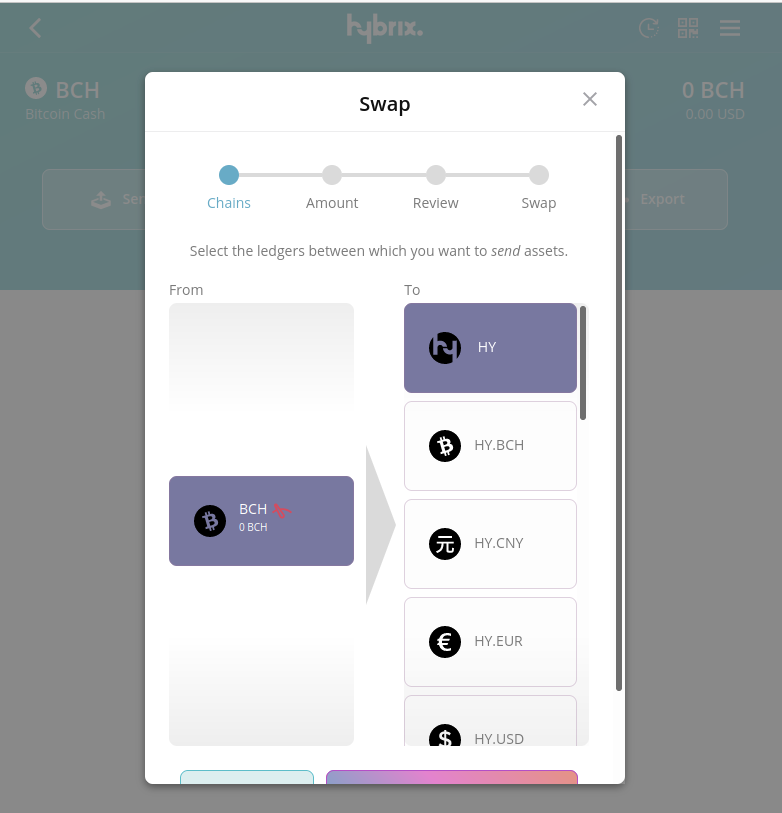
Then you need to buy 10 HY. My recommendation: deposit in you BCH wallet the amount do you want to allocate (provide liquidity) plus and extra amount to buy 10 HY. Don't try to buy HY using SBCH because there's no liquidity right now. Buying it's easy: deposit BCH in Hybrix, and in the same BCH wallet, click on "Swap" and then "Send". Select HY and then follow the steps.
Once you've got 10 HY in your Hybrix wallet, deposit the BCH and the SBCH do you want to allocate. Remember that you can provide liquidity in any asset and chain you want, this is just and example for the BCH/SBCH pair.
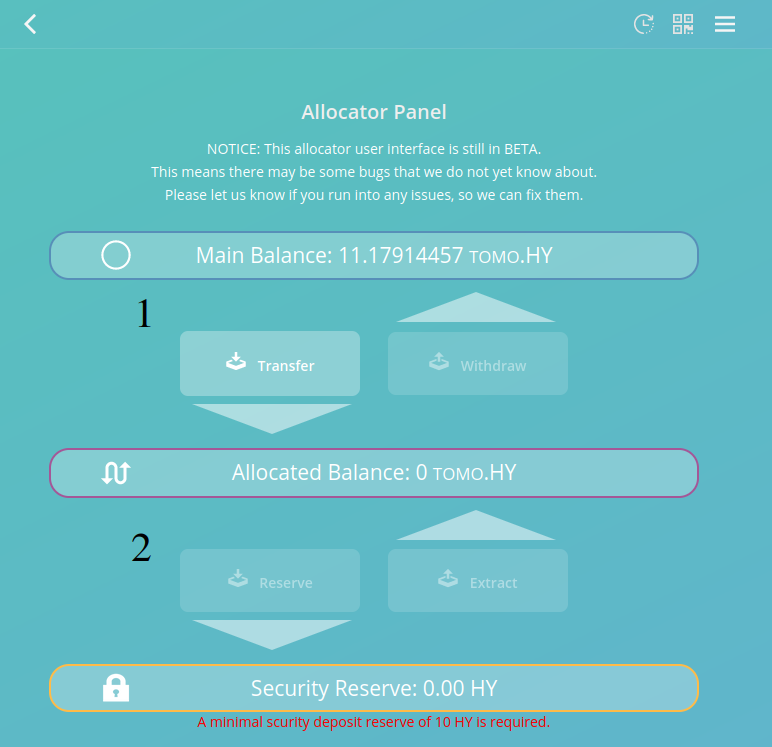
Time to go to wallet options -> Allocator panel. In you main balance you should have by now, at least, 10 HY. So the first step is to place those HY tokens in the Security reserve. You do this in 2 steps: click "Transfer" (1) to place the tokens in the "Allocated balance" section and then, click on the "Reserve" (2) button to place the HY tokens in the "Security Reserve". https://wallet.hybrix.io/#/allocate
Once done, click on "Create swap pair". Choose from "BCH" to "SBCH", click next, and transfer the SBCH do you want to allocated from your wallet balance to the allocated balance. You can set here your allocation fee, that's the fee you're gonna earn when someone swaps from BCH to SBCH. The current range is 0.1 to 0.3%. Hybrix will always pick the lower fee.
Repeat step 6, but this time with the reverse direction: from "SBCH" to "BCH".
Done! On the Allocator Panel, you'll see your Allocation Portfolio.
Risks and cons
Finally, we have a decentralized way to swap BCH <-> SBCH and even other chains and tokens, boosting SBCH adoption.
Using the wallet, anybody can realize that is quite slow: Hybrix runs over TOR, so the higher privacy is paid with a worse user experience. One way to solve this is to run an Hybrix node, contributing to the network.
You can see also some bugs: strange BCH/SBCH ratios (I've been told that it will be always 1:1 despite what the wallet set) or the impossibility to change the allocator fee once set.
I see 2 main risks:
Devaluation of the HY token: although you can withdraw you HY tokens from the security reserve, they can lose value as the price is volatile. Anyway, 10 HY is affordable by most people.
Hackers: like any other dApp, it's a omnipresent risk. The advantage of Hybrix is that is not a very new platform.
If you don't find yourself comfortable allocating some funds in Hybrix, you can wait for SmartBCH integration in AtomicDEX, which doesn't require any reserve but does require to be online for market makers.
If you find some mistake in this article or have any recommendation, leave me a comment.
HOWTO: Emergency withdrawal from BenSwap
Many of us asked the same question: what will happen to our funds if Benswap is down? Benswap has backup servers, but what if their down too? In Benswap docs, you can't find anything related to emergency withdrawal. Emergency withdrawal is often done in ETH or BSC using Metamask and MyEtherWallet, but MEW is not available for SmartBCH. https://docs.benswap.cash/
Don't worry: as long as any bug overseen in Benswap's audit has been exploited, your funds are safe. Follow these steps to withdrawal them:
STEPS TO FOLLOW TO RECOVER YOUR FUNDS
Copy the whole MasterBreeder.sol contract: https://github.com/BenTokenFinance/benswapbch-contracts/blob/master/Contracts/MasterBreeder.sol
Open Remix in a new tab: https://remix.ethereum.org/
Once in Remix, click on "New file", name it "MasterBreeder" and paste the contract you copied in step 1.
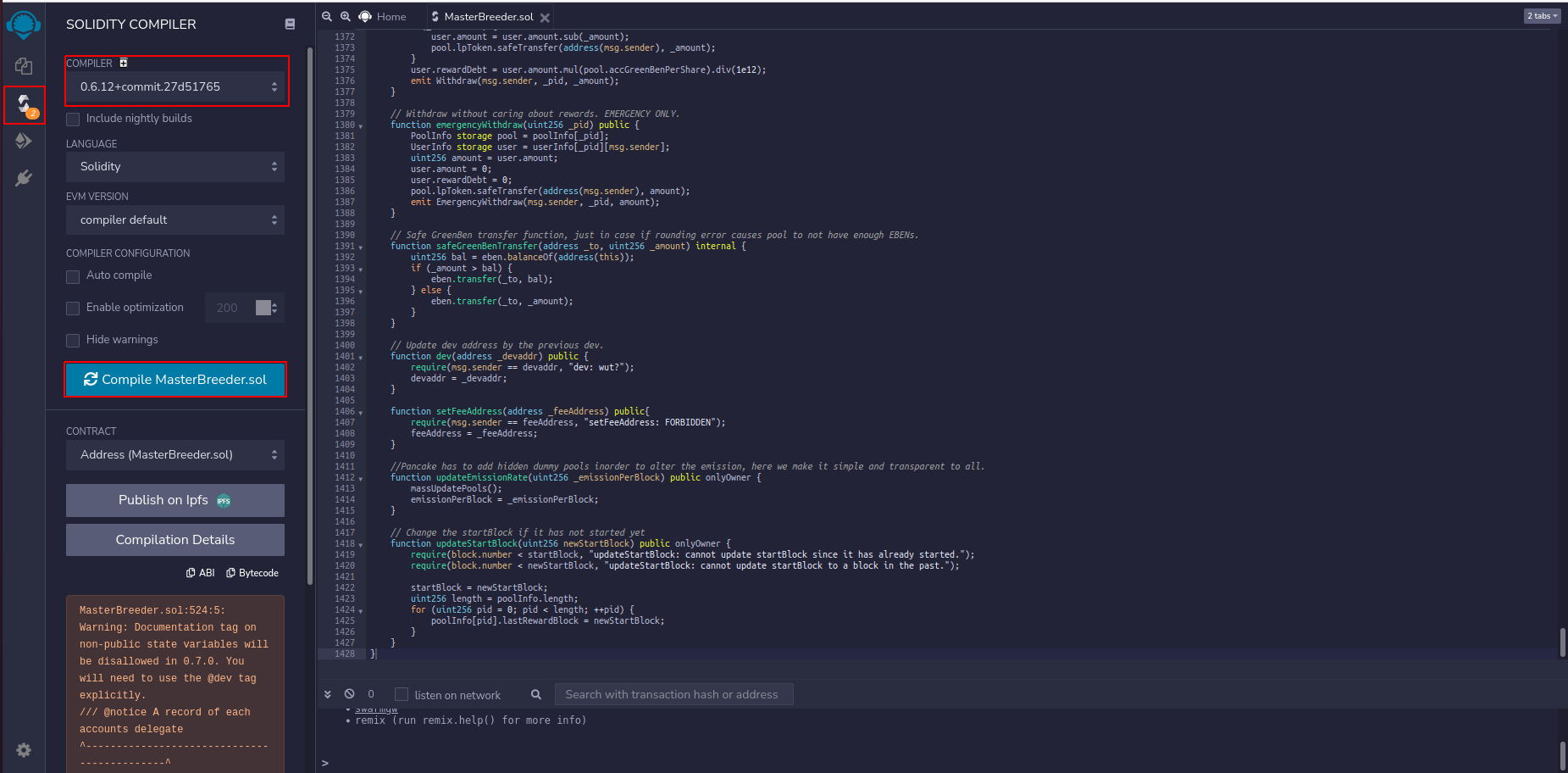
At the left column, you will find the "Solidity compiler" tab. Click on it. In the new panel, select from the droplist the compiler version 0.6.12. Now, click the button "Compile MasterBreeder.sol". You will see 2 warnings: ignore them
Make sure you have SmartBCH selected on Metamask. If you have multiple accounts, select the account from you want to recover the funds. And don't forget: you need a little BCH on SmartBCH to claim your funds!
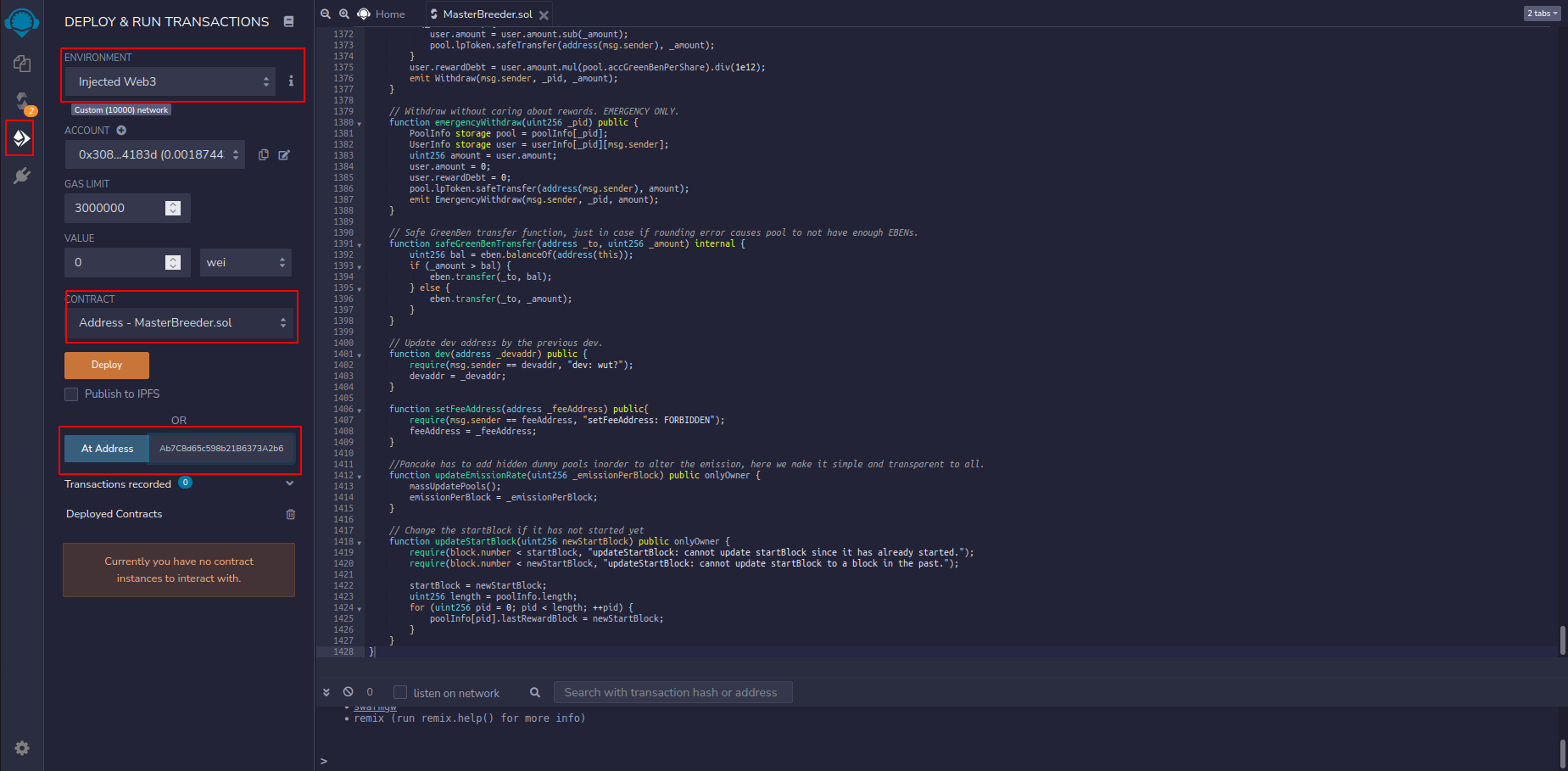
Again on Remix: select "Deploy and run transactions". In the environment droplist, select "Injected Web3". This allow us to interact with your Metamask account. Below, on the "Contract" droplist, select "MasterBreeder - MasterBreeder.sol". Next to "At address", there's a text box where you're going to paste the address where the contract is deployed in SmartBCH: 0xDEa721EFe7cBC0fCAb7C8d65c598b21B6373A2b6
Once the address is pasted on the text box, you can click the "At address" button". Click on it and a list of the functions available in the smart contract will appear. Let's recover the funds. In this guide I'll focus on the pools, let me do some research for the farms and I'll upgrade it.
The first thing to know is the total balance you have staked on the pool (if you want the quicker way and don't mind your rewards, see the bottom of this article and skip steps 8 and 9). So go to the end of the functions list, until you find "userInfo". This is the function which will tell you your total balance by filling 2 fields: the pool PID and your address. For the EBEN pool, PID is 1 and for the WBCH pool, PID is 2. Benswap dev needs to make the PIDs list public, it's very helpful for things like this. In this example, we find the total balance of our WBCH pool. Fill the PID field, fill the address field and click on "Call".
Copy the amount and go upwards, where you'll find the payable functions of the smart contract (in orange). Of course, click on "Withdraw". Again, you need to fill 2 fields: PID and amount. So on PID, insert 1 or 2 (EBEN or WBCH) and in amount, paste your total balance. Of course, you can withdraw less if you wish. Click on transact.
Metamask pops up. Remix suggest a gas fee of zero, which won't work. Edit the suggested gas fee: set gas limit to 229854 and gas price (GWEI) at 1,05.
Confirm the transaction. Congrats! You recovered your funds! If you don't see your tokens (EBEN, WBCH or whatever token they add on the future) make sure it's added as custom token on Metamask.
Bonus track: emergency withdrawal function
Maybe you have seen a function call "emergencyWithdrawal". This is a quicker way to withdrawal all your funds if you don't care about the rewards: you just need to insert the pool PID and click on transact.
Feel free to comment if you have any doubts or improved ways to do this.
All Bitcoin cash transactions are spam
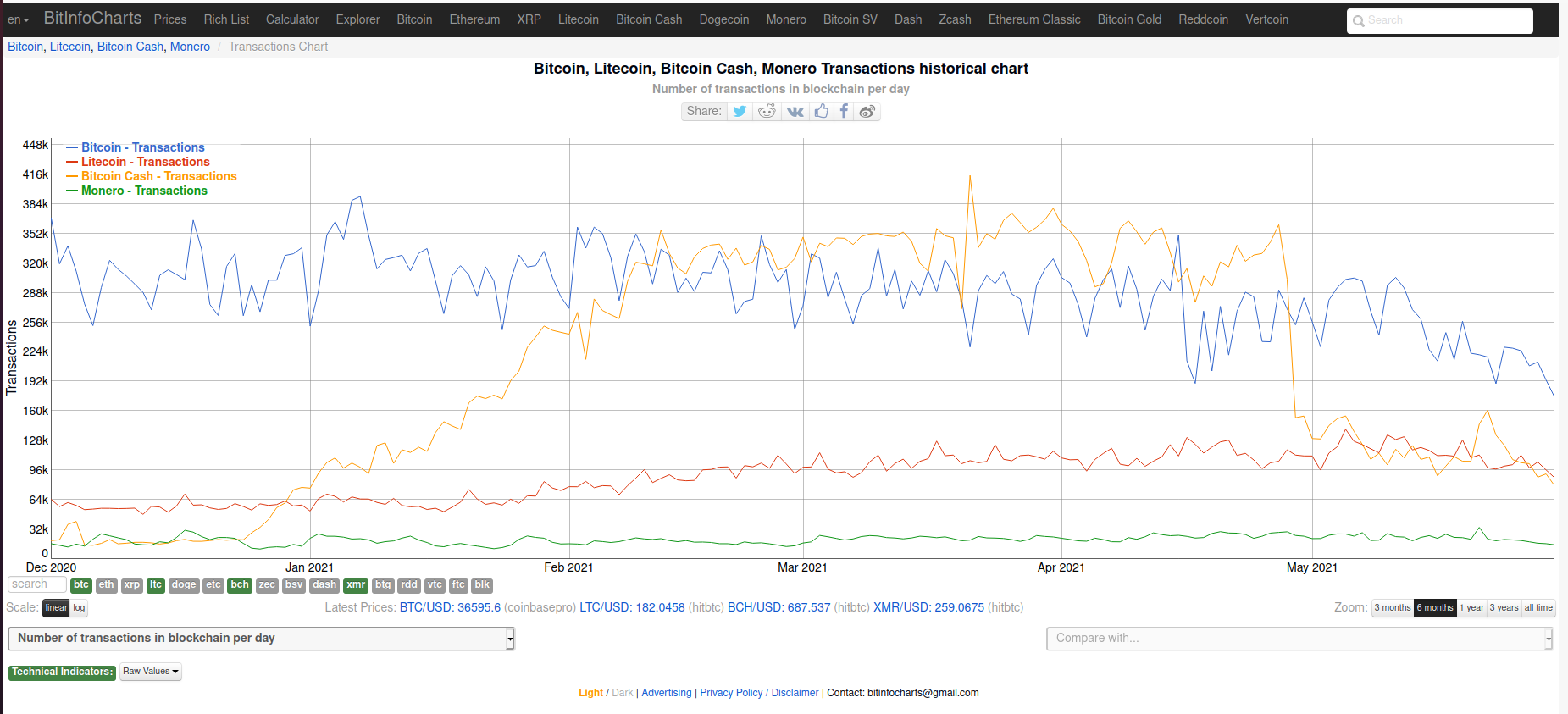
Bitcoin cash did pretty well the last bull run. BCH had an higher number of transactions per day than BTC, LTC or XMR.
Source: https://bitinfocharts.com/comparison/transactions-btc-ltc-bch-xmr.html#6m
This should be a good empirical way to prove how big blocks are a good way to scale, but no. All volume in the BCH blockchain is fake volumen, all transactions are spam.
This is the classical maximalist defense against BCH processing more transactions than BTC. The criteria use to classify volume as spam is random, so we can say that all BTC and LN transactions are spam using exactly the same criteria. But this is not the actual issue:
There is no spam in a permissionless blockchain
Spamming can be defined as "unsolicited or undesired electronic messages". When we use the word undesired, we are making a moral/ethical judgement. In a permissionless blockchain, no one can classify transactions as undesired and even less decide what is allowed/denied.
We can just face 3 paradigms:
Transactions pay 1 sat/B or more: go into the next block.
The number of transactions are so high that the network can't handle it: Bitcoin cash has failed.
Someone is attacking the network sending huge amounts of <1 sat/B transactions and the network can't handle it (DoS attack): Bitcoin cash has failed.
As simple as that.
Make your Python project interact with memo.cash
Any Bitcoin Cash and Python enthusiast should now Bitcash. With Bitcash you can easily interact with the BCH blockchain. Here I'll leave some useful scripts to show how to send and find data stored in the blockchain with OP_RETURN. https://github.com/sporestack/bitcash
Send a memo
Memo.cash is a nice social media based on BCH, completely trustless and decentralized. Sending a memo is very easy, just keep in mind the format described by the protocol:
from bitcash.wallet import Key
from bitcash.transaction import get_op_pushdata_code, calc_txid
from bitcash.utils import bytes_to_hex, hex_to_bytes
from bitcash.network.services import NetworkAPI
def send_memo(key, message):
POST_MEMO_PREFIX = "026d02"
PUSHDATA_CODE = bytes_to_hex(get_op_pushdata_code(message))
encoded_message = hex_to_bytes(POST_MEMO_PREFIX + PUSHDATA_CODE + bytes_to_hex(message.encode('utf-8')))
if len(encoded_message) <= 220:
memo_tx = key.create_transaction([], message = encoded_message, leftover = key.address, custom_pushdata = True)
NetworkAPI.broadcast_tx(memo_tx)
key.get_balance()
return(calc_txid(memo_tx))
else:
return "Error: message longer than 220 bytes"
Once you initialize a key with Bitcash, the function *send_memo* will allow you to send data up to 220 bytes. But how can you find data stored on the blockchain, once is sent? It's time to meet BitDB.
Search on the BCH blockchain with BitDB
BitDB is a powerful tool for searching data within the BCH blockchain. The result is a JSON file, so we can manage huge amounts of data.
I'll show you 3 useful functions:
raw_search_string: returns a JSON file with transactions containing the target string specified.
search_string: returns a dictionary with every transaction ID that contains the target string. This is more easy to use if you don't wanna bother with JSON files.
get_opreturn_by_txid: as the name says, you get the OP_RETURN data given a txid. Combined with the former function, you can search for a partial string and get the full string this way.
get_opreturn_by_address: simply get the data post from a given address (in cash format, not legacy). Combined with the send_memo function, you can use the BCH blockchain as your own database.
import requests, base64, json
MAIN_ENDPOINT = 'https://bitdb.bch.sx/q/'
def json_to_base64(json_file):
return base64.b64encode(json.dumps(json_file).encode('utf-8'))
def raw_search_string(target_string, limit):
#Search a string in any op_return containing txs and returns a json file with raw info
query = {"v": 3, "q": {"find": {"$text": { "$search": target_string },"out.b0": { "op": 106 }}, "limit": limit }}
b64query = json_to_base64(query)
r = requests.get(MAIN_ENDPOINT + b64query.decode())
if r.status_code == 200:
return r.json()
else:
raise Exception ("Something went bad. Status code is " + r.status_code)
def search_string(target_string, limit):
#Returns a dictionary with the TX id and strings that cointains the target string. Not case sensitive.
results = {}
json_results = raw_search_string(target_string, limit)
if json_results["u"] != []:
results["unconfirmed_txs"] = {}
for tx in json_results["u"]:
current_tx_id = tx["tx"]["h"]
results["unconfirmed_txs"][current_tx_id] = []
for output in tx["out"]:
for data in output:
if type(output[data]) == str and target_string.lower() in output[data].lower():
results["unconfirmed_txs"][current_tx_id].append(output[data])
if json_results["c"] != []:
results["confirmed_txs"] = {}
for tx in json_results["c"]:
current_tx_id = tx["tx"]["h"]
results["confirmed_txs"][current_tx_id] = []
for output in tx["out"]:
for data in output:
if type(output[data]) == str and target_string.lower() in output[data].lower():
results["confirmed_txs"][current_tx_id].append(output[data])
return results
def get_opreturn_by_txid(txid):
query = {"v": 3, "q": {"find": {"tx.h": txid}}}
b64query = json_to_base64(query)
r = requests.get(MAIN_ENDPOINT + b64query.decode())
if r.json()["u"] != []:
for output in r.json()["u"][0]["out"]:
if output["b0"] == {'op': 106}:
return output["str"]
elif r.json()["c"] != []:
for output in r.json()["c"][0]["out"]:
if output["b0"] == {'op': 106}:
return output["str"]
return "No OP_RETURN found in this transaction"
else:
return "No transaction found with this TX ID"
def get_opreturn_by_address(address):
#Find OP_return data send from a given address. A cash address must be provided, not legacy. Oldests TXs first.
results = []
if address[:12] == "bitcoincash:":
address = address[12:]
query = {"v": 3,"q": {"aggregate": [{"$match": {"out.b0": { "op": 106 }, "in.e.a": address }},{"$match": {"out.b0": { "op": 106 }}},{"$unwind": "$out"},{"$match": {"in.e.a": address }},{"$limit": 100000}],"sort": {"blk.t": 1}, "limit": 100000}}
b64query = json_to_base64(query)
r = requests.get(MAIN_ENDPOINT + b64query.decode())
if r.json()["c"] != []:
for output in r.json()["c"]:
if output["out"]["b0"] == {'op': 106}:
results.append(output["str"])
if r.json()["u"] != []:
for output in r.json()["u"]:
if output["out"]["b0"] == {'op': 106}:
results.append(output["str"])
return results
That's all folks, I hope these little scripts are useful for beginners!

Featuring the new Bitcoin Cash Watchdog: keep your BCH safe with an Arduino or NodeMCU board!
There are lots of reasons to keep track of your wallets. For example, to make sure your paper wallet is safe, to keep control of a shared wallet or to know if you have received any donation for your project (or your writings at read.cash).
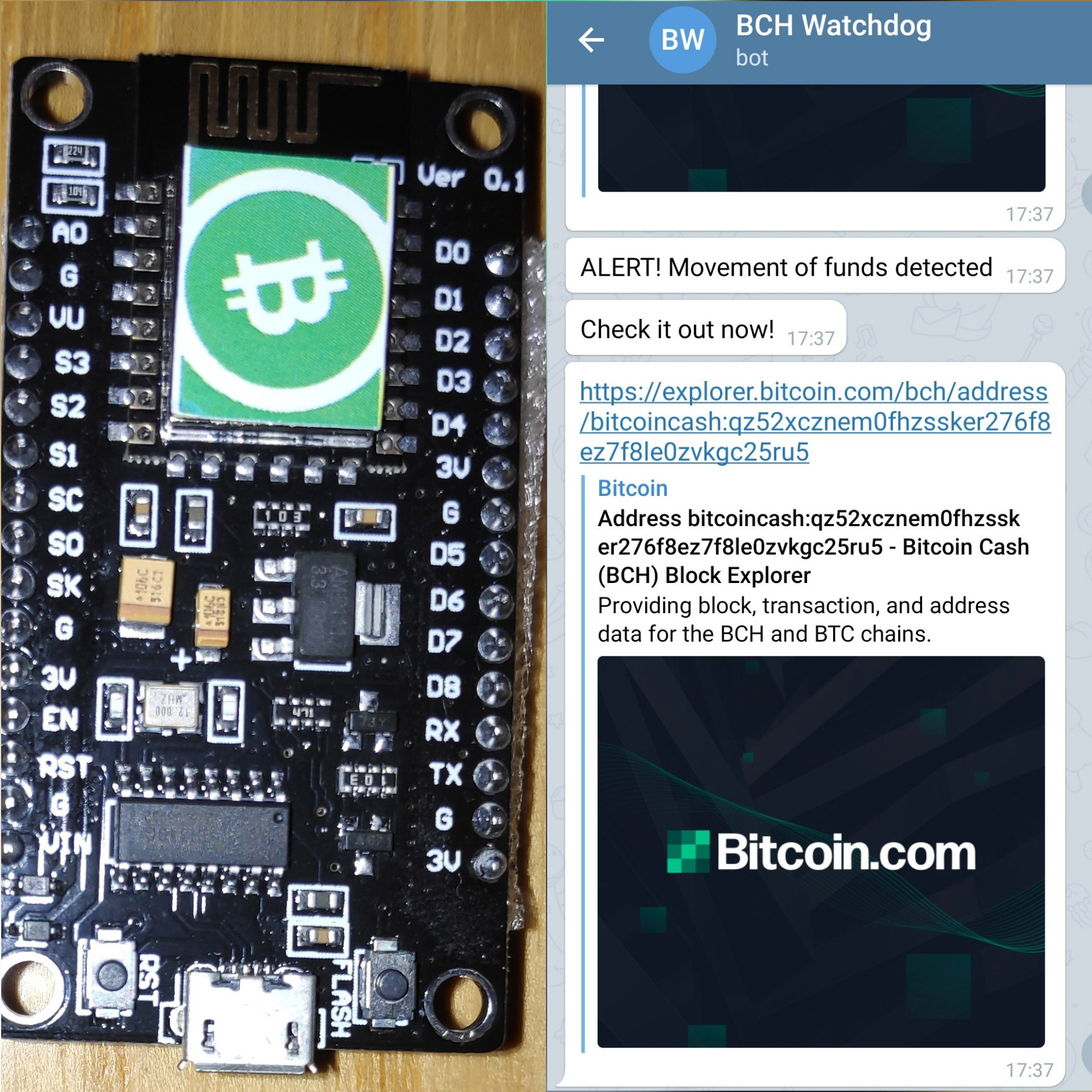
Now there's one way to make it possible without depending on any 3rd party service or doing it manually, you just need a $10 (or less) NodeMCU board. Any ESP8266 board could work, but I only have a NodeMCU V3 board to test it.
What is the Bitcoin Cash Watchdog?
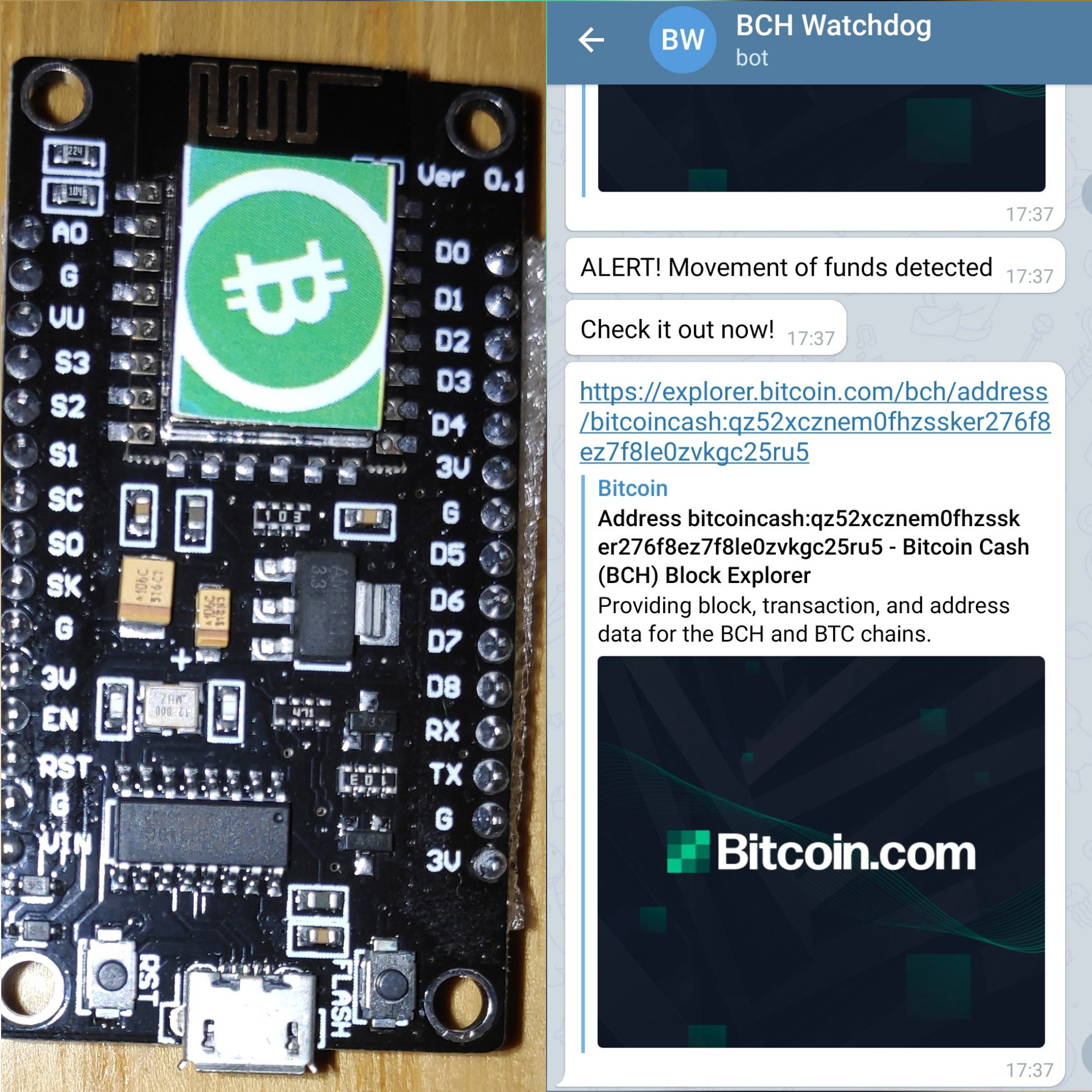
The BCH Watchdog is a little program that runs on any ESP8266 board. It constantly keep track of the balance of a list of addresses given by the user. If any change in the balance is detected, you will get an alert via Telegram in your computer, smartphone or laptop!
But the purpose is not just that. I try to show how the Bitcoin Cash blockchain can easily interact with IoT devices thanks to the Bitcoin.com REST API. You can make any project you want, like expending machines, with cheap hardware and little coding skills (like myself).
**Disclaimer**: this is just beta software.
How to set up the Bitcoin Cash Watchdog
First, download the Arduino IDE and install the ESP8266-compatible boards. Here's a quick tutorial: https://randomnerdtutorials.com/how-to-install-esp8266-board-arduino-ide/
Then, install the required libraries: ArduinoJSON and uTLGBotLib, both available at the Library Manager of Arduino IDE.
Make a Telegram bot to interact with the watchdog. Simply use the BotFather, set a name and keep your token. More info here: https://core.telegram.org/bots#6-botfather
Download the Watchdog, which is just a little .ino file: https://github.com/libercash/BCH_Watchdog/
Open the .ino file with the Arduino IDE, and change:
Addresses: put the addresses you want to track.
WiFi parameters: your WiFi SSID and password
Bot token: the token you got from the Bot Father.
Connect you ESP8266 board and upload the watchdog.
Send any message to the bot chat to start the watchdog. You're done!
Advantages
This is an open source project, you can customize it and do whatever you want. The Arduino community is huge and full of helpful people. The bot does not store any private key, so no risk of losing funds, and detects 0-conf transactions so you will get an early alert. And Telegram is available in lots of platforms, you you can get an alert wherever you are.
**To Do**
If I have enough free time, I want to implement HTTPS (incompatible with the Telegram library I'm using for Arduino) and make the bot interactive to add new addresses using Telegram. If anyone has any idea regarding BCH and Arduino I could try to help, despite this is my first BCH project and I barely have coding skills.
Debunking: nope, novel coronavirus is not an exosome
According to Dr Andrew Kaufman's conspiracy theory, the novel coronavirus (SARS-Cov-2) is in fact an exosome. After seeing this pseudoscientific hypothesis, I realized that many facts are incorrect. In fact, I would like to debunk with facts several statements I've found over and over again in social media. https://www.weblyf.com/2020/04/dr-andrew-kaufman-and-the-exosomes-coronavirus-truth/ https://www.ncbi.nlm.nih.gov/pmc/articles/PMC4906597/
Controls are used in virus culture
SARS-CoV-2 is usually cultured using the VeroE6 cell line and, despite Kaufman's claims, a control is usually used. For example, that was done with the first COVID19 patient in Australia: https://onlinelibrary.wiley.com/doi/full/10.5694/mja2.50569
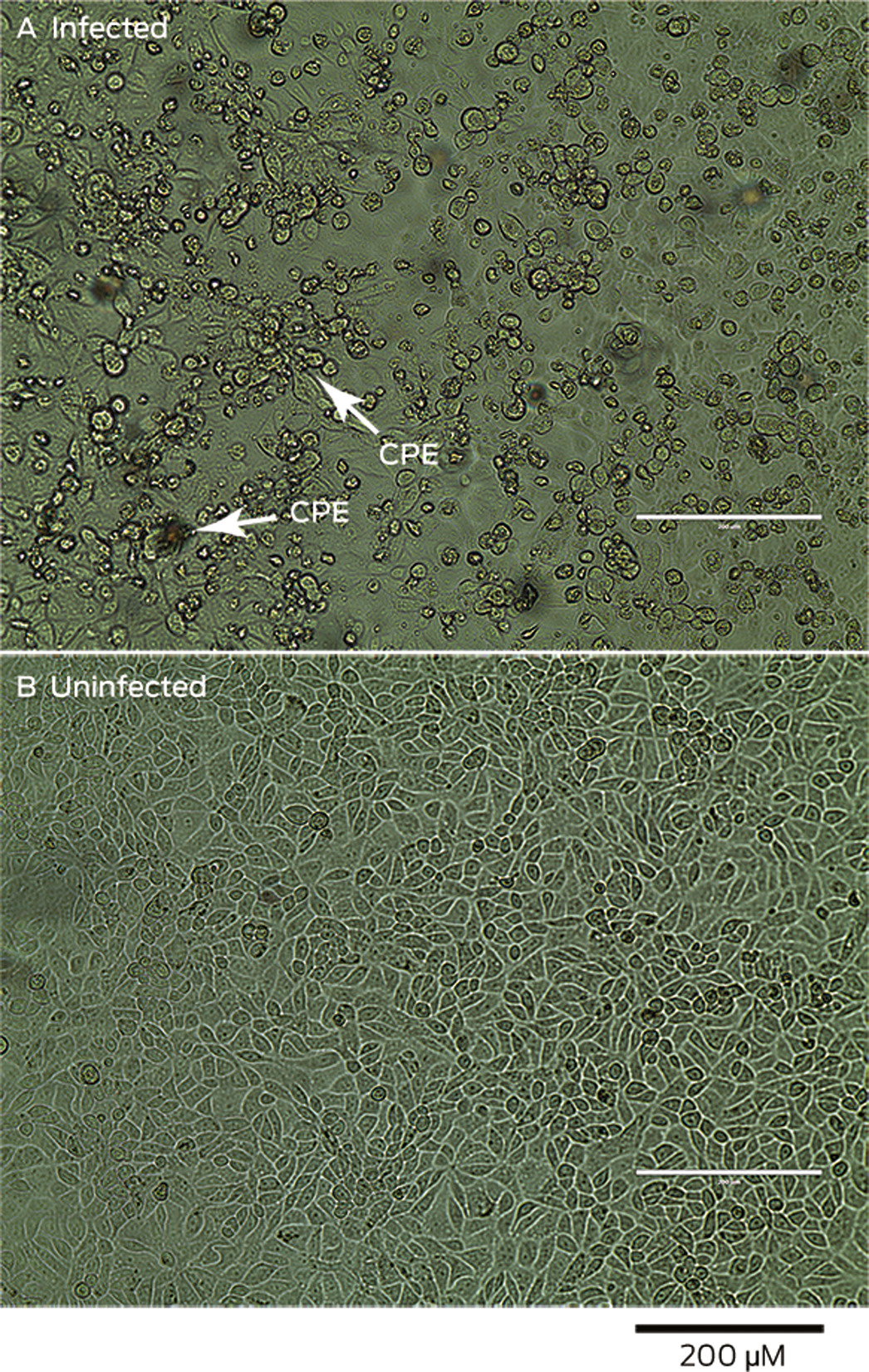
Here you can see a viral cytopathic effects produced in Vero/hSLAM cells by a sample containing the virus. The bottom line are uninfected cell lines.
SARS-CoV-2 is not an exosome only produced by Vero cells
Other cell lines are used to culture the virus and they give the same result, like Huh7, or human airway epithelial cells, but there are cell lines which have more advantages in viral culture than other.
SARS-CoV-2 cannot be an exosome
Our cells do produce exosomes, but exosomes cannot contain genetic information not contained in our genome. SARS-Cov-2 contains unique information which characterizes it, its genome has been completely sequenced and tracing mutations is a useful way to trace the virus around the world. https://www.ncbi.nlm.nih.gov/labs/virus/vssi/#/virus?SeqType_s=Nucleotide&VirusLineage_ss=Severe%20acute%20respiratory%20syndrome%20coronavirus%202,%20taxid:2697049 https://nextstrain.org/
Exosomes of infected cells, can, in fact, contain viral RNA. This is just if, and only if, the cell is infected by SARS-CoV-2.
SARS-CoV-2 has never been isolated
That completely false. As I showed above, it has been fully sequenced. You also can see it using electron microscopes: https://www.niaid.nih.gov/news-events/novel-coronavirus-sarscov2-images
But Koch's postulates have never been applied to the novel coronavirus!
Take a look at Koch's postulates. It's completely unethical to induce a disease in a human being to prove Koch's postulates. Currently, we have lots of new techniques anyway. In the lab, the virus not only infects cell lines, animals are also used as a tool to evaluate new treatments and to understand the virus better. https://en.wikipedia.org/wiki/Koch%27s_postulates https://www.ncbi.nlm.nih.gov/pubmed/32253226 https://www.ncbi.nlm.nih.gov/pubmed/32380511
DIY guns: here's what you need to make a proper barrel
The barrel is one of the most critical parts of any firearms. Maybe you want to do a gun with a 3D printer, or start from a blank/disabled weapon: you will need a proper barrel. I'm not an expert, but I'll share all the knowledge I have.
The core: hydraulic pipe
The basis of our barrel will be a seamless steel pipe. You can buy them in several places, even there are pipes sold as "explosion-proof" whose objective is, in fact, to become a firearm barrel.
When buying one, we should look at:
Length: minimum, we need the intended barrel length. The rest will be cut off.
Inner diameter: the closest one we need for our intended caliber, such as 9 mm for 9mm parabellum or .380 ACP.
Outer diameter: with the inner diameter, this will tell us the wall thickness. 2.5 mm thickness is good enough for 9mm. Larger calibers need thicker walls to stand the pressure.
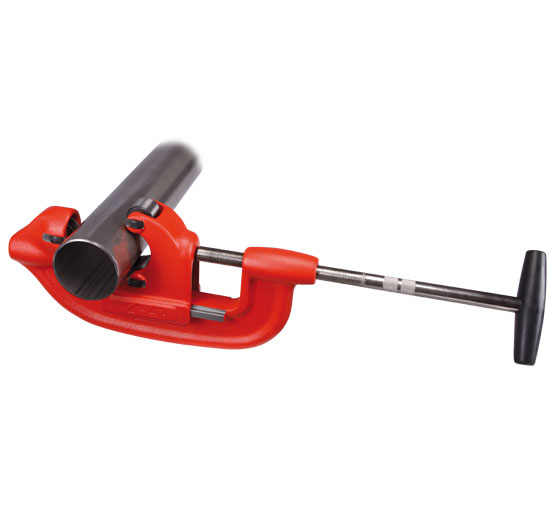
Steel pipe cutter
With this little tool you can cut your pipe to the desired length, and you will get a clean cut.
Adjustable reamer
When you buy a pipe with a 9 mm ID, you'll find that a 9mm bullet won't go go through. You need to wide the hole a little more, something like 9.03-9.04 mm. An adjustable reamer with the correct reaming range will do the trick. For example, a 8-9.25 mm reamer in this case. If your pipe is very long and the reamer short, you'll need to extend the reamer handle with a tool, you can even improvise one gluing the end of the reamer with a pipe using epoxy resin.
Tip: a digital caliper is very useful to know the exact diameter you are getting, and it's a cheap tool.
Chambering the barrel
You need to chamber one end of the tube in order to fit the bullet case. For pistols, it's usually easy. For example, for .380 ACP, is just reaming the first 17 mm of the tube with a 9.5 mm reamer. Other features depend on your gun characteristics: making a slot in one side for the extractor pin, or sanding the bottom to make the ramp. A Dremel is what you need here.
For long guns, a chamber reamer is required. It's easy to get, but quite expensive.
Rifling button and ejector pin
Without rifling, you will have a smoothbore barrel. The bullet will display erratic behaviors, rifling your barrel is highly recommended. Get a rifling button for the desired caliber, an ejector pin and pass the rifling button through your pipe with a hammer. Of course, if you have an hydraulic press, use it.
This is what you need to make a proper barrel. Don't forget to clean it before testing it in order to remove any debris. Always start with low loads to detect any malfunction.
Don't trust, verify: check the melting point of your chems!
Don't trust, verify. It's a mantra in the Bitcoin world, but not outside. No matter illegal drugs, ergogenics like steroids or SARMs, nootropics or any kind of raw powders: people usually ingest them trusting the vendor. Nevertheless, how could you analyze any raw chem at home? Checking the melting point is the answer.
Every chem has a melting point, which you can figure out easy with Google. If a chem does not meet its melting point, I'm sorry: you've been scammed, don't put that into your body!
In this tutorial, I'll try to explain how to check this value with cheap materials.
What do I need?
The chem to analyze, of course. It must be in raw powder, chems in capsules are (usually) mixed with fillers, so you can't use them with previous isolation.
Melting point capillaries, which are very fine glass tubes. Cheap if you order at AliExpress (check Haven first!).
Thermometer, preferably a thermocouple thermometer: the sensor is very fine and sensitive. Again, cheap bought from China.
Hot plate. If your hot plate has a magnetic stirrer to keep the heat uniform, it will be better. Nope, this time is not cheap even from China, so don't waste money and use a standard one.
Mineral oil.
A small glass (like 100 ml). Borosilicate is preferred, specially if the melting point is very high.
Step by step: example with LGD-4033enthusiasts
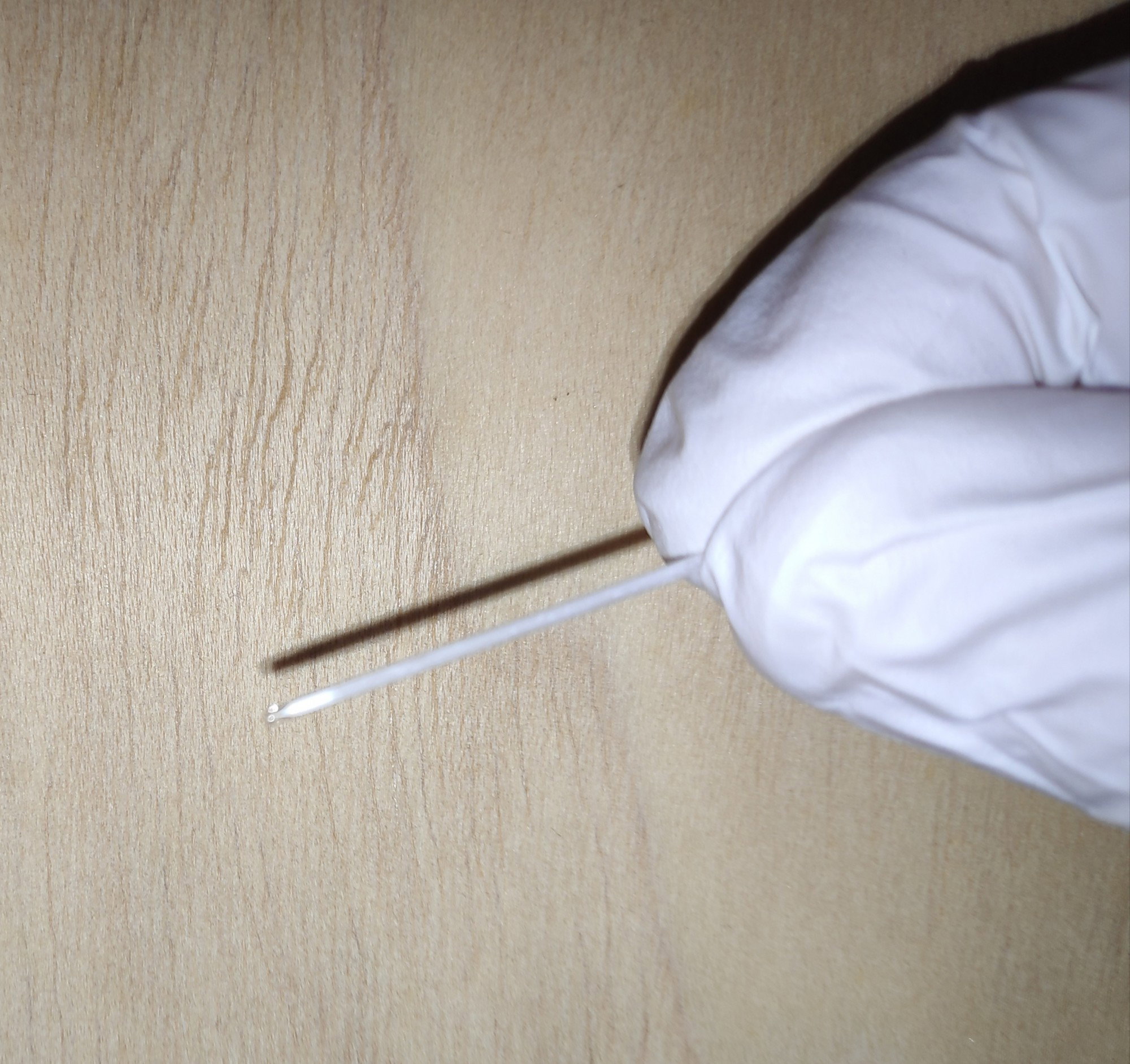
Grab with capillary tube. You only need it to be 3-4 cm long, so chop it if it's longer.
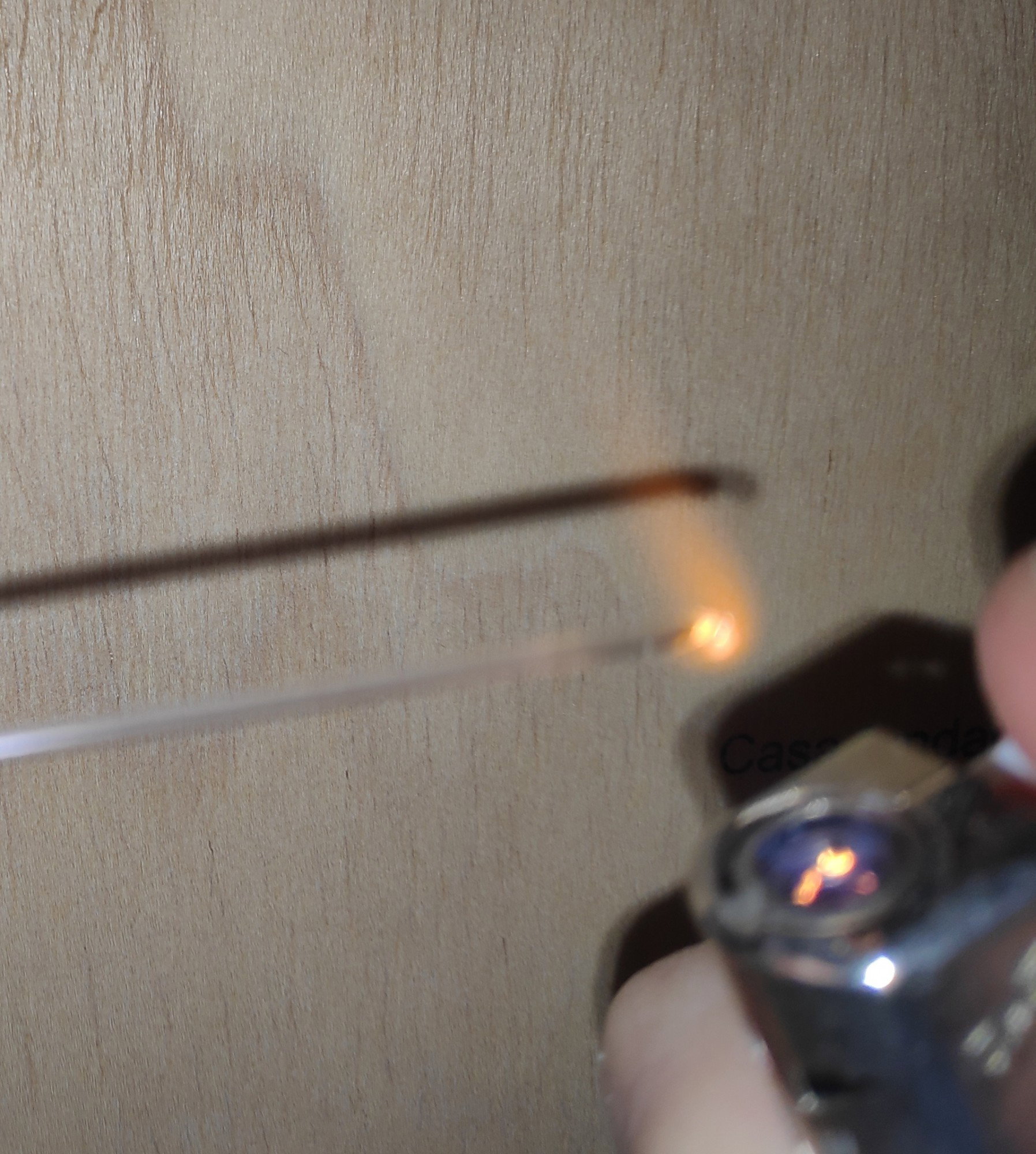
With a flame, seal one end. Once it becomes hot red, it's done.
Slowly, fill the tube with your chem. With a needle, push it to the end. Remember that you only need a small amount (a few mm long is enough).
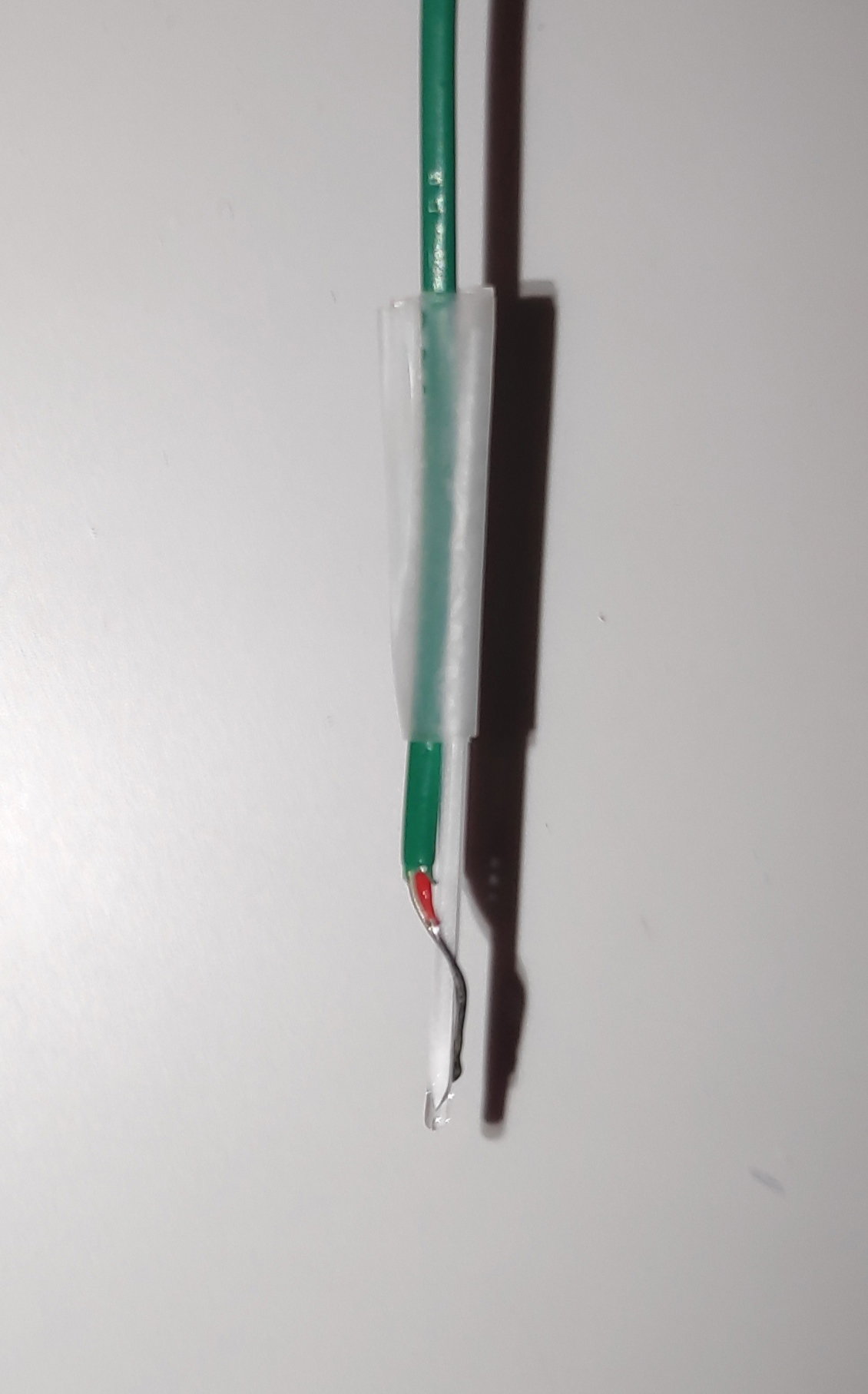
We want the tube to be very near the thermometer. Twisting the cable around the tube and sealing with a little tape makes the trick.
Fill your glass with mineral oil, just a little to cover the end where the chem is placed. Turn on the thermometer and the hot plate. Put the capillary tube inside the glass and keep heating slowly.
**Safety tips**: check the auto-ignition temperature of your mineral oil, you don't want it to catch fire. And always cover the glass with some aluminum foil, don't breath the vapours!
Keep an eye on the chem inside the tube, specially when it's reaching the theoric melting point. Use a good light to see the powder inside. I'm testing LGD-4033 with a melting point around 105-107 ºC. This is before and after reaching that mark:
Obvious difference, right? The chemical goes to a white solid powder to a clear liquid. Now, I'm 95% sure I have pure LGD-4033.
I hope this guide helps to science enthusiasts!
 @norphine