 @nolyoi
more from that month
@nolyoi
more from that month
Randomizing data with Flutter and Firebase. My walkthrough of various solutions.


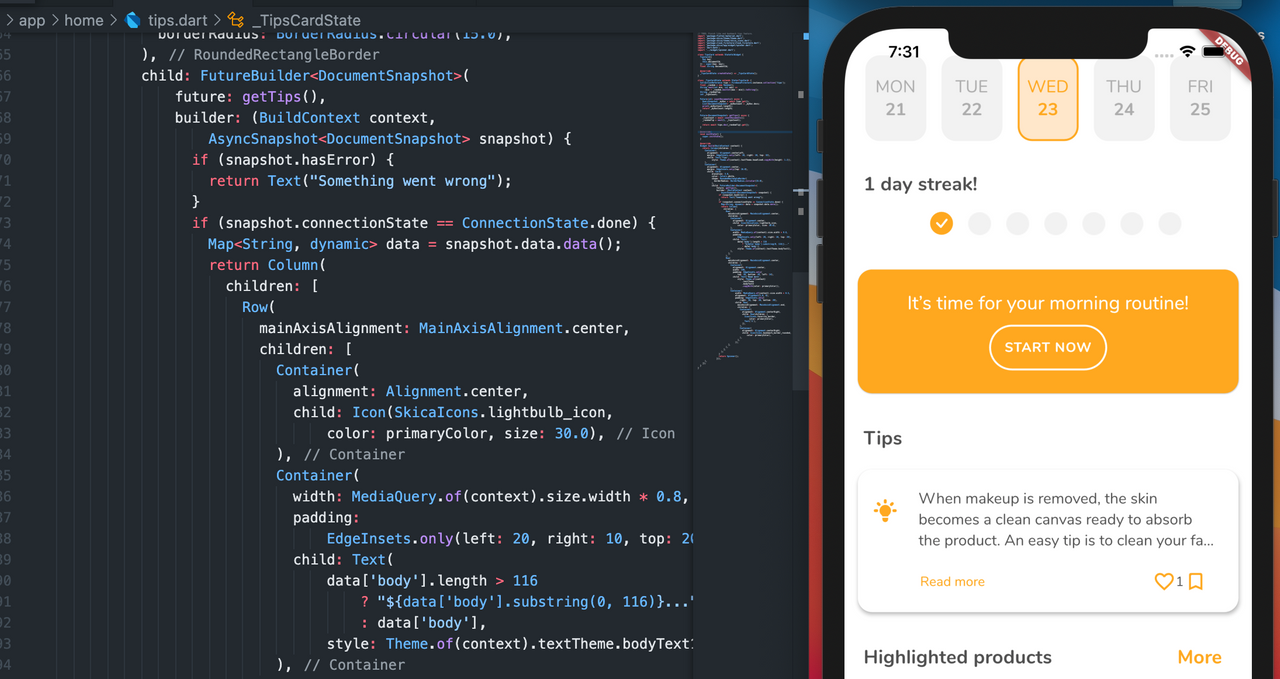
*So*, recently while working on the Skica Flutter application, I struggled with a problem of randomizing data and calling it the way I wanted to. Below goes through the various transformations of my code The 'tips' Cloudstore collection reference, a Random, and a 'next' function that randomizes a number between a given min and max range. class _TipsCardState extends State<TipsCard> { CollectionReference tips = FirebaseFirestore.instance.collection('tips'); final _random = new Random(); String next(int min, int max) => (min + _random.nextInt(max - min)).toString(); String _randomTip; int _tipsCount; Future<int> countDocuments() async { QuerySnapshot _myDoc = await tips.get(); List<DocumentSnapshot> _myDocCount = _myDoc.docs; print(_myDocCount.length); return _myDocCount.length; } Future<DocumentSnapshot> getTips() async { _tipsCount = await countDocuments(); _randomTip = next(1, _tipsCount); return await tips.doc(_randomTip).get(); } The problem I ran in to was trying to accomplish this all in a single function. There really is no reason to over complicate functions. Though, I'm pretty sure it can be done, it's better to just seperate things if it makes the code more readable, imo. First is the `countDocuments` function. This one is very simple. We're simply querying the `Tips Collection`, then getting the documents that belong to that collection and returning it's length. This gives us the amount of `Documents` in the Tips `Collection`. **Note:** In Firestore, a Collection contains Documents. In the body of the app, the `getTips` function is called within a `FutureBuilder` widget. Since it returns the `DocumentSnapshot` of the database. But! I ended up simplifying this even more by using a provider! I added a `StreamProvder<Tip>` to my app's `MultiProvider` like so. The code to randomize the tips remains the same, however now I manually set the range instead of generating it. dynamically. No biggie. class App extends StatelessWidget { static FirebaseAnalytics analytics = FirebaseAnalytics(); final _random = new Random(); String next(int min, int max) => (min + _random.nextInt(max - min)).toString(); String _randomTip; @override Widget build(BuildContext context) { _randomTip = next(1, 33); return MultiProvider( providers: [ ChangeNotifierProvider<AuthProvider>(create: (_) => AuthProvider()), StreamProvider<User>.value( value: FirebaseAuth.instance.authStateChanges(), ), StreamProvider<Tip>.value( value: TipProvider().streamTip(_randomTip), ), ], The `StreamProvider`'s value is `TipProvider().streamTip(_randomTip)` which is the following code below: class TipProvider with ChangeNotifier { final String uid; TipProvider({this.uid}); final FirebaseFirestore firestore = FirebaseFirestore.instance; bool loading = false; Stream<Tip> streamTip(String id) { return firestore .collection('tips') .doc(id) .snapshots() .map((snap) => Tip.fromFirestore(snap)); } The `TipProvider` also contains other useful methods related to tips such as `addTipLike`, `removeTipLike`, `addTipBookmark`, `removeTipBookmark`, etc. This is a much more clean way of organizing this code, imo. We can store methods/functions related to the Tips in the `TipProvider` file. Plus, having it set up as a `StreamProvider` allows the data to be kept updated in real time! And there is virtually no extra cost in Firebase, as compared to calling it manually each time. The end result is displaying that tip within the app like so, with real time updates to the likes count! Neat right!?
No comments yet