 @clairvoyant
Guide To DEEP WEB For Phones
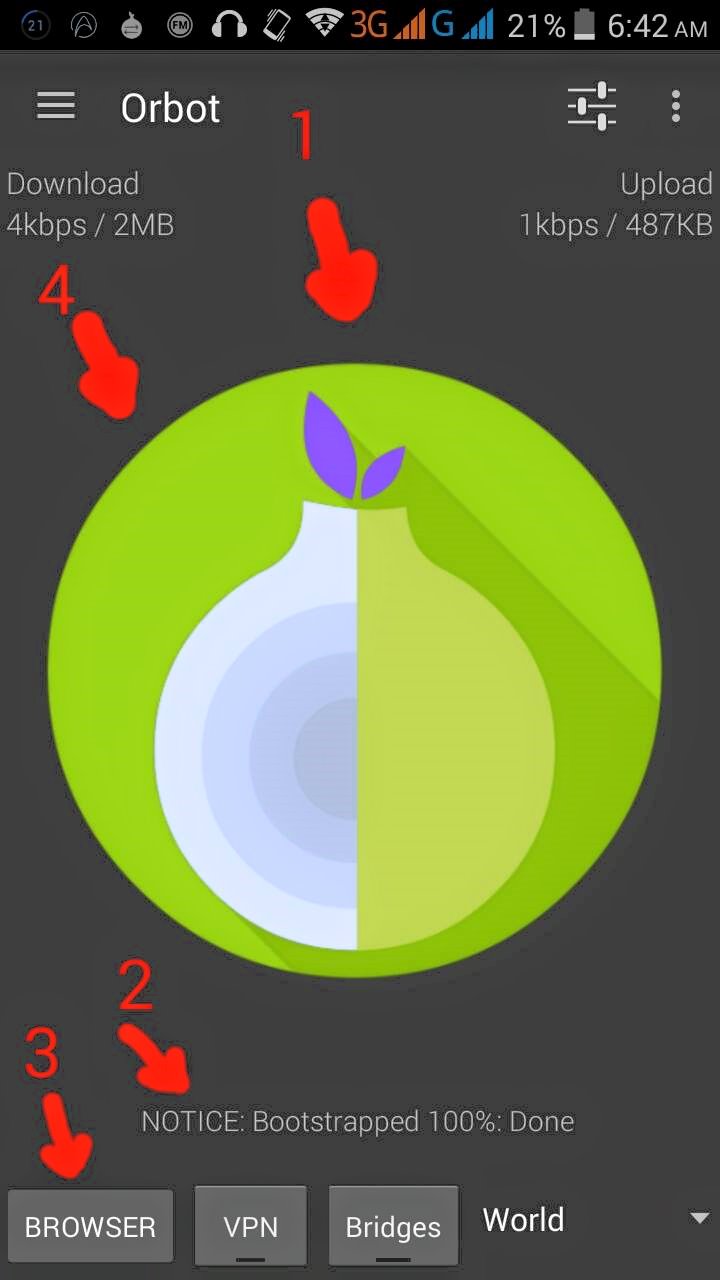
Install ORBOT at ORFOX sa google play (much better kapag valid ang app) . 1.) run ORBOT, long press onion icon to activate anonymous connection . 2.) Wait to "100% bootstrapped" . 3.) Click browser below, it's the shortcut to ORFOX. . 4.) ADDITIONAL TRICK, Swipe the onion icon to change your IP address for a new. . Another Additional guide: - alwes remembar na dipwib is biri biri dinjirus, do nat atemp to go releted to SEX, DRUGS, WEAPONS, CREDIT CARDS
5 comments
Isn't doing this is risky? I mean i hear so many unpleasant stories regarding deepweb. I will need a lot of courage before i try this.
its always risky my friend please be guided
Yeah i will make sure i will be careful. Thank you for this information i will try this when i am ready.
soon you'll be ready
I hope so. I think i will need a lot of time to think about it or maybe i will not try it at all because of my fear