 @cashdev
edited
@cashdev
edited
How to Split and Forward Bitcoin Cash with Python This code snippet is a bit longer than what I usually write here. That is because this time, we're writing a fully working program. This is a program that: Listens and reacts to receiving coins in a brainwallet. https://read.cash/@cashdev/creating-a-brainwallet-with-python-03758c0e Creates a new transaction, forwarding all the received coins to two different donation addresses, splitting them 50/50 Broadcasts the new transaction to the network And to do this, we'll be **creating a transaction ground up** using the **raw Bitcoin data structures**, signing the inputs **with Schnorr signatures** and communicating with the blockchain using the **public Electrum network**. You'll also see a method for calculating the transaction fee for your transaction, achieving exactly 1 satoshi per byte every time. We're using the bitcoincash Python library. https://bitcoincash.network/python/ *Disclamer: Use this guide at own risk. Remember that it's easy to mess up transactions in various ways, for example by spending all coins to miner fees.* **TL;DR:** **Here is the full program****. Below I'll cover it section by section**. https://gist.github.com/dagurval/d34076523a6ebb794c1ee6822e5fa26c DEMO!
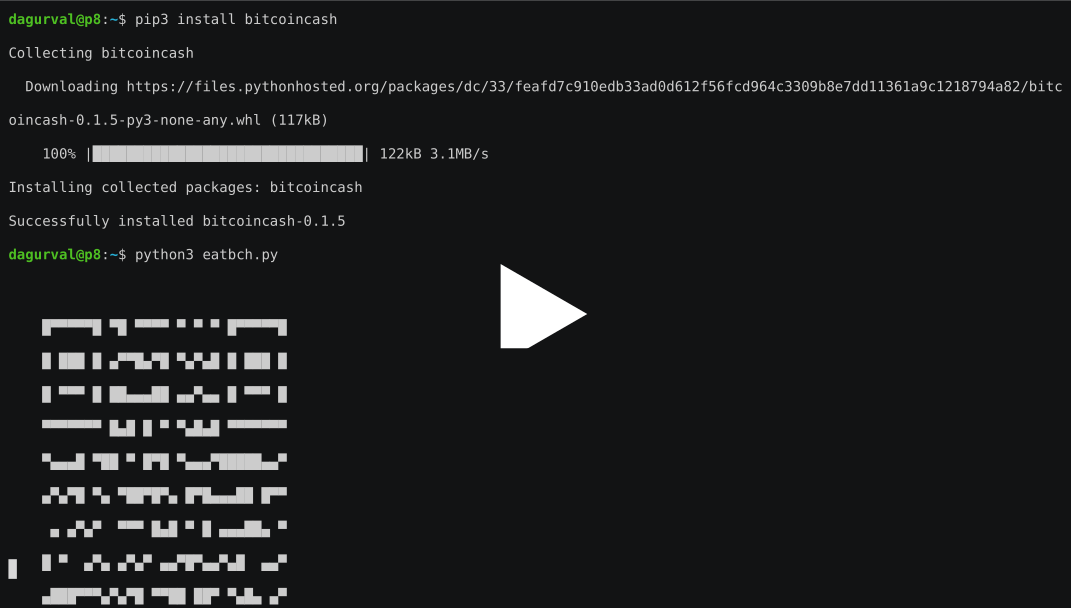
https://asciinema.org/a/291635 Demo using insecure brainwallet! Don't do this at home. Any coins sent to the above QR code will get stolen. Here is the transaction in a blockchain explorer https://explorer.bitcoin.com/bch/tx/60af59e9404c9a1d9119e45b3059cc55151181f09f4df3b80f7d877d252f4e54 Step 1) The boilerplate imports We start by importing all the stuff we'll use. Lets also define the two addresses we'll be forwarding to. These were fetched from EatBCH Venezuela and EatBCH South Sudans twitter profiles. https://twitter.com/eatbch_ve https://twitter.com/eatbch_ss import hashlib import qrcode import asyncio from bitcoincash.core import b2x, lx, COutPoint, CMutableTxOut,\ CMutableTxIn, CMutableTransaction from bitcoincash.core.script import CScript, SignatureHash, OP_RETURN, \ SIGHASH_ALL, SIGHASH_FORKID from bitcoincash.core.scripteval import VerifyScript from bitcoincash.wallet import CBitcoinAddress, CBitcoinSecret, P2PKHBitcoinAddress from bitcoincash.electrum import Electrum EATBCH_VE = "bitcoincash:pp8skudq3x5hzw8ew7vzsw8tn4k8wxsqsv0lt0mf3g" EATBCH_SS = "bitcoincash:qrsrvtc95gg8rrag7dge3jlnfs4j9pe0ugrmeml950" Step 2) The main loop We create a private and public key with a super insecure brain wallet phrase, encode the public key in a cashaddr and print out the QR code. After that, we enter the never ending forwarding loop. https://read.cash/@cashdev/creating-a-brainwallet-with-python-03758c0e async def main(): # Connect to an Electrum server cli = Electrum() await cli.connect() # Create an insecure brainwallet h = hashlib.sha256(b'replace this please or get coins stolen').digest() private_key = CBitcoinSecret.from_secret_bytes(h) address = P2PKHBitcoinAddress.from_pubkey(private_key.pub) # Output a QR code for the address in the terminal qr = qrcode.QRCode() qr.add_data(str(address).upper()) qr.print_ascii() print(str(address)) try: while True: await forward_loop(cli, private_key, address) import time time.sleep(5) finally: await cli.close() Notice that we upper case the cashaddr in the QR code. Upper case cashaddr are also valid, and by upper casing them, the data load can be encoded differently, making the QR code smaller, simpler and easier to scan. Step 3) The forward loop This is where the magic happens. We'll be: Checking if we've received coins Creating a blank transaction Adding all received coins as inputs to the transaction Adding the EatBCH addresses at outputs Signing the inputs with Schnorr Broadcasting the transaction async def forward_loop(cli, private_key, address): # Get list of spendable coins in address coins = await cli.RPC( 'blockchain.scripthash.listunspent', address.to_scriptHash()) if not len(coins): return By calling `blockchain.scripthash.listunspent` we're asking the electrum server if there are any coins sent to our address, that have yet to spend. If non, we just return to the mail loop. Before we go forward, note that `CTransaction`, `CTxIn`, `COutPoint`, `CTxOut` and `CScript` are all basic building blocks of the Bitcoin protocol. You will find the same data structures in all full nodes. In any code derived from Satoshis code base, they'll even have the same name. When there is *Mutable* in the name, it just means they are not read only, we're allowed to modify them. I believe its worthwhile to get familiar with these data structures, as you'll encounter them a lot when working with Bitcoin. tx = CMutableTransaction() # Store input amounts for later amounts = [] # All coins received as inputs for c in coins: tx_input = CMutableTxIn(COutPoint(lx(c['tx_hash']), c['tx_pos'])) # This dummy scriptSig makes fee calculation simple. # We know that the Schnorr signature exactly 65 bytes. tx_input.scriptSig = CScript([b'0' * 65, private_key.pub]) tx.vin.append(tx_input) amounts.append(c['value']) # store for later We create a blank transaction and append our coins as input. We don't need the coin amount yet. Our scriptSig will proof that we can and want to send these coins, and we'll replace it later after building the full transaction. But for now, adding a dummy placeholder that is the same size as the final scriptSig will help us calculate the transaction fee. # Dummy output amount (nValue). We need to calculate fee # before setting the actual amount. for addr in (CBitcoinAddress(EATBCH_VE), CBitcoinAddress(EATBCH_SS)): tx_output = CMutableTxOut(nValue = -1, scriptPubKey = addr.to_scriptPubKey()) tx.vout.append(tx_output) # For fun, let's add a small OP_RETURN greeting as well tx.vout.append(CMutableTxOut(nValue = 0, scriptPubKey = CScript( [OP_RETURN, b'Happy new year 2020!']))) We add our outputs, which are the two EatBCH addresses. For fun, we can add a third dummy OP_RETURN output to encode a small greeting. We can't add the amounts we're sending yet, because we've yet to calculate the transaction fees. Now that we've created the transaction, we can calculate the fee. total = sum(amounts) fee = len(tx.serialize()) if total - fee < 2000: # The amount is tiny, lets wait for more coins return Yep, that was easy. Find how many bytes the serialized transaction takes. Use that as fee. That makes it one satoshi per byte. # Update output values total -= fee half = total // 2 # // is integer division tx.vout[0].nValue = half # EatBCH VE tx.vout[1].nValue = half # EatBCH SS After subtracting the fee, we need to update the outputs. In this program, we choose to split them between the two outputs. # Hash and sign inputs flags = SIGHASH_ALL | SIGHASH_FORKID for i in range(0, len(tx.vin)): sighash = SignatureHash( address.to_scriptPubKey(), txTo = tx, inIdx = i, hashtype = flags, amount = amounts[i]) signature = private_key.signSchnorr(sighash) + bytes([flags]) tx.vin[i].scriptSig = CScript([signature, private_key.pub]) # Optional, but useful for developers: Verify that the input is valid. VerifyScript( tx.vin[i].scriptSig, address.to_scriptPubKey(), tx, i, amount = amounts[i]) Now all that remains is to sign the inputs with Schnorr. Hash the transaction Sign the hash value Update the scriptSigs with the signature # We're playing with money here, so lets assert for safety. # + 1 off is OK because of the integer division above. assert sum(o.nValue for o in tx.vout) + 1 + fee >= sum(amounts) assert len(tx.serialize()) == fee # 1 sat/byte fee print("Received {} satoshis in {} coins!\n"\ "Forwarding {} to EatBCH VE and {} to EatBCH SE. Tx fee {}.".format( sum(amounts), len(coins), tx.vout[0].nValue, tx.vout[1].nValue, fee)) # Done! Broadcast to the network. print("Broadcasting transaction...") print("Result: {}".format( await cli.RPC('blockchain.transaction.broadcast', b2x(tx.serialize())))) Finally, we do some sanity checks and then broadcast our transaction to the Bitcoin Cash network. Now that we've gone through this step-by-step, you should be able to understand **the full program****.** https://gist.github.com/dagurval/d34076523a6ebb794c1ee6822e5fa26c If you found this interesting, let me know. Subscribe and comment. Thanks! [sponsors]








No comments yet