 @bmjc98
edited
more from that month
@bmjc98
edited
more from that month
Basic Things To Know When Starting Your Own Wikipedia Page Did you know that you can create your own Wikipedia page right now? No need to be a professional in this field. You can do this job as long as you can write an article, know where to research, and are patient enough to fix the issues. It would be best if you also had a computer or laptop to work on this.

Disclaimer: I am not a professional Wikipedia creator/editor, but I have already made several Wikipedia pages, mainly in Italian. Also, I published one each for Portuguese and Russian Wikipedia (not my content, though). So in this article, I will give you the basics. Remember, we all start from the basics, which can lead to more as we continue. So if you are ready to learn, be sure to continue reading. Create your own Wikipedia account First, you need to create an account in Wikipedia. Creating one is very easy, and once you have it ready, then time to explore the platform. Find a topic to write The topic should be something that is not published yet in Wikipedia. Luckily for you, my fellow Filipinos, I have a few on them. I will list some of them below, and then you can try one. These topics are Hindu-related stuff, though. You can, however, refer to the English version and write your own. You can write any of these: Sharad Vasanta Durga Puja Mahishasur Vijay Dashmi Ramlila Dussehra Ravana Golu Dandiya Write it in a Wikipedia way In Wikipedia, there is a style guide to follow to make the content easier to read, use, write, and edit. The *article title* must be in a singular form. Do *not use abbreviations* in your title. Don't forget to add *headings and subheadings* to make the page easier to read. When using an image, *use captions to explain the photo*, which must be related to the article. *Use bullets or numbers* when you have a list. These are just the basics. For fully-detailed rules, you can read them here. https://simple.m.wikipedia.org/wiki/Wikipedia:Manual_of_Style Linking to other Wikipedia pages Linking to other Wikipedia pages, also known as wikilinking, helps readers find related information more manageable. So when you create a new page, make sure to do this.

In the example above, I linked ***Hindu*** to its own Wikipedia page. This way, readers who want to read more about it can click it and be directed to that page. Cite your references Creating a page without references is a no-no in Wikipedia. All text written must be cited for its reference that will prove your content is accurate and not mere hearsay. When searching for books as your reference, you can search them here. https://books.google.com
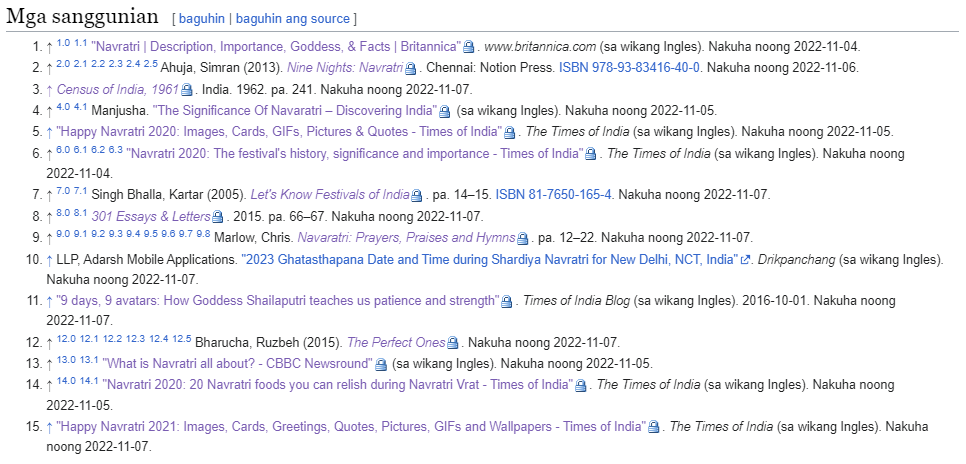
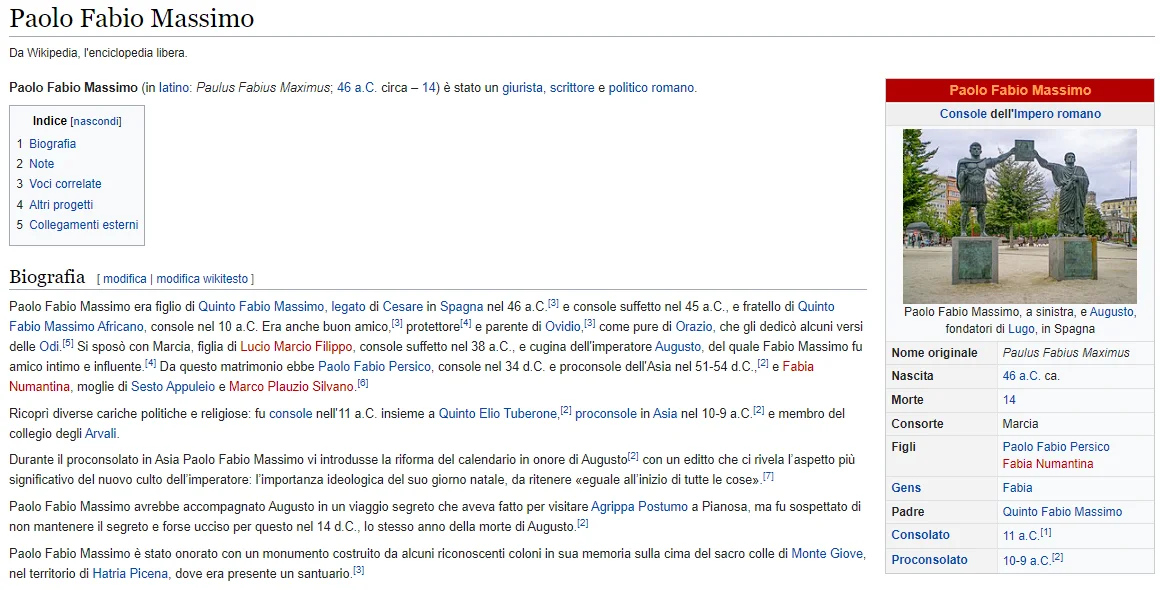
Helpful videos you can watch https://www.youtube.com/watch?v=T_k_VbCDm2Y Wikipedia pages I wrote and published I have a few pages and published content written by others. Vinum_Hadrianum (I wrote it myself but failed to get approval in Wikipedia. However, it was posted in Wikitia and EverybodyWiki.) https://wikitia.com/wiki/Vinum_Hadrianum https://en.everybodywiki.com/Vinum_Hadrianum Gens Maecia https://it.wikipedia.org/wiki/Gens_Maecia Gens Flavia https://it.wikipedia.org/wiki/Gens_Flavia Andrea Matteo I Acquaviva https://it.wikipedia.org/wiki/Andrea_Matteo_I_Acquaviva Paolo Fabio Massimo https://it.wikipedia.org/wiki/Paolo_Fabio_Massimo
Written by others Vinum_Hadrianum (in Italian and Portuguese) https://it.wikipedia.org/wiki/Vinum_Hadrianum https://pt.wikipedia.org/wiki/Vinum_Hadrianum Navaratri https://tl.wikipedia.org/wiki/Navaratri *PS: You won't get paid if you create a Wikipedia page on your own. However, by doing so, you will gain knowledge and experience in Wikipedia that you can use in Upwork.*

*Closing thoughts* As I have said, I am no expert here. I am still learning, so forgive me if I don't have much helpful information to share. Feel free to ask if you have something basic to know. As usual, if you have something in mind, let me know. ***Feel free to follow me on:*** noise.app | noise.cash | Publish0x | Hive | Torum | Twitter https://noise.app/bmjc98 https://noise.cash/u/bmjc98 https://www.publish0x.com/@bmjc98 https://ecency.com/signup?referral=bmjc98 https://www.torum.com/u/bmjc98 https://twitter.com/bmjc98






16 comments
I was really waiting for your article to know us more about the wiki account. Thank you for sharing I would try once I polish my writing skills more. I want to know if we could get finance if our page is accepted by Wikipedia??
You're very much welcome. Unfortunately, if you write your own page on your own, you won't get paid for it. It's like you are just contributing your work to the community. However, you will gain knowledge and experience in Wiki that you can use in applying in Upwork.
I think it's enough information you shared with us. It's good that you share it doesn't matter you're in learning stage or an expert. Do you know how to make a website?
I know how to make a website. https://club1bch.org I created this too.
That's good I'll check this later
May earnings ba here, Ate? Haha chars. Ayan talaga tanong ko since then ih, kadami kasing gumagawa ng contents jan. Though di ganoon ka-accurate kasi editable. Kapag marami na akong free time, try ko 'to. For now, will save it muna. 🤗
Me earnings kung me client ka. If wala, at for learning and pang portfolio purposes lang muna, din wala. Oo, one day, aralin mo to. Yung mga di accurate sa wiki, I think blinablock nila. At di naman approve kung mali mali ang nilagay mo.
Time to start learning on this field ate, for future clients natin. Sana masundan ko! 😊
Thanks cherry. Buti na lang nakita mo to. Hehe. Oo, aralin mo to pag me free time ka.
Sa pag create ng page sis, laptop din ba gagamitin? Or you can create kahit phone lang gamit?
Laptop pa rin sis. Kasi need mo mag research din e. Try mo mag create ng wiki page gamit phone with one of these topics na na mention ko. Since di mo naman need isulat ng marami unless gusto ni client na marami kang nilagay.
Is this part na din ng freelancing job ate? Ang galing. try ko sya aralin soon. Not now muna dahil stress pa me sa mga case studies.
Oo. Aralin mo to one day. Additional income din to. Ehehe
Well-done. I have an account that is almost six years old. But I made some edits. Two weeks ago, I received a job to create a Wiki page for a retired physics professor. But, the amount was not worth it. I offered some free tips and thanked the client!
Yay! That is so nice. How much did your client pay you? And how long did you finish it? Good luck to us, and may we have more projects to come.
I didn't do the job because it was low for creating a new Wiki from scratch. I thanked the would-be client and offered some free tips in my reply message. Thanks for your reply.