 @anli
@anli
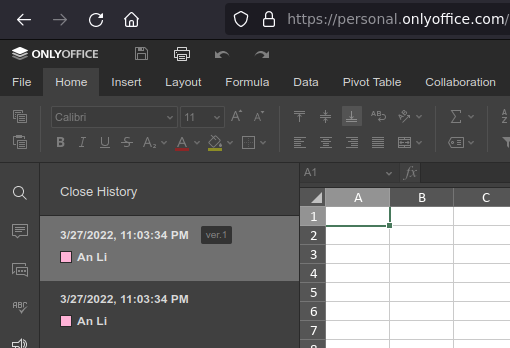
Spreadsheets on Android? #deutsch unten Anyone reading this who has experience with #spreadsheet #alternatives in the cloud? I was specifically looking for a spreadsheet that is designed for use on #Android, but not #Google. For my application It does not particularly need to be in the clouds. So if you know some, an offline app is welcome as well. Especially #FOSS, which means Free and Open Source Software. First I was looking into https://cryptpad.fr as being a zero knowledge service without fixed costs. But it lacked an interface designed for tablet use. Maybe I have overlooked something there. All controls are simply too small and fiddly to use in the browser on the tablet. Yet with this I found #Onlyoffice with a personal license without monetary costs. I took some effort to fill my first document with the data about a week ago, using the browser side app on my desktop. When I opened it for editing on Android today, the document was empty. Back at my desktop in the browser I found the #versionhistory. Fortunately, the second version in the picture is still the version that I had worked up. So now I can continue to work with it. But I am not really happy with the experience. I would be very happy about valuable contributions in the comments! *winkwink* Cheap comments, on the other hand, you are welcome to refrain from. #deutsch Tabellenprogramm auf Android? Hat jemand Erfahrungen mit #Tabellenkalkulation #Alternativen in der Cloud? Ich war speziell auf der Suche nach einer Tabellenkalkulation, die für #Android geeignet ist, aber nicht #Google. Für meine Anwendung muss es nicht unbedingt in der Cloud sein. Wenn Du also etwas weißt, ist auch eine Offline-App willkommen. Insbesondere #FOSS, was für Free and Open Source Software steht. Zunächst habe ich mir https://cryptpad.fr als Zero Knowledge Service ohne Fixkosten angeschaut. Aber es fehlte eine Oberfläche, die für die Nutzung auf Tablets ausgelegt ist. Vielleicht habe ich da etwas übersehen. Alle Bedienelemente sind einfach zu klein und fummelig, um sie im Browser auf dem Tablet zu nutzen. Doch so fand ich #Onlyoffice mit einer persönlichen Lizenz ohne monetäre Kosten. Ich habe mir vor etwa einer Woche die Mühe gemacht, mein erstes Dokument mit Daten zu füllen, und zwar über die App im Browser am Desktop. Als ich es heute auf Android zur Bearbeitung öffnete, war das Dokument leer. Zurück auf meinem Desktop im Browser fand ich den #Versionsverlauf. Glücklicherweise ist die zweite Version im Bild immer noch die Version, die ich ausgearbeitet hatte. Jetzt kann ich also weiter damit arbeiten. Aber so richtig glücklich bin ich mit dieser Erfahrung nicht. Ich würde mich sehr über wertvolle Anregungen in den Kommentaren freuen! *zwinkerzwinker* Billige Kommentare hingegen kannst Du Dir gerne sparen.
No comments yet