Grab one of these graphics cards to up performance in your PC !!
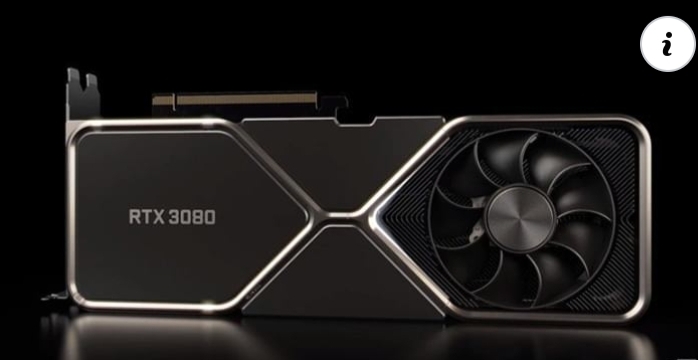
The best graphics card options available today will turn your PC into a bonafide gaming machine. Sure, you can run a PC with nothing but integrated graphics, but for real performance — the kind that nets you smooth frame rates in modern games — you need one of our picks for the best graphics card like the NVIDIA RTX 3080. Also known as the graphics processing unit (GPU), it plays an integral role in your gaming PC, helping out the CPU with a heavy load. If you're wondering exactly where to start, with either a fresh build or an upgrade project, we've collected a number of the best graphics cards available now for several different performance thresholds and budget ranges.
7 Best Graphics Cards in 2020
NVIDIA GeForce RTX 3080 — Best Overall: Next-gen Ampere, ray tracing, DLSS 2.0, power for quality 4K at a reasonable price
NVIDIA GeForce RTX 3090 — Expensive Overkill: Next-gen Ampere, 24GB VRAM, great for designers and developers
NVIDIA GeForce RTX 2070 Super — Runner-Up: Ray tracing, DLSS 2.0, power for 4K or high-end 1440p
AMD Radeon RX 5700 XT — Best AMD: Unreal price-to-performance ratio, power for high-end 1440p gaming
AMD Radeon RX 5600 XT — Best Mid-Range AMD: Excellent value, power for 1080p or 1440p gaming
NVIDIA GeForce RTX 2060 Super — Best Mid-Range NVIDIA: Ray tracing, DLSS 2.0, power for 1080p or 1440p gaming
NVIDIA GeForce GTX 1660 Super — Best Budget: Affordable price, enough performance for modest 1080p gaming
What is the best graphics card for gaming?
The beauty of building a custom gaming PC is that there are plenty of best graphics card options available to you based on budget and required performance. You can mix and match hardware as you please and still end up with a powerful rig. For most people, the NVIDIA GeForce RTX 3080 is going to hit a high-end performance tier and not cost an excessive amount of money like the more powerful overkill options. Cue the NVIDIA RTX 3090, which is the Ampere generation's answer to the RTX Titan, ideal for design and development work through demanding a very high price.
If you're looking to experience 4K PC gaming, the next-gen RTX 3080 will work well, delivering only about 10% less performance than the RTX 3090 for a whole lot less money. If you want to just dabble in 4K gaming but primarily focus on a high-end 1440p experience, the NVIDIA RTX 2070 Super will do good for those on Team Green while the AMD Radeon RX 5700 XT will be attractive for those on Team Red. Keep in mind the next-gen NVIDIA RTX 3070 is also expected in October 2020, and it should shake up the mid-range GPU picks.
There are plenty more best graphics card options out there, whether you're looking at one for gaming, 4K power, or happen to be on a budget. And don't forget to keep an eye out for the latest NVIDIA RTX 30-series GPU releases, which are now beginning to move into top slots. AMD also has its Radeon 6000-series GPUs coming sometime in the not-so-distant future. We will keep you updated on those developments as they come about.
1. NVIDIA GeForce RTX 3080: Best Graphics Card for Most Gamers
Bottom line: Thanks to powerful next-gen Ampere performance and a truly competitive price, the RTX 3080 is an excellent pick for most people. It affords you the ability to choose FHD, QHD, or UHD resolutions at a high frame rate, and it delivers the extra features exclusive to NVIDIA RTX cards like ray tracing and deep-learning super sampling (DLSS) 2.0. It's much faster than the RTX 2080 and even beats out the RTX 2080 Ti in raw performance.
Memory: 10GB GDDR6X | Memory speed: 19Gbps | Memory bus: 320-bit | Boost clock: 1,815MHz | CUDA cores: 8,704 | Process: 8nm | Power: 340W
Manufacturer
Version
Vendor
MSI
Gaming X Trio
See at Amazon
NVIDIA
Founders Edition
$700 at Best Buy
EVGA
XC3 Ultra
See at Amazon
Zotac
Gaming Trinity
$700 at Newegg
We recommend checking out the MSI Gaming X Trio version due to solid all-around performance, style, and cooling.
Pros
Next-gen Ampere performance with 8,704 CUDA cores
AI-enhancements from DLSS 2.0
Compatible with G-Sync displays
Powerful enough for 4K gaming
Outperforms the RTX 2080 and RTX 2080 Ti
Cons
Overkill for some people
There's no one true pick for everyone when it comes to the best graphics card, but if we're choosing what should suit most people based on performance and price, we have to go with NVIDIA's GeForce RTX 3080. While AMD has undoubtedly cut into NVIDIA's claim to the GPU throne with its Radeon RX 5000 cards, a few of which are included in this roundup, the top-tier options still belong to Team Green. The RTX 3080 is the second most powerful GPU in this roundup — next to the RTX 3090 that costs far more money — beating out the RTX 2080 and RTX 2080 Ti.
Not only does the RTX 3080 outperform last-generation GPUs, but it also delivers the extra benefits that make RTX cards so sought after. Ray tracing, the first main feature, isn't as widespread as many people would like it, but it's still available in popular games like Call of Duty: Modern Warfare, Control, Minecraft, and more. And the RTX 3080 still includes dedicated cores for ray tracing.
DLSS 2.0 is perhaps the more impressive feature that comes standard with this GPU. It employs dedicated Tensor cores to run AI rendering in real-time, effectively boosting frame rates while also making frames come out at a much higher resolution. Because ray tracing can be detrimental to performance, DLSS 2.0 is the perfect pairing.
The RTX 3080 has some beefy specs, and it's the right card if you're looking to enjoy smooth 4K gaming at 60 FPS without having to turn down in-game settings. If you want the best PSU for the RTX 3080, NVIDIA recommends at least going with a 750W option. This card is compatible with G-Sync monitors, which have the adaptive sync technology to reduce screen tearing. It will also work with any FreeSync monitors that are "G-Sync compatible." Whether you're looking to game at 4K or 1440p, the RTX 3080 is the new best graphics card for many people.
Unfortunately, this GPU sold out almost immediately after the September 17 launch. Check back often for availability updates, and be sure to visit our guide on where to buy the NVIDIA RTX 3080 for more information on restock notifications. Also have a look at more GPU options in our best NVIDIA RTX 3080 graphics cards roundup.
MSI Gaming X Trio RTX 3080
With stellar 4K and 1440p performance that bests the RTX 2080 and RTX 2080 Ti, the new RTX 3080 is our pick for the best overall GPU for your custom gaming PC. Just make sure it's not overkill for your needs.
See at Amazon
$760 at Newegg
$760 at B&H
Best Graphics Cards in 2020
1. NVIDIA RTX 3080 (From $700)
2. NVIDIA RTX 3090 (From $1,500)
3. NVIDIA RTX 2070 Super (From $500)
4. AMD RX 5700 XT (From $390)
5. AMD RX 5600 XT (From $316)
6. NVIDIA RTX 2060 Super (From $420)
7. NVIDIA GTX 1660 Super (From $265)
Want to turn your plain PC into a powerful gaming PC? You'll want to look at investing in one of our picks for the best graphics card. It's responsible for rendering everything you see on-screen and taking workloads off the CPU when powering through calculations. The last thing you want to do when purchasing a new GPU is to waste your money on an older model or one that's not powerful enough to do what you need. You also don't want to overspend.
There are several questions you need to ask yourself. What kind of games are you playing? Love low-impact indie titles or well-optimized esport games? Or do you wish to take full advantage of current-gen AAA gaming and want to enjoy the best graphics at a 4K resolution? If the answer is the former, you'll need to think about more affordable graphics cards that don't require advanced components to get the most out of the GPU.
As for more demanding games, it's generally down to your budget and what your current PC has in terms of a processor (CPU), RAM, and more. If your PC build is rocking anything less than a recent Intel Core i5 or AMD Ryzen 5 CPU, it's probably not worth forking out on top-of-the-line and most expensive GPU options. You'll most likely experience what is known as a bottleneck, where a separate piece of hardware isn't capable of keeping up with the GPU's ability.
For which resolution and frame rate are you shooting? Entry-level budget GPUs are ideal for 1080p (FHD) gaming, mid-range is best for 1440p (QHD) gaming, and the top-tier options are cut out for 4K (UHD). Of course, you can always drop down to a lower resolution with a top-tier GPU just to get better frame rates, or if you don't want to shell out the cash for a 4K gaming monitor.
How long would you like the GPU to last? Going with a budget option now is going to save you money, but it won't be relevant as long as a mid- or upper-range GPU. If you don't want to replace the GPU any time soon, you will want to spend a bit more now to ensure you can continue playing games as they're released in the next few years. With NVIDIA's RTX 30-series GPUs on the way in the next few weeks, holding off now for the next generation is probably wise.
With all these questions considered, those who need a graphics card now should consider the NVIDIA GeForce RTX 3080. It's our pick for the best graphics card because it hits a sweet spot in terms of performance and price. It's nowhere near as costly as the aging RTX 2080 Ti, yet it bests it in terms of performance across resolutions. If it's not quite what you're looking for, either in terms of price or performance, there are plenty of other great GPU options available.
2. NVIDIA GeForce RTX 3090: Most Powerful, Most Expensive
Bottom line: The RTX 3090 is a physically large GPU, stacking 24GB of GDDR6X VRAM to help handle design and development work. Yes, it can technically game at 8K, but only in certain circumstances. It'll deliver about 10% better performance than the RTX 3080 for 4K gaming, but it also costs more than double the price. This is a card best cut out for professionals or those with money to burn.
Memory: 24GB GDDR6X | Memory speed: 19.5Gbps | Memory bus: 384-bit | Boost clock: 1,785MHz | CUDA cores: 10,496 | Process: 12nm | Power: 370W
Manufacturer
Version
Vendor
MSI
Gaming X Trio
See at Amazon
NVIDIA
Founders Edition
$1,500 at Best Buy
ASUS
TUF Gaming
$1,500 at Newegg
Gigabyte
Eagle OC
$1,500 at B&H
We recommend checking out the MSI Gaming X Trio RTX 3090 thanks to a sharp design and strong performance.
Pros
Absolutely enormous specs
Can game at 8K in certain circumstances
Crushes 4K gaming
Excellent for professional design and dev work
Cons
Very expensive
Not a whole lot better than the RTX 3080 for gaming performance
Physically enormous
NVIDIA's RTX 3090 is a huge card both physically and on paper. It has a whopping 24GB of GDDR6X VRAM and 10,496 CUDA cores, but don't assume that translates to raw gaming power. If you're interested in 4K gaming, you'll likely only see about a 10% increase in performance over the RTX 3080. And don't even think about buying this GPU for 1440p or 1080p; it's just not worth the money.
Considering it's more than double the price of most RTX 3080 cards, this is going to be a piece of hardware reserved for professionals and those with big budgets. Yes, this is the card to kill the expensive RTX Titan, and developers and designers are going to be very interested.
If you are going all-out for one of these cards, be sure it fits into your case and be sure you have a big enough PSU to handle power demands. We've put together a collection with options for the best PSU for RTX 3090 to help you get started.
MSI Gaming X Trio RTX 3090
This massive card is basically the new Titan card branded with a GeForce logo, and for most people, it's going to be overkill. It will, however, be mighty tempting for professional design and development work.
See at Amazon
$1,590 at Newegg
3. NVIDIA GeForce RTX 2070 Super: Killer Performance, Less Expensive
Bottom line: The NVIDIA RTX 2070 Super sits below the RTX 3080 in terms of performance, but also in terms of price. If you're more interested in high-end 1440p experience mixed with casual 4K gaming, the 2070 Super should be a great pick and will save you hundreds of dollars. Just be sure you don't want to hold out for the RTX 3070.
Memory: 8GB GDDR6 | Memory bandwidth: 448GB/s | Memory bus: 256-bit | Base clock: 1,605MHz | Boost clock: 1,770MHz | CUDA cores: 2,560 | Process: 12nm | Power: 215W
Manufacturer
Version
Vendor
NVIDIA
Founders Edition
$500 at Best Buy
EVGA
Black
$548 at Amazon
EVGA
XC Ultra
$580 at Best Buy
ZOTAC
Mini
$591 at Walmart
We recommend the NVIDIA Founders Edition version of the RTX 2070 Super thanks to a stellar price, strong performance, and a slick all-metal design.
Pros
40 dedicated ray-tracing cores
DLSS 2.0 included
Considerably more affordable than our top pick
Delivers quality 4K or 1440p gaming
Nearly matches RTX 2080 power
Cons
Still likely overkill for some people
Expensive compared to similar AMD GPUs
NVIDIA's RTX 2070 Super makes the list of best graphics cards thanks to offering dedicated cores for ray tracing and DLSS 2.0 technologies to help boost your gaming experience. The 2070 Super has 8GB of GDDR6 VRAM and specs that otherwise place its performance near that of the standard RTX 2080.
If you're searching for a GPU that can deliver a quality 4K experience, the RTX 3080 is still a much better choice, though the 2070 Super will allow you to dabble at the higher resolution. Where it really shines, though, is at 1440p. You should be able to max out most modern game settings and still achieve high, smooth frame rates. And thanks to G-Sync technology, pairing the GPU up with a compatible monitor will further reduce any screen tearing.
The fact that the RTX 2070 Super costs hundreds less again than our top pick no doubt makes it quite appealing to many gamers who just don't have as much money to spend on a single piece of hardware in their gaming PC. NVIDIA does recommend at least a 650W PSU to pair with the 2070 Super, so that might be a necessary upgrade. In any case, this is a stellar card for anyone wanting to stick with 1440p and absolutely crush frame rates.
Note that the RTX 3070 is expected to release October 2020, bringing in a performance that rivals the RTX 2080 Ti for about $500. If you're looking for mid-range power, you probably want to wait for the new hardware.
NVIDIA GeForce RTX 2070 Super Founders Edition
It costs considerably less than the RTX 2080 Super, yet it can still deliver 4K and 1440p gaming. Ray tracing and DLSS 2.0 only sweeten the deal, making this a killer card for enthusiasts on a tighter budget.
$500 at Best Buy
$610 at Amazon
$599 at Walmart
4. AMD Radeon RX 5700 XT: Best AMD GPU for 1440p
Bottom line: AMD's Radeon RX 5700 XT is all about delivering high-end 1440p gaming at a great price. It almost matches the RTX 2070 Super in terms of raw performance, but you can often find it for hundreds of dollars less. It will dabble in 4K gaming, though it will truly shine as a more affordable GPU for high-refresh 1440p displays. Be wary that AMD is expected to reveal its next-gen Radeon cards.
Memory: 8GB GDDR6 | Memory bandwidth: 448GB/s | Memory bus: 256-bit | Base clock: 1,670MHz | Boost clock: 1,925MHz | Stream processors: 2,560 | Process: 7nm | Power: 241W
Manufacturer
Version
Vendor
Sapphire
Pulse
$440 at Amazon
XFX
RAW II
$420 at Best Buy
MSI
Mech OC
$390 at Dell
ASUS
ROG Strix OC
$450 at Walmart
Sapphire makes some beautiful graphics cards, and this Pulse version of the RX 5700 XT that we recommend offers all-around good cooling and performance.
Pros
Unreal value
Power for smooth 1440p gaming
FreeSync technology
Efficient 7nm process
Cons
Lacks some NVIDIA RTX features
Performance won't compare to our top pick
AMD's RDNA GPUs with 7nm process were a huge step forward in terms of taking a bite out of NVIDIA's supremacy and also making the older AMD Radeon cards look a bit power-hungry and antiquated. The former AMD boss, the Radeon VII, essentially delivers the same or worse performance compared to the RX 5700 XT, yet it sucks up far more power and costs a lot more dollars. That's a big win for AMD.
The available performance means you will be able to dabble in 4K, though not at a high framerate or with high game settings. The card is intended for use at 1440p, where it will deliver high frame rates in most games with maxed-out settings. And thanks to FreeSync technology, compatible monitors will see far less screen tearing. Do note that AMD recommends a 650W PSU, so an upgrade may be necessary if you're coming from a lesser card. This GPU is also our top pick of the best graphics cards for VR.
Compared to the NVIDIA RTX 2070 Super, the RX 5700 XT can be expected to deliver about the same performance. Unfortunately, the AMD GPUs don't offer the same ray tracing or DLSS 2.0 benefits as NVIDIA cards. If those extra goodies don't matter to you and you'd like to save a good chunk of change, the RX 5700 XT remains one of the best value graphics cards on the market. Just be sure to note that AMD is expected to reveal its 6000-series GPUs shortly.
Sapphire Pulse RX 5700 XT
The RX 5700 XT is a budget-wise performance GPU that genuinely excels at 1440p. It doesn't have all the same features as NVIDIA RTX cards, like ray tracing and DLSS, but it's nevertheless going to deliver a stellar gaming experience.
$440 at Amazon
$430 at Walmart
5. AMD Radeon RX 5600 XT: Mid-Range Power at a Great Price
Bottom line: AMD's RX 5600 XT is the card you're looking for if you want to game at 1080p. The price is enticingly low for what you're getting here, which is a performance to match an NVIDIA RTX 2060. You will be able to game at 1440p at a lower frame rate but stick with 1080p to truly see what this card is all about. Keep in mind AMD is expected to unveil new 6000-series GPUs soon.
Memory: 6GB GDDR6 | Memory bandwidth: 336GB/s | Memory bus: 192-bit | Boost clock: 1,750MHz | Stream processors: 2,304 | Process: 7nm | Power: 160W
Manufacturer
Version
Vendor
Sapphire
Pulse
$323 at Amazon
XFX
RAW II
$320 at Best Buy
Sapphire
Pulse
$316 at Walmart
The Sapphire Pulse version of the RX 5600 XT is our recommended pick thanks to a competitive price, good cooling, and strong performance.
Pros
Budget pricing
Performance for high-end 1080p gaming
Efficient 7nm process
AMD FreeSync technology
Cons
Not as many features as NVIDIA RTX cards
Not suited for 4K gaming
While 1440p and, to a lesser extent, 4K resolutions are becoming more popular for gaming, 1080p remains the standard that ensures you're going to get high frame rates and high game settings at a far more reasonable price. If that's the resolution with which you're comfortable, the AMD RX 5600 XT should be quite appealing.
The RX 5600 XT will be able to handle mid-range 1440p gaming, though the RX 5700 XT will be a much better option if that's the resolution for which you're aiming. Thanks to AMD's FreeSync technology, compatible monitors will be able to take advantage of adaptive sync to reduce screen tearing.
The RX 5600 XT has 6GB of GDDR6 VRAM and a boost clock up to 1,750MHz, making it well cut out to handle an FHD resolution at a high frame rate. This GPU rivals the standard NVIDIA RTX 2060, though it comes in at a lower price. True, it doesn't offer ray tracing, though many people find the RTX 2060 to be lacking enough performance to make a viable run with the technology. And the fact that the RX 5600 XT has a juicy price tag attached should make it quite attractive to many people interested in mid-range power.
Sapphire Pulse RX 5600 XT
For a 1080p gaming experience with high game settings and high frame rates (or mid-range 1440p gaming), the RX 5600 XT should make a great choice that comes at an attractive price.
$323 at Amazon
$316 at Walmart
$335 at Newegg
6. NVIDIA GeForce RTX 2060 Super: Mid-Range GPU with RTX Benefits
Bottom line: Those mostly interested in ultra-tier 1080p or high-end 1440p are going to love the RTX 2060 Super. Anyone who purchased the standard RTX 2060 no doubt wishes they'd waited for this card, which delivers performance around an RTX 2070.
Memory: 8GB GDDR6 | Memory bandwidth: 448GB/s | Memory bus: 256-bit | Boost clock: 1,815MHz | CUDA cores: 2,176 | Process: 12nm | Power: 175W
Manufacturer
Version
Vendor
GIGABYTE
Gaming OC
$560 at Amazon
NVIDIA
Founders Edition
$600 at Amazon
VisionTek
OCPC
$500 at Dell
MSI
Gaming X
$449 at Best Buy
The GIGABYTE Gaming OC version of the RTX 2060 Super is recommended thanks to excellent cooling, high boost clock, customizable RGB, and a competitive price.
Pros
Enough performance for 1080p or 1440p
Ray tracing and DLSS 2.0
NVIDIA G-Sync technology
High memory bandwidth compared to RTX 2060
Cons
Costs more than the AMD RX 5700 XT for lesser performance
Ray tracing better paired with beefier GPUs
The NVIDIA RTX 2060 Super is a significant upgrade over the standard RTX 2060, and no doubt those who rushed out to buy the original 2060 wish they'd waited for the Super version. Performance-wise it sits somewhere near the standard RTX 2070, meaning it has the power to handle a quality 1440p gaming experience. Most AAA games will be able to be played on high or, in some cases, ultra settings without sacrificing frame rates. And if you're working with a 1080p monitor, this card will deliver a smooth, ultra experience no matter the title.
Ray tracing and DLSS 2.0 technologies are included, though if you're really into ray tracing, you still probably want to go with one of the higher-end NVIDIA cards. The 2060 Super will get the job done, but you will sacrifice performance in other areas with it enabled.
There's also the matter of cost. AMD's RX 5700 XT, which performs slightly better, won't have you spending as much money. If it's just raw performance you're after and don't mind the lack of extra NVIDIA RTX features, it's probably the better buy. In any case, the RTX 2060 Super remains an attractive card for those on Team Green who are looking for an introductory GPU for ray tracing and high-quality 1440p gaming.
GIGABYTE Gaming OC RTX 2060 Super
Those who love NVIDIA and its extra RTX features should find the RTX 2060 Super to be a solid introductory card for 1080p or 1440p gaming.
$560 at Amazon
$420 at B&H
$700 at Newegg
7. NVIDIA GeForce GTX 1660 Super: Affordable 1080p Gaming
Bottom line: Any custom PC builders looking to create something budget-friendly should love the NVIDIA GTX 1660 Super. It delivers a smooth 1080p performance and doesn't have an unreasonable price.
Memory: 6GB GDDR6 | Memory bandwidth: 336GB/s | Memory bus: 192-bit | Boost clock: 1,830MHz | CUDA cores: 1,408 | Process: 12nm | Power: 125W
Manufacturer
Version
Vendor
MSI
Gaming X
$265 at Best Buy
VisionTek
OCPC
$300 at Dell
MSI
Ventus XS
$271 at Amazon
Gigabyte
Gaming OC
$285 at Amazon
MSI's Gaming X version of the GTX 1660 Super is recommended due to excellent performance, cooling, and a competitive price.
Pros
Attractive price
NVIDIA Turing architecture
G-Sync technology
Enough performance for smooth 1080p
Cons
Not intended for 1440p
No DLSS 2.0
Not everyone sees a need to game at a higher resolution than 1080p. Displays are more affordable, and fewer pixels generally allows for a much higher frame rate. If you're not looking to overspend on a GPU, NVIDIA's GTX 1660 Super should make a great pick. It's not an RTX card, so it doesn't offer dedicated ray-tracing cores, though a driver update does allow it to technically be compatible. DLSS 2.0 is not supported. It's still based on Turing architecture that makes it relatively power efficient. This GPU also sits atop our list of best cheap graphics cards.
It has 6GB of GDDR6 VRAM (the base GTX 1660 uses GDDR5) and rather high memory bandwidth at 336GB/s, allowing it to edge out even the 8GB version of the AMD RX 5500 XT in terms of raw performance. You're going to see elevated, smooth frame rates at 1080p with pretty much any game, even at high settings.
MSI Gaming X GTX 1660 Super
The NVIDIA GTX 1660 Super is a perfect card for anyone happy with smooth gaming at 1080p. It doesn't offer RTX benefits like dedicated ray-tracing cores and DLSS 2.0, but it's still a great GPU with reliable performance.
$312 at Dell
$265 at Best Buy
$390 at Amazon
What about all the other graphics cards?
There are a ton of other best graphics cards on the market, ranging from deep budget sub-$100 options, best graphics cards for VR, best graphics cards for 4K, and on up to professional-grade cards intended for specialized design and development work. But as far as GPUs cut out for gaming go, these are the cards that make the most sense in terms of performance-to-price ratio.
Graphics cards are generally available from several different manufacturers; performance and specs are generally the same with just slight differences, though the price, cooling, and overall design will differ. No matter your preferred resolution, preferred games, or preferred manufacturers, you're going to find a GPU in this guide that will suit your next fresh PC build or upgrade.
Is it a good time to upgrade your graphics card?
With NVIDIA's latest RTX 30-series GPUs seeing a staggered release, you probably want to hold off on buying a new card right now, at least unless it's the RTX 3080 or RTX 3090. Many people are also undoubtedly looking to offload their old GPUs, meaning you might find one secondhand at a great price.
Just how big of an upgrade are the new RTX 30-series GPUs from NVIDIA? Ampere tech has propelled these GPUs forward in the biggest generational leap, with the RTX 3070 reportedly putting out similar performance to the RTX 2080 Ti. NVIDIA is claiming a price of about $499, which is absolutely nuts considering the price of the 2080 Ti.
Stepping up, the RTX 3080 is an improvement over the RTX 2080, which will put it firmly in a position to handle 4K at 60 FPS. It starts around $700.
Finally, the beastly RTX 3090 is faster than the Titan RTX and is designed to handle 8K gaming at 60 FPS in certain scenarios. However, in terms of raw 4K gaming, it's only about 10% or 11% more powerful than the RTX 3080. Those are nevertheless some big numbers, but with a price around $1,500 it's no doubt not worth it for most people when the RTX 3080 is standing by. Check out our guide on where to buy NVIDIA RTX 30-series graphics cards for further information on release and availability.
Do you need to upgrade graphics cards?
Trying to figure out whether or not it's time to upgrade your GPU can be challenging. Of course, if you're seeing signs that your GPU is dying — screen artifacts, PC crashes, whining — it's no doubt time to upgrade. But if your current GPU is working fine, do you really need something new?
That depends on what types of games you want to play and at what resolution. If you were satisfied with low-impact indie games and built a PC to handle them, you'll no doubt find that your PC struggles to keep up with a hot new AAA title that snagged your eye. The same goes for resolution. If you're upgrading your monitor from 1080p to 1440p or 4K, a new GPU is likely required to make the most of the higher-resolution display.
Whenever a new generation of GPUs is released, the previous generation seems to look disproportionately old. Say, for example, you have an NVIDIA GTX 980 in your PC. It's a great GPU, but it's four generations behind now that the RTX 30-series GPUs are released. Considering RTX 30-series cards are a huge leap forward over even 20-series cards, an upgrade is no doubt looking quite tempting.
Finally, you don't want to upgrade your GPU if you can't also afford to upgrade the rest of your PC components to keep up. Buying an AMD RX 5700 XT GPU and installing it alongside 8GB of RAM and a 4th Gen Intel Core i5 CPU is not going to allow the GPU to realize its full potential. Plus, you might not have a large enough PSU unit to provide enough power to your system, or the cooling system might not be beefy enough to keep the PC running optimally. Always be sure you can upgrade sufficient to avoid bottlenecking the system.
How to check what PC hardware you already have
Whenever you look at investing in a new component for your PC, it's good practice to run a piece of software to have a gander at what you have already. This will help determine just how recent other components are and whether or not they will become a bottleneck for your upcoming GPU purchase. To have a look at what makes everything tick inside the PC case, there are many software options available; CPU-Z, and Speccy are two we would recommend.
These apps will tell you what motherboard you have, as well as CPU, RAM, and other bits and pieces. We'll mainly need to see what CPU you have, and a good measurement to use to determine how good your CPU will be with a new GPU purchase is 3DMark. The higher the 3DMark score, the better a CPU generally is in gaming and other intensive applications. It shouldn't be used as a definitive value, but the 3DMark score of a specific chip will give you an idea as to how powerful it is.
As well as the score, one should also consider the age of the processor, the generation it's part of, the manufacturing process used, the cooler installed, whether or not it's overclocked, and how many cores you're rocking. Intel has its ARK platform available for conveniently searching its portfolio of CPUs. If you're on #TeamRed, AMD has a similar feature on its own website.
How to choose a display resolution for PC gaming
If you're building a new PC from the ground up, you might be wondering for which resolution to aim. There are plenty of great gaming monitors in 1080p, 1440p, and 4K, so it can be tough to choose. What you need to consider is price, fidelity, and the power of the PC hardware you're interested in including.
A 1080p gaming monitor will generally cost the least, but will still include a high refresh rate and low response time, both of which are features gamers search out. It's not going to look as crisp as 1440p or 4K, but it will also take quite a bit less power to run games at a high frame rate. You're going to be able to get away with a lower-tier GPU and CPU, saving you more money.
Bumping things up to 1440p is going to make everything look better. Once you've made the switch to QHD, dropping back down to 1080p is noticeable. The issue with 1440p, however, is that monitors generally cost more, plus you're going to want beefier hardware to achieve high frame rates. The better the GPU and CPU, the better performance you will see at 1440p. Even the high-end RTX 2070 Super and RX 5700 XT that can dabble with 4K will do much better running with a 1440p display.
And finally, we have 4K. It's a rather big jump, even from 1440p, and you should have top-tier hardware to get the most of it. 4K displays are expensive, so buying one and pairing it with a subpar PC is not advised. Even with a high-end GPU and CPU, don't expect frame rates to get anywhere near what you can achieve at 1080p and 1440p.
Credits — The team that worked on this guide
Cale Hunt is a staff writer at Windows Central. He focuses mainly on PC, laptop, and accessory coverage, as well as the emerging world of VR. He is an avid PC gamer and multi-platform user and spends most of his time either tinkering with or writing about tech.
Rich Edmonds is a staff reviewer at Windows Central, which means he tests out more software and hardware than he cares to remember. Joining Mobile Nations in 2010, you can usually find him inside a PC case tinkering around when not at a screen fighting with Grammarly to use British words.