Minimalism
Life is short, so why waste it being distracted? This is the basic principal of minimalism -- don't let clutter distract form living your best life.
Every person has their own ideals (goals, hobbies, etc). The nature of ideals puts them above everything else, but yet it seems common for our actions to veer from our intentions. Why is this?
In the era of ever increasing supply of goods, distracting technology; cheap gizmos and gadgets; as well as constant pressure via advertising to consume more, it is no surprise our actions don't match, or are even juxtaposed to our ideals.
Minimalism is a gateway to a distraction free life. No more waiting for tomorrow,you can tackle your problems today.
Clutter
Minimalism means different things to different people, but the core principal remains the same; remove clutter, bring back focus.
The concept of clutter varies from person to person. An artists definition of what clutter is will be different from a software developers definition of clutter. The artist, and software developer have different ideals (goals), and these differing goals help determine what is clutter.
This concept of what is clutter and what isn't clutter can be applied outside of professions. For example, If your goal is to read a book, but each time you try to read you find that your phone rings, dings, or vibrates -- leaving you distracted from reading -- then in that moment your phone is acting as clutter.
Decluttering
If clutter keeps us from focusing, how does one stop clutter? By simply decluttering.
Decluttering is a two step process; identify what is clutter, then remove it. The process is simple enough, but a lot of emotional pain can be attached to acting upon decluttering, particularly with step two.
It might seem strange, even silly that for some decluttering can be painful, but this pain can be felt for a variety of reasons. People can wrap up a lot of emotion, and pride in objects. Objects can represent status, safety, memories, and even ones aspirations. When even just one of these emotions is tethered to an object, it becomes vastly more difficult to detach from it.
For those who struggle with object attachment and still want to declutter, you can always start small. Look for clutter that has no importance to you, the type that has been sitting around for years unattended. This could be clothes from your childhood, old phones you keep stashing in a dresser drawer after each mobile upgrade, notes from classes you are no longer taking, and so on.
Remember, if you find something brings joy or value, and it isn't acting as clutter, then don't throw it out! Minimalism isn't about trashing everything in sight.
Future
Once you start to declutter and you feel your stresses beginning to go, it's time to make a promise to yourself. No more thoughtless purchases. Before you make your next purchase ask yourself these three simple questions.
- Why do I need this good?
- Can I borrow this good from someone I know?
- Will this good fill a practical need, or just act as clutter?
You can apply those three questions to any purchase. Answering honestly you will quickly decipher what is needed in your life, and what is an impulse buy resulting in future clutter.
Keeping yourself away from impulse buying is just as important as decluttering. The less future clutter you purchase -- the less you have to think about decluttering -- the more you can focus on your ideals.
Summary
Each person has ideals, but unfortunately many are distracted from achieving their ideals. Clutter is distracting from what would fulfil us most, yet we keep accumulating more -- just one more purchase and I'll be happy. It never works.
If feelings of distraction, anxiousness, and lack of satisfaction plague you, consider if these pains come from the objects in your life, or the objects you dream of owning. Will buying newer and "better" goods truly bring you joy?
Minimalism asks us, "Life is short, so why waste it being distracted?"
Well, what is your answer to minimalism?
Virtual Planets, Power by Ethereum Blockchain
Virtual assets, like weapons in a video game, have long been finite. Owning these weapons has not been possible for users since they depend on a central server to allow access to them. The ramifications of this are actually quite significant especially in gaming. When you play a game and collect, trade, and purchase in game goods (items) it will feel as if you own the items you have earned, the unfortunate truth is you don't.
Consider these scenario, what happens if the game you are playing shuts down, goes offline for a bit, or bans your account. In all of those cases your access to your items is compromised -- at best temporarily, at words indefinitely. Also, consider what happens when a hacker gains access to your game account. It would be trivial for them to take everything you have earned, bought, and laboured for.
Lets look at how this differs with items being stored on a blockchain. No longer is the a games server shutting down, having downtime, or you being banned a risk factor. Even without access the game you will still have access to your items, and could even trade/sell them as normal. In the example of your account getting hacked, your items should still remain safe. A hacker when trying to steal your hard earned items would need to verify the transaction on your wallet -- which should not be tethered to the game's server.
As you can see, with blockchain we have enabled true ownership of virtual assets, users are no longer beholden to server admins. Somewhat unsurprisingly brilliant minds have already put these ideas of decentralized virtual asset ownership into practice.
0xUniverese
"0xUniverse is powered by the Ethereum blockchain. This tech guarantees you indisputable ownership over the planets you’ve conquered – even if the developers get hit by a meteorite."
0xUniverse is a game set in the 22nd century where interstellar travel has become a reality. Cosmic expansion has been deemed a necessity, and to speed up the process the United Earth Government decided to pass law that gives ownership to those who discover new planets. https://0xuniverse.com/
In 0xUniverse you will be playing as a discoverer in search of unique and collectible virtual planets to learn the secrets of the 0xUniverse. Planets in 0xUniverse can be bought and sold to fuel your next astronomic expedition. The Ethereum blockchain is what powers ownership on 0xUniverse insuring users that they own their planets, and rockets.
https://www.youtube.com/watch?v=QDSaNrAbo5g
Planets come in 4 different varieties, common, rare, epic, and legendary. Common being the least rare/valuable, and legendary being extremely rare and valuable. Planets provide valuable resources that will need to create and launch ships. Each launch is high risk, high reward, you never know if you will find the next legendary planet, or lose your ship to the difficulties of space travel.
Prospectors
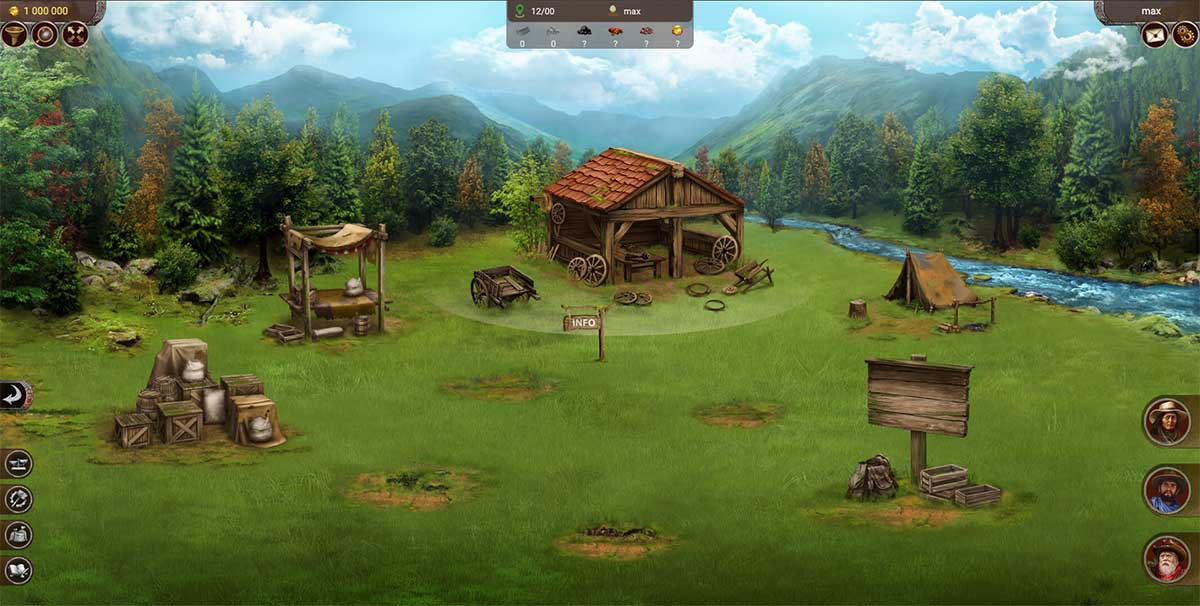
"Prospectors is the first of its kind MMO dapp, economic strategy, and crypto game, where you can find your own way and reach your goals. This blockchain dapp will let you try yourself in business development during the Gold Rush Epoque and building your social network."
Prospectors started a new game genre known as MMORTES (Massive Multiplayer Online Real Time Economic Strategy). Economy is such an essential part of Prospectors that you could probably get away with call Prospectors an economic simulation rather than a game. With that said the economy, and economic incentives are what make Prospectors strategic, rewarding, and fun then it would be otherwise. The EOS blockchain is what powers ownership in prospectors, giving in game items actually value, and use. https://prospectors.io/
Prospectors is all about resources and it's players are the ones in charge of harvesting, converting, and exchanging the lands resources. As a prospector you will be trying to harvest resources such as coal, iron, clay, wood, stone, and gold. These resources drive the economy, and are essential for trade, crafting, building, even hiring workers. The free market between prospectors is essential; it allows any resource rich prospector to pay new prospector for work. As a prospector earns more wealth they can begin to fill unique rolls, like hiring others to mine ore, and setting up shop to build the tools needed for mining.
https://www.youtube.com/watch?v=sZKLUxQtj7A
As you can see the economy is what Prospectors game play revolves around. Without everyone working together resources would be much more difficult to obtain as well as profit from -- supply and demand.
Cryptovoxels
"Cryptovoxels is a virtual world powered by the Ethereum blockchain. Players can buy land and build stores and art galleries. Editing tools, avatars, text chat and voice chat are built in."
Cryptovoxels is a creative sandbox with similarities to Minecraft. Land ownership is powered by the Ethereum blockchain so users have true ownership over their plots. Upon plots can be built, art, digital store fronts, social spaces (music centers, chat spaces), and much more. https://www.cryptovoxels.com/
Cryptovoxels doesn't have any essential goals, making it more about social experiences like creating, sharing, and exploring. The lack of a goal gives Cryptovoxels a similar charm to early releases of Minecraft, but with a twist of decentralized ownership.
https://www.youtube.com/watch?v=PMAkpeyWGWA
When watching the trailer you will likely notice that most of Cryptovoxels is just white blocks. Color in Cryptovoxels is an token asset called COLR, you can purchase COLR and use it to make what you build more vibrant. A further explanation of COLR tokens can be found in this article by Ben Nolan (the founder and lead Cryptovoxels developer). https://medium.com/@bnolan/blue-skies-and-colr-1b86ee534d2d
As Cryptovoxels develops I'll be interesting in watch the directions it is taken, the possibilities are open.
Summary
Blockchain gaming is still infantile, but as the examples above demonstrate it provides game developers and maybe more importantly users with unique opportunities. Virtual asset ownership is now a reality, and that provides an opening for all kinds of interesting things. For example, because of blockchain technology, virtual assets are no longer dependent on one game, and could be used across many.
With blockchain technology now in the hands of game developers it is only a matter of time before we see massively decentralized games become mainstream. Blockchain has the potential to revolutionize the gaming industry, developers just need to find the right key to unlock it.
Minecraft and Blockchain Adoption (Enjin Coin)
The first article in this now two part series covered how Minecraft and Bitcoin were created around the same time and began gaining notoriety in tandem. This left the two destined to cross paths, and that is exactly what ended up happening. Some early Minecraft servers, like the previously mentioned BitVegas, and BitQuest, adopted Bitcoin economies providing a totally unique Minecraft experience and a wonderful early demonstration of the future of programmable money. https://read.cash/@Polydot/minecraft-and-bitcoin-cash-adoption-6caa44ff
Rather than continuing to look towards the past lets take a look at present involvement of blockchain and Minecraft. As well as some future speculation on blockchain integration in games.
Enjin Coin
The previously mentioned BitVegas and BitQuest provided quite the experience for Minecraft players. Many hadn't experienced Bitcoin, and were awed by the fact that you could earn it in one virtual economy, spend it in any other virtual economy, or even spend it on physical goods and services.
Enjin Coin takes this idea much further by allowing tokenized assets. Put simply a tokenized asset means you can store any virtual asset on the Enjin blockchain, giving users true control over these assets that they earn in various games.
For example, imagine you earned a piece of armour in an Enjin supported Minecraft server from slaying a monster; that armour would get recorded on the Enjin blockchain, and is then accessible by your Enjin wallet. Even without you ever being involved again with the server you earned your armour from, you will still have access to your armour. Remember, it is on the Enjin blockchain, not any one server. This also implies that just as Bitcoin can be bought and sold across economies, our armour can also be bought and sold across economies, all without a servers permission.
To further how detethering for servers benefits users lets imagine that the Minecraft server your got your armour on shuts down. No doubt the closure of the server is a shame, but all hope is not lost as another server with a new host is soon created. This new server chooses to support the items your earned from the previous server. Thus the armour you earned still has use and value.
The simple overview above has hopefully got you interested in Enjin. I didn't go into detail about what Enjin has to offer, so if you want more checkout the video below.
https://www.youtube.com/watch?v=OCeg_i782f0
Also, here is a video of a Minecraft Server with Enjin integration.
https://www.youtube.com/watch?v=jAhsKTYp9Xk
Minecraft Alternatives
Yes, building upon Minecraft is a great way to spread awareness for blockchain technology, however in Minecraft you are limited in your level of creative freedom since it is proprietary software.
With that said, Minecraft is moddable -- i.e. it allows some aspects to be changed -- which gives uses more creative freedom than many games. In fact modding is part of what gave Minecraft broad appeal and replay-ability, but modding will only get you so far. To achieve better blockchain integration in Minecraft the code would need to be open-sourced. Unfortunately this doesn't seem likely to happen anytime soon. https://en.wikipedia.org/wiki/Open-source_model
All hope is not lost, some open-source Minecraft alternatives do exist.
Minetest
Minetest is considered a open-source voxel game engine. The engine is indeed to be a base for anyone to play or build their own voxel based game upon. Minetest also supports modding, which provides an easy ways for users to tailor their experiences. Multiplayer is also supported, so your games, mods, and worlds can be a shared experience. https://www.minetest.net/
TrueCraft
TrueCraft is an open-source implementation of Minecraft beta 1.7.3. It's github page provides us with the following clean and concise explanation of TrueCraft. https://github.com/ddevault/TrueCraft
"A completely clean-room implementation of Minecraft beta 1.7.3 (circa September 2011). No decompiled code has been used in the development of this software. This is an implementation - not a clone. TrueCraft is compatible with Minecraft beta 1.7.3 clients and servers."
The Point
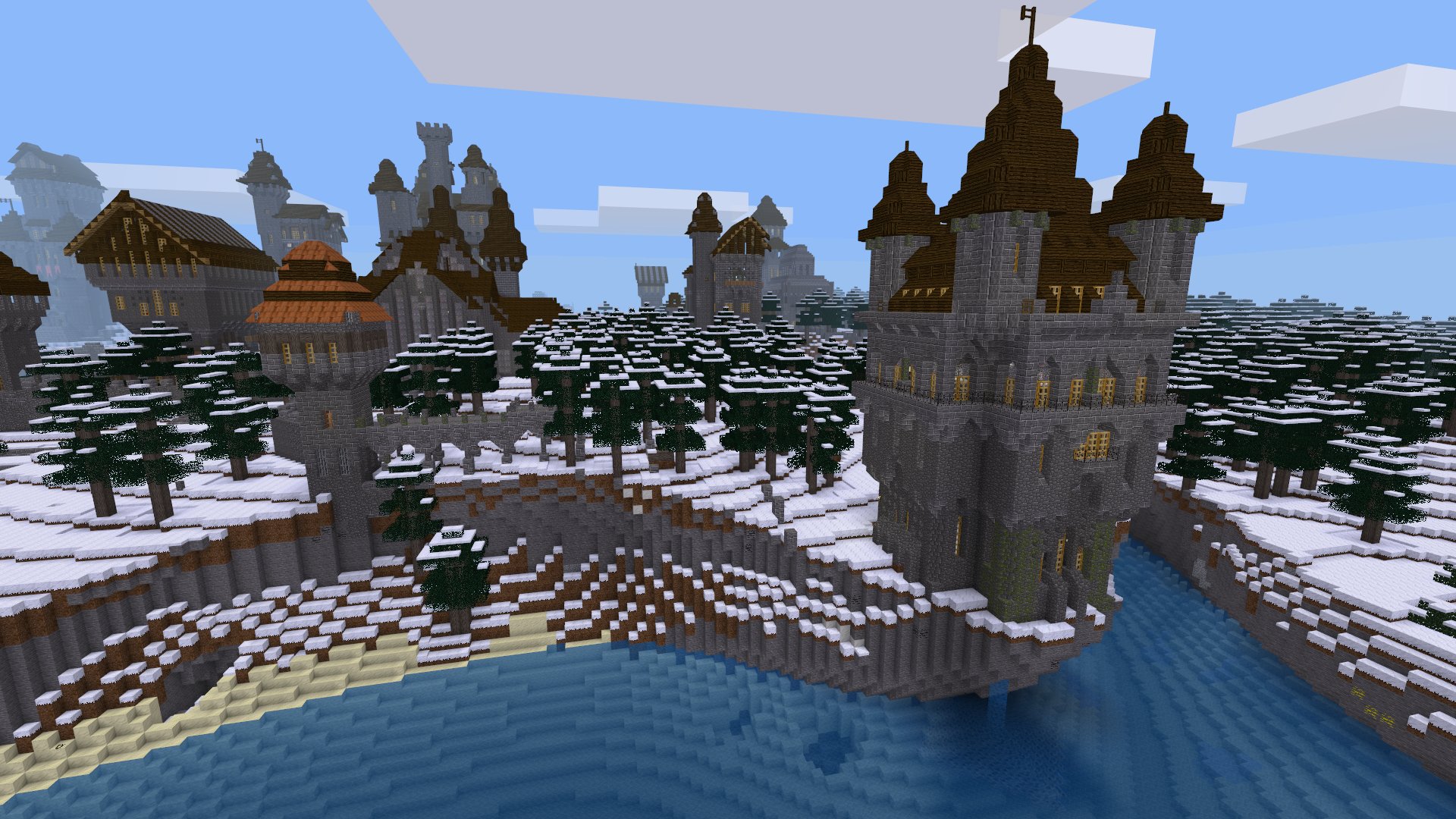
Minecraft has been a fantastic gateway for a new audience to discover what a game economy powered by blockchain can be like. The problem is that Minecraft can only be taken so far with it's proprietary source code.
Open-source Minecraft alternatives like Minetest, and Truecraft are just asking to be integrated with Enjin, and other great blockchain tech. A Minecraft esque virtual world with deep blockchain integration allowing for true ownership, free trade, and unique social experiences might be just around the corner, only time will tell.

Read.cash Community: Leave a Comment, Share an Article.
This is a short bit about read.cash and Bitcoin Cash community growth.
I have been using read.cash for over a week now and have published 5 articles -- not including this one -- covering fairly unique topics. These articles are, for the most part, vastly different content to what most people are publishing on read.cash, and this vast difference is what I want to talk about.
Growth
As I'm sure everyone has noticed the majority of read.cash articles revolve around Bitcoin Cash (BCH), and general crypto news. This is of course not a bad thing, and it is to be expected since read.cash is a platform using BCH for upvotes. That said, all this BCH/crypto tailored content does beg the question, wouldn't a wider range of content attract new read.cash, and Bitcoin Cash users? I think it can safely be said that it would.
If unique content does attract new users, then it would be greatly beneficial for read.cash users to have more interaction with articles of varying topics. This could be the simple act of leaving a comment, subscribing to a user you like, or tipping an author. These three simple interactions will show new read.cash viewers and users that read.cash is a platform for anyone looking to share interesting content -- as long as it follows the rules of course. :) https://read.cash/@Read.Cash/what-is-readcash-7b0bfcfc#what-can-i-publish-on-readcash
An action read.cash users can take that might be more beneficial than comments, subscriptions, and tips combined is to share read.cash articles. What better way to spread adoption than showing someone quality content on a topic that someone is interested in. Combine that quality article, with it having a few comments, etc, and you have the recipe for platform adoption.
To possibly take this one step further you could even share a read.cash community full of content that someone is interested in. Communities are just getting started, so supporting them is crucial to help read.cash grow and share in a diverse range of interesting topics.
Wrap Up
I'll leave my thoughts at that, as I don't want this running on too long. It will be interesting to see some other opinions and tips/suggestions for read.cash, and BCH growth.

World Map, Firefox, and Gaming, With Only Text.
I recently wrote an article on web applications that could be ran using the cURL command inside of your terminal. It was a unique take on how to get some basic information -- news, weather, cryptocurrency prices, and more -- without using a browser, or specifically tailored applications. Now I'm going slightly the opposite direction and showing you a few text based Terminal applications that can do some amazingly powerful, interactive, and modern tasks. https://read.cash/@Polydot/minimal-web-applications-and-the-curl-command-36addcb6
MapSCII
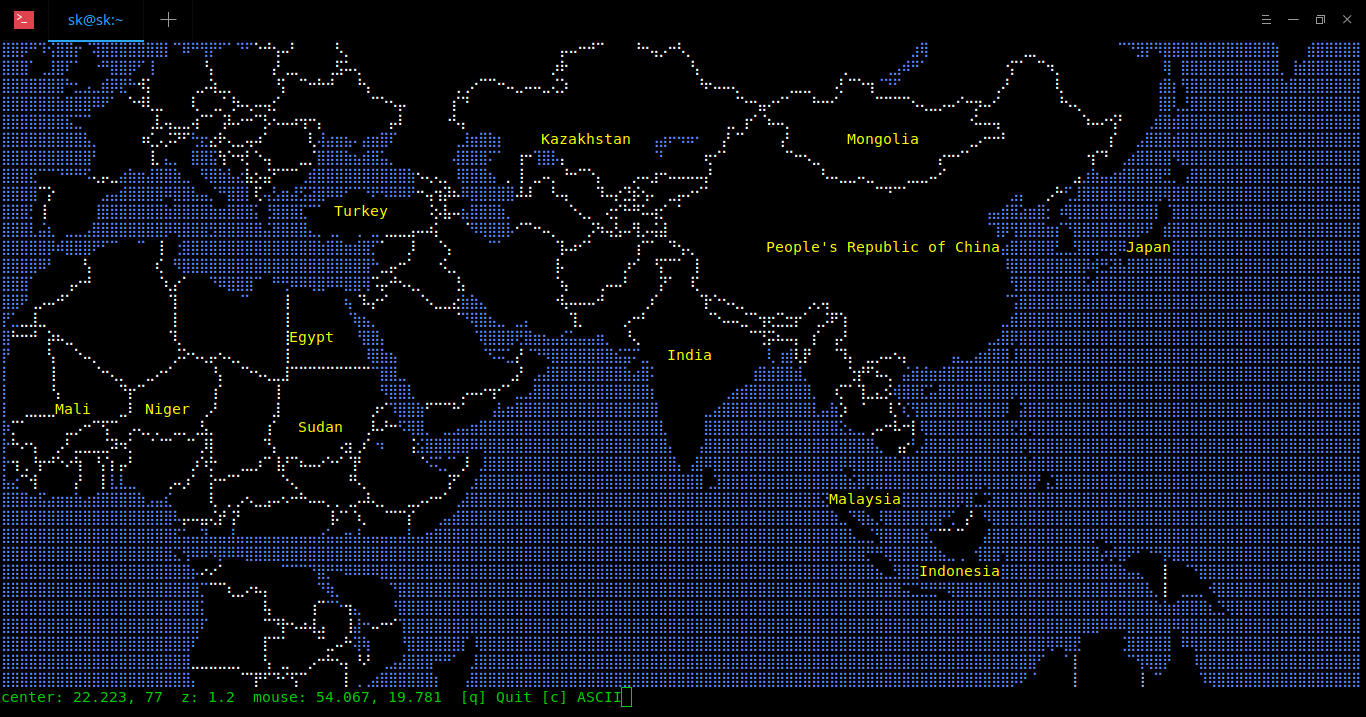
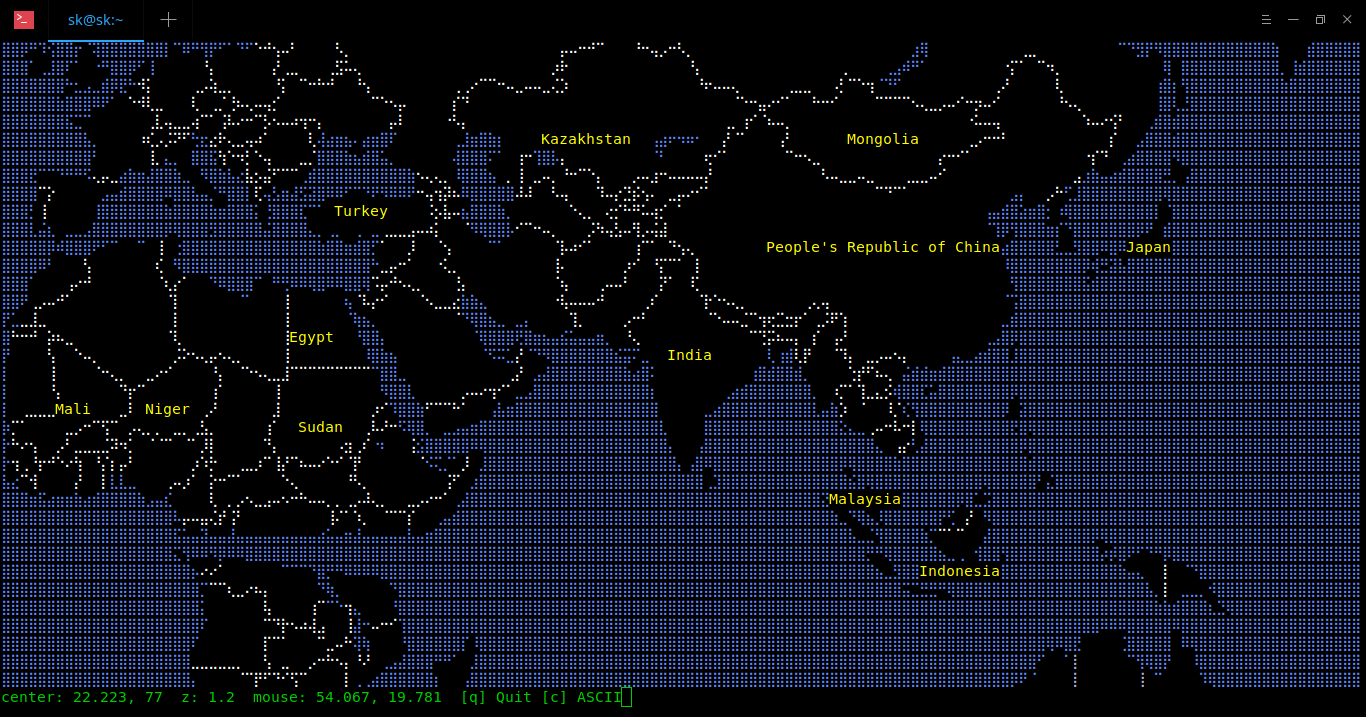
When I first tried out MapSCII I was honestly shocked. Never had I thought that a world map with the ability to zoom all the way down to a street level view would be something that ran well, and looked good in a terminal. I was dead wrong.
MapSCII can be accessed through the TELNET protocol, using the `telnet` command on Linux, MacOS, and probably, Windows.
`$ telnet mapscii.me`
The `telnet` command gives us interactive communication with another host using the TELNET protocol. This is a great way to try out MapSCII, but for a cleaner and quicker experience you should download MapSCII from github. https://github.com/rastapasta/mapscii
Browsh
As it turns out you can run a modified Firefox web browser inside of your Terminal without sacrificing much web fidelity. As is stated on the browsh homepage "It renders anything that a modern browser can; HTML5, CSS3, JS, video and even WebGL". If the server isn't clogged you can even try out a remote browsh instance ran through SSH. Remove access is going to be much slower than running browsh natively, especially since SSH isn't the quickest protocol. https://www.brow.sh/
`$ ssh brow.sh`
Browsh was designed to be a fully featured web browser for users with low bandwidth. Almost all terminal browsers have little to no Javascript Support, so browsh fills quite a large gap in user experience.
The most lacking part of browsh is it's ability to render images and videos clearly. They still have enough fidelity to get the gist across, and if you want to you can always load images and videos in external players -- VLC, MPV, et cetera.
Curse of War
Gaming in the Terminal is often quite lackluster, but their are always exceptions to the rule. Curse of War is a fantastic Real Time Strategy (RTS) game, that runs inside of your terminal. Unlike other RTS Curse of War takes a slightly different approach to gameplay, rather than managing units you focus on high level planning. This includes building infrastructure, securing resource, and managing your army.
Curse of War can be played against AI, or other players -- yes it is multi player. Check out the Curse of War website for more information, on how to install and play the game. Once installed run it like any other terminal application, and have a blast playing. http://a-nikolaev.github.io/curseofwar/
`$ curseofwar`
Summary
MapSCII, Browsh, and Curse of War are all three unique and well designed applications that make expert use of a terminals limited graphical capabilities. Although many might find the terminal antiquated it's simplicity is part of the charm.
Github Links
Browsh https://github.com/browsh-org/browsh
MapSCII https://github.com/rastapasta/mapscii
Curse of War https://github.com/a-nikolaev/curseofwar/
Minecraft and Bitcoin Cash Adoption
Minecraft is a sandbox adventure game that was released in 2009 and shortly after it began to take the world by storm. Eventually Minecraft reached the status of best-selling video game, a title which it has held since. 2009 also marks the release year of Bitcoin, similarly starting it's journey into mainstream attention. Eventually these two future successes collided making what could have been, and still could be, a great medium for driving crypto adoption. https://en.wikipedia.org/wiki/List_of_best-selling_video_games
BitVegas
BitVegas was a Minecraft gambling server that took place in a 6 story casino. Players could gamble Bitcoins (BTC) across multiple different games, such as Bacon Racing (horse racing but with pigs), Roulette, a Drinking Game, and many more. BitVegas also happened to be one of the most generous faucets of it's time, with 0.002 BTC per hour being given to visitors -- gambler or not. https://en.bitcoin.it/wiki/BitVegas
While a Bitcoin based casino at the time was not a new idea, building one that was vastly more social and utilized the already thriving Minecraft community was not only a new idea, but a genius one.
https://www.youtube.com/watch?v=HjWD4O2zsQI
I can say first hand having played on BitVegas shortly before it was defunct that the social experience of an 3d interactive casino still sticks vividly in my mind. It was a great time for both me and friends, even when we were doing nothing more than watching other people gamble with mixed results. BitVegas met an early demise due to an exploit in a widely used Minecraft server software called CraftBukkit. This exploit allowed for anyone to login to BitVegas as anyone else, leading the majority of user wallets being drained, with a resulting loss of 7 BTC about $1000 USD (US Dollar) at the time, and around $56,350 in USD today.
BitQuest
BitQuest took a very different approach to what Bitcoin was being used for in a Minecraft server. For the most part BitQuest functioned similarly to your average server providing the users with the ability to buy and sell items, kill monsters to earn rewards, and claim land. The main difference being it had an BTC driven economy. Slaying monsters could earn you some BTC, then that BTC could be used to purchase in game items, land, etc. To buy a 16x16 plot of land you needed to spend some BTC, but only about 1 cents worth. Buying items could be done through the in game market, or through other BitQuest players. https://github.com/bitquest/bitquest https://github.com/bitquest/bitquest/wiki/Claiming-Land https://github.com/bitquest/bitquest/wiki/The-Market
I only played BitQuest for a short time, this had nothing to do with BitQuest rather my own dwindling interesting in playing Minecraft. Still for that short time I got to play I felt much the same enjoyment as I had found myself getting from BitVegas. Being able to earn a digital currency in one economy that could be used to further that economy or spent elsewhere is quite the thrill. Not only that, it was a social environment shared by similarly interested peoples, and many newbies who just happened to stumble upon BitQuest -- or BitVegas.
Note: BitQuest seems to be defunct at the time of writing this, but the plugin used to make the server function is open-source. https://github.com/bitquest/bitquest
Summary
If BitVegas and BitQuest were to exist today they would no doubt still garner attention, especially if kept fresh with new content. A key difference would be the Block-Chain technology in use, likely it would be Bitcoin Cash (BCH) or something with similar speed, and low fees. Maybe Enjin Coin would be used to tokenize in game items allowing them to be sold and shared across Minecraft servers, or even other platforms.
Games are a great way to help adoption by showing the power and purpose of programmable money. What better video game to help do it than Minecraft, since after all, it is one of the most popular games in the world.


Command-Line Efficiency: Optimizing your Workflow
Ah yes, the joyous command-line interface, a friend among the tech savvy, and often a feared entity by computer novices. While those who work in tech usually know better, average people likely have seen the command-line interface associated with hacking. This is no doubt thanks in part to the way Hollywood films portray "hackers" furiously typing away inside their command-lines while command outputs flash down their terminals, I digress.
Note: Terminals and command-line interfaces (cli) are different things that work together, in short the cli is the part that takes input from a user and outputs it in the terminal.
Realistically command-lines are far more often used for simple tasks such as text editing, emailing, or browsing files, in an efficient fashion. You can even do basic web browsing in the command-line, though it is somewhat limited, nevertheless it is neat and worth checking out. With that in mind we will be diving into how to make your everyday cli usage more efficient, and all around less annoying. https://read.cash/@Polydot/minimal-web-applications-and-the-curl-command-4bc2f614
Aliases
Setting up an alias to be called inside your command-line will vary depending on what shell you have. I'm going to be making the assumption that you are using the Bash shell since it is quite universal in all Linux based operating systems. If you have no idea what shell you are using then open up a terminal and print it out with the following command.
$ echo "$SHELL"
The output should say "/bin/bash", if it doesn't don't worry, you can probably make aliases in whatever shell you are using, the syntax will just be a little different, but that isn't anything a quick web search can't solve. You could also change your shell to the Bash shell if you are so inclined.
To make your first alias in the Bash shell, open up your '.bashrc' file in your home folder (~) with whatever editor you like, I'm using Vim.
$ vim ~/.bashrc
Once the file is open jump to the bottom and add this line. Then save and quit back to your terminal.
alias c="cd"
That is your first alias, we are simply mapping (aliasing) `c` to be the `cd` command inside when ran from the cli. To make these changes take effect you will need to reload your bashrc, this can be done with the following command.
$ . ~/.bashrc
Now run any normal `cd` command by only typing `c` followed by it's parameters. The following example is me moving back one directory.
$ c ..
How simple was that? There isn't much to making aliases but nevertheless you can get a lot of bang for your buck. I'll list a few more simple aliases to get your imagination started.
alias reload=". ~/.bashrc" # Reload your bashrc
alias diff="diff --color" # Always use diff with color
alias t="touch" # Shorthand for touch
alias mv="mv -i" # Prompt before file overwrite
alias cp="cp -i" # Prompt before file overwrite
alias rm="rm -I --preserve-root" # No root delete, warn when removing 3+ files
Shell
Shells in short are interactive programming languages. A very literal example of a shell being a interactive programming language is the python shell. In the previous "Aliases" section of this article I mentioned the Bash shell. Bash is a more traditional shell that provides a simple language for executing programs, writing programs, and combining programs; as well as extra features like the aforementioned aliases. https://www.tutorialsteacher.com/python/python-interective-shell
It is worth starting with a little history, Bash was first released in 1989, it was intended to be a free and open source replacement for the "Bourne Shell", hints Bash being short for "Bourne Again Shell". Since then Bash's prominence has exploded and it has become the default shell on many operating systems. This includes versions of macOS, and most Linux distributions.
Now that we know what we are dealing with lets take a look at configuring our Bash shell.
Start by opening the bashrc file like previously shown, this file will be the hub for configuration. Depending on your operating system this file may already have some defaults, to avoid breaking anything, you can always backup the bashrc by saving a copy of the current bashrc file and calling it bashrc.old.
$ cp ~/.bashrc ~/.bashrc.old
With a backup file made it is safe to go ahead and start making changes to our bashrc file. We are going to get started by toggling some parameters to make our cli use more pleasant and efficient.
shopt -s autocd # Cd into directory with only it's name
shopt -s dirspell # Correct spelling errors
shopt -s cdspell # Also correct spelling errors
Using the `shopt` command followed by `-s` flag (`shopt -s`) we are able to enable different shell options. Now if we reload our bashrc with the previously mentioned command -- or the alias we previously made -- then these changes will take effect.
$ . ~/.bashrc
To test the enabled autocd functionality you should be able to type a directory name and hit the return key to change directories (this is without using `cd` or the `c` alias). With Bash's dirspell and cdspell enabled Bash will be able to fix spelling errors when you tab complete a command -- yes you can hit tab to auto fill in partial commands, folder names, etc.
Here are a few more shell options I like to toggle on.
shopt -s histappend # Append to history file
shopt -s cmdhist # Save multi-line command as one line
shopt -s checkwinsize # Commands fit to window
To get a list of possible bash shell options (shopts) you can run the following command, this command also tells you if the option is toggled on or off.
$ bash -O
Another set of configuration parameters exists inside of Bash, but are not Bash specific. Having two sets of options comes down to Bash's history of being a replacement for the "Bourne Shell". Options accessed through `shopt` came later as additions to Bash, but options accessed through `set` are "Bourne Shell" options. To access a list of these "Bourne Shell" options you just run the previous command but with a lowercase flag.
$ bash -o
Two options that might be of interest to lovers of Emacs or Vim, are the corresponding emacs and vi mode. Both provide some standard functionality of their respective editor, I'm personally a big fan of vi mode in my shell. Setting these legacy options is almost the same, but with the difference being you use the `set` command, followed by a `-o` flag (`set -o`).
set -o vi
Once I reload my configuration file I have access to Vim's normal and insert mode. You can swap between them with the standard keys of **i** and **Esc**. Vi mode is pretty feature rich, so as a Vim user it sure beats standard cli navigation.
Summary
One final tip, if you would like to separate out your aliases from your other Bash configurations you can make an alias file. Separating your bashrc file from a Bash alias file allows for quicker and cleaner configuration. To use an alias file first create one inside your home directory.
$ touch ~/.bash_aliases
Then place the Bash `if` statement below into the bottom of your bashrc,
if [ -f ~/.bash_aliases ]; then
. ~/.bash_aliases
fi
Now any alias you create can be added and read from the bash_aliases file -- be sure to reload the bashrc configuration file each edit. Separation like this is wonderful, especially when you get a lot of aliases, or Bash configurations.
Even with just these small tweaks we have improved our ability to perform tasks in an efficient and customizable fashion. You can take all these configurations much further and may want to do so depending on the kind of workflow you are aiming for. I would even recommend writing custom shell scripts for automating common repetitive tasks -- like extracting files or compiling programs -- but explaining shell scripting is out of the scope of this tutorial.
Veteran and novice alike, implementing some of these basic quality of life changes will make everyday tasks vastly more enjoyable. As we all know when you actually enjoy what you do, you'll do it a lot more, so get to optimizing your workflow.

10 Ethical Ways To Fund Your Open-source Project
Funding for open-source projects has for years been a conundrum for many free software developers and advocates. My initial inquiry about open-source funding came from wondering how a game developer could fund open-source game projects while remaining competitive to the potential profits of proprietary releases. Quickly this inquiry grew into a more general list of possible methods of funding all kinds of open-source projects, and luckily many successful examples of these alternative funding methods already exist.
To avoid any confusion I'm going to frame these methods of funding under the following ethics.
No spying on the user (advertising, data mining, etc.)
No compromising of a products functionality (**[1]**AdBlock Plus)
No source code obfuscation
No obfuscation on compiling the program
No restrictive license on what is done with the source code
With these general guidelines out of the way lets get into this list of 10 ethical ways to fund your open-source projects.
One Time Donations
Every open-source project should provide it's supporters an option for one time donations. One time donations are one of the best low effort ways to begin getting financial support from dedicated users. More than likely accepting one time donations will not provide you with a sustainable income, however it can still be a great boost when combined with other revenue sources.
Patrons
Patrons have long been around to support starving artists, and modern platforms like Librapay, the soon to be defunct Bitbacker and Patreon have made great strides with taking patronage into the digital age. When a developer or a project is able to build long term financial support it provides a level of sustainability and security, allowing better focus on actual development. A premiere example of this kind of revenue model working for open-source is the Godot game engine. Currently boasting 1,145 patrons, with a total income of $11,469 a month. https://liberapay.com/ https://bitbacker.io/ https://www.patreon.com/
Selling Support
This revenue model consists of selling technical support, setup, consulting, and much more. Essentially you build a paid ecosystem around supporting and maintaining a piece of open-source software. Red Hat comes to mind as a pioneer in this field having been a consistently profitable company for the last 16+ years. Red Hat got it's roots in selling support for it's Linux distribution Red Hat Linux, but now they have all kinds of products in a broad range of categories from middleware to storage.
Closed Assets
Keeping license restricted assets for valid purchasers of software is a great way to have an open-source project while being able earn revenue from sales. The closed asset model is particularly well suited for game development, as generally games have a large amount of assets, such as art, music, and sound effects. This approach was popularized by John Carmack, a founder of id Software, and is seen in many of id Software's game releases, including the ever popular Doom and Quake series, which still garner sales to this day. https://github.com/id-Software/DOOM https://github.com/id-Software/Quake
Hardware Sales
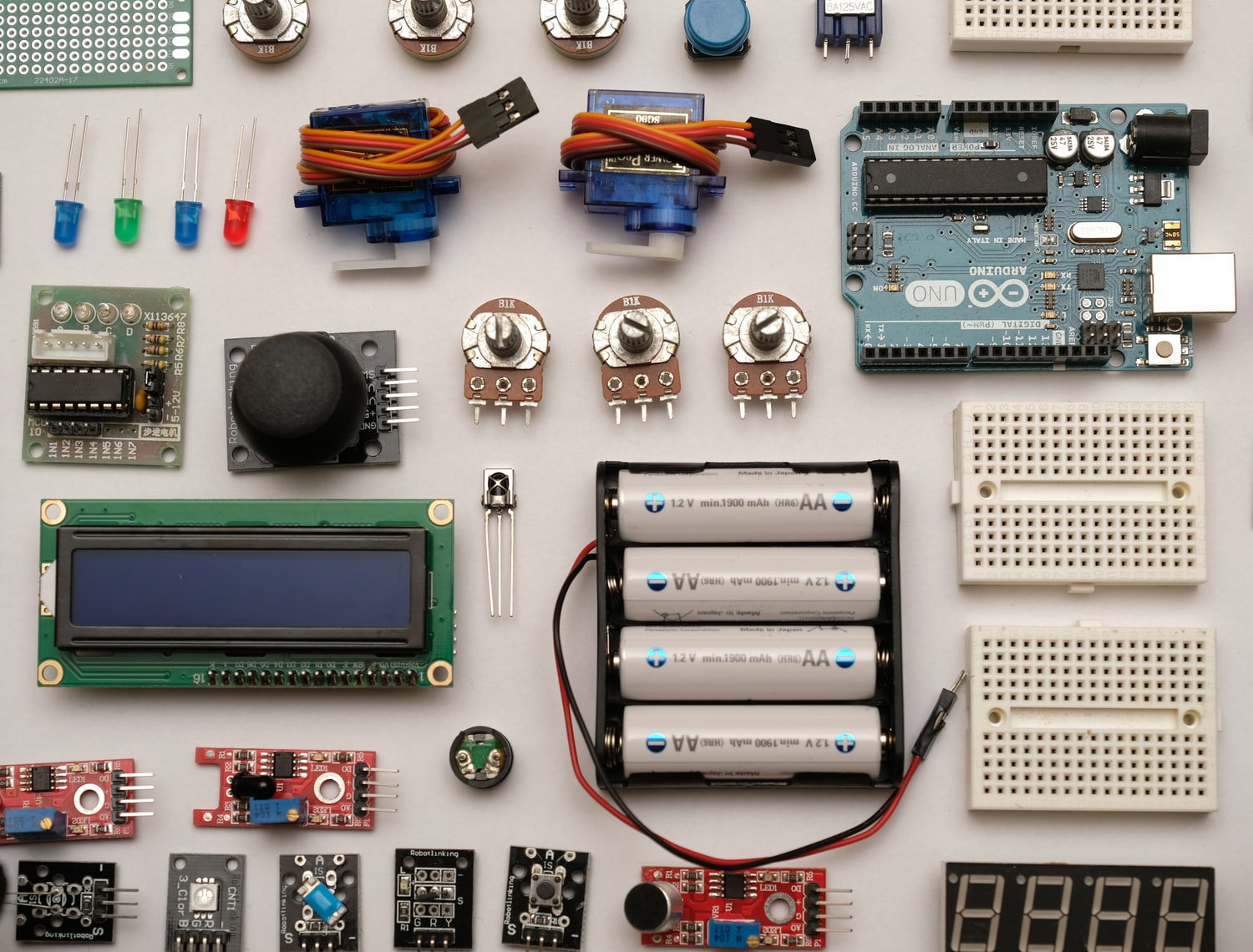
Depending on the type of open-source project you are creating one possible avenue for profit is selling hardware. This model could work for a wide variety of **[2]**projects, including operating systems (Pop! OS), VoIP/telephony (Digium), and robotics (ROS). A great example of open-source hardware succeeding is the company Adafruit. Adafruit has it's roots selling DIY kits for creating open-source hardware, and software projects. A personal favourite example of the hardware model is Arduboy, an Arduino based handheld game console; it's seriously awesome. https://system76.com/specials https://www.digium.com/products https://www.ros.org/ https://www.adafruit.com/ https://arduboy.com/ https://www.arduino.cc/
Corporate Sponsors
If an open-source project manages to grow large enough and have decent infrastructure built around it, then corporate sponsorship opens up as a means of revenue. In the space of corporate sponsorship Linux dominates with hundreds of sponsors. Though Linux dominates it isn't alone in the realm of corporate sponsorship; a few more sponsored projects are Apache, and OSGeo. Generally sponsorship is renewed yearly providing more sustainability then an income model like one time donations. https://www.linuxfoundation.org/membership/members/ https://www.apache.org/foundation/thanks.html https://www.osgeo.org/sponsors/
Crowdfunding
With modern sites like Kickstarter, Gofundme, Indiegogo, and Bountysource, giving your open-source projects a jump start with crowdfunding has never been easier. Crowdfunding is a great way to get a large chunk of income all in one go, hopefully completely funding a development goal or the completion of your project. If you set your crowdfunding goals correctly -- and manage to achieve them -- then for most smaller projects crowdfunding alone can be enough to get by. For large projects, or ones with continuous maintenance crowdfunding is still a great way to get a kick-start, or at least fund a few development goals. Depending on the project an Initial Coin Offering might be the best way to crowdfund, and might even work toward helping users obtaining assets for an open-source project such as a card game -- I touch on this more in the "Merchandise and Resources" section. Don't forget you can combine crowdfunding with other sources of income. Here are a few projects who had success crowdfunding, Niryo One, La Frite, Beehives, Nybble Robotic Kitten. https://www.kickstarter.com/ https://www.gofundme.com/ https://www.indiegogo.com/ https://www.bountysource.com/signin https://www.kickstarter.com/projects/librecomputer/la-frite-open-source-fries https://www.kickstarter.com/projects/niryo/niryo-one-an-open-source-6-axis-robotic-arm-just-f https://www.indiegogo.com/projects/open-source-beehives https://www.indiegogo.com/projects/nybble-world-s-cutest-open-source-robotic-kitten
Grants
A fairly common way of funding an open-source project is through grants. Government and university grants are two income options that some open-source projects have had success with; of course results will greatly vary depending on your government or university. You can also get grants from other sources, such as these open-source projects that are giving grants to help out smaller open-source development, Mozilla's grant program, open-source Grants initiative of the Travis Foundation. https://www.mozilla.org/en-US/grants/ https://foundation.travis-ci.org/grants
Direction Incentives
A model for for funding open-source I have never seen utilized -- but would likely have great success -- is direction incentives. What are direction incentives? In short direction incentives are a list of potential additions to a project that users put money towards, and ones with the most funding are prioritized. This could work in a multitude of ways, but in terms of game development a few examples are, what dungeon gets made next, what set of items are worked on, what new character is added, etc. Another way to explain direction incentives is polling user opinion based on financial support.
A project likely wouldn't want direction incentives to rule all of development as this could lead to loss of control, ignoring core development, neglecting bug fixes, etc. Thus it is up to a project manager to maintain balance and not make direction incentives too ludicrous.
Merchandise and Resources
If done cleverly, selling merchandise could be quite a decent option for making revenue from open-source projects. For example, if a project had a lovable **[3]**mascot then to bolster sales that mascot could be put on all kinds of merchandise. That said generally most projects just use merchandise as a way to spread the word, and potentially provide a little extra income. A few projects selling merchandise that come to mind are ElementaryOS, Wikipedia, Free Software Foundation, and Docker. https://elementary.io/store/ https://store.wikimedia.org/ https://shop.fsf.org/ https://www.cafepress.com/docker
Along the same vein as merchandise you could also sell external resources; such as tutorials, I could see this providing some revenue for an open-source game engine. The tutorials could come with assets as well to further the incentive.
With an open-source game buying and selling assets could be a integral part of gameplay. This idea is particularly suited to card games, for example Spells of Genesis. One problem is that selling of in game assets is a grey area when it comes to my initial rule of "No compromising of a products functionality". https://spellsofgenesis.com/
Summary
Traditional methods of selling software don't thrive as well in the world of open-source, but that doesn't mean profit is impossible. With some creativity and a little elbow grease competing with proprietary sales isn't impossible; in fact, it has been done many times. Some previously mentioned projects have even seen unparalleled success likely because of taking an alternative route to their competitors.
Also, it is worth remembering that the 10 methods of generating revenue from an open-source project listed above can be combined in a multitude of ways to further increase profitability.
Get creative, profiting from open-source isn't a one trick pony, don't be afraid to think outside the box.
Footnotes
**[1]** AdBlock Plus gets paid by Google for letting whitelisted Acceptable Ads bypassing the browser ad remover. https://www.techsupportalert.com/content/how-block-ads-adblock-plus-paid-whitelist.htm
**[2]** Hardware can also be designed and sold for an existing open-source project, with the proper license or owners permission. Arduboy is quite a good example it makes use of the already existing open-source Arduino electronics platform. https://arduboy.com/ https://www.arduino.cc/
**[3]** Checkout these mascots for different computing projects, many of them are for open-source projects -- do a word search for "open-source". https://en.wikipedia.org/wiki/List_of_computing_mascots

Minimal Web Applications and the Curl Command
The modern web has changed vastly since it's original incarnation and release in 1991. For the most part, the days of simple webpages with only text, hyperlinks, and a bit of styling are over, while the era of large, interactive, and often invasive webapps has arrived in full force.
Thankfully all the simplistic whimsicality that comes with the early days of the web haven't gone away completely. In fact a new incarnation seems to have come about in the form of what I'm calling curlable webapps or capps for short. Now, what exactly is a curlable webapp? Well, in short capps are no more than using the cURL command on a target URL which serves content intended to be displayed in a terminal.
Capps are probably best understood with an example, so go ahead and open up a terminal, and run the following command -- you can also visit wttr.in in any web browser, graphical or otherwise. If you are using Microsoft Windows then cURL might need to be installed or ran through a Linux virtual machine.
`$ curl wttr.in`
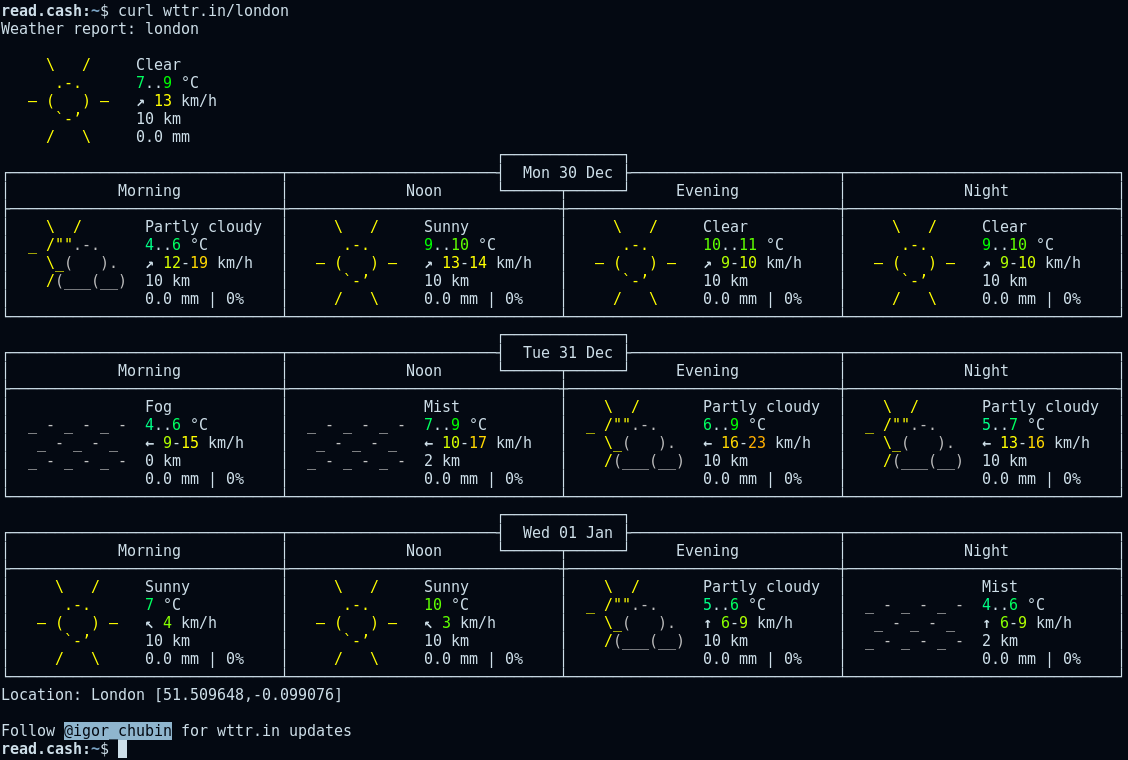
Voilà, right inside of your terminal you have access to an ASCII art weather report based on your current geolocation, all without running anything more than the `curl` command. Pretty neat huh? Well, it gets better, when using cURL on wttr.in with a specific URL paths we can gets lots of different information. As seen in the examples below, I am able to check the weather in London, the phase of the moon, and even wttr.in's help page. http://wttr.in/
`$ curl wttr.in/London`
`$ curl wttr.in/Moon`
`$ curl wttr.in/:help`
Many more amazing capps exist, some are quite useful, some are quite useless. Lets take a look at a handful of them that fall into the useful category, and maybe at the end we will have a look at a few that are more for amusement than anything else.
Cheat Sheets
Remembering every command-line tool as well as all of its associated options is quite the daunting task, even the best of the best will undoubtedly forget tidbits here and there. While a manual command called `man` exits on most Linux distributions, it doesn't always provide great examples. You could also google for answers, but that isn't quite as fast since you have to open up a browser. This is where cheat.sh comes in handy, combine it with curl and you have an accessible cheat sheet right in your command-line whenever one is needed. http://cheat.sh/
`$ curl cheat.sh/ls`
`$ curl cheat.sh/tar`
`$ curl cheat.sh/vim`
`$ curl cheat.sh/:help`
QR Codes
One of my favorite capps is this nifty little QR code generator, found at qrenco.de. Qrenco.de takes any input and generates a QR code from it. http://qrenco.de/
`$ curl qrenco.de/how`
`$ curl qrenco.de/amazing`
The above commands will generate unique QR codes from the path of "how" and another QR code from the path "amazing". As far as I'm aware qrenco.de doesn't provide the ability to change the size of a QR code, which is unfortunate, but no deal breaker. You can also `curl qrenco.de` without any parameters to get it's help page.
Dictionary
Something I find myself doing frequently is looking up definitions for words. Being able to use cURL and get a dictionary definition without installing a dictionary application, or opening a web browser is quite a time saver. Here is how it works.
`$ curl dict://dict.org/d:internet`
`$ curl dict://dict.org/d:website`
I used cURL to get the definition for the words "internet" and "website", from dict.org. You might notice something funny about the syntax in relation to our previous examples, particularly the "dict://" protocol is specified. As it turns out cURL does more than just use the hypertext (HTTP and HTTPS) protocols, in the example above we are using the dictionary (DICT) protocol.
While you can specify a protocol it generally won't be required, for example the same dict.org commands work with no "dict://" protocol specification.
`$ curl dict.org/d:internet`
`$ curl dict.org/d:website`
Also, a note of convenience, a lot of cURL commands can be aliased in your shell to make using them more like normal command-line applications. For example in my '.bashrc' file I have an alias for the dictionary capp used in the above examples.
`alias dict="curl dict://dict.org/d:$1"`
With this set I can run the previous dictionary searches for "internet" and "website" like so.
`$ dict internet`
`$ dict website`
Now our command is much easier to use and remember, as an added bonus it also functions like other command-line applications. For more on aliases checkout my article on command-line efficiency (I'll update this when it is published).
Cryptocurrency Prices
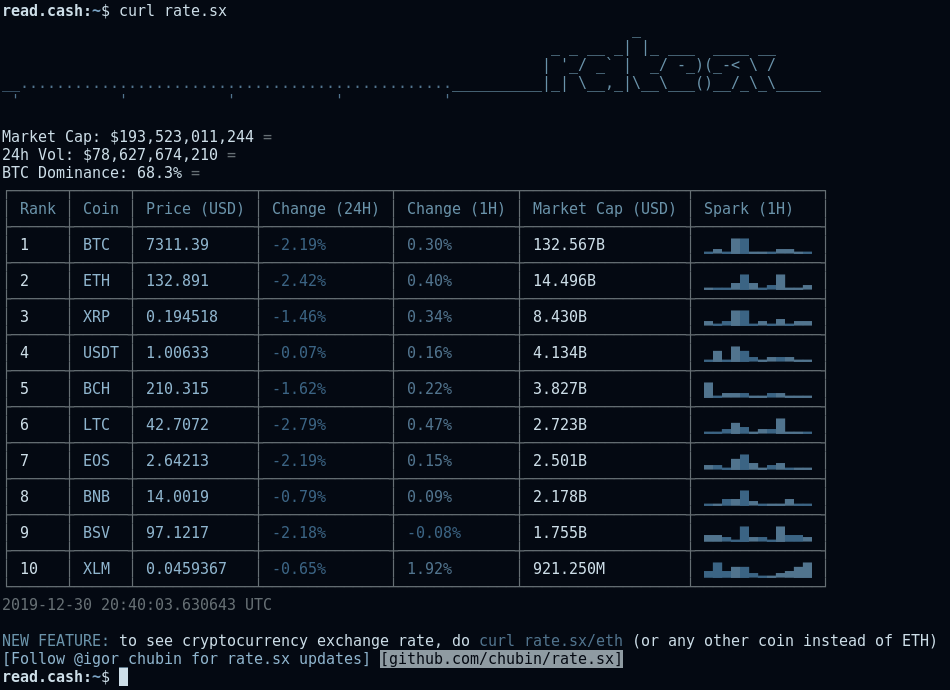
Anyone familiar with cryptocurrency knows the feeling of constantly wanting to check prices. A few capps have this urge covered, the best of the lot being rate.sx, which not only shows a general top 10 chart, but allows for specifying coins. http://rate.sx/
`$ curl rate.sx`
`$ curl rate.sx/btc`
`$ curl rate.sx/eth`
Another option is cmc.rjldev.com. Unfortunately it is lacking in features -- at least as far as I am aware -- such as not having any special option for filtering currencies. In the example below I pipe the large output of the curl command into `less -r` this is done to let you start at the top of the chart: the `less` command is often useful when combined with capps. http://cmc.rjldev.com/
`$ curl cmc.rjldev.com | less -r`
Shorten URL
You could install an application to shorten your URLs or maybe use some website filled with slow Javascript, but why do that when you can just use cURL.
`$ curl -F'shorten=https://youtube.com' https://0x0.st`
`$ curl -F'shorten=https://google.com' https://0x0.st`
When you run the above commands they will make a shortened URL for accessing youtube.com and google.com respectively. Like the example I provided in the dictionary section, this capp is much better when set to a shell alias. When aliased to "shorturl" the examples below would perform the same function of shortening URLs as the above examples, but with a more compact and rememberable syntax.
`$ shorturl https://youtube.com`
`$ shorturl https://google.com`
News
A personal favorite example of the possibilities with capps is getnews.tech. While it isn't as flashy as some of the other apps, it is an example of quite an important web use case. https://github.com/omgimanerd/getnews.tech
`$ curl getnews.tech`
`$ curl getnews.tech/trump`
`$ curl getnews.tech/world+cup`
`$ curl getnews.tech/trump | less -r`
Essentially, getnews.tech provides related articles to words provided in the URLs path. An additional feature that would make getnews.tech more useful is the addition of opening specific articles after doing general searches.
Less Practical Capps
Lets look at a few more capps that are less practical, but still neat.
Parrot.live is a demonstration of animation, which hasn't been seen in any of the previously listed capps. https://github.com/hugomd/parrot.live
`$ curl parrot.live`
Whatthecommit.com is supposed to be used when doing a git commit, as it picks the commit message for you. It shouldn't need to be said -- though I'll say it anyway -- using these commit messages is a terrible idea, especially in important projects. https://whatthecommit.com/index.txt
`$ curl -sk https://whatthecommit.com/index.txt`
`$ git commit -m $(curl -sk https://whatthecommit.com/index.txt)`
Ping.gg has some practical use cases, the only problem is most of the time you can use pre-installed commands to do exact same thing that ping.gg accomplishes. It just doesn't seem worth going through a third party (ping.gg), nevertheless checkout the examples below. https://ping.gg/
`$ curl ping.gg`
`$ curl ping.gg/me@example.org/104.28.13.51`
Summary
Capps will never be a drop in replacement for the modern web, but they do offer many benefits, the foremost being speed. For command-line aficionados capps might actually be a great way to access some basic content like the weather, crypto prices, et cetera.
The current state of capps is more akin to some neat party tricks to show your friends, but it obviously doesn't have to be that way. The ecosystem for capps is still infantile, but the potential is quite obvious at this point, we just need creative ideas, and powerful implementations. With that said, now we wait, or create.
 @Polydot