 @Monolith
edited
@Monolith
edited
Protect your keys offline with zero expenses.
YOU DOWNLOADED A CRYPTO WALLET. Next, you're given some safe words (or 'seed phrase'); you're the sole owner of any funds deposited there, now and always. But in fact, many things can later go wrong. It is crucial you start with the right foot by **protecting your keys** best you can, against theft, software failures, hardware failures, and any kind of eventualities. Here I show you a simple method that will not require spending a penny. 🛠️ What you'll need: A working internet connection. Desktop or Portable Computer. An old USB Flash Drive (of any capacity).
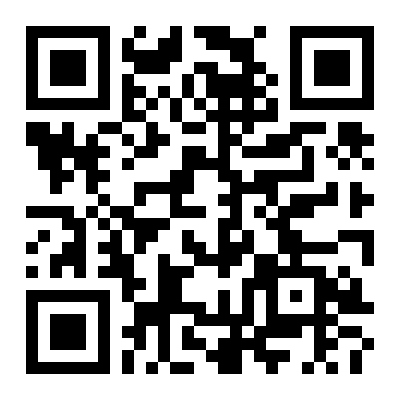
Step 1 Open your **Notepad** and write down your *seed phrase*. Now save the text file somewhere easily accessible. Step 2 Find yourself a good QR generator. For this example we use https://www.the-qrcode-generator.com/ but it could be even better if you install one on your phone, and if you're feeling paranoic, disable the network while creating the QR. Copy your *seed phrase* (words MUST be consecutive, separated by single space), and paste it under "Free Text" Select an picture size that isn't very small, 400 × 400 px will do. Save the image file (.PNG) near your text file. Name both files so that you'll easily recognize which funds they grant access to, for example "SafePal Wallet".
Step 3 You need **WinRAR** for the next step. If you don't have it installed, download the newest version in your own language from RarLab. https://www.rarlab.com/download.htm If you're not familiar with this application here's a quick guide to get you started. https://openrarfile.net/quick_guide.html Select both files in your computer –the text file and the generated QR– with your cursor and right click on any. Choose 'Add to File...'
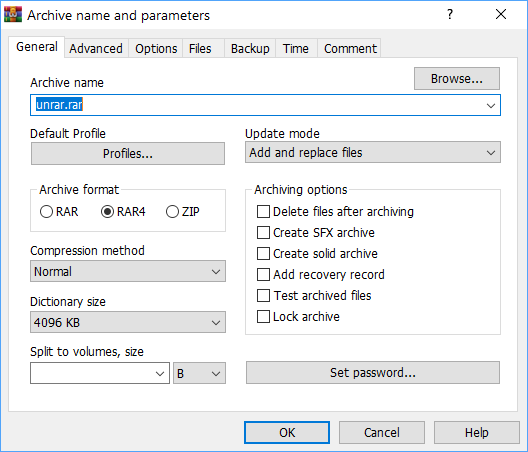
From the dialog (above picture) check 'Delete Files after archiving', 'Add recovery record' and Set a password. Choose an strong password that you won't forget. When setting your password also select: **Encode the file names**. Leave the rest of the options by default and click "OK".
Now just copy your resulting compressed file to a Flash Drive you're not using. It doesn't matter which size, brand or speed your drive is, but is a good idea to have a couple of these for **extra offline copies.** DONE! Whenever you need your keys back, just plug in the USB, open the RAR file and copy the text in the text file, or scan the QR with your phone, depending on your needs. `Hint` You can also print the QR in a piece of paper and put this sheet somewhere safe. Hope you find it useful. Let us know how you guard your keys offline. Also don't forget to Like and Subscribe.

↗️ Twitter ↗️ Telegram ↗️ **Surf all our posts** https://twitter.com/thelithtoken https://telegram.me/lithtoken https://read.cash/@Monolith/monolith-masterbook-3262fc6b

18 comments
Oh, this is a great information that is passed telling us the real truth. Thanks so much for sharing
No problem, as you find it useful. Or just saying that to get more bonus? 🙃
I learned a lot from this article, but can I use mobile phone if I don't have any laptop?
Yes is a possibility. You can effectively find an app to compress and password protect your keys. Then store them in a microsd card (or flash drive, if your device supports USB OTG), or online on your favorite cloud drive.
Alright bro this is really a big help! I can now protect my keys.
it's interesting to convert all the seed phrases to a QR code, but sometimes i imagine what would happen in a EMP apocalypse, will the internet and crypto networks still be alive? or we're all toast hahaha🍞😅. crypto millions, all gone. 😅💸.
Haha. Of course if in the event of apocalypse and internet dying won't we any use for cryptocurrencies or whatsoever. Nor fiat currencies. We will be back to trade one another with life valuable things like medicine and food.
indeed, it's back to bartering society. or maybe some bottlecaps would do as a token? lol 😆 (fallout game reference)
We will be saving some bottlecaps just in case.
haha, cheers then 🥂. this made my day a 'lil better. 👍
Nicely done dear.. I didn’t know that kind of information. It will help me a lots. Thank you dear
Very educating thanks a lot
Thanks for sharing. Really enlightening
Thank you so Much for sharing this artical
As always giving useful information to facilitate many things ... And to think that I do not trust many things and copy all the seeds in my diary by hand hahaha sometimes I go crazy looking but this is a very good way to keep them safe! Thank you 👏🏻👏🏻
In the event case scenario your cat scratch some diary pages, then what?
It will be a grilled cat with french fries lol
I tried, and it works fine.