9 Signs You Suffer from Low Self-Esteem (and How to Fix It)
Self-esteem is our personal opinion of ourselves and how we value ourselves. It shapes how we view the world and how others see us.
It is one of, if not the most common psychological disorders in this day and age. It's hardly surprising considering the culture we live in. We are constantly bombarded with messages that tell us we're not good enough, attractive, or worthy of love or respect. This constant barrage means that low self-esteem could be one of your biggest problems – regardless of whether it's a matter of low self-worth or a deep-seated feeling that no one sees you as “good enough”.
With low self-esteem, it's easy for a person to believe his or her flaws are more important than their successes.
Low self-esteem is a worrying issue that can affect any individual's life in many different ways. It can result in various problems in relationships, work and school, and even in your health. To prevent low self-esteem from getting worse you need to learn how to recognize its signs and how to overcome them.
*Read more:* *Low Self-esteem explained - Causes and Effects* https://read.cash/@Lixten/the-dangers-of-low-self-esteem-5d4c75e7
Low self-esteem can manifest in many ways, including:
Viewing yourself as inferior to others or not good enough.
Avoiding social situations or activities due to fear of judgement or rejection.
Putting yourself down frequently or making negative comparisons to others.
Feeling unworthy or undeserving of love, success, or happiness.
Struggles with making decisions due to lack of confidence in your abilities.
Being afraid to take risks
Needing approval from others
Trouble accepting compliments
Feeling guilty or ashamed all the time
If you identify with any of these signs, it may be indicative of low self-esteem. Thankfully, there are things you can do to overcome this issue. By increasing your self-awareness, practicing self-compassion, and setting healthy boundaries, you can start to boost your self-esteem and feel better about yourself.
Overcoming low self-esteem: Tips and strategies
If you're struggling with low self-esteem, know that you're not alone. Millions of people deal with this issue every day. The good news is that there are things you can do to overcome low self-esteem. Here are some tips:
#1: **Spend time with people who make you feel good about yourself**. Surround yourself with positive people who will build you up, not tear you down.
#2: **Be mindful of your thinking**. Pay attention to the negative thoughts running through your head and challenge them. Why do you believe these things? Are they really true?
#3: **Do something that scares you**. Push yourself out of your comfort zone and do something that scares you. This could be anything from giving a presentation at work to skydiving.
#4: **Celebrate your accomplishments**. Big or small, take time to celebrate your accomplishments. This will help you start seeing yourself in a positive light.
#5: **Seek professional help**. If you're struggling to overcome low self-esteem on your own, seek professional help from a therapist or counselor. They can provide guidance and support as you work to improve your self-esteem.
In conclusion:
Self-esteem is an important part of our overall feelings about ourselves. Too little and we might feel inadequate to handle what life brings our way, whereas too much could lead to an unhealthy degree of arrogance. In the end, we need to find a balance that allows us to feel comfortable with who we are at any given moment.
You may also like to read about the dangers of low self-esteem. https://read.cash/@Lixten/the-dangers-of-low-self-esteem-5d4c75e7
The Dangers of Low Self-Esteem
Low self-esteem is a lack of confidence in oneself and is often characterized by negative thoughts and feelings about oneself. People with low self-esteem often compare themselves unfavorably to others and may feel that they are not good enough or worthy of love, respect, and success. Low self-esteem can lead to a negative feedback loop where people believe that they are not capable of achieving their goals, which leads to more negative thoughts and feelings, further reducing their ability to achieve their goals. This can lead to a downward spiral that becomes increasingly difficult to escape.
Low self-esteem can have a significant impact on every aspect of a person's life, including their relationships, work, and mental and physical health
Low self-esteem can be caused by many things, including bullying, abuse, trauma, or negative messages from parents or society. It is also common in people with mental health conditions such as anxiety and depression.
There are many ways to overcome low self-esteem. therapy, self-help groups, and positive thinking are all effective methods. It is important to find an activity or hobby that makes you feel good about yourself. Doing things that make you feel good can help increase your self-esteem and confidence.
Why Low Self-Esteem Is Dangerous
Low self-esteem is more than just feeling bad about yourself. It's a negative evaluation of yourself that can lead to all sorts of problems. Here's why low self-esteem is dangerous:
1. It can lead to depression
Depression and low self-esteem often go hand-in-hand. If you have low self-esteem, you're more likely to become depressed. Depression is a serious mental health condition that can have a profound effect on your life. It can make it hard to work, study, eat, sleep, and enjoy life. If left untreated, depression can even lead to suicide.
2. It can lead to anxiety
Like depression, anxiety, and low self-esteem often go together. If you have low self-esteem, you may be more likely to experience anxiety disorders such as social anxiety, panic disorder, and phobias. Anxiety can have a major impact on your life, making it hard to function at work or school and enjoy your hobbies and social activities.
3. It can affect your relationships
If you have low self-esteem, you may find it difficult to form and maintain healthy relationships with others. You may feel unworthy of love and affection, which can make it hard to let people in. You may also find yourself in abusive or codependent relationships.
4. It can impede your success in life
Low self-esteem can hold you back from achieving your goals in life. If you don't believe in yourself, it will be difficult to succeed at work or school or pursue your dreams. You may find yourself settling for less than you deserve out of life because you don't think you're good enough for anything better.
5. It can lead to other mental health problems
Low self-esteem is often accompanied by other mental health problems such as eating disorders, substance abuse disorders, and body dysmorphic disorder (a condition characterized by an obsessive preoccupation with one's appearance). Having low self-esteem can make you more vulnerable to developing these and other mental health conditions.
In Conclusion
Low self-esteem is a serious issue that can lead to depression, anxiety, and other mental health problems. If you have low self-esteem, it is important to seek help from a mental health professional. With treatment, you can learn to see yourself in a more positive light and improve your mental health.
Web Hosting Packages and What They Mean to You
Whether you're a new blogger or an old pro, you've probably heard the term "web hosting" before. But what does it mean? And why should you care?
First off, web hosting is a type of computer server that keeps your website running. The type of software that runs on your web host determines how fast your site loads and how easily visitors can access it. If you have an older computer or don't have the resources to host your site yourself, a web host can help save money and hassle by taking care of all the tasks involved in keeping your site up-and-running smoothly.
If you're looking for a web hosting company, you'll want to make sure you're getting the right kind. There are many different types of web hosting that can be found on the market, each one has pros and cons—and it's important to know which one might work best for your needs before jumping into any decisions. Here are some of the most common types of web hosting:
1. Shared Hosting
The most popular type of web hosting package is shared hosting. This allows multiple websites to share a server, which makes it easy for people to set up a website without having to pay extra for a dedicated server. Each website shared access to the same amount of storage space and processing power. You do not have access to the entire machine, so you cannot make changes to the operating system. Instead, you share the resources of the computer with others. Shared hostng offer low monthly costs but have many limitations – some shared hosts don't allow PHP code optimization, others limit bandwidth, and many do not provide any security features.
2. VPS Hosting
A virtual private server (VPS) is a more advanced version of shared hosting. A VPS is a type of web server hosting service where each customer gets their own physical server. As a result, the customer is responsible for managing the server's operating system and applications. A VPS gives you access to a virtual machine with its own operating system, so you can install any software you want. You also have full control over how much memory and disk space you use.You get the flexibility of having complete control over your server. Most often, VPS hosts offer higher quality services than shared hosting while offering similar pricing. You may need to spend some time learning about the various types of VPS hosting before choosing one over shared hosting, but it is well worth it.
3. Dedicated Hosting
A dedicated server is a computer that runs only one website at a time. It has its own IP address and is connected directly to the Internet. This means that you will not share bandwidth with other websites. However, there are some downsides to using a dedicated server. You cannot move your site to another location unless you purchase an entirely new dedicated server. This is the best option if you need a high performance, highly secure server environment. Dedicated hosts give you total freedom and independence, allowing you to optimize your services and increase productivity. However, they also come at a higher cost than other types of web hosting.
4. Cloud Hosting (Cloud)
Cloud hosting is the latest trend in web hosting. A cloud hosting package offers a number of benefits over a traditional shared server. With cloud hosting, you simply pay for your usage rather than keep paying month after month for a fixed amount of service. Your website will automatically scale depending on how many visitors you receive. There are many cloud hosting providers offering varying levels of service.
5. WordPress Hosting (WordPress)
WordPress is a shared hosting service that caters to a more specialized clientele. WordPress hosting offers low-cost, hassle free and convenient management. WordPress is an open-source content management system (CMS) powering 29% of the world’s active websites. WordPress provides its customers with unlimited disk space, bandwidth, email addresses, MySQL databases, and much more. You can easily install plugins, themes, and add-ons without having to worry about spending hours tweaking settings.
9 Best Network Security Tools For 2022?
What’s the best network security tool to secure your business or home network to ensure that sensitive data isn't being breached? There are hundreds of different tools out there... What makes one better than another?
Network Security has become a very important aspect of our day-to-day lives. As more devices connect to the Internet, the risk of theft, tampering, or unauthorized access to personal information increases drastically. Network security solutions are designed to prevent these risks from occurring. By using effective security solutions, businesses and individuals minimize the number of risks associated with their networks.
As network security becomes more complex, choosing the appropriate solution for your network can often be challenging. This guide focuses on 10 network security tools and software in the market today.
1. Wireshark
Wireshark (formerly Ethereal) is a free network protocol analyzer developed by **Gerald Combs** and released under GNU GPL. It provides packet capture capability at layer 2 of the OSI model, including IP, Ethernet, ARP, ICMP, TCP, UDP, etc., as well as various control protocols. Wireshark provides real-time packet capture from network interfaces.
2. John the ripper
John the Ripper (JtR) is an open-source password cracker created in 1996. JtR was originally written to test Unix passwords. The goal was to find weak login passwords based on dictionary attacks. The project continues today to maintain the original goals while improving performance and adding features.
3. Kali Linux
Kali is a penetration testing distribution based on Debian GNU used by organizations to scan IT systems and networks for vulnerabilities. It includes tools for security auditing, network analysis, reverse engineering, and forensics.
4. Cain & Abel
Cain & Abel is a powerful open-source vulnerability scanning solution. It uses dynamic, automated penetration testing techniques to identify vulnerabilities in an organization’s computer networks. It is ideal for those seeking to perform ethical hacking.
5. Metasploit
Metasploitable is a vulnerable virtual machine designed for penetration testing. It comes preinstalled with several different targets. These include web applications, mail servers, databases, file shares, and much more.
6. Nmap
Nmap scans ports on hosts looking for vulnerabilities. It’s designed to scan IP addresses or hostnames and tell us what services (application name and version numbers) they offer. It’s not just about scanning; it’s about detecting vulnerable servers. Nmap reports back what protocols each service uses, how well it is secured, and if any problems were detected while trying to connect to it.
7. TcpDump
Tcpdump is a powerful network protocol analyzer tool. You can use it to capture sessions at the low level (packets) or high level (flows). It supports Linux, BSD, Mac OS X, Windows, and Solaris operating systems.
8. Nikto
Nikto is a free web vulnerability scanner with over 1 million scanned sites per day. It checks for common web application vulnerabilities. If a site uses custom code written in languages like PHP, Perl, Python, ASP.NET, ColdFusion, Java, or VB Script, Nikto will check if the language's built-in libraries have known vulnerabilities. Nikto does not require root privileges to run.
9. Forcepoint
Forcepoint is an open-source Network Security appliance based entirely on the open-source Snort/IDS system. It provides advanced intrusion detection and prevention capabilities. It can protect both wired and wireless networks and has many useful features for small offices.
How to Choose the Best Web Hosting Service for Your Website - 7 Factors to Consider
How do you choose the best web hosting company? There are several things that you should look at before choosing a web host for my site or blog. Which ones should you take into consideration?
Web hosting allows websites to be hosted from a data center instead of being stored locally (on a laptop or desktop computer). This type of service is necessary to make sure that websites are accessible on the Internet.
A web host company provides space for the website files, and also serves as a place where the website goes live. They provide servers, bandwidth, support staff, etc., all needed to operate a website.
There are many things to consider before selecting a web host. There are several options out there, and choosing between them requires time and effort. The goal is to choose a provider that offers the features you need at a fair price. Here are a few things to consider when choosing a web host.
1. Price
Choosing a web host that charges reasonable rates is imperative to budgeting and saving money. Look at what the current market price is for each plan offered and select the one offers good value for money and falls within your budget.
2. Bandwidth
Bandwidth refers to how much data your site can handle at once (or the amount of data that is transferred over time). A low bandwidth means less than average speed, while a high bandwidth indicates a faster transfer rate. As we know, website loading speeds directly affect how much visitors spend their time on any given page. When choosing a web hosting company, determine what kind of traffic you expect to receive. Do not choose a provider based solely on pricing; if you’re planning on attracting many visitors, look for a plan with adequate service levels - you should look for a web host who offers high-bandwidth services. High-speed servers allow for faster loading times.
3. Compatibility
Compatibility refers to whether or not your web browser and operating system will work well together on your web hosting service's website. Many websites require specific versions of browsers. So if you choose a web hosting company that uses unsupported software, you may have problems viewing certain sites. A good idea would be to check out compatibility tools provided by the web hosting companies themselves before selecting any.
4. Reliability and availability
Reliability is defined as the time between failures of a system. You need to find a host that offers reliable service. This measures the number of hours that a server remains online without being taken offline due to errors or malfunctioning equipment frequently referred to as uptime. You should pay attention to the uptime value and select a plan that will keep your site operating smoothly. The best web hosting providers offer uptime (availability) rates of 98 and 99 percent. A good host will notify you of any downtimes before they happen.
5. Security Features
Data security is an aspect that many people overlook when choosing a web host. Ensure you select a provider that takes precautions to prevent hacking attacks. Look for a web host that provides security features designed to protect your data, including online backup solutions, malware protection, firewalls, DDoS mitigation, and SSL certificates. Your web hosting company should display its SSL certificate on their homepage. Look at reviews to see if customers had issues with security breaches.
6. Customer Support
It's important to find a web host that provides excellent customer support. Look for 24-hour live chat and email options to receive help immediately when you have questions or concerns regarding your website. Also, look for a web host that includes a money back guarantee should anything go wrong. You don't want to spend your hard-earned cash on a web hosting package only to realize that you cannot get the technical assistance you need to fix any issues.
7. Additional Services Offered
You may not think much about your web hosting company offering additional services, but some web hosts do provide additional perks to enhance your experience. These extras can include discounted domain registration or free web design templates. The best web hosting companies know that customers don't buy web hosting packages based solely on price; they purchase them based on what they can gain from the added value.
Closing Thoughts
We need to choose a reliable web hosting company who offers high quality products at an affordable price. It's never wise to pay more for low quality services. When looking for a web hosting provider, I recommend using a third party review service. These reviews allow you to compare hosts, their features, and pricing. In addition, they also provide customer feedback and ratings of each host. There are many ways to choose the best web hosting service for your business.
The main thing to remember is that you want to find a web host that offers good value for money. This means finding the best combination of price and performance.
Top 6 Web Hosting Services of 2022
Hosting services can be used to host websites, email accounts, databases, or other types of software applications. There are several hosting providers out there, offering different levels of service at varying prices. Which ones should you choose?
Hosting services are crucial parts of any website, and they allow users to access your site, navigate pages, and view content. A good web host ensures that your website loads efficiently while providing the tools necessary to create future projects. There are many types of hosts, each offering different features and benefits.
When it comes to web hosting, there are a lot of options out there. And while some companies offer the same service, others have different features and different prices. That's why I've gathered together 8 of the top web hosting providers to help you decide which one is right for you.
Let's get started!
1. Hostinger
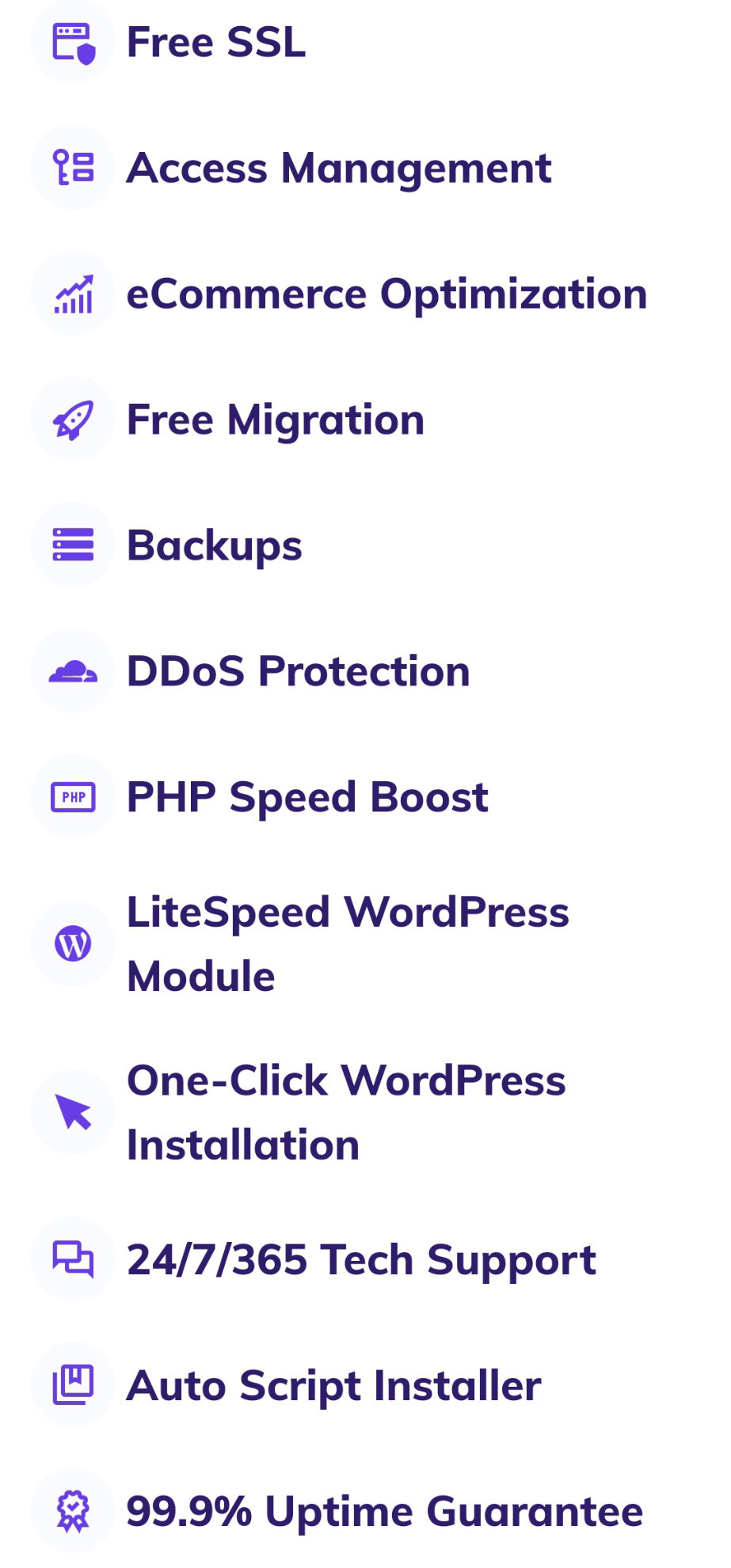
Hostinger is a web hosting service provider based in Kaunas, Lithuania. It is one of the best web hosting services out there and in my opinion, they have the best customer service and support around. They offer great features: https://www.hostinger.com/
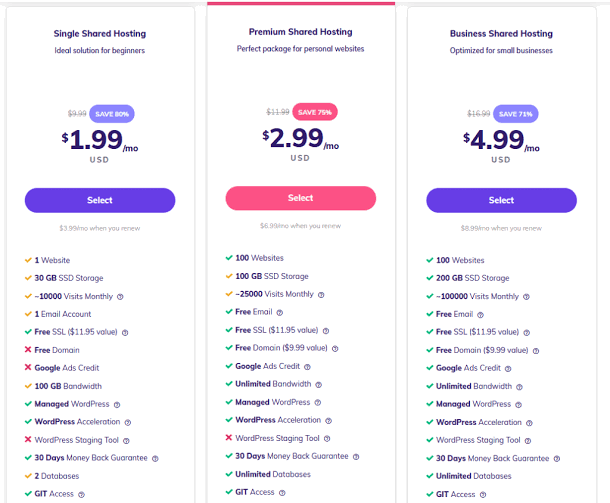
The company offers three different shared web hosting packages including Single, Premium, and Business Shared Hosting.
Since its launch in 2011, Hostinger has been consistently ranked among the top ten web hosting companies. Today, it is still one of the best web hosts in the industry for customers who want reliable services at affordable prices.
2. Bluehost
Bluehost was founded in 2003 by Matt Heaton and Danny Ashworth in Provo, Utah, and provides a wide variety of web hosting plans. They have different types of packages that include - https://www.bluehost.com/
Shared hosting - Basic, plus, choice plus, and pro plans.
Dedicated hosting package - standard, enhanced, and premium plans.
VPS hosting package - standard, enhanced, and ultimate plans.
Its web hosting package price starts at a reasonable $2.95 per month for the Basic Shared Hosting plan and goes up to $119.99 per month for the Premium Dedicated Hosting plan. In addition to standard features like the cPanel, email accounts, and auto-discovery tools, Bluehost also gives clients access to premium features such as free domain name registration, free SSL certificates, unlimited bandwidth, free site backup, and free website migration. Their customer service is phenomenal.
3. Dreamhost
Dreamhost is a web hosting service that focuses on customer care and satisfaction. As one of the first web host providers to offer what many consider a superior level of customer care, Dreamhost has earned many awards for being a leader in providing excellent customer service. Across all of its plans (26 in total), DreamHost’s prices range from $2.59/month to $399/month. https://www.dreamhost.com/
Dreamhost's clients have unlimited disk space, bandwidth, storage space, and emails. Additionally, they get 24/7/365 support via phone and live chat. Their customer service is incredible.
4. Hostgator
Hostgator is a web hosting service created by Brent Oxley in 2002. A lot of people know them for offering the cheapest web hosting in the world. They offer a ton of website hosting options, a 99.9% uptime guarantee, a free SSL certificate, easy WordPress installs, and a free domain starting at $2.75 per month. https://www.hostgator.com/
Though their plans are low prices, they have a ton of amazing features.
5. GoDaddy
GoDaddy originally began as the domain name registry service. However, it soon expanded and also provided web hosting. Now, it combines these two services under one roof. Their plans range from $5.95/month to $19.99/month and include unlimited email accounts, unmetered bandwidth, free domain, free SSL certificate, and daily backups. https://www.godaddy.com/en-uk
They provide their customers with an easy-to-use dashboard that allows them to manage their site in real-time, as well as provide detailed reports and statistics on how they are performing, and offer 24/7 customer support via live chat or phone call.
6. SiteGround
SiteGround has been around since 2001 and is one of the oldest web hosting companies out there. It focuses on providing affordable, reliable hosting to small businesses and individual users alike. Their web hosting plans range from $3.99 per month to $10.69 per month https://www.siteground.com/
They offer a 30-day money-back guarantee, Free Email, SSL, CDN, backups, and unlimited database and bandwidth. Their servers are optimized for WordPress websites and their customer service is outstanding.
Closing Thoughts
The bottom line is that there are many web hosting providers to choose from, but they all differ in so many ways that it can be a daunting task to figure out which one is right for you. What's more, your specific needs may not always align with what one provider has to offer, so it's crucial to look at your hosting requirements first before jumping the gun with a particular host or brand.
Of course, no web hosting service is perfect, and there are other things to consider when choosing your host. To make sure you find a web host that meets your needs, you'll need to do plenty of research and uncover some vital information about the hundreds of hosts out there, including their prices, locations, platform,s and more. The next step is finding which one features the most value for the money you're willing to spend. That being said, I hope that this blog has made it a little bit easier for you to get an idea of how much web hosting should cost.
How to Optimize Your Content for SEO
Most would agree that the end goal for a website is to attract relevant traffic and last for some years. But what about the short term? The next quarter? How can the content on your website be optimized in order to meet your immediate goals?
SEO stands for Search Engine Optimization. And it refers to the activities undertaken to obtain maximum visibility for a particular website on search engines such as Google. The process involves creating relevant content that is optimized for specific keywords. These keywords are selected depending on the user’s search intent and the type of content they want to see on their screen. Google has become the default search engine for most websites. That means that if someone wants to visit a certain site, he or she is likely to start searching using those words.
Accordingly, having optimized content with these keywords is crucial to getting visitors from organic searches. This is why it’s important to follow some guidelines for optimizing content.
1. Define Your Goals
Before you can optimize your content, you need to know what you're trying to achieve with it. Are you looking to attract new readers? Or are you hoping to boost the ranking of an existing piece of content? If you're looking for a specific result, then make sure that your title and metadata reflect that goal.
2. Do Your Research
Once you've defined your goals, it's time to do some research! What keywords are most frequently searched by potential readers of your content? How often does each word appear in search results? What do people search for when they're looking for information about those keywords? How many times have other people used those words in their own titles or meta descriptions? These are just a few questions that will help give context as you begin writing your article—it'll make it easier for Google to understand what they're looking at when they see it on page one of their search results!
3. Choose Your Keywords
Once you've done some research, it's time to choose the keywords that will help boost their rankings for those pages with high clickthrough rates (CTR). These could be anything from "how to optimize content for SEO" or "what is SEO?" depending on what kind of information you want people who search for those phrases to find on your site. The more specific your keyword list is compared with competitors', the higher chance people will find your website and visit it.
4. Create Compelling Content
Your content needs to be compelling, relevant, and well-written so search engines will find it. You can use SEO strategies to help improve the readability of your page and make it easier for people to find what they're looking for. When you create compelling content, people will want to share it with others who are interested in related topics. This will help increase the visibility of your blog or website, which can lead to more traffic and conversions.
5. Optimize Your Title and Meta Tags
Make sure you use keywords in your title tags and meta descriptions. Use keywords once per title tag and once per meta description. Don't overuse keywords though; they only dilute your ranking power. Also, don't put too many keywords in your title tag; instead, use several different variations of one term. Doing this gives you a wider variety of potential combinations and makes search engines less likely to penalize you.
In order to get the most out of SEO, you need to make sure that your content is engaging and valuable to users. So keep your material relevant and helpful, and always focus on creating content that readers will want to spend their time reading. It might take a little work at first, but with time it'll become second nature.
Writing Convincingly: The Key to Successful Blogging
Writing convincingly is one of the most important skills you can have as a blogger. When your readers feel like you're speaking directly to them, they're more likely to stick around and keep reading.
In this post, we'll give you some tips on how to write in a way that's believable and engaging. We'll also show you how to use storytelling techniques to bring your writing to life. By following these tips, you'll be able to connect with your readers on a deeper level and keep them coming back for more.
Understanding Copywriting
When it comes to copywriting, you need to think about the reader first. After all, if you can't convince your readers to take a step, then you're not going to make much of a difference.
Copywriting is all about persuasion. You're trying to get people to take a specific action, whether that's clicking on a link, signing up for a mailing list, or buying a product. And to do that, you need to write convincingly.
What Makes a Successful Blogger?
So, you want to be a successful blogger? There are a few key things you need to remember.
First and foremost, you need to be a good writer. This means being clear, concise, and engaging. You have to capture your reader's attention and hold it until the end of the article.
Second, you need to be knowledgeable about your topic. When you're writing about something you know well, it shows in your writing. You're able to convey your knowledge interestingly and engagingly, which is essential for attracting readers.
And lastly, you need to be consistent. This means publishing new posts regularly and keeping your blog updated. If readers can't count on you to produce new content on a regular basis, they'll lose interest quickly.
The Key to Writing Convincingly
To write convincingly, you need to be able to put yourself in your reader's shoes and see things from their perspective.
You need to understand what they're looking for and what their concerns are. You need to be able to show them that you understand their point of view and that you're on their side.
When you can do that, you'll be able to write convincingly and connect with your readers on a deeper level. And that's when the magic happens.
Tips on Writing Convincingly
Let's talk more about writing convincingly. This is key to successful blogging, and if you can master this skill, you'll be well on your way to creating content that engages your readers and compels them to take action.
So how do you write convincingly? Here are some tips:
1. **Make a strong argument**: When you're writing, make sure your points are clear and logical. Support your argument with evidence, and be prepared to counter any opposing views.
2. **Be persuasive**: Use persuasive language that will make your readers want to agree with you.
3. **Be engaging:** Write in an engaging and conversational tone, and use storytelling to bring your points to life.
4. **Be authentic**: Be yourself, and let your personality shine through in your writing. People will respond more favorably to content that's authentic and genuine.
**So you want to be a successful blogger?** It all starts with writing convincingly. And by that, we mean being able to capture your reader's attention and keep them hooked until the end.
But how do you do that? It all comes down to using the right techniques. For example, let's take a look at some of the most successful bloggers out there. One thing they all have in common is a unique voice. They're not afraid to be themselves and they let their personality shine through their writing. They're also great storytellers, and they know how to capture their readers' attention from the get-go.
Another thing they do well is use visuals. Graphics, videos, and photos help break up the text and keep readers engaged. But most importantly, they always stay on topic and never lose sight of their target audience.
If you can incorporate these techniques into your own writing, you'll be well on your way to becoming a successful blogger.
Conclusion
When it comes to blogging, writing convincingly is key to success. If you can make your readers feel like they're right there with you, experiencing everything as you do, you're well on your way to creating a blog that's both engaging and informative.
The Unemployed are More Likely to Succeed at Online Businesses - 5 Reasons
In one of my articles, we discussed how to cope with unemployment, giving 8 tips to help you survive and even thrive when unemployed. The truth is you don't have to be employed to earn money - you can start a business (offline or online or both) and even take advantage of earning opportunities online. In this post, we'll discuss the advantages an unemployed person has in successfully starting and running a business. https://read.cash/@Lixten/how-to-cope-with-unemployment-8-tips-to-help-you-survive-and-even-thrive-0574788b
According to the U.S. Bureau of Labor Statistics, people are classified as unemployed;
**if they do not have a job, have actively looked for work in the prior 4 weeks, and are currently available for work**.
Unemployment means that someone has lost his job. It doesn't necessarily mean that he is looking for another job.
In the past few years, there has been a tremendous increase in the number of unemployed people. Many of these people have come to realize that they have no choice but to start their own businesses and make money online. But how do these people succeed?
The unemployed are more likely to succeed at online business because:
1. No Boss Breathing Down Their Neck
The unemployed are free to pursue whatever they want without any worry about being fired. They are not tied to a company’s policies or rules. In fact, they have a lot of freedom to try out different things without having to answer to anyone higher than them. Being unemployed allows them to explore many fields of interest and find out if they truly enjoy them or not. Since they don’t have to work under someone else’s supervision, they are free to make decisions on their own. So if they start their own online business, they don't need permission to become successful. If anything, the fact that they're unemployed gives them greater motivation to succeed.
2. They don't have to spend hours commuting to an office every day.
If you are unemployed, you will have plenty of free time to devote to your business. You won't need to worry about getting up early in the morning or spending hours commuting to an office each day. You'll have time to invest in a startup or online opportunity and also free time to do things that you enjoy doing, such as reading books, writing articles, and more.
3. They are More Motivated
People who are out of work are simply more motivated than those who have steady jobs. They may have been fired or let go from their job, but they still want to make money through a business. This can be seen by the fact that they are more likely than other people to start their own businesses and succeed in them. Not only are they motivated to succeed but they have even greater motivation to keep themselves going especially since the job market isn’t great. They've got nothing to lose. So they're less likely to give up. They can't afford to fail. That makes them even more determined to succeed.
4. They have the time and resources to dedicate to their businesses
The unemployed are more likely to succeed at online businesses because they have a more flexible schedule and can work from anywhere. Unemployed people don't have obligations that require them to work during the day, so they can work on their businesses throughout the day. This gives them even more time for their businesses and allows them to achieve success much faster than someone who has a full-time job.
5. Low Expectations
When you are employed, you are forced to live up to certain expectations set by your boss or society. But when you are unemployed, you don’t have those kinds of pressure. You can really relax and live your life the way you want to. Even though you might fail, you won’t be held accountable for it.
Closing Thoughts
Even though you are unemployed, you can still do something productive: you can start your own business. Yes, the risk is a little bit higher because of your current status, but the payoff could be a lot bigger than what you initially expected. Maybe you want to be your own boss or maybe you just want to help out with the family expenses. Either way, online businesses offer a convenience that working for others can never offer. You always have control over how much money goes in and how it's being spent. Heck, you can even work from home if you want to!
So, if you're on unemployment because of a layoff, think about it this way: you have lots of time. If you do decide to get into online marketing and start a new business, you will have all the time you need to support your efforts.
In the end, no matter who you are, no matter what your current situation is, everyone is capable of successfully launching a startup out of nowhere. But be sure to set yourself up for success before you actually get started. Good luck!
Your Eyes are Precious - Protect Them!
Are you aware of some of the dangers of using mobile phones? In recent years, the number of eye issues related to smartphones has increased rapidly.
Screen time is a part of our lives. We work, we play, we communicate… all of it happens on screens. With that, there's a significant amount of light that's shining directly in your face, which can be harmful to your eyes.
Millions of smartphone owners suffer from eyestrain, headaches, or other symptoms after their daily smartphone usage. While the amount of light emitted by your phone screen is lower than that of the sun, prolonged gazing at it causes strain to the muscles around the eyes and overstimulates them. This can cause headaches, blurred vision, dryness, and fatigue.
There is no doubt about it, screen time has become a routine in our lives. Getting rid of our smartphones and TVs just isn't going to happen. And who doesn't love scrolling through social media? So how do we protect our vision without completely giving up our digital devices?
Protect your eyes from screen light with these seven easy tips:
Don't stare at your phone or computer screen all day.
Use a screen filter to block out the blue light emitted by screens.
Keep your phone away from your face when possible.
Purchase glasses that have UV protection built into them, so that you never have to worry about damaging your eyesight due to overexposure to bright lights like those on phones and computer screens.
Regulate the brightness of your device. Lowering your screen brightness will reduce the amount of light in your eyes.
Take regular breaks during long periods spent staring down at a screen even if it's only for five minutes, to give yourself some time to blink and look away from the screen. it's important to give your eyes a break every so they don't become fatigued over time and strain themselves.
Place the phone farther away when you're using your phone.
Wear sunglasses - Wearing sunglasses reduces the amount of blue light that enters your eyes and decreases the risk of developing eye conditions. Sunglasses also protect your eyes from damage caused by UV rays.
Getting enough sleep is another way to lower the risk of eye issues. Studies show that long hours of sleep each night helps prevent migraines and improve focus. Aim for 6 to 8 hours of uninterrupted sleep each night.
Put on sunglasses if you're outside in bright sunlight (or even just on a sunny day).
Don't forget about your eyes when you're gaming or watching videos on your phone—try using an anti-glare filter or tinted lenses to reduce the amount of light coming into them (and protect against glare).
The bottom line is to be wary of your eyes, check in with your vision care professional when necessary and try out some of the tips above as you see fit. Remember, there's no need to fear technology—but like all things, do so responsibly!
Thank you for reading and we hope that you have found this information to be helpful in your quest for a better vision.
How to Cope with Unemployment: 8 Tips to Help You Survive and Even Thrive
How would you cope if you lost your job? Would you be able to adjust without going into debt or being forced to move back home?
Unemployment is one of life’s greatest challenges. While some people thrive during periods of uncertainty, others struggle. The good news is, there are ways to adapt.
Unemployment can seriously damage your finances. There are several ways to deal with it. Here are eight tips to help you survive and even thrive:
Tip 1: Be Prepared!
Being prepared will give you a great sense of security and confidence. It will also ensure that you have access to information about how to manage your situation and remain positive. You don't want to sit around worrying about where the money will come from – you've got bills to pay! Instead, take action now and get ready for what lies ahead. Make sure you have enough cash to cover your expenses until you find a job and start preparing for the future by making plans and taking steps towards your goal - no matter what it may be.
Tip 2: Get Involved and Network!
Networking is a powerful tool that helps you build relationships and gain access to opportunities. If you're not already doing this, make time to meet people who might be able to put you in touch with the right person at the right company. There's nothing wrong with being well-connected, and if you're proactive about building relationships, you'll stand out from others who are simply waiting for opportunities to present themselves. And remember - if you're looking to change careers, don't just settle for networking online; get off your computer and go out and meet people face to face. You never know when you'll need a real live human being to introduce you to someone who can really help you move forward.
Tip 3: Keep Your Resume Up To Date!
Even though you may feel like you have everything under control, keep your resume current. This means that you should update it regularly with any changes to your skills and abilities, as well as keeping it up to date with any relevant work experience. Don't let yourself become obsolete by failing to stay updated.
Tip 4: Create A Budget!
Yes, I know you probably have heard this before, but it bears repeating. Creating a budget is an excellent way to help you stay focused on your goals and keep track of exactly where your finances are going. It also lets you plan, identify potential problems, and avoid them. Start small by tracking your grocery spending over a few weeks, then add in entertainment and travel costs and expand your focus onto other things that you spend money on.
Tip 5: Stay Organized!
When you're unemployed you may suddenly find yourself spending way too much time on unimportant tasks rather than focusing on the things you need to do. This includes researching companies and reading up on the industry you hope to enter. Make sure you keep track of all of these activities using a calendar or diary so you can reference back when you need to make decisions or apply for jobs. By staying organized, you'll be able to maximize every opportunity that comes along. Whether you prefer paper or electronic methods, make sure that you have a system that works for you. One thing to consider is using cloud storage services. These allow you to access your files from anywhere on any device. Check out some of our favorite apps: Dropbox or Google Drive.
Tip 6: Be patient
It's normal to feel nervous about applying for new jobs or interviewing for positions that you haven't held before, but don't let those feelings stop you from taking action! Before sending out hundreds of applications, take some time to research the hiring manager and his/her company. Look at the website to learn more about the company and its products and services. Read reviews about the company and its employees. Once you have a good idea of the types of questions you want to ask and what you expect to hear, write down the answers to those questions and practice answering the phone or emailing potential employers. You don't have to have a perfect interview to land a great job, but you should feel confident when you walk into the room and meet the interviewer.
Tip 7: Build good habits
When you're unemployed, it's natural to feel down and discouraged. Your mind will often go blank and you may feel like you're spinning your wheels. However, if you build good habits -- such as reading daily, exercising regularly, meditating, studying something new, and spending quality time with friends -- you'll be building positive momentum while you wait for the right opportunity to present itself. Having regular routines helps prevent your mind from wandering, and makes you less likely to dwell on negative thoughts. These small changes can add up over time, making you stronger mentally and emotionally.
Tip 8: Get creative
If you love doing things that challenge you, think outside of traditional employment options. Maybe you enjoy teaching yoga? Do you have a knack for graphic design? Or perhaps you're interested in pursuing a career in fashion? Whatever you're passionate about, think about ways you can monetize that skill set and turn it into a business idea.
Bonus Tip: Take care of your health
The last thing you want to be worrying about when you're trying to look for work is your health. Your physical and mental well-being is extremely important in these difficult times. Get plenty of sleep, eat right, and exercise regularly. Remember to take time out for yourself. You know the drills.
In Conclusion, unemployment is difficult. But if you learn how to handle it, it can become easier to deal with in the future. Never give up hope and keep looking for jobs until you find what you are looking for. Good luck fellow job seekers! 💪🏽
6 Planning Tools to Keep Your Content Organized
Are you tired of searching through your folders or files to find the information that you want? Are you feeling overwhelmed by the huge amount of content that you produce? Are you looking for means to organize your content systematically? If so, you should check out these tools. They'll make it easier for you to organize your content and save time.
We've all been there before. Looking for something specific can be quite challenging. Searching for a particular file can be tedious, especially when you have hundreds of them scattered across multiple computers. This can be very tiring and annoying.
Whether you’re a content marketer, blogger, writer, or video creator, every piece of content you produce requires some kind of organization. This means finding a way to catalog all of the information you create and keep it organized so you can easily access it later. There are plenty of apps and websites designed to help with this task
There are several ways to organize your computer files. The right tool depends on what type of project you are working on. Here are 6 tools that can help you stay organized:
**1. Trello**
Trello is a web-based application designed for project management. It helps people manage their projects at work, classes they are taking, and tasks for the day. There are many different board layouts that businesses and individuals use to organize their projects. One of the most popular ones is Trello's Kanban boards. Trello is simple to navigate and implement due to its drag-and-drop functionality. It provides a variety of features including task lists, due dates, time tracking, file attachments, chat, and team collaboration tools. You create boards that can have lists within them. Each board represents a project or task. You add members to each team and assign individual lists to those members. When you make changes to the lists, everyone gets updated automatically.
2. Asana
Asana is a task management app for personal productivity. You have a dashboard that helps you manage your tasks, set deadlines, create tasks, and follow up on them. Asana enables you to set priorities and focus on what matters most to you. It reminds you of upcoming due dates and deadlines, helping you stay organized and avoid procrastination.
3. Airtable
Airtable is a cloud-based database solution that provides flexible and intuitive tools for organizing and managing data across different types of teams and applications. Whether you need only a basic spreadsheet or advanced feature sets like conditional formatting, macros, queries, reporting, or even workflow automation, Airtable makes building out your own apps and collaborating on any type of project much simpler.
4. ContentCal
ContentCal is a tool that helps make content creation, planning, scheduling, and posting simple. It's perfect for tracking ideas, writing articles, and taking notes. You simply add folders based on categories that make sense, then drag your files into these folders. From there you can search your files, share them, tag them, etc.
5. HubSpot
Hubspot is a marketing software platform that helps businesses manage their entire business operations online. It allows users to create landing pages, and blog posts, build emails, set appointments, manage social media accounts, automate tasks, and much more. HubSpot's goal is to help small businesses become larger companies. They accomplish this by providing tools that help small businesses scale by providing them with everything they need to grow their revenue and brand online. HubSpot's content marketing tool is great for anyone who wants to get started easily organizing their content online. Hubspot helps users post articles, send out emails, schedule social media updates, build lead forms, and more. If you're looking for a free platform to manage your content, Hubspot is definitely worth taking a look at!
6. Content Snare
Content snare is a cloud-based software solution for managing and distributing content. Content Snare offers an organized way to monitor and organize content across any device. You can easily add categories to your content, categorize them into themes, and tag each piece with keywords. You can even embed your videos directly into your webpage with a few simple clicks.
Organization is nothing more than being able to effectively manage your task and content. I hope these tools will help you do that.
*What tools do you use to plan and keep your content organized?*
5 Automation Tools to Boost Your Content Marketing
Is it really possible to automate some of the repetitive tasks that take up so much time and energy? Well, yes! There are several tools out there that allow you to automate various processes (like social media marketing) without having to do them manually.
The growth of automation across industries has led to the emergence of numerous tools that have become indispensable in our daily lives. The rise of AI has also played a pivotal role in creating the demand for these tools.
As consumers seek new ways to streamline their workflow, they’re starting to adopt smart assistants such as Alexa/Google Home and Siri, among other platforms, to fulfill their needs. As marketers, building and maintaining a successful presence on these platforms requires a combination of creativity and data analysis.
What does it mean to automate something?
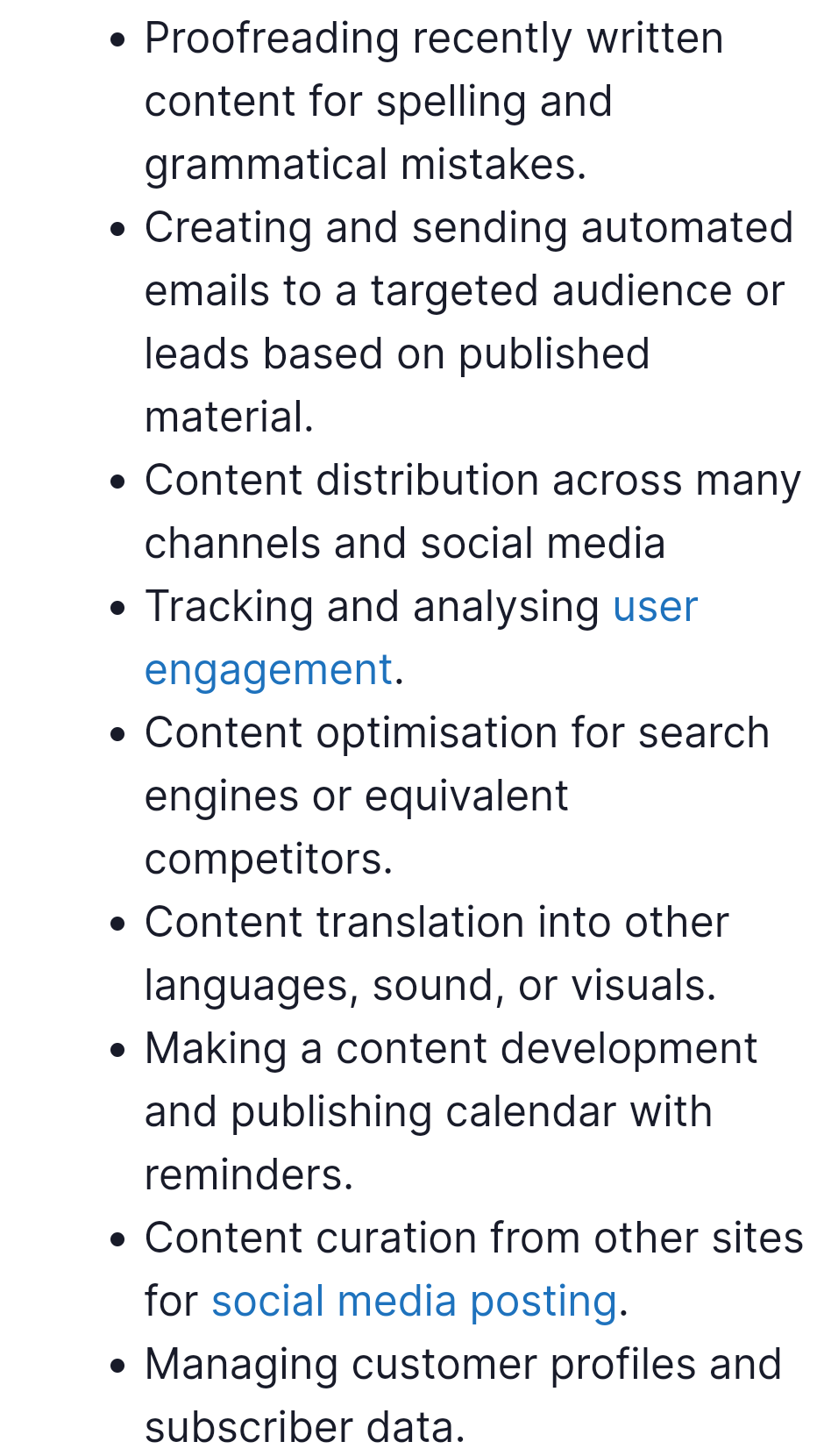
Content automation refers to the practice of creating automated processes that allow you to create, distribute, publish and measure content on social media platforms.
Automation allows us to generate consistent, high quality content every time. There are hundreds of ways to go about automating content creation, distribution, publishing, and measuring success. For example, you can build your social media audience, upload and schedule posts using third-party tools, and automate scheduling across multiple channels.
Content Marketing Automation Tools - How They Work?
Content automation tools allow firms to perform certain repetitive tasks such as data entry, emailing, and marketing campaigns.
Content automation tools aren’t new, but they've never been as powerful as they are today. They give us unprecedented visibility into our audience and allow us to deliver relevant, timely content at scale.
Content automation is already widely used by businesses and it is becoming increasingly popular for efficiently performing the following tasks:
*Source* https://inkbotdesign.com/content-automation/
There are several types of content automation tools available, some paid and some free. The best ones offer features that let you create great content fast, save time, and generate massive profits from your efforts.
Here are five effective content automation tools to choose from:
1. Automated bulk emails - MailChimp
MailChimp is a marketing automation platform that helps businesses automate their entire emailing campaign while saving them time and money. If you have ever tried to create a newsletter manually, then you know how much work goes into it. But with MailChimp, you don’t need to do any of the hard work yourself. You just set up your list, add subscribers, and start sending out personalized emails.
2. AI-based proofreading - Grammarly
Grammarly is an online grammar checker and editor that checks your writing for mistakes including spelling, punctuation, and sentence structure. There are two types of accounts – a free version and a premium version. Both offer similar features, but the premium version offers additional tools like plagiarism detection and advanced research.
3. Automated curation of content ideas - Feedly
Feedly is an RSS reader that lets users follow blogs, news sites, and magazines that they want to read. Users can easily organize subscriptions based on categories and themes. When they find something interesting, they can share it instantly via Twitter, Facebook, Google+, or Pinterest.
4. Link Social Media Handles, Plan and Schedule Posts - CoSchedule
A tool to connect your Twitter, Instagram, Facebook, LinkedIn, Tumblr, and YouTube accounts together so you can automatically share content across all platforms. With its comprehensive feature set, CoSchedule enables businesses that utilize social media to manage multiple campaigns from one platform, increase sales conversions, and automate repetitive tasks. CoSchedule is also a scheduling tool that automatically creates a calendar of events for you. Once you enter your event details, CoSchedule will generate a schedule and save it in PDF format. All you have to do is send out invitations!
5. Content translation into other languages - Google Translate
Google Translate is a free online program that allows you to translate text between any two languages with just a click/tap of a button. Google translate allows for app integration, multi-language translation, and a website translation widget. Other free content translation tools are Reverso and DeepL.
Bonus Tool: Automated image and audio generation - Hotpot.ai
I found some awesome software called Hotpot.ai. In minutes you can create beautiful images of the objects you mention in the caption. Hotpot.ai is a free online tool that helps people create cool images automatically! Simply enter the image description in the text, choose a style (e.g. painting, anime, watercolor, pencil sketch, etc), choose image size, then click create.
10 Go-To Tools To Create and Edit Videos On Your Own
Are you looking for some new tools to create or edit videos? This post shows you ten video production and editing applications, from free software to paid options.
Video has become an increasing part of our lives. Most of us watch at least two hours of video per day on average. And according to some global video consumption trends:
Videos Are a Favourite Among Consumers - To make it quite simple, consumers love video content. Animoto https://animoto.com/blog/business/2018-social-video-consumer-trends/
There were over three billion internet users watching streaming or downloaded video at least once per month in 2020. This number is projected to increase annually, ultimately reaching nearly 3.5 billion by 2023. - Statista https://www.statista.com/statistics/1061017/digital-video-viewers-number-worldwide/
82% of Global Internet Traffic in 2022 Will Come From Video - Cisco reports https://www.cisco.com/c/en/us/solutions/collateral/service-provider/visual-networking-index-vni/white-paper-c11-741490.html
90% of Consumers Watch Videos on Their Mobile Devices - wyzowl https://www.wyzowl.com/video-marketing-statistics-2018
And according to YouTube
More than 2 billion people use YouTube - that’s one-third of all internet users.
Today, there are various tools available to create and edit media. These include apps, plugins, browser extensions, and other programs that can improve your workflow. Learn about these resources.
**There are plenty of free video editing tools out there, but what makes the difference? Which ones should you rely on?**
Video editing is a complicated task, especially if you want to create something special or add a professional touch to your project. To edit efficiently, you'll need top-notch software. So what are the best tools for video editing?
The answer depends on your skill level, budget, and purpose. Here are ten tools to consider before starting your next project. I hope they give you some ideas and inspire you to check out other options too!
1. InShot
InShot is a video editing platform that is free for personal use. You get unlimited video uploads and unlimited downloads. You can import videos from various sources including YouTube, Facebook, Instagram, Dropbox, Google Drive, etc. There are many features including trimming, cropping, adding text, and overlays, adding filters, adjusting audio levels, and even adding music and sound effects. Additionally, there is the option to export videos in different formats which include MP4, MOV, GIF, WEBM, AVI, MPEG, and 3GP.
2. Movavi Video Editor
Movavi is one of the best video editors out there. Its feature set is extremely robust and there are plenty of tutorials online if you need help getting started. You have the option to edit both 2D content and 3D content. Editing options range from trims, cuts, color correction, titles, transitions, overlays, filters, speed changes, and volume adjustments. As mentioned before, you can export in over 30 formats including H.264, MP4, FLV, AVI, WMV, MOV, MKV, MPG, MPEG, DIVX, XVID, MPE, 3GP, and 3GPP.
3. CapCut
CapCut is a great tool for those who want to make their own videos. It provides a simple interface to create and customize cut charts for each clip. Once you’ve created your chart, you can add titles, transition effects, or even add music. CapCut makes it easier than ever to create professional-looking videos.
4. Canva
Canva is a powerful design app that enables users to easily create beautiful visual content without any experience whatsoever. Users simply choose from their library of pre-designed templates to start building their content. Don't let the simplicity fool you, however; once you are rolling, you can edit your work just about any way you want to give it that extra special touch!
5. Animoto
Animoto is a cool website that helps you create high-quality animated presentations. You can record directly from your webcam, smartphone, computer screen, or via social media apps such as Facebook Live, Twitter, Periscope, and Instagram. Use them to present projects, and sales pitches, explain everyday objects, show off products, and more.
6. Premiere Pro
Premiere Pro is a video editing software application developed by Adobe Systems. It is the successor to Adobe Premiere and was launched in 2003 and is currently available for both professional and consumer use. If you're looking to create videos for YouTube, then you should definitely consider using this program. In addition to being able to edit existing videos, premiere pro has features that allow users to upload original content onto their channel. You can add filters, titles, transitions, and music to make your videos look great. While not all videos require high-end equipment, if you want to make sure everything looks good then you'll need to invest in some decent hardware.
7. Pawtoon
Pawtoon is a free online tool designed to help artists produce animated GIFs. The best thing about pawtoons is that they are simple to use and can be used for many different purposes. For example, you can use them as memes, quotes, text overlays, avatars, etc. When making your own, keep in mind that the longer the gif, the larger the file size. That said, if you plan to share your creations, you'll probably want them to be short.
8. Wideo
Wideo is a website dedicated to helping people make funny videos. There's no doubt that wideo is becoming increasingly popular right now, especially among young people. If you don't have any ideas of your own, then you can browse through the thousands of other user submissions to find something that works for you. Wideo offers you the chance to collaborate with other users to create videos together. Once you've created your video, you can save it to your account or embed it anywhere else on Facebook, Twitter, Tumblr, etc.
9. Biteable
Biteable is a website that lets you create bite-sized videos. These clips last about two minutes long. After that time is over, you can play the entire clip without having to watch each segment individually. Instead, you just wait until the whole clip finishes loading before playing it. This is perfect for sharing quick stories, jokes, or updates on social media.
10. iMovie
iMovie is one of the best applications to create videos. It is designed to allow you to make movies. The best part of iMovie is that it integrates seamlessly into other programs and apps. When using iMovie, you can add different types of audio and videos and add music to them. You can also trim those videos to remove unwanted parts. Moreover, it has a nice built-in camera roll where you can store all your different video clips. It is possible to play back those clips directly on the timeline and even add transitions and effects.
Closing Thoughts
With the above tools, you can create amazing videos for your business, social media, or personal use. These tools offer free versions with the provision to subscribe to a premium version for additional features. By downloading any of these tools, you can begin working on your own projects immediately.
Finally, I hope you enjoyed reading this article and learned something new. Feel free to leave comments and suggestions below. Thanks for reading and until next time!
8 Free Tools to Create Images for Articles and Social Media
If you're looking for a tool to create images for articles and social media, you've come to the right place! In this post, I'll tell you about the tools I use and how they can help you create images of your own.
Gone are the days of lugging around heavy cameras and lenses to capture high-quality images for your articles and social media posts. In the digital age, you don't need to be a professional photographer to create beautiful images that can easily be shared across platforms like Pinterest, Facebook, Instagram, Twitter, and LinkedIn.
Image creation tools are the best way to create images for all your web and social media needs, whether you're marketing a new product or creating an image for a blog post. These tools help you create beautiful images that look just as good on screen as they do in print. Creating images for articles and social media isn't just about knowing how to take pictures. It's also about knowing how to use the right tools to get the results you want.
Here's a list of my favorite image creation tools:
1. Canva
This tool has everything you need to create beautiful and professional-looking images. You can choose from over 60 million free fonts, themes, shapes, and images that other users have uploaded. This tool lets you easily create infographics and other graphics based on templates that were designed specifically for web designers and copywriters. It's great if you just want something simple that looks professional, but it's also good if you want something more creative with lots of customization options.
2. PicMonkey
This tool is great for creating graphics that look like they were created by a professional designer. You can choose from thousands of professionally designed graphics that are easy to customize for your needs. It also has a wide range of templates.
3. MemeGenerator
Memegenerator is a web app that lets you create memes using your own pictures. There are several different meme templates to get inspiration from, including quotes, animals, and even food items. All you need to do is upload your picture, choose a template, and customize the meme to fit your liking.
4. PiktoChart
This infographic creator is great if you need to make a chart or diagram. It makes it simple to create infographics and presentations. Their interface is easy to understand and they provide plenty of useful information about how to design a presentation. The best part is that Piktochart works on both desktop computers and mobile devices, making it accessible no matter where you are. Piktochart offers a free plan, with additional charges for premium plans.
5. Giphy
Giphy is an internet search engine for gifs. The name is an acronym for Google Image Search plus.gif. People use it to find animated gifs for inspiration, humor, art, and information. It's useful for finding pictures, GIFs, videos, and Vines. Simply type in a word and Giphy returns relevant images based on its database of over five million total images.
6. QuoZio
Quozio provides its users with the option to create quotes and amazing photo collages without having to spend hours going through different websites. You can take advantage of their website's layout and drag-and-drop methods to put together beautiful images. Additionally, you can easily edit your photos and customize them before sharing them on social media.
7. PicResize
This web application allows you to resize your images in a matter of seconds. Resizing can be done manually or automatically depending on the size of the original file. When resampling, you have the option to preserve the quality of your image. You can also preview the changes before saving your new version.
8. Pixlr
Pixlr is a free online application that allows users to edit photos using many different filters. Users can adjust brightness, contrast, exposure, saturation, temperature, and white balance in a matter of seconds to achieve a visually appealing result. Pixlr also offers effects such as frames, stickers, shapes, and textures that you can apply to your photos.
Suffice it to say that, when it comes to image creation tools for articles, social media, and marketing, the process will never be perfect. It will always take some amount of time and effort to create images from scratch. The quality of your images will depend largely on the quality of your design. But using these tools can make your life easier when creating images for this purpose.
If you are looking for free online tools that let you create images for your articles and social media, then this list of tools to create images online will be very useful to you. These tools will help you maintain the visual appeal of your content while helping to grow your traffic and generate leads.
8 Content Writing Tools for Improved Productivity in 2022
Writing better content doesn't have to be a struggle. Some tools will make your job a lot easier by bridging the gap between subpar content and optimal content. Whether you need help with:
Creating compelling headlines
Writing spectacular descriptions
Organizing your blog posts in an appealing way
Adding engaging images and videos that will keep readers interested
Content writing tools are the best way to make sure that your content is in tip-top shape. They'll help you keep track of everything from your words and grammar to your tone and style.
**Why Should You Use Content Writing Tools?**
Good content is the foundation of any successful social media marketing strategy. It's what engages your audience and keeps them coming back for more—and it's also what helps to increase your brand's reach, which in turn leads to more sales and raises your visibility in search engines.
But creating good content isn't easy. And it doesn't always come naturally to you—you might struggle with writing or editing your own work, or find it hard to get started on a new topic. That's where content writing tools come in handy!
These tools can help you do all the things we just mentioned: write well-organized, informative content that people will want to read; create unique pieces of content that showcase your expertise as an expert in your field, and get into the habit of writing regularly so that you don't forget about your business goals.
The best content writing tools are those that can help you create content that stands out from the crowd. They should be easy enough for beginners to use, but also have advanced features that will make professionals blush with envy.
We've looked at some of the best content writing tools, and put together a list of helpful eight:
1. Google Docs
Google Docs is a cloud storage service offered by Google. To use it, you simply sign in to your Google account. Google Docs gives you access to word processing, spreadsheets, slide decks, presentations, drawings, PDFs, and other types of files.
2. Grammarly
Grammarly is an advanced grammar checker tool. It checks your work, pointing out errors automatically and letting you know what changes you should make. It can help you improve your English and make it easier to communicate with others.
3. Coschedule
Coschedule is a service that helps writers maintain their best ideas throughout the year. By using its calendar feature, you can track projects, set due dates, and record your progress.
4. Thesaurus
This tool helps you generate lots of synonyms for the keywords you choose, depending on how you use them in your text. You may want to use a thesaurus if you have a lot of different words to describe something in your post.
5. Yoast SEO
Yoast SEO is a WordPress plugin that provides many helpful features for optimizing blog posts. These features include things like title, description, meta tags, image loading and alt attributes, custom permalinks, page titles, and much more. I do recommend using this tool to make sure the content you write is optimized properly.
6. HubSpot Blog Topic Generator
Hubspot's Blog Topic Generator is a free online tool that helps you find the best topics to write about based on the keywords you enter. Entering just a few keywords will give you a list of popular topics relevant to those terms. If you're looking to attract customers to your business, then these topics could help you get some traffic.
7. Copyscape
Copyscape is a free online plagiarism checker that instantly scans your article to ensure that you don't reuse someone else's work without giving credit. Just paste the article you'd like to scan into Copyscape and let it do its thing. Copyscape will tell you whether or not your content matches any published works. If it does match, Copyscape will provide you with a detailed list of where the material came from, how many times it was copied, and which parts were taken.
8. Canva
Canva is a simple and fast graphic design application that makes creating graphics quick and easy. You can use their templates or upload your own images to create professional-looking graphics for your article.
To sum up, content tools are very helpful in writing. They make the process easy and simple, and they save your precious time. The best content writing tools help you write content that engages your target audience and persuade them to turn into customers while adding value to your business. These tools have changed the way content is being created by providing more effective solutions and creating better quality content.
7 Best Content Analysis Tools in 2022
Content analysis tools are a great way to get a sense of how your content is performing and where it needs improvement. But which one is right for you?
Content analysis tools are an efficient way to analyze your content, and they make it easier than ever before to understand what your audience is saying about your content.
But what are content analysis tools, exactly? They're more than just a fancy name for something that can already be done with a spreadsheet or text editor. These tools help you analyze the words and phrases that people use in your posts, so you can get an idea of what they like, what they find boring or confusing, and how they respond to different types of content.
Content analysis tools help you do this by providing you with a dashboard that gives you access to all kinds of data about your posts—and by analyzing it for you! With these tools, you don't have to spend hours crunching numbers on your own—just set up some filters and see how people respond to different types of posts or images.
This means that when it comes time for planning out your next marketing campaign, you'll know exactly which topics will resonate most with readers at any given moment. The insights from these tools can help you create campaigns that work best with their interests and expectations—and those who would be most receptive to them.
Content analysis tools are a great way to make sure you're tracking the right metrics, and they can also help you find trends and patterns in your data.
Some of the most popular content analysis tools include:
1. Google Analytics
Google Analytics is currently the world's largest free web analytics service offered by Google. It records detailed information about how users interact with websites. Its user tracking features include Adwords Conversion Tracking, Goals & Funnels, Ecommerce Tracking, Social Media Marketing Reporting, Website Optimizer, SEO Reports & Keyword Planner, Custom Dashboards, Event Tracking, and Demographics. Google Analytics is an incredible tool for tracking the performance of your content and how it performs in real-time. It can help you understand where your audience is coming from, how they're interacting with your website, and what content is performing best. You can also use it to see which pages are getting a lot of traffic and which ones aren't—so you can figure out why.
2. SEMrush
SEMrush is a leading search engine optimization software tool. It offers free trial options and provides SEO tools, content research, backlink monitoring, competitor analysis, website speed analyzer, and much more. It helps marketers discover potential keywords by analyzing their competitors' websites or content. SEMRush tracks competitor searches, organic search results, social media chatter, YouTube videos, and more - giving you all the information you need to make smart decisions about your own content strategy.
3. MOZ
MOZ is a powerful online marketing suite that includes a keyword research tool, a backlink checker, social media analytics, rankings tracker, site speed test, and a local listing checker. It covers every aspect of digital marketing and helps marketers identify opportunities for their sites. MOZ makes it easy to find out if your site ranks well in search engines like Google and Bing, as well as if it's performing well organically (without paying for advertising). It also lets you compare your website's content performance against other sites.
4. Google Search Console
Google search console is a free tool offered by Google to help businesses promote themselves online. You can use it to monitor rankings, manage pages, check crawl errors, add sitemaps, and submit images to Google's image search. It lets you see which keywords are driving traffic to your website from Google's search results pages—and which ones aren't ranking at all!
**5. Ahref**
Ahref is an excellent tool that allows you to see how many times each URL has been shared across social media. It's perfect for seeing what your competitors are doing, as well as what kind of content resonates with readers. Ahref provides data on the number of searches performed across different keywords including Google Search, Bing Search, Yahoo, AOL, Ask, DuckDuckGo, etc. It also includes historical search trends, locations, and countries where people perform their searches.
6. Blaze
Blaze gives you detailed information about the content of websites and their SEO (Search Engine Optimization). It analyzes the backlinks of the website and tells how many pages are linked to them. Also, you get the list of top-ranking keywords for the URL, its Rank history, and Alexa rank. It tells you about the amount of traffic your site gets from each article, and it will show you how often it's shared on social media sites like Facebook and Twitter. This can tell you which articles are getting the most shares, which makes them more effective in driving traffic to your site.
7. SimilarWeb
Similarweb is an analytical platform that helps website owners understand their audience demographics and engagement levels. It can also track conversions, revenue, and traffic. It also helps you find out what sites your competitors are linking to. You can use it to gain insight into who your competition is and whether they are doing anything similar to what you do.
8. ScreamingFrog
Screaming Frog is also a popular choice among marketers looking for content analysis software. This tool can crawl any site and provide details about what’s on each page – if it contains images, videos, lists, tables, or forms. It does this by following links on the page and extracting all the relevant info.
Closing Thoughts
Able to quickly analyze large quantities of content and provide insightful reports, there are several ways that digital marketers can collect data. These reports and charts can help you understand what your customers really want and need, as well as illustrate strengths or identify a need to revamp your website's product selection or improve upon functionality.
The question that often comes next is what type of analysis should be done for each type of content. This is an excellent question and it deserves to have a well-reasoned answer. The logical advice would be, first, make sure you're creating great content in the first place; don't try to manipulate data to fit your story if there's nothing there. Next, try to define your success metric for the content campaign in question. Once you know your content is good and you have defined what success will look like, now go ahead and analyze the heck out of it. Who said marketing is boring?
Content Marketing: Content distribution tools
Did you know that you can now reach millions of people around the world, without spending a dime? All you need is a good idea, a bit of creativity, and access to the right tools.
Content distribution tools help you create, distribute, and promote content across multiple channels. Learn about the best options for marketers!
**What is Content Distribution Tools and why should I care?**
The rise of digital media platforms has resulted in a shift in the way consumers consume information. Consumers no longer require a large amount of time or effort to access the content they want. In response, content providers such as publishers, authors, and journalists often look for ways to improve their reach without having to spend a lot of time creating new content.
Content Distribution Tools (CDTs) allow anyone to create compelling and effective content, regardless of their budget or technical skills. And they can easily gain global exposure from virtually anywhere in the world.
A CDT allows you to distribute any type of media, such as photos, short video clips, music, or podcasts, to a massive audience. CDTs include Facebook, Instagram, Twitter, Tumblr, Pinterest, Vimeo, SoundCloud, Google+, and YouTube. Using these platforms, you can post content to websites, blogs, and other social networks, build your email list, and even sell items directly through your posts. There are several types of CDTs:
1. Blogging tools – These tools help bloggers to write blog posts and manage their blogs. They also provide basic statistics for analyzing traffic and generating revenue from advertising.
2. Social sharing tools – These tools let users share content via social media sites.
3. Video sharing tools – These tools enable users to post videos to websites, blogs, or social networks.
4. Podcasting tools – These tools help users record audio and publish them to social media websites, websites, blogs, and podcasts.
Buffer
Buffer is a social media tool that helps to keep your site’s content organized and ready for your audience. Buffer provides a free service that automatically publishes posts to Twitter, Facebook, LinkedIn, Tumblr, Instagram, and Google Plus pages at set times. You can select which social sites you would like to publish to or even create automatic posts based on keywords and topics.
HootSuite
HootSuite is a web-based platform designed to help people manage their social networks. It's free for small businesses, nonprofits, and individuals who use Twitter, Facebook, YouTube, and LinkedIn. Through HootSuite, you can schedule tweets, post status updates, share links, engage in conversations, and much more.
MailChimp
MailChimp is a free email marketing software that makes it simple and affordable to send professional emails. It offers features including segmentation, autoresponders, advanced tracking, and lead nurturing/scoring. MailChimp is probably the easiest way to send emails to your subscribers, list, and customers. With this tool, you can distribute your content via newsletters to your subscribers.
Social Media
In recent years, content distribution has become easier for marketers. The rise of social media platforms like Facebook, Instagram, Twitter, and YouTube have helped to distribute content to millions of consumers every day. Not only does it provide opportunities for brands, but it also allows anyone to take part in content creation and marketing campaigns.
According to recent research from Newscorp, nearly 80% of online adults get at least some of their news via social networks. This means that social networking sites are now playing a significant role in our daily lives. Thus, it only makes sense that businesses that produce content would also start using these services to distribute their content.
There are so many social media platforms to share content online these days. It's easy to feel overwhelmed by the sheer number of choices available. However, there are some key differences between each platform that will make them better suited for certain kinds of content.
**LinkedIn**
LinkedIn Pulse is a social network designed specifically for business professionals. You can use it to post articles, blog posts, and other types of content. This is an excellent option for sharing longer pieces of content.
**Facebook**
Facebook groups are another type of social media site where people come together to discuss topics. They're often used as a place to connect with others who share similar interests.
**Twitter**
Twitter lists are a good option for distributing short, curated messages. These are typically used to send out news updates or announcements.
**Pinterest**
This social network is similar to Tumblr, but it focuses on visual content. Users can pin images, videos, and articles to boards. They can also follow others who share interesting content.
Both Twitter lists and Facebook groups are great ways to reach a large number of people at once. However, each has its own pros and cons. For example, Twitter lists allow you to curate a list of people based on certain criteria. If you want to send out a message to everyone on your list, you can do so by sending a tweet to them. Facebook groups are more open than Twitter lists. Anyone can join a group, and depending on the setting everyone or only members can see what's posted there. Each platform offers different features and benefits.
You can also share your content on Instagram, Twitter, and others.
.
7 Time-Saving Content Discovery Tools
Content discovery tools help marketers create compelling content by finding relevant topics and sources for their content marketing campaigns. They also provide insights into how people search online and which keywords drive traffic to websites. I've compiled a list of the best content discovery tools available on the market today. Read on to discover what they do and why they matter.
If you’re a content marketer, you know the importance of content discovery. You need to be able to find the right piece of content for your audience and use it in a way that’s going to get them engaged, excited, or motivated. I can’t tell you how many times I’ve been called by someone who wanted me to write some kind of blog post about a topic and all I could think about was how much time this would take and how much money I was going to lose as a result.
Content discovery tools are a great way to find the best content for your business. They can help you identify which articles and blog posts are most relevant, what topics are trending or have a lot of traffic, and whether or not a piece of content has been shared on social media.
Content discovery tools are a great way to find new content. You can use them to discover new blogs and articles, and even watch videos if you're into that sort of thing. The best part is that they don't take much time to set up, so you can get to reading right away.
That’s why today we’re going to talk about some of the best content discovery tools available on the market today. These tools will help you find exactly what you need quickly, making sure that your time is well spent and that you don’t waste any money on something that won’t work out.
The first step is creating an account with the tool. There are plenty of different options, but most require you to create an account with your email or social media accounts like Facebook or Twitter before you can use them. Once your account is set up, all you have to do is search for content on the site! You'll be able to see what's trending in the news, recent blog posts, videos, images, and more!
If it's not already obvious from the name, these tools aren't designed for everyone - you have to have some interests for them to be useful for you. If you're looking for something specific, such as recipes or tech news related to your field of work (or just interested in those subjects), then this could be a great tool for finding what interests you!
Let’s look at 7 top content discovery tools that can save you tons of time.
1. BuzzSumo
BuzzSumo is one of the most popular content discovery tools. It allows users to see what other sites are talking about when it comes to any given topic. This helps marketers understand what type of content is resonating with audiences and what kind of content should be produced next.
BuzzSumo offers two versions of its product: free and pro. While both offer similar functionality, there are some key differences between them. The free version only shows you the top 20 results for each search term, while the pro version gives you access to more than 1 million data points.
2. Feedly
This tool helps you discover new content for your social media feeds and news outlets. There's no need to manually search for content on different networks; now with Feedly, you can simply subscribe to websites, blogs, and apps directly from your browser. From there, it automatically updates whenever new posts are published. In addition to saving time, Feedly also provides a way to organize, manage, and share content and ideas across platforms. It's a great way to keep track of what's happening in the world of social media and online content while also keeping track of everything you want to read. You can add any website to your feeds section and then view them all at once later after you've finished reading.
3. Social Animal
Social Animal is a website that aggregates all kinds of social platforms into one simple interface. You can connect with others via Twitter, Facebook, Google+, LinkedIn, Instagram, Tumblr, Pinterest, Digg, StumbleUpon, Reddit, Foursquare, Delicious, and many more. Its clean design makes it ideal for users who want to focus on just finding and sharing information. A platform where people share interesting content they find around the web. You can even create your own list of curated websites. If you're looking for inspiration, you can follow some of the users' lists. Social Animal is completely free to use.
4. Content Studio
This tool helps you curate the best content from around the web based on your interests, location, date, topic, etc. There's also a search feature where you can type in keywords and look for content related to those terms. It includes tools for editing, converting, publishing, uploading, and tracking analytics. The app is free to use, however, there are paid memberships available if you would like access to premium features.
5. Social Mention
Social Mention is another popular social media analytics tool that helps you find trending topics and influencers. It also provides insights into how people talk about brands online. You can use the tool to see who's talking about your brand, where those conversations are happening, and what kind of sentiment is being expressed.
6. MozBar
MozBar is a free tool that lets you see how people are searching for certain terms. This includes the number of times each term has been used, as well as the location where it was used. You can also use it to track the popularity of different websites.
7. Topsy
Topsy is an easy-to-use tool that allows you to search through millions of tweets and posts to find the latest trends. You can even set up alerts so you're notified when new topics start trending.
8. Google Alerts
Google Alerts allows you to monitor specific search terms and websites online. You can choose any keyword or combination of keywords that you want to track or even ones that you don't necessarily know about yet. There are many different types of alerts you can set up including news, blogs, videos, books, and much more.
Closing Thoughts
Researching fresh topics on a weekly or even daily basis is not an easy task. Nor it is something constant, as trends are ever-changing, and new sources are popping up all the time. That is why most publishers have outsourced this job to different tools. One of the more popular solutions today is Buzzsumo. The software enables users to track the most shared content pieces on social media in any niche or industry. With this tool, users can do detailed analyses, check out which publications are the most frequently cited in their field of interest, and find influencers who share similar articles.
It isn't enough anymore to just create great content. To maximize its value, you will need tools like the ones discussed here along with a plan to prioritize the content you create and distribute.
Essential Content Marketing Tools of 2022
How important are content marketing tools in today’s world? What does it take to create a successful content marketing plan?
In today’s digital world, content marketing has become an integral part of business strategy. It helps businesses gain visibility online and attract more customers.
Content marketing is the process of creating and distributing relevant, valuable, consistent, and good-quality content to attract and retain customers. Content marketing uses various communication channels to share information, educate, entertain or sell. The key component of content marketing is its ability to generate leads, increase sales, and build brand recognition.
Content marketing tools are essential for creating engaging content and driving traffic to your website. Whether you are looking for a basic or advanced solution, these tools allow you to create, manage, publish, and distribute high-quality content across various channels.
With so many content marketing tools available, choosing the right one can be overwhelming. To help you choose the best tool for your needs, we have categorized the top content marketing tools based on their essential functions.
This post examines the various categories which will be discussed in detail in subsequent posts.
1. Discovery Tools
In today’s era, it is vital to create quality content. The challenge lies in finding new ideas and creating them. This requires an abundance of information from the web, as well as time spent gathering it. Because of this, the demand for content discovery tools has grown. These types of websites allow you to search through millions of pieces of data, offering relevant suggestions and information.
There are several reasons why these tools are useful. First, they enable you to discover great content that you wouldn’t otherwise find. Second, they can save you tons of time. Third, they make your life easier and faster. Finally, they present you with interesting suggestions, allowing you to spend less time searching and more time doing something else.
2. Distribution tools
Content distribution tools (CDT) are software services that allow you to share and promote your content across various social media platforms. Using them can boost your reach and visibility significantly. CDTs offer great value for marketers who want to distribute their content faster and at scale. If you've ever wondered how to optimize your content to go viral, try some of these methods.
3. Content Analysis Tool
Do you remember writing essays? If yes, then you probably also remember how much time you spent analyzing each part of it before submitting it. The same applies now - if you want to write an effective piece of content, you must analyze its structure and content thoroughly. Luckily, several tools can help you achieve this goal.
Content analysis is often done manually, but modern software has made it easier for anyone to find out exactly what their audience wants to read. The right tool can save you hundreds or even thousands of hours of labor, which means you can spend more time creating great content instead of wasting time on copy editing. There are tons of content analysis tools on the market today. Some of them are very basic and some of them offer advanced features. Regardless of the amount of functionality they provide, they all share the same purpose: They help you create better content by finding out where you can improve.
4. Content Writing Tools
As the Internet continues to evolve, content has become an integral part of websites and apps. Whether you're creating social media posts, blog articles, ebooks, infographics, or other types of content, it's important to create high-quality pieces of work that speak directly to your audience.
Writing is one of the hardest parts of creating content. There’s nothing worse than sitting down to write an article only to realize that you're not feeling very inspired. Even if you’ve got a great idea, the words aren’t flowing out easily.
Writing is a skill that requires practice and experience. Not everyone is born a natural writer. Like anything else, you can improve your skills by using tools to make things easier. There are various tools available to help writers create good content. The goal of these platforms is to make creating content faster, easier, and more efficient. For example, Grammarly is a tool that checks your grammar before you publish.
5. Image and video creation tools
Creating images or videos from scratch isn’t always easy. Sometimes you need to edit a photo or film clip to make it look better. Or perhaps you want to add special effects to a picture. With the increasing number of apps and software for imaging and video production, it’s easier than ever before to create great photos and videos in no time
There are thousands of image creation tools available on the web. Some apps let you edit photos directly on your phone or tablet, while others require desktop computers. And some don’t even run on mobile devices at all. To choose the best photo editing software, you’ll want to consider features such as file size, storage space, price, ease of use, and compatibility with specific platforms. Photoshop, Canva, Fotoxx, and Premiere Pro are some of the popular image and video editing software options out there.
6. Automation tools
Content marketing automation (CMA) software helps you streamline the entire process of creating content, saving time and resources. CMA software automates the creation, curation, distribution, management, optimization, analytics, and measurement of content. By using these platforms, marketers can easily create unique pieces of content on demand, schedule posts at optimal times, measure performance, track user behavior, and even automate repetitive tasks.
7. Content Organisation Tools
When working on a project, you want to save time by having everything organized and accessible at hand. The problem is that you probably don’t have the perfect system for organizing your documents. It would be great if there was always a way to access all of your important files and folders wherever you go. Fortunately, there are several tools out there that will allow you to keep your information secure, safe and accessible. These include the likes of Google Keep, Basecamp, Slack, and Trello.
5 Effective Financial Tips for Newlyweds
Are you starting on your financial journey together or are you already married and looking to improve your finances? Either way, having good financial habits now can help you start off your marriage on the right foot.
How would you like to start married life on a sound financial footing? From paying bills to saving for retirement, Planning for your future financial well-being isn’t something that should be thought of once you've tied the knot.
While married life can bring new challenges, it also brings exciting opportunities. In addition to building your career, saving for retirement, buying a house, and growing your family, you'll also want to ensure both of you are financially stable. Here are five ways to ensure your finances stay on track through your marriage.
1. Discuss monthly budgeting plan
With the arrival of marriage comes the need to discuss financial matters. While many couples may not spend much time thinking about money before they get married, it's important to develop a plan to manage finances together once the two of you have decided to live together and start a family. The first thing to do is sit down and write out what each person earns. You don't want any surprises later on! Make sure to take into account your combined income, as well as your individual income. Your budget should cover everything including food, housing, utilities, child care, healthcare, transportation, entertainment, etc. Having a written plan gives both parties a clear picture of where their money goes.
2. Record all potential expenses
A budget also provides couples with an opportunity to record all expenditures. If you have children, it's best to create a separate budget just for them. You can use a spreadsheet program (like Microsoft Excel) to keep track of expenditures. Keep receipts handy, along with copies of canceled checks and bank statements. Keeping records of all purchases helps you identify possible overspending. It's a good idea to set aside enough money at the beginning of the month to make sure you won't run short. In addition, if you find yourself overextended, look for ways to cut back on unnecessary spending.
3. Create an Emergency Fund
An emergency fund is a savings account set aside specifically for unexpected events. Having money saved away for emergencies gives one peace of mind, and makes life easier if something does happen. An emergency fund should be enough to cover any major expenses, such as medical bills, car repairs, or home improvements. A general rule of thumb is to have three months' worth of spending amounts in the account. If you don't currently have an emergency fund, then you may want to consider starting one today. Here are some tips to help you along the way:
Start small
Open a separate bank account
Save regularly
4. Set Saving Goals
If you want to make sure that you're putting money away for a rainy day, setting savings goals is a good idea. You need some sort of goal before you start putting money away to make sure you stay motivated. Without a clear goal, you may find it difficult to stick to your plan. Whatever your financial goals are, they need to be realistic and attainable. Make sure that you have the right tools to achieve them.
5. Prioritizing Certain Things
While establishing an emergency fund and setting saving goals is important, it doesn't mean that you shouldn't allocate some of your spare cash to other priorities. By doing so you can help you build a strong foundation for building wealth. When you buy any item, try to prioritize what you really need versus what looks good. When it comes down to it, everything else doesn't matter if you don't have enough food in your home. Make sure you take care of those essentials first before buying anything else.
Whether you’re newly married or have been married for years, financial matters can easily become overwhelming. Every couple has their own unique situation, so it’s important to start out on the same page. Learn how to budget wisely, avoid debt, and save for a rainy day.
Getting into good financial habits early on in marriage can help both spouses build a solid foundation for future success.

Colors and Feelings: How Different Colors Affect Perception and Mood
What colors affect our mood? Are emotions triggered by colors? Or does color affect our perception of emotions? And what colors can change our perception? When does blue bring us down, or does yellow give us happiness? What happens when we wear white?
We often associate certain colors with specific feelings. Red means love. Green means growth and health. Blue means calmness. Yellow means happiness. White means purity. Purple means royalty. These associations come from thousands of years of history and culture, and they influence the way we look at things around us.
But what about when we don't exactly see what we believe we should? As psychologists say, we can only see what we expect to see. This phenomenon leads to distorted views about color and emotion. In other words, our eyes trick us into seeing something else. For example, red isn't always the brightest color, and a pale green won't always lighten up our mood. And the color white brings out different emotions depending on its context.
Colour Psychology
What is color psychology? Is it really that important or valuable? How does it affect our emotions and decisions? These questions will be answered in today’s post.
*Color psychology is the study of the relationship between colors and emotions.*
In the last couple of years, there has been a surge in interest in understanding the psychological meaning of colors. This branch of science focuses on exploring the relationship between our emotions and perceptions of color. The human brain interprets certain colors differently depending on their contexts, such as whether they appear in nature or art.
Colors play an enormous role in our everyday lives. They influence us in ways both subtle and significant. Colors carry messages that affect us emotionally and psychologically. Knowing how colors influence us can help create better relationships, improve productivity, and boost emotional wellbeing.
Colors are the basic building blocks of the universe. They affect everyone differently and they have a significant impact on our lives. The color theory explains how colors affect us emotionally, psychologically, physically, intellectually, spiritually, and socially.
The way we perceive color can also change our mood and even impact our decision-making abilities. For example, blue is a calming color, whereas red represents energy and passion. Our perception of color depends on several things such as light source, time of day, and our environment. Colors affect our mood and cognitive functioning. Many researchers believe that color therapy provides a practical approach to improving mental wellbeing. From stress management to emotional regulation, color therapy is becoming widely accepted as a complementary treatment.
How Specific Color Makes You Feel
1. Red
Red is a color of emotion and passion. It stimulates the senses and arouses feelings of excitement, aggression, anger, love, lust, and courage. If you're feeling down, red might just help get things going again. It stimulates us to action and makes us feel courageous and even heroic.
2. Orange
Orange is the color of sunlight. It's energizing and uplifting and is associated with positive emotions and happiness. There have been several studies showing that wearing orange gives us a sense of well-being and optimism, and helps us fight off illness and depression.
3. Yellow
Yellow is the color of gold and sunshine. It represents wealth and prosperity, making us feel happy and confident. Wearing yellow can give us a boost in our self-esteem and make us feel good about ourselves.
4. Green
Green is the color of nature. We associate green with freshness and cleanliness. Studies show that if we wear clothes that are predominantly green, we feel healthier and cleaner. It also reduces stress and anxiety.
5. Violet
Violet is the color of night. It symbolizes mystery and contemplation. It inspires our imagination and creativity. Scientists believe that wearing violet makes us feel calmer and happier.
6. Blue
Blue is the color of heaven. Its soothing quality makes people feel calm and relaxed. Blue is a calming color. It calms us, brings serenity, and encourages patience, inspiration, and concentration. Blue can make a person feel happy, relaxed, secure, peaceful, and calm.
7. Black
Black is the darkest color you can find. It's not only dark, it's depressing. When we think about black, we tend to think of death, evil, depression, sadness, and regret. However, this isn’t black’s only emotional impact. Since black is the dominant color in formal wear, it can make a strong statement without being too flashy. When combined with white, dark colors can also create a sense of cleanliness and simplicity.
8. White
White is the color of innocence. It suggests purity and spirituality, making us feel peaceful, calm, and serene.
9. Pink
Pink is the color of love. It brings out feelings of tenderness and affection in our hearts. Research shows that women who wear pink experience higher levels of sexual arousal.
10. Brown
Brown is the color of earth. It reminds us of home and comfort. If we wear brown clothes, we feel safe and secure.
11. Purple
Purple is the color of royalty. It symbolizes majesty and wisdom. It can make us feel powerful. It is often seen on royalty robes.
One of the basics of psychology is that we tend to perceive things differently depending on their colors. Different colors evoke different feelings in us. When choosing colors for your home or office or graphics designs, it would be good to consider these psychological properties of colors.
5 Financial Tips for Young Adults
What financial advice should young adults follow to prepare them for the future?
Young adults today face unique challenges with the rising cost of living. They often struggle to save enough money for emergencies, retirement, or their future. Many students also face a high level of debt due college loans. There is high unemployment rate and increased competition between major industries
The world is full of opportunities. The only thing that stands in the way of you being able to take advantage of them is your money. You may have a lot of money at your disposal, but if you don't know how to use it, then all the money in the world won't help you get where you want to go.
So if you're looking for financial tips for young adults, here are some things to consider:
1. Keep track of your money
One way to be sure that you're always on top of your finances is to keep track of them! It's easy to overlook spending and make mistakes when you're distracted by other things, but if you take the time to log what's going on with your accounts and make sure everything is accurate, it will save time in the long run.
2. Learn to budget
One of the best ways to manage your finances is through budgeting. This means setting aside money each month for certain expenses that aren't covered by other sources of income or savings—things like rent and utilities, as well as monthly bills like car payments and student loans. Once you've got a budget in place, all that's left is making sure that every dollar goes towards its intended purpose so there's no extra money left over at year's end because someone forgot about paying a bill!
3. Know what you're getting into
You're probably going to have to get a job, and that's okay. But you should also be aware of the type of work you'll be doing, how much you'll be paid, and how likely it is that you'll be making enough money so that you can live comfortably—and maybe even do some traveling or save up for a nice house. If the job doesn't seem like it will leave you with enough money to live on your own or take advantage of opportunities in your field (like going to college), then it might not be the right choice for you.
4. Build up emergency fund
A rainy day fund is often overlooked, but it’s a good idea to start building one up. Emergency funds should not only be saved for natural disasters, but any unexpected expenses that may arise. You never know what could happen, so it’s best to have some money set aside for those emergencies. Saving money is hard work, especially if you don't have the proper budgeting skills. Start small and build up momentum. Experts recommend putting away three to six months of your paycheck, but the sooner you start, the better. Make sure that you have enough to cover at least three months worth of expenses, just in case something unforeseen happens. By having a little bit of extra cash saved, you’ll always feel prepared for anything.
5. Pay your debts - debt sucks!
Many people find themselves caught up in the trap of debt. Credit cards, student loans, car payments, mortgages, etc. These types of debts can seem like a necessary evil, but they are actually holding you back from being able to achieve bigger goals and dreams in life. Instead of getting deeper into debt, figure out how you can pay off those bills. Try to make a budget, prioritize your spending, and stick to it!
6. Live below thy means
Living below your means doesn't mean that you shouldn’t spend money occasionally. Sometimes you need to treat yourself to something nice. However, when you're spending money, try to make sure that you make it last. Only buy what you really need and don't go overboard on frivolous items. Saving money isn't about denying yourself; it's about knowing how to manage your money well.
7. Protect your wealth
It seems pretty straight-forward, right? If you want to protect your money, just make sure you're saving enough each month. Stash your money in a diversified portfolio of stocks, bonds, mutual funds, real estate etc. If you put all your eggs in one basket, then you might lose everything if one investment goes down.
8. Stay healthy - health is wealth
When you are young, you may have plenty of opportunities to improve your physical health, but when you become older, many things can happen to slow down the aging process. Things like chronic medical conditions and illnesses can take their toll on your body. One way to make sure you're staying healthy is to eat well. To avoid unhealthy habits, put yourself in control of your diet and make healthier decisions. Eat smart, exercise regularly, and get enough sleep. These three things aren't just great for your body, they'll help improve your mood and keep stress levels low. Keeping yourself physically fit will allow you to live longer and enjoy a higher quality of life.
Closing thought
As young adults, we all have different financial situations. Some of us are making a lot of money, while others have to work part-time. Some of us have a hefty student loan they must pay off while others are fortunate enough that they managed to avoid college debt. Some of us will still be living with our parents, others will be free as birds to do whatever we want.
Regardless, the idea here is that you never know what the future holds for you and your finances. The best way to make sure you don't regret it later is to start on a solid financial foundation now. It can change many things in your life for the better, and I know it's something that I wish I had done when I was younger. Good luck!2. Pay yourself

6 Online Survey Tools for Market Research
Online surveys are an effective way to gather information about your target market. Read on to discover some of the most popular tools!
In a world where the internet is king, it's hard to imagine there was a time when people had to physically visit a store or an office building to conduct market research. Now, though, you can do this all from the comfort of your home or an office chair with only the click of a mouse.
But what about if you want more than just a simple questionnaire? If you want to get more detailed information about your potential customers, then you'll need some extra tools.
Luckily, there are a lot of online survey tools out there that will make your job easier! Here are a few of our favorites:
1. SurveyMonkey
SurveyMonkey is one of the most popular survey tools available today. It is a free online survey tool that allows you to create surveys in minutes. It also offers features for tracking responses and analyzing results.
2. Google Forms
Google Forms is a free tool provided by Google that enables users to create their own self-administered forms where people can enter data themselves into designated fields. These forms can then be shared with others. They can be set to automatically send out reminders to respondents once they have completed them. Each user can set their own privacy settings, including who can view the information submitted, how long the information remains private, and whether the form submissions should be publicly visible.
3. Qualtrics
Qualtrics is a professional-grade survey software platform that provides many features including branching logic, skip patterns, randomization, time blocking, and much more. Qualtrics is best suited for large studies that require complex branching logic. Their platform supports over 40 different languages, making it convenient for international research. It offers pricing plans depending on how many respondents you expect and how long you plan to conduct your study.
4. Zoomerang
Zoomerang is a free online survey tool that allows you to build custom questionnaires. It also offers features such as automatic reminders, data export, and more. Their customer service team was extremely helpful, and they have great tools for generating questions and invitations!
5. SurveyGizmo
SurveyGizmo is a free online survey builder that uses a drag-and-drop interface to create surveys. Surveys built with their software seem to be well-designed, and the reports provided upon completion are useful and clear. There is no option to customize your own reports, however. If you need something different, you may have to design them yourself.
6. YouGov
YouGov is a UK-based market research company whose services range from online polls to focus group studies. They offer their own polling platform for free, along with the ability to connect to third-party apps like Survey Monkey. Data collection seems fast and reliable, although you need to pay per respondent.
7. TypeForm
TypeForm offers a free option for basic online surveys, as well as subscription plans for larger projects of up to 2000 respondents. The site’s survey platform looks nice and clean, and the reporting features are comprehensive. Their customer service hasn’t always been responsive, but they do seem to be doing everything they can to improve and keep things running smoothly.
Before you go for your tool, do a quick diagnosis. You need to assess your needs and priorities and get clear about what exactly you are looking for. Your primary requirement could just as well be wrapped up in your priorities – and you can accomplish this best by thinking through the project as a whole.
8 Best Customer Relationship Management Software in 2022
In this blog, we'll cover the best customer relationship management software for your business.
**Did you know that your customers are a source of your business's revenue?** They pay for the products you sell, and they're the ones who tell their friends about you. If they don't like what they get, they'll stop buying from you.
The best customer relationship management software can help you keep tabs on these customers, track the interactions between them and your company, and analyze data to predict sales trends so that you can make better decisions about how to market your products.
It can also help you improve customer satisfaction by offering a tool for sending gifts or coupons directly to customers who have recently interacted with your company.
There are many different types of CRM systems available for businesses today, but only a few are worth considering if you want to build a solid CRM strategy for your organization. In this post, we'll discuss 8 options:
1. Salesforce
Salesforce is a cloud-based customer relationship management (CRM) platform. It provides salespeople, marketing managers, service representatives, and executives with powerful tools to drive sales effectiveness and organizational performance. Its applications provide a unified view of a company’s customers and prospects and help them engage and interact with existing as well as potential customers. It helps companies get a 360-degree view of their customers and prospects.
2. Microsoft Dynamics 365
Microsoft Dynamics 365 is a CRM solution developed by the tech giant Microsoft to help businesses manage the entire sales cycle. It provides a platform where companies can create marketing campaigns, collect feedback, follow up with clients, and measure performance.
3. HubSpot CRM
HubSpot CRM is a software that integrates various business processes for tracking interactions between businesses and customers. It’s a complete system that includes email marketing, lead generation, landing pages, CRM, analytics, social marketing, reporting, and more.
4. Zoho CRM
Zoho CRM is a web-based application that allows users to build custom CRM solutions by connecting apps and data from leading platforms such as Google Analytics, MailChimp, Facebook, Twitter, and others. Users can set up workflows, automate repetitive tasks, and integrate third-party tools.
5. Pipedrive
Pipedrive is a modern customer relationship management software that was built specifically for small-to-medium-sized businesses. It is best suited to companies with 20 to 200 employees. Users have access to all relevant information about their customers right away. They get instant access to any customer data they need to make decisions. Pipedrive works great for people who want to manage interactions between companies and their clients/customers. It helps them plan and prepare for upcoming events in real-time and saves time by automatically emailing customers before they even reach out to them.
6. SugarCRM
SugarCRM is a powerful tool for managing a company's sales pipeline. You can use it to easily create and automate marketing campaigns, send emails, and track opportunities. The system includes tools for lead management, prospect communication, account planning, forecasting, and more. SugarCRM offers many different modules that you can add based on your business' specific needs. Businesses can choose from over 50 different modules, each designed to offer something unique. There are also prebuilt solutions for many industries including Retail, Manufacturing, Telecommunications, and Retail.
7. Worketc
Worketc is a cloud-based platform for organizations to collaborate and work together across departments, teams, and geographies. Unlike traditional collaboration platforms, Worketc does not require users to install anything locally. Instead, users enter their login credentials once and access all information everywhere. It provides secure file sharing, content creation, document editing, and review. It integrates with Microsoft Office 365 and Google Docs, making it simple to share files, edit documents online, and collaborate.
8. Zendesk
Zendesk is a leading service desk solution for businesses, providing agents with intelligent helpdesks and detailed reporting. Zendesk is ideal for a wide variety of applications, including customer service, technical support, and business operations.
Closing Thought
No matter what industry you're in, customer management is essential. While some companies get by with minimal tracking and customer management, others need a highly advanced CRM system to focus on their customers' needs.
CRM is a system that allows a business to take control of its customer relationships. CRM software helps you to maintain contact with your customers and potential customers systematically and provides you with information that can help improve your marketing strategies. CRMs can be customized according to different business verticals and requirements. So whether you are a sports shop, an insurance company, or a doctor, there are some best CRMs for small businesses you can select, which will help you manage visitors, train your team members and create new contacts.
So, consider your options and plans carefully to determine the right fit for your business. If you have already settled with a particular CRM software and are happy with it, keep in mind that there is still room for improvement. Think of this as an opportunity to give your business that extra bit of motivation to work even harder, to be more effective and efficient. You will realize greater success when you do, taking your sales and customer retention to new heights.
Your customers are the lifeline of your business. Without them, you cannot survive in the market. Therefore, it is important to take care of them and nurture relationships with them. By so doing, they would be more likely to recommend you to their peers and friends in social networks and communities.
8 Free Online Analytics Tools for Small Businesses
Analytical tools are essential for small businesses looking to grow their business online. These free tools will help you analyze your site traffic, track conversions, optimize your content, and much more.
There's a lot to consider when it comes to online analytics. You need to know how your site is performing against competitors, what types of content are performing well and poorly, and where your traffic is coming from—all without spending a fortune on software.
Analytics tools are very important in a digital marketing strategy as they provide data you can use to assess and fine-tune your website. They are also crucial to understanding how and why people are visiting your site. You can use the information gleaned from analytics tools to make improvements to your site, promote products and services, improve search engine rankings and develop new content on your website. With that said, the type of analysis you need most will depend on what you hope to achieve for your business or client.
In this article, we're going to discuss 5 different types of analytic software that are currently available. We'll go over the pros and cons of each one so it's easier for you to decide which analytics software would be best for your needs.
1. Google Analytics
Google Analytics is one of the most popular analytics tools available today. It provides detailed data on how visitors interact with your site- how people find your site, how much traffic you receive, what they do once they arrive, what pages people visit, how often they return, and where they go after leaving your website - allowing you to make informed decisions about your web design and content strategy. There's not much we can really say about this, however, it helps us understand our audience better.
2. Mixpanel
Mixpanel is a great tool for tracking user engagement and understanding your users' behavior. It allows you to view trends over time and get real-time updates on your visitors and their activity on your site. It offers a nice visual interface that makes data easier to interpret.
3. KissMetrics
Kissmetrics is one of the most popular analytics platforms available today. It is similar to Mixpanel. It lets you know what content your visitors are interested in. It offers a complete suite of features, including conversion tracking, heat maps, and social media monitoring.
4. Hotjar
HotJar is a unique tool that provides insights regarding consumer engagement with brands, offers, products, and services on social networks. You can use Hotjar to find out where users drop off, what pages they spend the most time on, and even what links they click on. This helps you understand what your customers want and need, so you can improve your product and services.
5. CrazyEgg
Crazy Egg is a fun marketing tool that lets businesses know what visitors are doing on their site. Crazy Egg uses simple segmentation to build custom audiences and then tells you everything about those people—what they’re interested in, what they do once they get to your website, and even what they do before they get there.
6. Clicky
Clicky helps you understand what content works best for your audience. You can use these data-driven insights to create more relevant, shareable content and improve conversions and revenue across your entire business.
7. SEMRush
SEMRush is a powerful digital market research suite designed to give marketers instant access to traffic, competitors, and keywords. SEM Rush features keyword analysis, competitive intelligence, global search trends, popular sites, top content analysis, and much more!
Closing Thought
Analytics tools are great for businesses who want to evaluate the success of their existing campaign(s) or want to keep track of performance metrics over time. You can invest in a high-quality analytics platform, but there are also free analytics tools that are great for beginners. Each of these online analytics tools has robust features that can help you gain a deeper understanding of your audience so you can provide them with a better experience.
Five analytical tools are offered in this article and each of them has its ups and downs. They all offer some great value, so it ultimately comes down to your own preference. Don't be afraid to experiment with these tools to see what features you like the most and which fit your needs best. Whichever analytics tools you end up using, keep an eye on your numbers. By comparing performance over time, you can learn so much about your business, and how best to serve your customers. Your choice of tool doesn't "make or break" your business; knowing what's going on does.

The 5 Best Website Builders in 2022
These tools are designed to help you build websites quickly and easily. Read these reviews to see what they have to offer!
It’s time for a change.
The world is changing. In a world where people want to make their own things, there's no better way to do that than with a website built by a website builder.
Website builders allow you to create web pages without having to learn HTML code. They also provide templates for you to use when creating new sites.
But what exactly are the best website builders in 2022? We did the research, and here are our five favorite options for creating websites for your business.
**What makes these builders so great? Let’s take a look**:
1) They’re easy to use
2) They have plenty of features that allow you to create amazing websites in no time at all
3) They have very low prices
4) They have great customer service
5) They have unique designs that make your site stand out from everyone else’s!
1. Wix
Wix is a web-based website builder that was founded in 2006. Over time, it has grown to become one of the most popular website builders. Wix is one of the first website builders out there. It’s a great choice if you just want to build a simple site without much customization. Its drag-and-drop editor makes building sites quick and easy. It does allow you to create a professional-looking website without having to pay anything extra. A majority of their customers use a standard template that provides them with a basic website. Wix also has a wide variety of templates and features that enable users to customize their website however they want.
2. Weebly
Weebly was started in 2006 and today it has millions of sites hosted around the world. Weebly uses a drag-and-drop format and lets users build websites using any type of layout they desire. In addition to its simplicity, Weebly's interface enables users to create custom layouts without needing to know HTML. Additionally, the site builder enables users to design professional-looking websites at a low cost.
3. Squarespace
Squarespace is a powerful platform that gives you everything you need to create a beautiful website including features like automatic SEO, responsive design, custom domain, and eCommerce integration. Users can choose from thousands of pre-designed elements, including contact forms, navigation bars, and headers. Furthermore, users can edit these designs themselves with the help of a visual editor. Customization is not only possible for themes; users can also easily design logos, social media icons, and much more.
4. WordPress
WordPress is a free platform that provides users with many features including a drag-and-drop editor, built-in photo galleries and video hosting capabilities, plug-ins, themes, and much more. WordPress is incredibly flexible and powerful. You'll find that even novice users can make great changes to a website's appearance and functionality.
5. GoDaddy
GoDaddy is a popular web host company offering simple website creation tools for beginners while advanced tools are available for experienced webmasters. Their services allow you to create a professional-looking website without any coding knowledge.
In conclusion, there are many website-building platforms out there and plenty to choose from. When looking for a website builder, look at the templates available and see what technology they use. Is it easy to use? Do they build responsive websites? These are just some of the questions you will want to ask before choosing the right platform for your project.
Over time, website builders will inevitably improve. We'll see more features introduced, better customer service support, and more templates and themes offered as time goes on. So if you're thinking about getting a website in the future, chances are you'll have more options for doing so by then. And that can only be a good thing.
All screenshots are from Forbes. https://www.forbes.com/advisor/business/software/best-website-builders/
One Essential Read.cash Function That Could Save Mobile Users from Frustration
It’s my fault, I know. And I’ve taken responsibility for that, but this feature could have saved my day.
If you're anything like me, you love to write. You love the feeling of putting words on paper and seeing them come to life as you read them out loud. But writing can also be one of the most frustrating parts of the process—there's nothing like starting content and ending up accidentally deleting it before hitting the save button.
As a mobile user who writes directly on the read.cash word program, you've probably been frustrated by the fact that there's no way to undo mistakes when you're writing. You know how sometimes you feel so devastated that you nurture the feeling of smashing your device? That's how I felt yesterday.
I was on my phone, and I accidentally deleted what I was writing. I was about to complete an article on the 5 best free email marketing software in 2022. It was going to be my next blog post, and I couldn't wait to publish it! And then… I deleted it. All that was left was the title of the article. I'm not sure how it happened—I didn't intentionally delete anything. But suddenly there was nothing left of the article I'd been working on for hours. It was like a dream gone wrong. https://read.cash/@Lixten/the-5-best-free-email-marketing-software-in-2022-d3def9dd
I was so devastated! I started wondering if maybe there's a way to get it back. Without closing the opened tab, I opened a new word page on a new tab with hopes of using the “RESTORE” function. But when I pressed the “RESTORE” button, nothing was restored, I was stuck on a blank page. Not even the title was restored. But I didn’t give up.
Then I remembered I had saved it at one point. I opened the “My Articles” page and scrolled through saved drafts. I found the saved draft of the article I was working on, I opened it, but only half of the work was saved – from the last time I saved my work. So about half of my writing effort was gone. I saw the restore option again, I tried it, But everything disappeared again, except the title. Why? It restored the last action on the content, which was in this case deleting the content.
The read.cash word processor has an in-built "auto-save" function that automatically backs up a copy of your work. The RESTORE function retrieves the last backed-up copy. So for my work, the last backed-up copy was after the deletion - with just the title left. The auto-save and restore functions are only efficient when the work is not deleted. So if you accidentally leave the page or close the tab, the restore function will save your day.
When you're working on a draft, it's possible to make mistakes. You may accidentally delete a paragraph or the entire content (or some other mistake that could lead to loss of content). When you find yourself making a mistake when using a PC or writing on a mobile phone using other word processors like MS Word, there's always the possibility that you can undo it and go back to where you were. But when writing on read.cash word processor, using a mobile phone, the undo function is not available to you. Once you delete any important part of your article, it’s gone forever with no way of recovering it. This is where Undo comes in handy!
**The Undo feature can be a godsend for mobile users who type directly on the read.cash word processor.**
The undo feature is one of the most important tools that you can have in your bag of tricks.
One of the most important features to have in a text editor is the Undo feature. Having this function in the read.cash editor will make it easier than ever for writers (who type directly in the read.cash word program using a mobile phone) to go back and change their mistakes without having to start all over again! Which is especially useful when you've made some serious errors. It's not just about saving time; it's about saving face and avoiding frustration! When you delete something accidentally and then regret doing so, Undo gives you a chance to get it back without having to start over from scratch.
When you write, it's important to remember that mistakes are a part of the process. That's why I hope for the Undo feature! Though a long shot, I’ll be excited to see this function added to the read.cash editor.
But for now, I’ve to take measures to avoid such an occurrence. One of such is saving my work frequently. This becomes harder when you are writing long content, as you have to scroll to the top to tap on the “Save as Draft” button each time you want to save. Another option is to type on another word processor like WPS, then copy and paste on read.cash after completion to apply finishing touches.
The 5 Best Free Email Marketing Software in 2022
If you're looking for an affordable option, there are several free email marketing solutions out there. Which one is best for your business?
No matter what industry you're in, email marketing is a crucial part of growing a business. It's also a cost-effective method of reaching new customers. Whether you're looking for tools to help you make more money or just want to stay in touch with your customers, there's an email marketing software that can meet your needs. The right email marketing software will allow you to create professional-looking emails that are easy to send and receive. It should also provide you with tools to track how well your emails perform.
If you’re looking for an email marketing software that can help you grow your business and reach more people, we put together this list of 5 Best Free Email Marketing Software in 2022.
1. MailChimp - The most popular option among small businesses
MailChimp is a powerful email marketing tool that is widely accepted. Users have access to all the features they need including templates, autoresponders, forms, etc. You can create different lists and segment them based on their interests and preferences. Create campaigns easily by linking to specific pages or landing pages. MailChimp offers a free plan with a monthly email send limit of 10,000 sends (a daily limit of 2000). You'll need to upgrade to a paid plan to send more than that. The premium plan starts at $11/month. In addition to being free, MailChimp also offers a lot of features that make it easy to use. It's simple to set up and manage campaigns, and it integrates with other services such as Facebook and Twitter. https://mailchimp.com/
2. AWeber - An affordable solution with great features
If you're looking for an email marketing service that's both free and has lots of features, then AWeber might be right for you. Aweber is a popular email marketing software. Like many others, it provides its users with everything they need to start marketing: which includes sending emails, Landing pages, Web push notifications, Drag and drop builder, Email templates, Sign up forms, e-commerce, building subscriber communities, tracking opens and clicks, and much more. If you want to start small, try out the free version first before upgrading. The free version allows up to 500 email subscribers. You'll need to sign up for a paid account to access some of its more advanced features. https://www.aweber.com/
3. Constant Contact - Simple and effective
Constant Contact is a popular choice among small businesses because it offers a lot of flexibility and ease of use. It also comes with a variety of templates and themes to help you customize your emails. Constant Contact makes it simple to create professional-looking emails that look great. It's perfect for those who are just starting out and don't have a lot of experience with email marketing. The platform offers lots of features to help you get things done. https://www.constantcontact.com/landing1/global-home
4. Campaign Monitor - Great for beginners
Campaign Monitor is a complete solution for online marketers looking to send emails. If you're looking for an easy-to-use email marketing platform, Campaign Monitor is a good option. You'll find plenty of features here, such as autoresponders, customizable newsletters, and more. They offer analytics tools to measure campaign success and user engagement. The platform offers different subscription levels; however, if you're just getting started, consider the free plan option. https://www.campaignmonitor.com/
5. GetResponse - **Best for automated lead generation**
GetResponse is another effective email marketing software. It is a full-service platform that includes everything you need to launch successful email marketing campaigns. These services include email automation, autoresponders, lead management, landing page creation, social media integration, and much more. To use GetResponse, all you need to do is add your contacts. You can also integrate your website traffic for mobile-friendly landing pages. Their free plan includes some of their premium services. https://www.getresponse.com/
Closing Thought
Email marketing is one of the most cost-effective and powerful marketing tools available to a business. It's also an opportunity to build your brand and share special offers with your clients. Using a system like an email marketing software will simplify your promotion strategy and ensure you stay on top of trends in the marketplace.
With the aid of email marketing software, you can easily promote your business through e-mail sending it to targeted individuals. You can send out special offers and discounts, product advertisements, and other resourceful information like recommendations. The fact remains that with the growing use of email by internet users on a global scale, this is a capable way to reach potential customers online and win their hearts for sure.
The future of Email Marketing lies in better technology, we hope this helps you out in choosing a software for your email marketing campaign.
8 Best Free Social Media Management Tools to Make Your Life Easier in 2022
With all the tools out there, it can be hard to know where to start your search. But we've done the work for you, and compiled a list of the best free social media management tools to make your life easier in 2022.
Social media has become an integral part of our lives. We use it to communicate with friends, family, and even our colleagues. It is easy to get lost in the maze of social media platforms and forget about the marketing aspect of it.
Social media marketing (SMM) has become a necessity for businesses today. According to Statista, https://www.statista.com/statistics/278414/number-of-worldwide-social-network-users/
*Social media usage is one of the most popular online activities. In 2021, over 4.26 billion people were using social media worldwide, a number projected to increase to almost six billion in 2027.*
As a result, it’s no surprise that social networks have come to play a vital role in every kind of marketing strategy. And some tools can make your life and work easier when you are managing your social media accounts. So what exactly are these tools?
Social media management tools are Apps, software, or websites designed specifically to manage multiple accounts at once, automate tasks, monitor performance, and optimize content distribution across various networks. The good news is that social media management is not limited to paid services - there are numerous free options out there, but some offer better features than others. Which ones should you choose? Let’s take a look at our top picks.
Here are 8 free social media management tools that can help you manage all your accounts in one place:
1. Social Champ
SocialChamp is an online service that helps you manage social media accounts on Facebook, Twitter, Instagram, LinkedIn, Google Plus, YouTube, Foursquare, Tumblr, and Pinterest. You can schedule posts ahead of time using their calendar feature and create custom audiences based on location and keywords. The free version includes 5 profiles including Facebook, Twitter, and 4 accounts each for LinkedIn, Google+, YouTube, Foursquare, and Tumblr. There are no ads and they have a really cool design. https://www.socialchamp.io/
2. Hootsuite
Hootsuite is a platform that lets users easily share content across various platforms, including social networks, blogs, and news sites. You can schedule tweets, set alerts, and get notifications via email, SMS, or mobile app. The service supports 30+ social networks and has integrations with WordPress, Blogger, TypePad, and other web-based services. Users can find relevant information and trends on topics they are interested in, and view detailed reports on what is being talked about. Tweets posted using Hootsuite can automatically link back to websites or blogs, and appear in search results. All posts can be scheduled ahead of time, meaning no last minutes scrambling to get something out. Hootsuite provides users with a dashboard interface showing what's going on with various accounts and gives access to analytics. https://www.hootsuite.com/
3. Buffer
Buffer is a tool that lets users post content to social media websites at intervals and automatically push out a message to different social networks. Users can pick from several templates or use text blocks and images to customize messages to their brand. The service offers free plans for personal and business use. It's simple to use and great for small businesses. Simply set up a profile, choose your audience, add content, and publish. Every piece of content published to Buffer is tracked by keywords, making it easy to search for and target the right audiences. Users receive daily emails notifying them of new content, and if they follow certain tags, those updates will show up in their Inbox. https://buffer.com/
4. Planable
Planable is a free social media tool that makes it possible to manage all of your social accounts from a dashboard. You can create posts directly from the dashboard, schedule them out to post at specific times, track metrics, and set goals for each account. If you need help setting up your profiles, you can download the app and receive training videos. https://planable.io/
5. SproutSocial
SproutSocial was built specifically for social media marketers who want to automate their content creation process and get real-time engagement data from their posts. By integrating directly with Facebook and Twitter, SproutSocial enables users to publish updates to multiple networks at once without having to create separate posts for each network. Users get real-time analytics about how their content is performing and what types of interactions they’re getting on each post. SproutSocial also provides analytics around where fans and followers are coming from and how they engage with different pieces of content. The platform offers features for scheduling tweets, posting images, videos, links, quotes, polls, check-ins, events, notes, and even live streaming videos. There is no limit to how many people you can manage, and SproutSocial has an intuitive drag-and-drop user experience that makes it a snap to set up. If you're looking to take your social media marketing campaigns to the next level, SproutSocial is worth checking out! https://sproutsocial.com/
6. CoSchedule
CoSchedule is an online social media management tool similar to Buffer, Hootsuite, and SproutSocial. It features calendar scheduling, and automatic posting to Facebook, Twitter, LinkedIn, Google +, Pinterest, and Instagram. You can schedule posts at specific times, date ranges, time intervals, and locations. If you want to see how well your content is performing across different platforms, you can set up custom reports. CoSchedule provides analytics on the performance of your posts, likes, shares, followers, reach, comments, and impressions. CoSchedule also includes a built-in CRM system, which helps you keep track of contacts to send them future content via email and SMS messages. CoSchedule offers free basic accounts, which allow users to manage five profiles, five pages, 10 scheduled posts per day, 25 followings, 50 hashtags, and 5 keywords. Paid plans start at $39/month. https://coschedule.com/marketing-calendar
7. Crowdfire
CrowdFire is an online platform for managing social media marketing campaigns. One of its key features is that you can create automated social media post templates to save time. Posting is done automatically using tags, hashtags, URLs, or images. You can then publish these posts to Facebook, Twitter, Instagram, Linkedin, Tumblr, Blogger, WordPress, and more. You can even use the same post across multiple networks. Customized landing pages can be created, along with customized emails. Content can be automatically posted based on activities such as clicks, Likes, Followers, Comments, etc. CrowdFire provides analytics to help you monitor results. Pricing starts at $9.99/month. https://www.crowdfireapp.com/
8. Tailwind
Tailwind is a cloud-based social publishing and engagement software. Users can collaborate through groups, schedules, and tasks. You can add any URL or image to the Tailwind app. Then, Tailwind generates tweets, pins, Facebook, LinkedIn, and YouTube videos for you. Tailwind lets you schedule posts, analyze content, and measure engagement. You can integrate Tailwind with your website or CMS, or create your own branded dashboard. Tailwind also integrates with popular third-party tools, including Google Analytics and Google Tag Manager. Premium accounts start at $19.99/month. http://tailwindapp.com/
Bonus Tool: Canva
Canva is a simple yet powerful social media advertising tool that enables anyone to create beautiful designs that look great across all devices. Its drag-and-drop interface makes changing text, colors, shapes, and more a snap. Its free version offers basic features while a paid version comes with additional editing options and templates. Users can use Canva to create social posts, banners, flyers, email marketing materials, websites, infographics, presentations, blogs, resumes, business cards, invitations, posters, and much more. You'll be able to share your work instantly via social media platforms.
Closing Thought
with the world in a constant state of flux, it's impossible to stay atop every development as they happen. Instead, it's best to arm yourself with tools that can help automate and streamline the process. Powering your social media efforts with the right tool can make all the difference in your ability to succeed and adapt.
We've explored some of the best free tools to monitor, manage, and automate your social media marketing on various platforms. There's no one-size-fits-all solution—not even close. And this is why it's essential to choose the right tools for your audience and analyze what kind of results you get from them so that you can optimize this process for increased effectiveness and efficiency.
Overall, one thing is for sure: No matter what you're using or why your social media tools should be lightweight and easy to use. There's an entire universe of potential in social media, and the right management tools can help you get there.
 @Lixten