 @Geri
edited
@Geri
edited
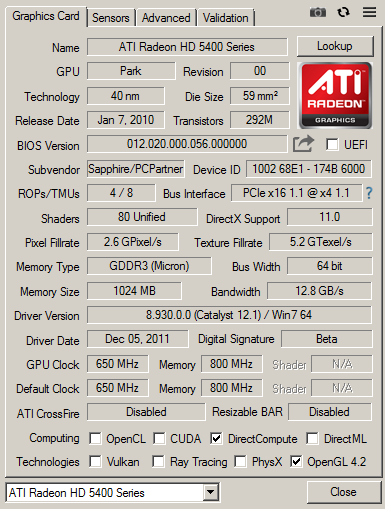
Graphics cards for $5 Potent graphics cards are quite expensive, and its becoming harder for people to be able to afford gaming systems. This test is going to feature super cheap second-hand graphics cards, and we will find out, if they can be used for actual gaming, or not. To test these graphics cards, a ~15 year old system will be used. In reality, these cards are going to be used in low-end computers, it wouldn't make sense to do this test with a strong system - therefore, a very weak system will be used. To make things more interesting, i have choosen graphics cards which i was able to buy for $5 or even less. Digging the graphics cards -Most modern games will require a fully DirectX 11 compatible graphics card. DirectX 11 is backwards compatible with DirectX 10-based cards, however, some of the newest DirectX 11 based games will require a graphics card supporting the latest DX11 feature level, which will prevent DirectX 10 based hardware to start the game. -For this money, its not possible to get old flagship cards, only old multimedia cards, and old midrange graphics cards. Obsolete DX11 high end graphics cards would cost more than $20, which is now outside of this budget. -These cards were usually released between 2010 and 2015. They can be from nVidia or AMD, and no other gpu manufacturers existed in that era (other old-school manufacturers usually stopped at earlyer versios of DirectX, new manufacturers started in the DX12 era, or only offered integrated DX11 accelerators). -All of these cards available nowadays - you can still find them in webshops. -Driver support ended for them years ago. Its hard to get them for cheap Its easy to find these cards, however, the prices can be high sometimes. Because cheap entry level graphics cards are not a thing any more (even the newest low-end cards begin around $100), the prices of these old cards also started to rise. Webshops usually sell these above $50, so i had to wait weeks till i found these offers. I got more than the ones i will test - but not all of them were in a functional state. One even catched fire, when i started to test it. At the end, i ended up with 6 fully working cards which were all below $5, and required only some minimal maintenance. First, lets see the AMD cards: AMD Radeon HD5450 The HD5450 got released in 2010, the HD 5xxx line is the first DX11 capable chip generation on the world. At this time, nVidia has not yet produced a DX11 graphics card. The HD5450 in the test is a passive card, and it usually uses DDR2 memory, but mine was equipped with DDR3. According to online sources, a GDDR3 versions are also available. The card has 1 GB VRAM, but its a 64 bit card.
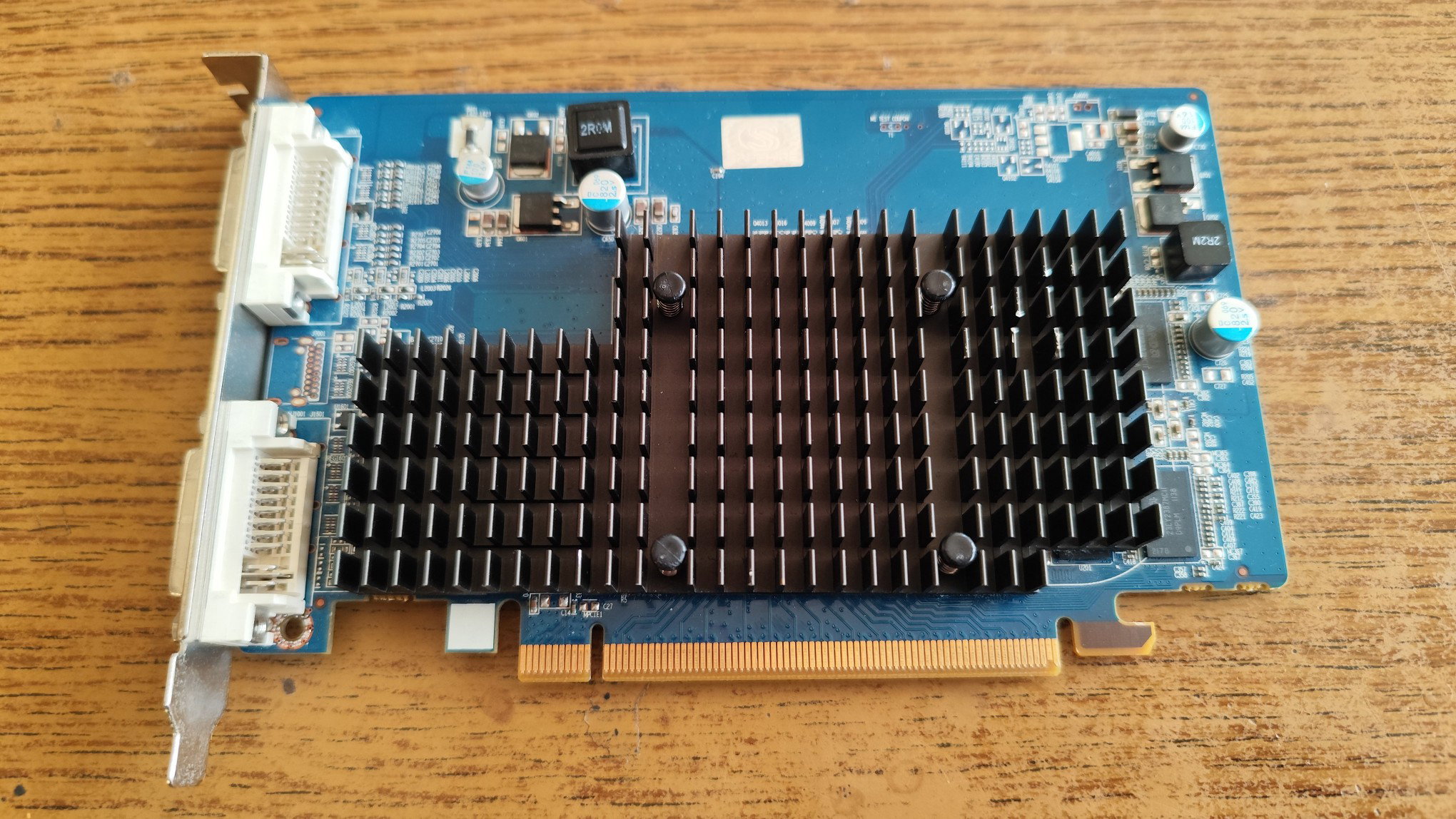
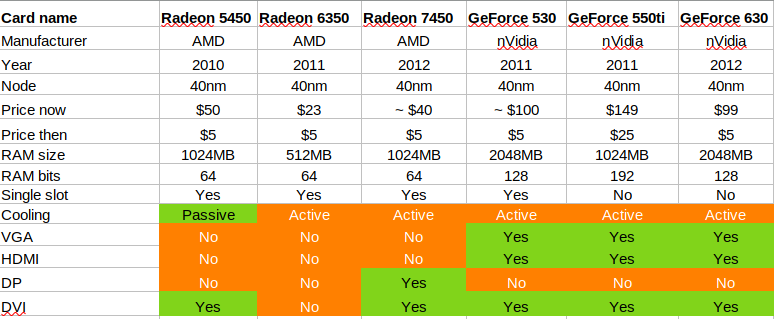
My model has no HDMI or Display Port connector, only two DVI ports. The PCB looks quite empty, but its full sized. Both sides of the PCB has memory modules. Some cards have 2GB VRAM, which would be quite overkill when the HD5xxx line got released. The card booted up in all of my systes without an issue.
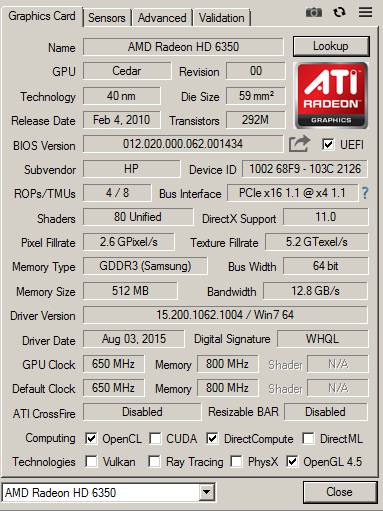
AMD Radeon HD6350 The Radeon HD6350 in 2011, and the specifications look very similar to the 5450: the same number of rendering pipelines (4) and shader units (80). What looks like a single DVI connector, its actually a DMS connector. A special cable has to be used to convert the output to VGA. Again, no HDMI or DP ports can be found on the card.
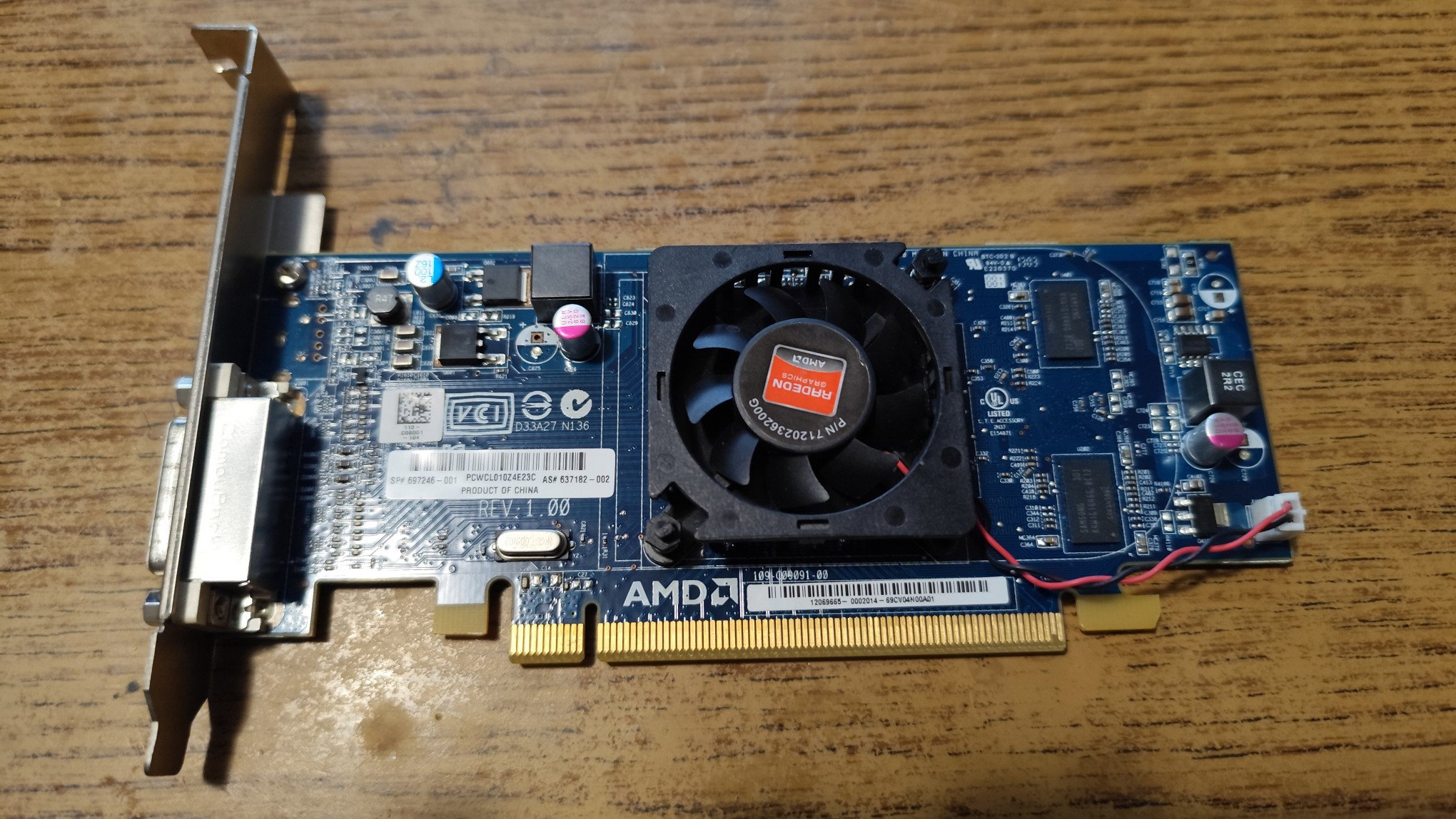
This card is a low profile card, can be adapted with a low profile backplane, and can be put into a minipc. This card is equipped with only 512MB DDR3 RAM (1GB versions are also available). The card looks like the renamed version of the previous card. The specifications are identical, but this one uses active cooling.
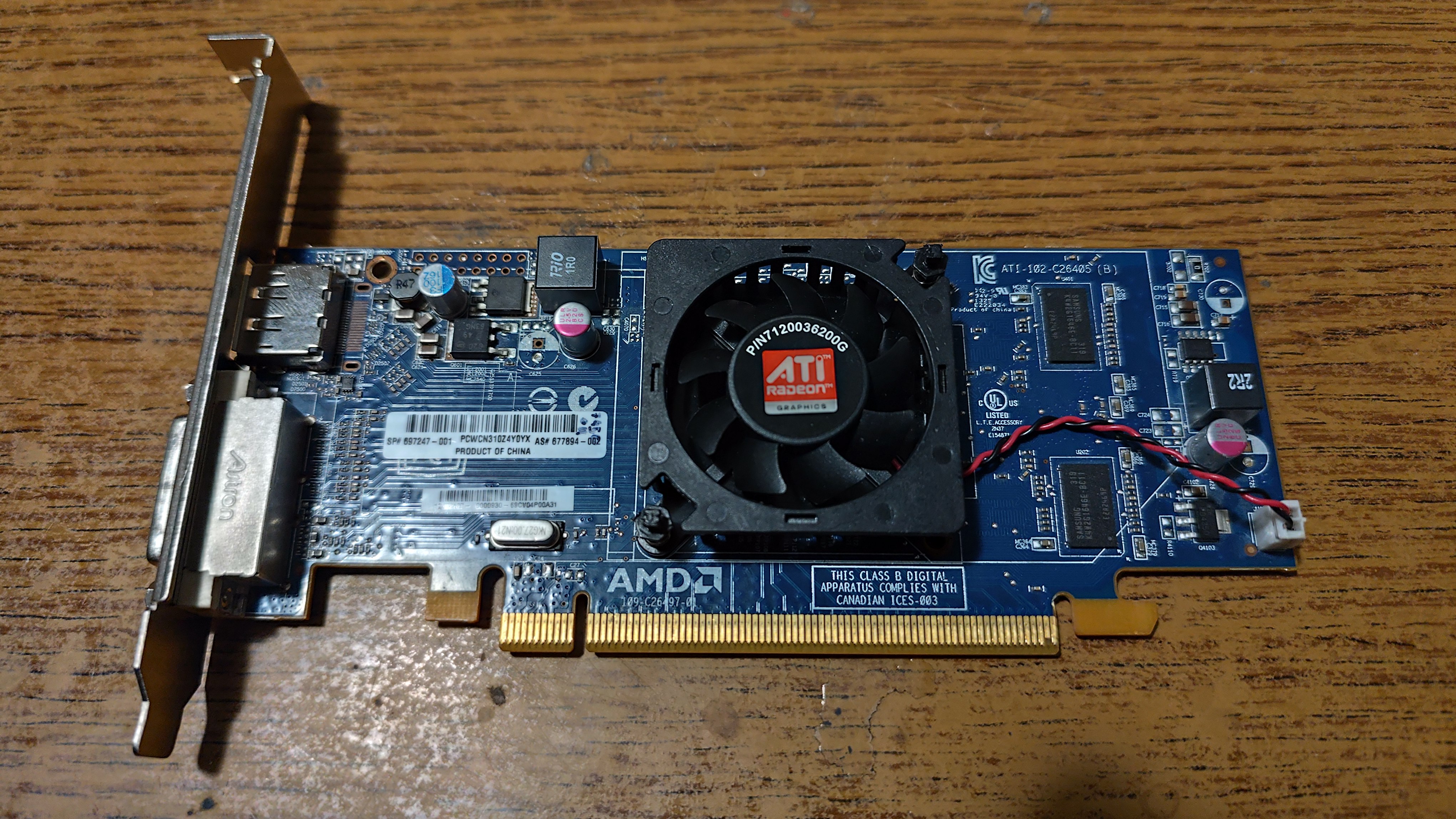
AMD Radeon HD7450 This card was released in 2012, and the number of rendering pipelines are 4, however they have increased the shader count to 160. The chip was built on 40nm, and uses active cooling. This time, a normal DVI port and a Display Port got integrated to the card. The cooling was partially broken, so i have snatched a working cooling from a broken card. The PCB looks quite similar to the previous 6350 card, and i can imagine the pinout of these chips are identical, or nearly identical, to make the manufacturing cheaper.
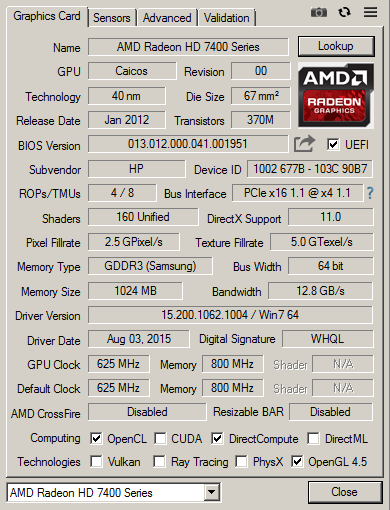
The is no uplift in clock speeds even got decreased, lowering the theorical fill rate. The cooling feels very flimsy, it was very hard to remove and add the another cooler. This card has 1 GB DDR3 VRAM as well, and uses a 64 bit memory bus, as usual on these cards.
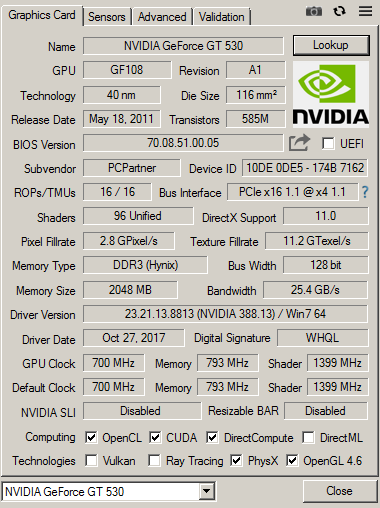
The nVidia cards The AMD cards were like the clone of each other, with not too much redesign. The nVidia cards will be hopefully more diverse. Its important to note, nVidia's DX11 graphics cards are also compatible with DX12 if using the latest drivers. This is not true for the AMD cards listed above, so take this into consideration if you are building a DX12-capable WIN10 computer with these cards. nVidia GeForce GT 530 The card was released in 2011, and its the second DX11-conform core from nVidia. This is a low profile single slot card, mine only has the full size backplane. The card has standard outputs: a VGA port, a DVI and an HDMI connector. A good surprise, this is finally a 128 bit card, with DDR3 memory. The card has 96 shader units, and 16 rendering pipelines.
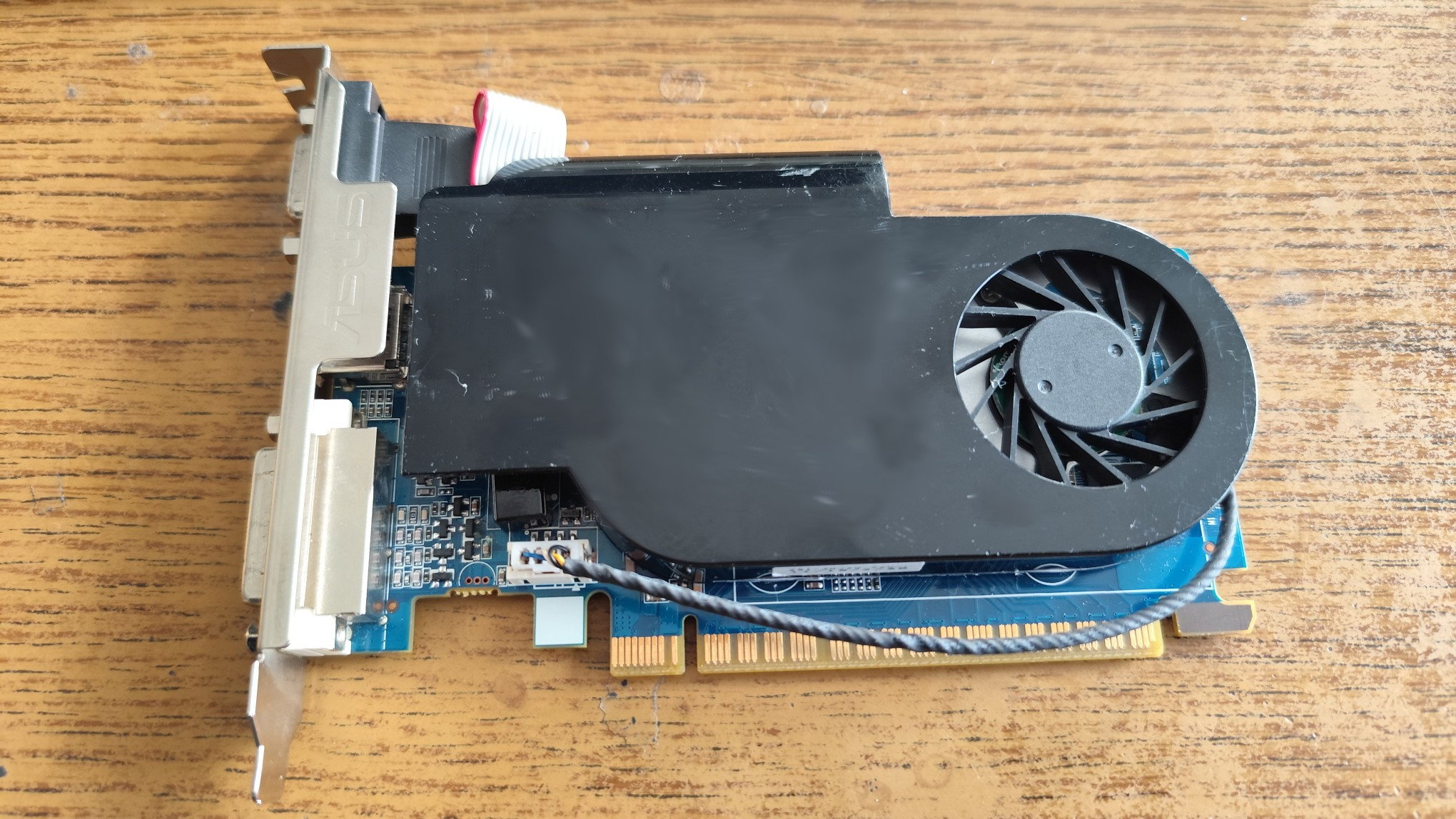
Unlike the AMD cards, the cooling feels very good quality. Behind the plastic cover, there is a thick metal heatsink to conduct the heat from the chip. My card has a whooping 2GB VRAM, which was considered very large in 2011, and of course all of these are combined with full DX11 support. Both sides of the cards have memory chips. The overall build quality of this card feels much higher than the AMD computerparts, and the specifications also indicate a stronger card despite of its low-end nature.
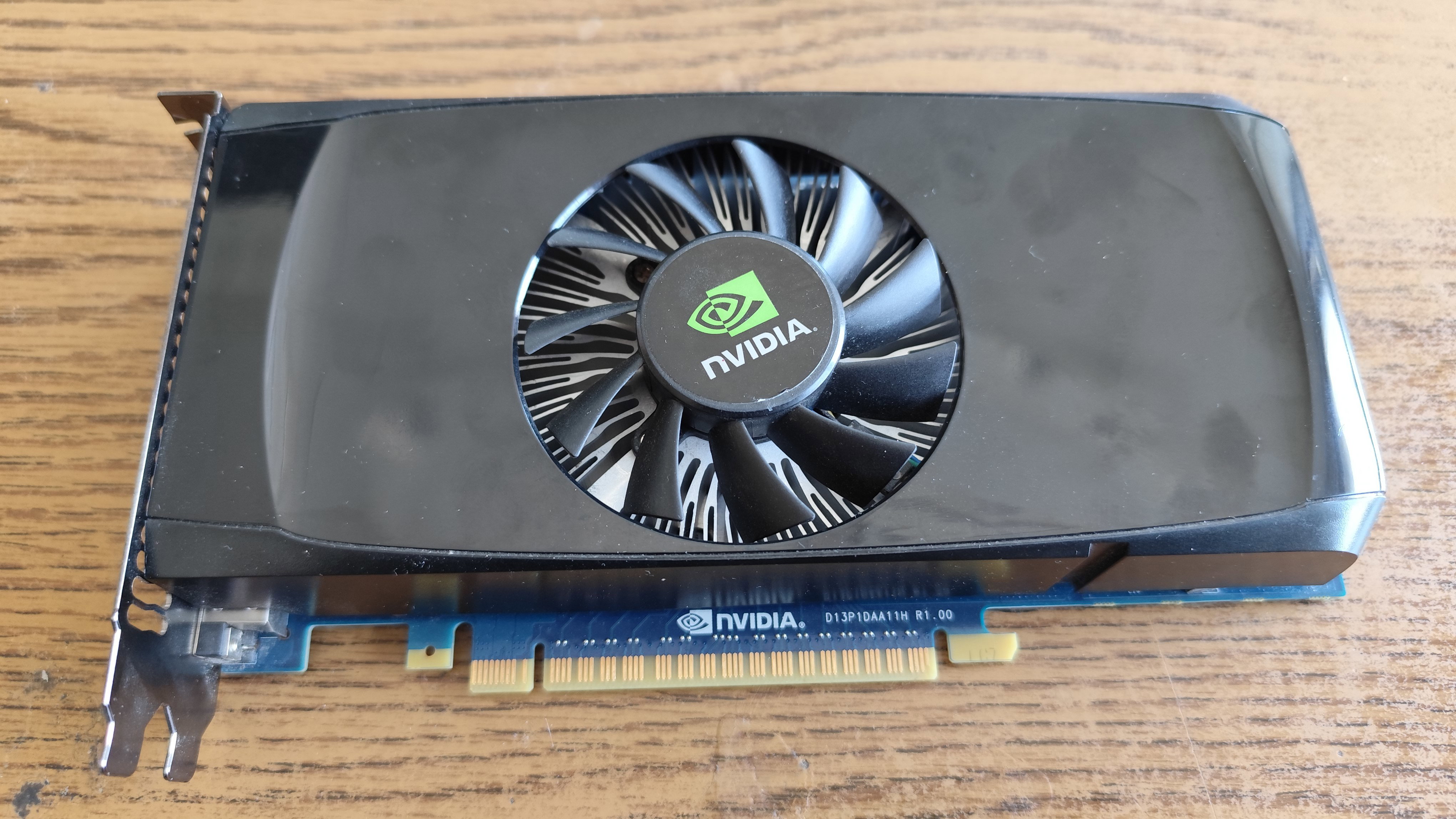
nVidia GeForce GT 550Ti This is a card from 2011, but its actually an outlier of this test. These cards go around $25, and i have only included it in the test, because i had to test it when i was also doing the test. This isn't a cheap multimedia card, and it also required a 6 pin PCI-E power connector to operate. This is the bigger brother of the 530 and it uses a 192 bit memory bus, but only 1 GB RAM. I have only decided to feature this card to have something strong to compare to, as a reference.
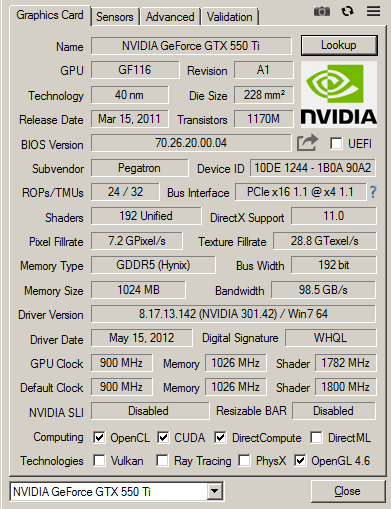
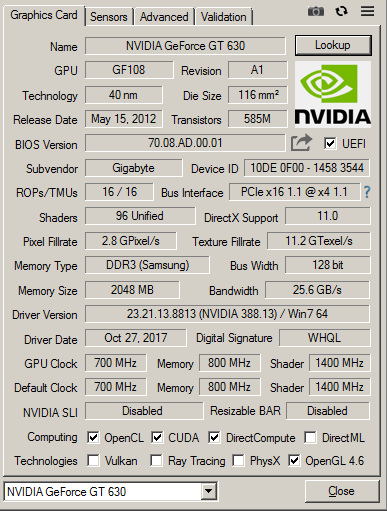
And another reason is, the lack of nVidia cards - it was quite hard to get DX11-capable low-cost nVidia cards. AMD cards get thrown after you, but nVidia cards were either missing from the market, or they were dead on arrival. The 550 features 192 shader units, and 24 rendering pipelines. This is a dual slot card. nVidia GeForce GT 630 This card got released in 2016, and its the second DX11-conform core from nVidia. The card is large, and has a large, but very slow fan, which spins silently. The card is from 2012. This is the only double slot card. Similarly to the 530, the chip has 16 rendering pipelines and 96 shader cores. The specifications seem to be near identical. It seems nVidia also did a cloning here, and the 630 is basically just a renamed 530.
This card also has 2GB DDR3 VRAM on it. 1GB and 4GB versions also exist, and the latter one is quite overkill. A GDDR5 based 630 card also exists. This is a 128 bit card, similarly to the 530. Alongside a DVI port, HDMI and VGA ports also got integrated to the card. There are quite a few versions of the 630 exist: cards with DDR3 and GDDR5, and four version of chips with different number of execution cores and rasterizing pipelines. This is the weakest version.
The test system The good old Asrock 775dual-VSTA, which was featured in a previous test here, will be used as a test hardware. This system has a quad core Core2Quad 9300 running at 2 GHz, 4GB DDR2-RAM, and a PCI-E slot limited to 4x lanes. This is a very low-end system by todays standards. The chipset is weak and slow, the 4x PCI-E lanes running at 1.1 means the graphics cards will only get around 1 Gbyte/sec bandwidth. This is however less of an issue, because the system could'nt do more more than 1 GByte/sec RAM to RAM copy anyway, making the chipset, specifically the north bridge to be an ultimate speed hog. Another issue is the cpu clock speed, running at 2 GHz instead of the rated 2.33GHz due to chipset limitations again. To achieve good performance on this system, the graphics drivers have to be efficient to manage the resources well, and minimize the bandwidth usage and vram swapping.
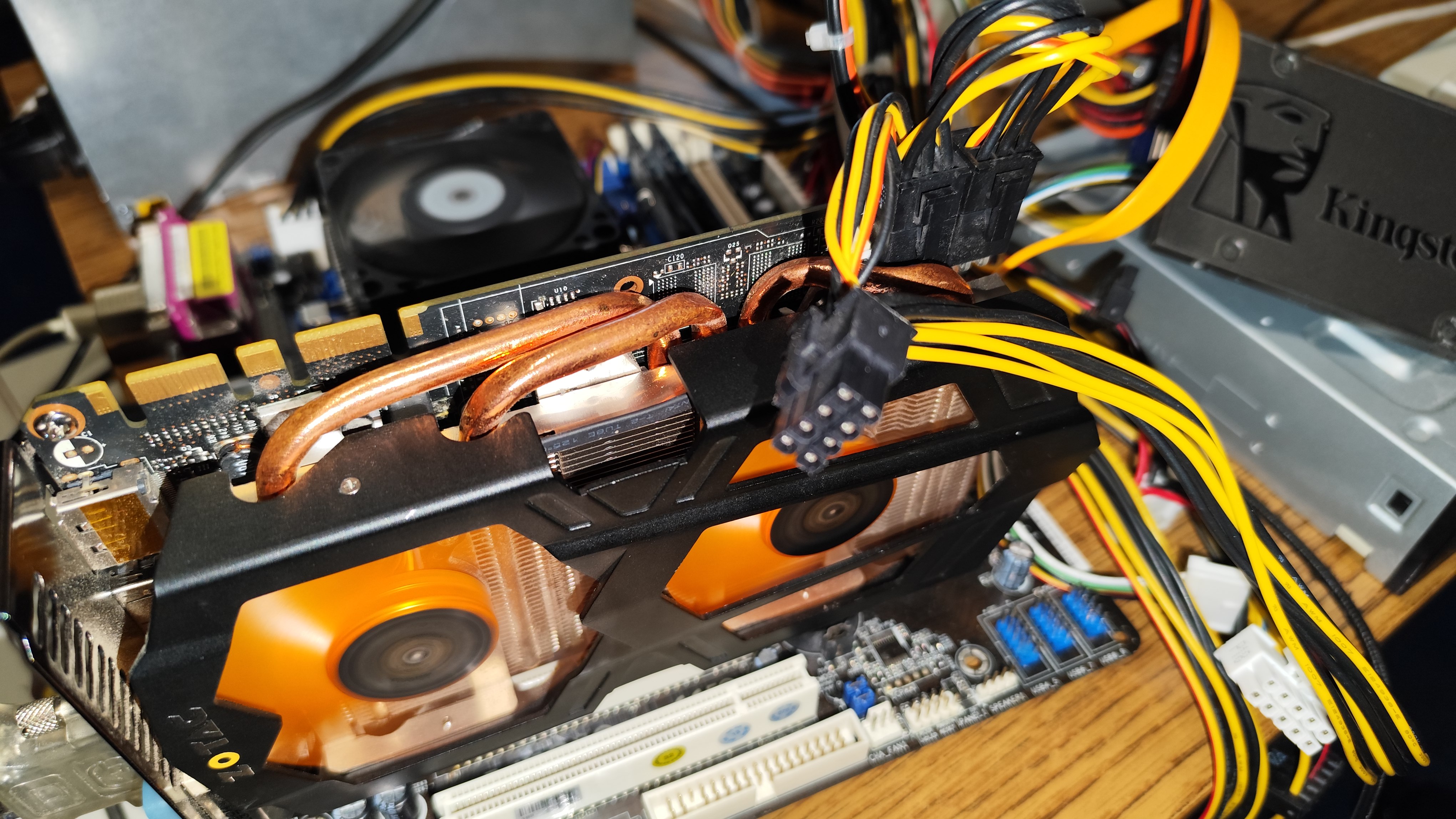
Motherboard: Asrock 775dual-VSTA CPU: Core2Quad Q9300 RAM:2x2GB DDR2-533 HDD: IDE 80GB + 40GB
Games I tried to find non-AAA games from the past years, featuring games which a typical user would play on such system: A, B, Indie titles, mostly from Steam. One old AAA game was also added to the test. The selected games require about 2 GB RAM to run, so such system can usually run them without serious issues, but 8GB would be recommended to some, which this motherboard doesn't supports, so keep in mind to buy a system with at least 8GB RAM if you plan to play games. Yandere Simulator A well known game which got popular around 2020. The game uses shaders heavily and allocates about 6 GB RAM, which means a lot of swapping for the test system, and would give a bad experience even with a high end graphics card. The game managed to start up on all the test graphics cards, but was not playable. The fps was measured at the opening of the game, but the in-game fps would be half of this.
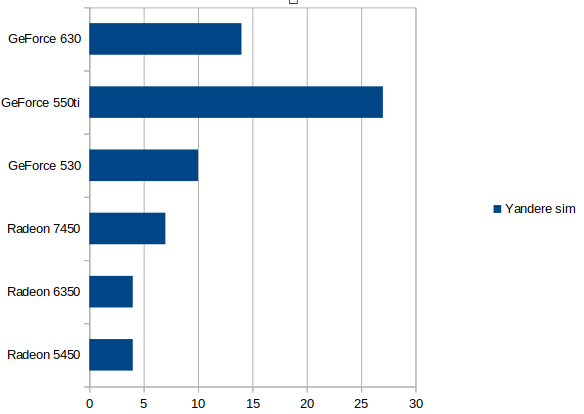
None of the cards managed to be playable, the 550ti was on the edge of being playable, the AMD cards pulled a single-digit frame per second rate. This game would need an old high-end card, or a new entry level card to be playable, especially when paired with such a low-performance hardware. The game was tested in 1920x1080, and lowering the resolution was only helping a little bit. Tokio Ghoul - Call to Exist This is a relative new game, featuring the anime with similar name. I have tested the first battle in the game. The game ran in 1920x1080 and all cards managed to start it.
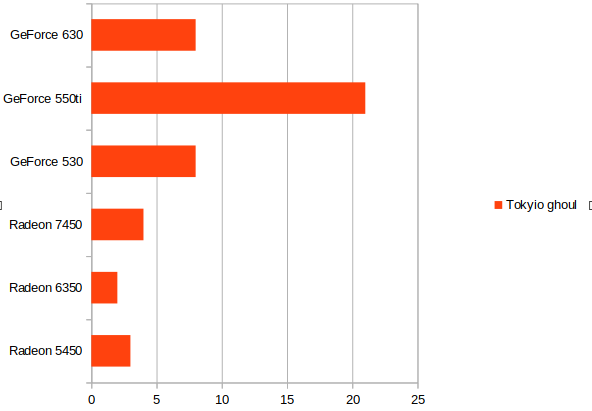
All cards, except the 550Ti shown single digit frame rates, the Radeon 6350 only managed to reach 2 fps. The fastest card was the 550Ti, which managed to reach 21 fps, which was somewhat playable. Too bad the 550Ti is not a $5 card like the others. Hinami Bay This is a pervy game, the developers decided to generate most of the visual content with the help of AI. The AI is very CPU demanding as well, but it has a certain baseline of GPU which it requires.
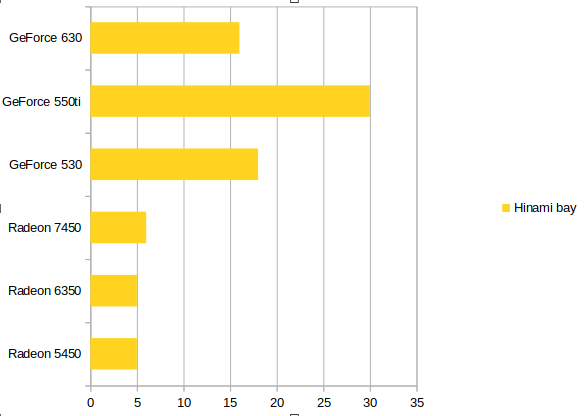
Once again, all AMD cards managed only a single digit frame rate, meanwhile nVidia cards were near around 20 fps. The 550Ti reached 30 fps (however that card was only included as a baseline), so again, none of the $5 cards offered satisfactory results in this test. Especially not the AMD cards. The game ran in 1920x1080 but decreasing the resolution only minimally helps the cards. Dirt3 This is an old AAA racing game. Its still very popular among players, and among testers as well. The game is entertaining and very nice. It however requires high frame rates to be enjoyable, the controls becoming problematic at low frame rates. The game is from the last decade, but a core2 CPU is enough for it.
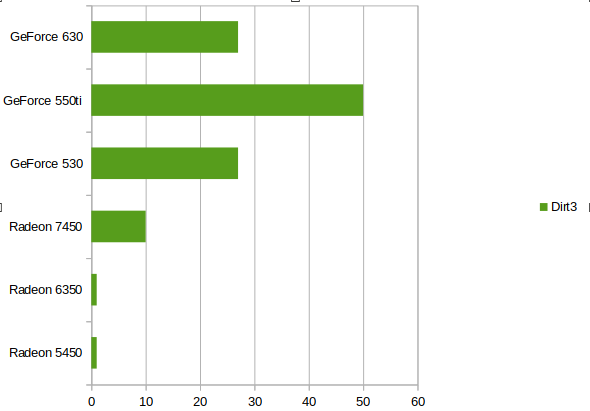
All the cards managed to start up the game, but the 5450 and 6350 only managed to reach 1 fps, and the game was literally a slideshow. The Radeon 7450 reached 10 fps. The nVidia cards reached playable frame rates, both the 530 and 630 exceeded 25 fps and hovered around 30 fps usually. The 550ti almost reached 60 fps. This game was also tested in 1920x1080. The AMD cards once again delivered terrifying results, and nVidia won the race. Lorena and the Land of Ruins This is an Anime game, about two years old. Its a dungeon hack-slash type game, a third person magic-shooter, and i decided to test it in 1920x1080. Its important to note, this game usually reacts very well to decreasing the resolution, but i have decided to keep the game in 1920x1080 as i have also tested other games like that.
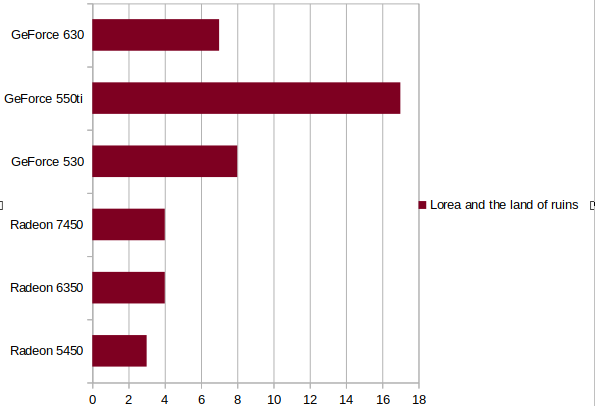
AMD cards struggled to reach even 5 fps, and the game was totally unplayable on them. On nVidia cards, only the 550ti managed to exceed 10 fps and almost reach 20. The others were below 10 fps. Its important to note, when setting the resolution to 1360x768 the frame rates basically doubled or tripled, but during gameplay the cards still struggled to deliver good frame times. Witchspring This is a point and click adventure game, featuring an alchemist, who creates living dolls. The game is not a fast pace game by any means, but its very irritating when even the menu horribly stutters for you. Which is the case with AMD cards, which once again, delivered only about 10 fps.
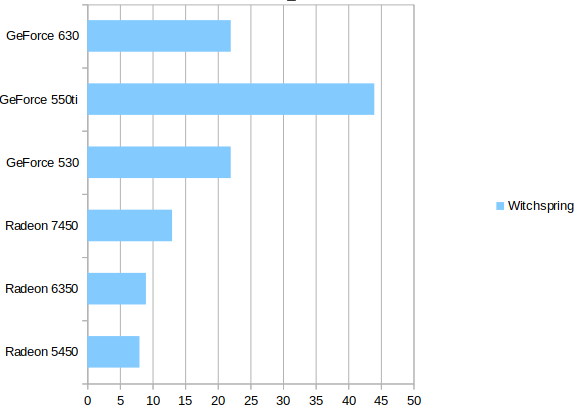
The nVidia cards exceeded 20 fps, and produced playable frame rates, the 550ti even managed 44 fps. I haven't tested this game at lower fps, maybe 1360x768 would push the Radeons above 20 fps and the 530 and 630 cards above 40 as well. Verdict Do not buy an old Dx11-capable $5 multimedia graphics card to run games. The games will start up, but the performance will be outrageously low. The 5450 and 6350 have not managed to reach even 10 fps in any of the tests. These are likely the same core, but with different name. These cards don't usually have HDMI, DP or VGA connectors, just a DMS connector which is not standard, and needs a special cable. The 6350 was actually worse than the 5450 due to the lower RAM. The performance of these cards are about 10 times less than what the name would indicate - equals to the performance of a first generation integrated Intel HD graphics. The Radeon 7450 is only 50% faster than the 5450/6350 and gaming in 1920x1080 is impossible with it. However, if someone is fine playing indie games in 1024x768 on some very old monitor, this card could actually manage around 20 fps, which could be a last resort solution till someone saves up money to buy something strong. The GeForce 530 and 630 cards can't deliver playable results in 1920x1080 but still much faster than the AMD Radeons. This means the 530 and 630 could reach 25 fps in 1280x720 or similar resolutions in most indie and B class games. If you really couldn't buy anything more serious, just stuck with these cards, then choose these cards instead of AMD. The 550Ti is not a $5 card, but that card was around $20 second hand, till it was available. Nowadays, its hard to come by, and cards such as 770 can be found instead - those are however still good cards, and if you manage to buy them for $30 or so, then you can enjoy 25+ fps gaming even in 1920x1080 with the latest indie and B class titles (but not AAA). The 5450 had no issues, and the only thing this card wins is: its a passive card, requires no cooling, unlike the others. The 6350 had an issue with the RAMDAC, and refused to operate above 1600x1200, so the tests on that card ran in 1600x1200 (not that it mattered). This was the absolute worst card even regarding of the performance. The 7450 had a bug when using the VGA cable, and sometimes the screen flickered. It was very irritating. The nVidia cards had no issues.
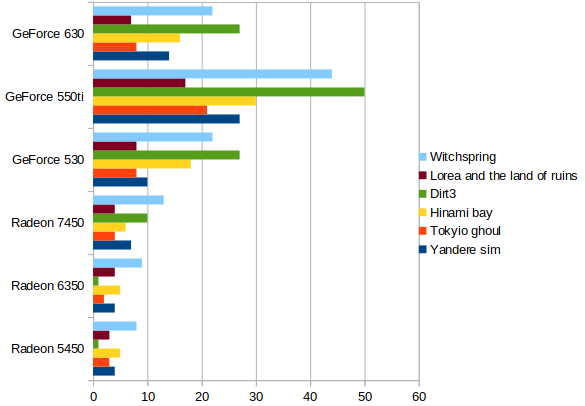
These AMD multimedia cards left a very bad taste in me. AMD had no awareness of how weak these chips are. The chips are weak and bugous. AMD didn't even bothered to integrate proper outputs to the graphics cards, they just put one or two super low quality connectors on them, usually something which isn't even standard. Combining these weak chips and useless output configuration with 64 bit memory, making these chips an expensive e-waste. Its important to note however, low-end nVidia cards were two times more expensive, but their performance is also about 3 times higher.
No comments yet