 @Geri
edited
@Geri
edited
Guide to buy a gaming laptop Gaming laptops are becoming cheaper to obtain, barely more expensive than desktop counterparts. I decided to write a tutorial, how to choose a proper laptop for gaming with the proper components, because most article in this topic are nonsensical marketing presentations about the first few newly released gaming laptops which google displays. This article is going to be a guide, what to be aware and how to choose a laptop for gaming, and i will try not to mention any brands and laptop models.
Gaming laptops are cheap, but here is the catch Not just second hand gaming laptops, but the new ones are also relatively cheap. You can get a laptop for gaming below $1000 even brand new, from various vendors. Its however recommended to buy a high-end model second hand, especially when the build quality on a newer model is low. Manufacturers sometimes tend to use thin plastic, which easily breaks, and designs where you can't take apart the laptop. If you can, try to avoid these. There are laptops where a maintenance window still exists on the bottom - where you can easily access and replace internal components without tearing the laptop down. Maintenance window (maintenance door) Before we try to deep dive into hardware specifications, i must emphasize the importance of the maintenance window. Instead of a regular laptop, you will have to replace the components of a gaming laptop more frequently. Replacing the SSD, the RAM, the DVD drive, even to insert a SIM card is possible by opening a maintenance window. If your laptop lacks this, you will have to take down the entire bottom cover, and sometimes, even removing the keyboard, to be able to chance the RAM or SSD. Unlike a regular laptop for content consumption, you will have to swap parts more frequently to upgrade your ram, your SSD, and other components.
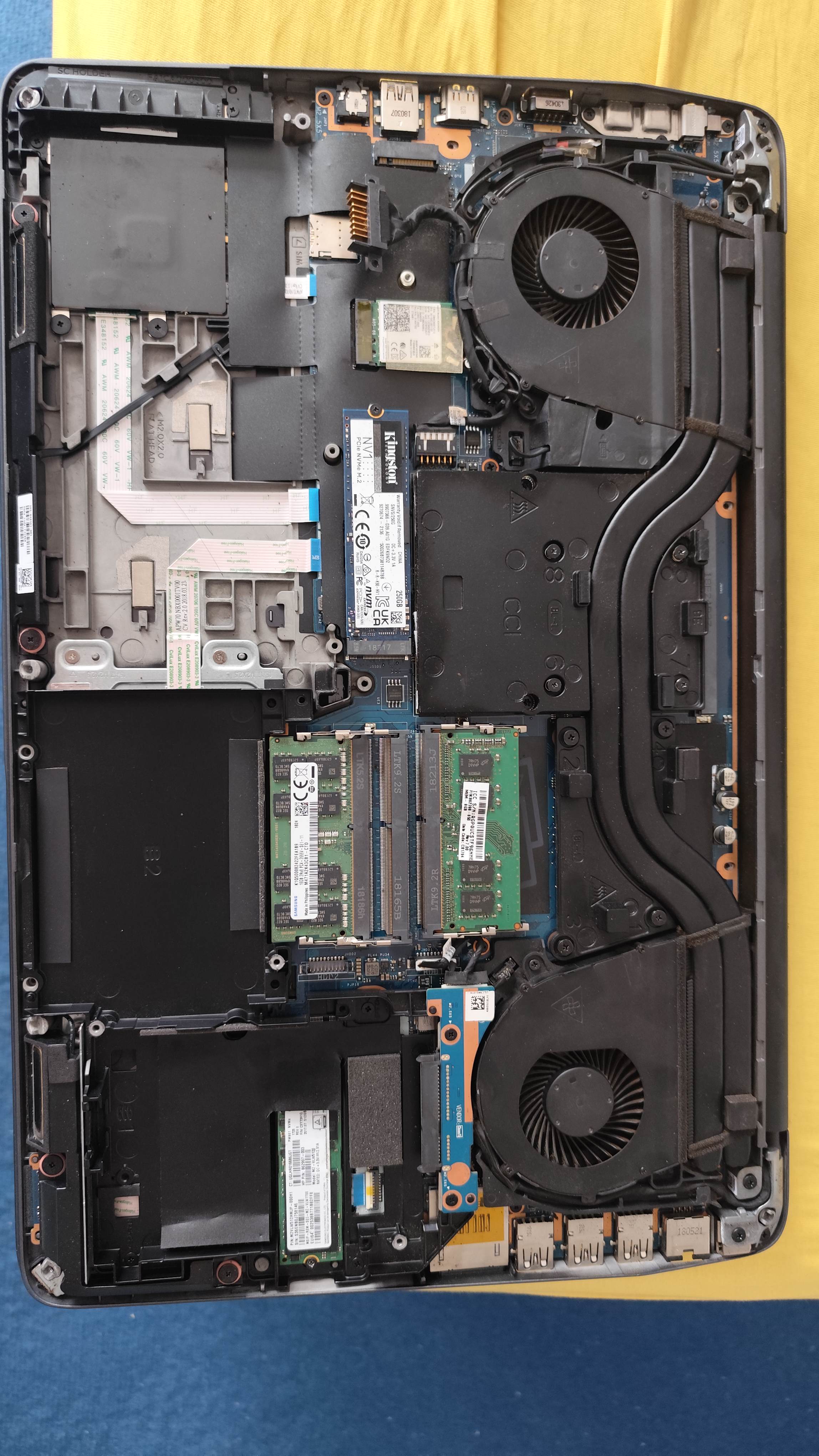
Picture: a laptop without a proper maintenance window Upgrading the hard disk An ideal gaming laptop should be able to accept one or two NVME SSD drives, and it should have one or two SATA bays for SATA SSD-s or HDD-s. This is very important, because games are huge, some games can exceed 200GB and even some indie games are simply larger than 50GB. Laptops are usually equipped with 512GB or 1TB SSD drives, which is just simply not enough, and you will have to expand your storage by adding multiple large SSD and/or hard disks. Therefore, ensure the gaming laptop of your dreams have multiple options to do this upgrade, and ideally, ensure you can easily access these disks from a maintenance window. Upgrading the RAM Ideally, a gaming laptop should have at least two memory slots. Its even better if it has four slots available. However, in the case of the laptop having four slots, two can sometimes be only accessed after a partial teardown of the laptop, which is not recommended. Avoid the laptops with one memory slots, those are too limited. Laptops sometimes come only with 16GB RAM, or less: in that case, you should upgrade them to at least 32GB RAM or more, even if some games are willing to work with 16GB. Potemkin maintenance window There are laptops where the maintenance window is fake, and especially HP is doing this with some of its models. On some of models, you can only access the battery, and only one of the disk drives behind the maintenance window. This means, you will have to partially tear down the laptop, regardless of having a maintenance window. Its recommended to watch video tutorials about replacing components of the laptop before buying it, so you can see, what can, and can not be accessed below the maintenance window without partially tearing down the laptop. Soldered memory and SSD My neighbor knocked on my door a few days ago, to show his Acer laptop, which he bought in a large European electronic device mall. He was proud of his computer, until it turned out, it only has a 64GB SSD. After attempting to upgrade it to a larger SSD, it turned out, the SSD is soldered on the motherboard, and its not upgradeable. How about the RAM? 4 GB, and guess what, its soldered. He bought e-waste for $400. Chains are about to scam you, don't trust them to give you a proper laptop, always do your research, and buy from reputable sellers, not from your local mall! Workstation laptops Instead of trying to search specifically for a gaming laptop, you should consider buying a workstation laptop. These usually have similar components as gaming laptops, but they have better build quality: some of them have metal shell instead of a plastic, they still have DVD drive bays (which is ideal if you want to play older games released on a DVD), and they tend to have screens with better color representation. In exchange these laptops are heavy and more bulky.
The screen Nowadays, most gaming laptop screens are 15.6 or 16 inch in size, some workstation laptops are released with 17 inch. I recommend to buy a laptop with IPS screen. Gaming laptops are frequently released with TN panels, which are not recommended to buy, however, those can do higher refresh rates. IPS panels usually can only do the standard 60 Hz refresh rate, and they can rarely do more, however, the color accuracy and viewing angles of IPS screens makes it superior in all cases. 18 inch laptops are very rare, and even the 17 inch verions are becoming less common. Its recommended to buy a 17 inch model with IPS screen, if its available, as you want as large scren as possible. The audio The audio on most gaming laptops are terrible. There are some exceptions, but you can't really find reviews about them. If the audio system has some sort of branding which is sort of known in the industry, you can expect a somewhat acceptible sound quality, otherwise prepare the quality of your grandfathers Sokol radio. Some of the laptops simply have one mono speaker, and even if its stereo, it tends to be awful. I don't want to mention brands too much, but Bang&Olufsen gives usually an acceptable quality. And of course, if a laptop has multiple large speakers inside, those will also give a good quality, however, if the specifications modestly forgets to talk about the speaker specifications, then you can be sure its bad. The keyboard Beware, when buying used gaming laptops! The previous owner might have partially damaged the WADS and cursor keys. Some people tend to press them too hard, and after a while, this have a toll on the key quality. Ordering a replacement keyboard with the key allocation of your country can cost more than $50, so you should be financially prepared to swap the keyboard when you buy such a laptop. High end gaming and workstation laptops have keyboard backlight, but you shouldn't let yourself decieved by such feature, as these keyboard frequently represent an even less quality than older standard keyboards. The graphics chip You might noticed, i avoided the most important factor of a gaming laptop: the GPU. Avoiding the hot porridge like a cat up to this point, because its a can of worms on its own. As you might be aware, graphics chips (IGPs) are integrated into CPUs for a while by now. Basically every CPU has an integrated IGP, and sometimes these are even advertised to be able to offer an acceptible gaming performance. This is however, a lie. IGPs are not enough for gaming In the recent 5 or so years, the performance of integrated graphics chips were not able to keep up with the demand of video games. Intel's newest HD graphics, and Intel UHD and Iris chips can't deliver the required performance for modern games, not even for indie games. And in fact, you can't expect more than single digit frames per second in modern titles. Do not even consider buying a laptop without a discrete graphics card, because no matter how well the marketing texts are phrased, these integrated chips are unable to deliver acceptible frame rates. Intel, however, has a discrete graphics chip, more on that later. When you buy a laptop with an AMD Ryzen CPU, it has a modern AMD Vega IGP integrated into it, but just as the Intel counterpart, you can expect single digit frame rates from this in the modern titles. No matter how hard you want to believe, graphics chips integrated onto the processors can't deliver enough performance any more, and you should avoid buying such laptops. Avoid old discrete GPUs Having a discrete GPU in your laptop doesn't means you automatically got a proper product. Older generations of discrete GPUs will not be able to offer acceptable performance. Graphics chips from the DirectX 11 era, such as nVidia Quadro 1000M/2000M/3000M, GeForce GT 730M (and the 7xx line), GT 960M or lower, are simply not strong enough. Single digit frame rates can be expected even in medium settings, and some newer games will have degraded graphics quality due to the lack of hardware DirectX12 support. AMD HD 6xxx and 7xxx GPU's only support DirectX 11, and they are not just slow, but have driver issues. A lot of games will simply crash in the menu, or refuse to start alltogether - the driver quality is very poor. nVidia MX 110 and other low end discrete graphics chips are using the older DirectX11-compatible cores, despite being released after DirectX12 was available. GT 960 also have a DirectX11 core at hardware level, despite its naming. Misleading naming can confuse the buyer, so i recommend you to google the name of the chip to see if it supports DirectX 12 with at least 12_0 feature level or above, and if it says 11_x, then you should avoid buying that hardware. Newer, weak discrete GPUs (~25 fps) Discrete graphics chips released after 2020 are usually up to the task to run the games. however, some models are very weak, and not recommended, unless you can't find anything newer. -nVidia MX 250 and 350: these are cut down multimedia chips of the GeForce 10xx generation, they are basically the laptop version of GeForce 1030. Prepare for sub 20 fps gameplay. Absolutely not recommended. -nVidia GeForce 1050 Mobile 2GB/3GB/4GB: this card has multiple versions and chips. The 2 and 4gb versions are based on the desktop 1050 with 128 bit memory bus, the 3GB version is based on the 1050 TI chip (and has more execution cores than the 2GB models, but only 96 bit memory bus). The 3GB version usually not available any more, but if yes, then you should buy the 3GB version, as the 768 execution cores it has, tops the 640 execution cores of the 2/4gb version, giving a few extra fps, which this card really needs. This doesn't needs its recommended: its just the least worse of the generation. These cards can usually reach 25 in modern games, especially the 3GB model. -nVidia Quadro P2000 Mobile: This has the chip of the GeForce 1050 TI with a 128 bit memory controller, but still not recommended, and the card will balance on the edge of playability in newer titles. -Intel Iris Xe: Do not confuse it with the Iris, because thats an IGP! Iris Xe is Intel's discrete graphics chip for laptops. Its much faster than their integrated solutions, however not fast enough to be recommended. The chip can usually exceed 25 fps, but barely. If you end up with it, its not a problem, but you shouldn't specifically search to buy one. There are various versions of Iris Xe, there isn't too much difference in performance, they perform similarly to the 1050 series in practice. -AMD Radeon RX560 Mobile: AMD basically managed to die out in the laptop discrete GPU market, however you can still find them from day to day. The RX560 performs similarly to the 1050 family, usually a little bit slower than those. Struggling to keep the game above 25 fps, unfortunately its usually even more expensive than the 1050 based laptops and making it a worse deal. Acceptible laptop GPUs (30-60 fps) These laptops can run most of the newest games above 30 fps, and generally they give a very good gameplay experience. -GeForce 1060 Mobile: These are the cheapest alternatives for good (30+ fps) gaming experience for a laptop, and they are available in 3GB or 6GB versions (192 bit memory bus). You should buy the 6GB version if you can, because that will give better experience in the newest titles. This is the first chip which you can buy without thinking twice, but the longevity of the system can be questionable, as this was a midrange model when it was released. -nVidia Quadro P3000 Mobile: This is the same as the 1060, the same memory model, and the same execution units in the same quantity: you can buy it. -nVidia Quadro P3200 Mobile: This chip was using the core of the GeForce 1070, but the memory system of the 1060 (so its still 192 bit with 6GB ram). It can give a good 20% extra performance over the 1060 chip, so if you see the same laptop with a P3000 and P3200, choose the latter one. -nVidia 2050 Mobile: Its built to replace the 1050, but with a newer chip. It has only a 64 bit memory bus, however using the newer GDDR6 memory stanard. It can outperform the 1050 by around 60%, making the performance equal to the P3000 Mobile in most cases. One of the drawbacks is the 4GB graphics memory. The gaming performance will however be acceptable.
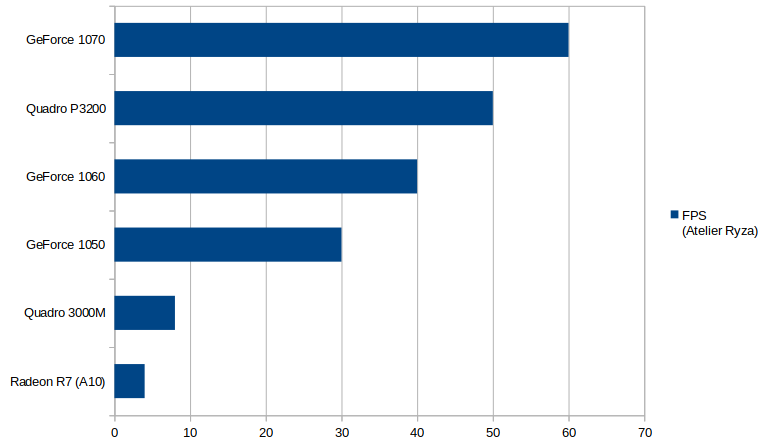
Great laptop GPUs (60+ fps) -nVidia GeForce 1070 Mobile: This basically equals to the GeForce 1070 desktop version: it features a full 256 bit wide memory bus containing 8GB RAM, but actually contains more execution units even as the desktop 1070, but less than the GeForce 1070 Ti. Its a highly recommended laptop card, usually more than 30% faster than the P3200, usually pushing games above 60 fps. -nVidia Quadro P4000 Mobile: This equals to the 1070 Mobile, and the same applies to it. The only difference is in power consumption, the Quadro version consumes somewhat less power. -nVidia Quadro P5000 Mobile: This equals to the 1070 Mobile, but has 16 GB graphics memory, which increases the systems longevity. This card is however, rare, and the 16GB RAM on this chip is a little bit overkill. -nVidia 1160 Mobile: Built similarly as the older 1060, but contains a newer and stronger graphics chip. It has the same 196 bit memory bus and 6GB ram, and the same number of execution pipelines. Regardless, its about 40% faster than the older 1060 due to its newer design. -nVidia 2060 Mobile: It has more execution pipelines than the 1160, however these pipelines running at a much lower clock speed. In practice, the performance equals to the 1160, and the memory system was built similarly with a 196 bit memory bus. It uses a newer generation of graphics core. -nVidia 3050 Mobile: 2048 execution pipelines paired with a 64 bit GDDR6, making it somewhat faster than the 2050 and even the 1160. Its a recommended card, but one drawback is the small 4 GB memory size, which makes it less of a good choice when longevity is considered. -nVidia 3060 Mobile: Simiarly to previous xx60 cards, it has a 192 bit memory bus combined with 6 GB VRAM. It has 3840 execution cores, its a very fast card, the only limitation is the 6GB memory size. Its one of the faster solutions available in second hand laptops for very cheap price tags, and its highly recommended. -Quadro RTX 5000: This equals to a desktop GeForce 2080 Super in regards of execution pipelines, and has a a 256 bit memory bus, using 16GB GDDR6 memory. With this games, you can except a perfectly fluid game play and hitting the 60 hz limit of your screen all the times with modern titles, however its harder to find this type of graphics card, so you shouldn't specifically search for it unless you want to wait months for one to appear.
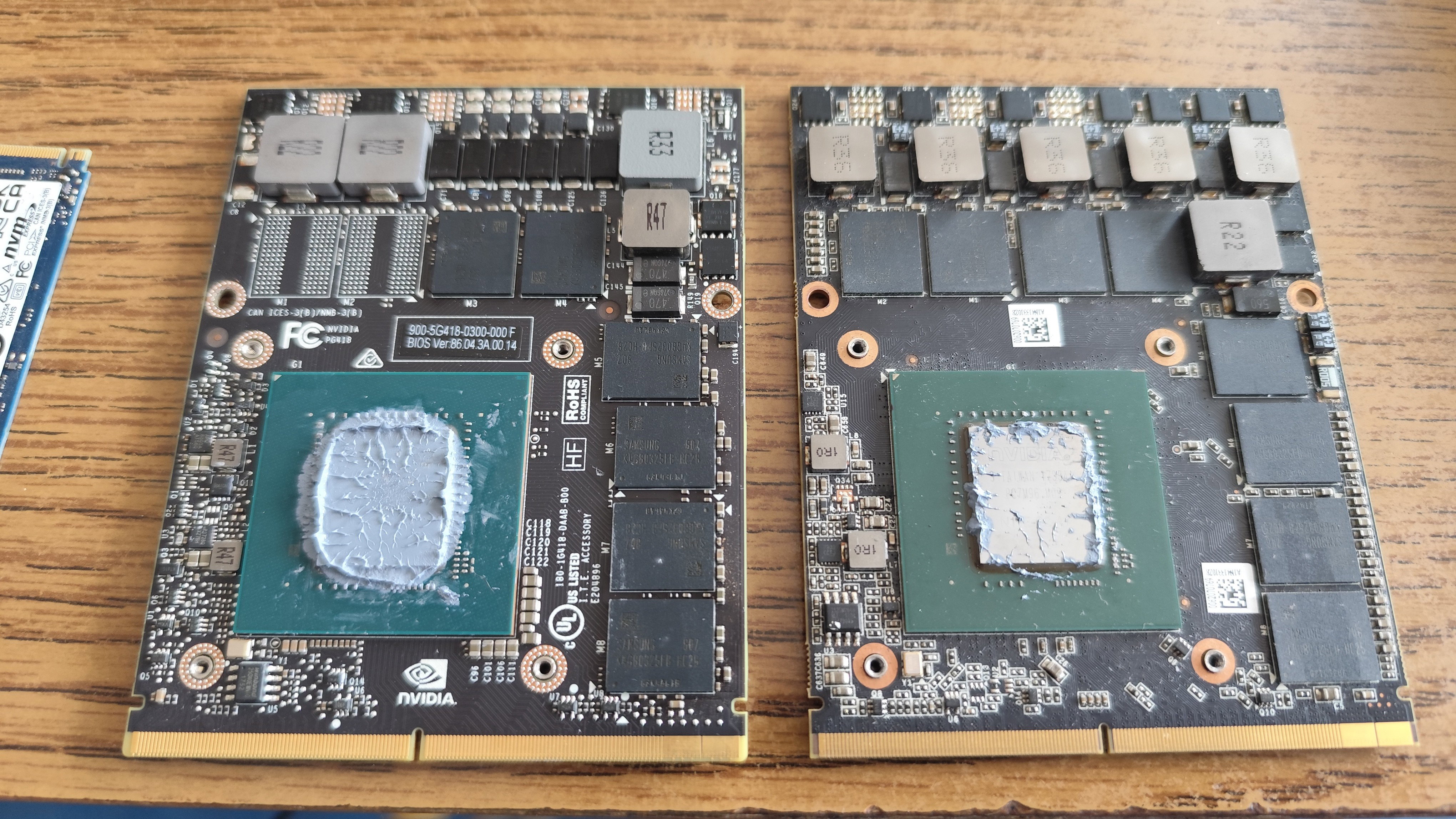
Upcoming products Currently the new RTX 50xx Mobile chips are released, and arriving on the markets very soon. I havent personally touched such new things yet, checking the specifications of the 5060 it will be a very great chip which can be bought, i however not included them in the list due to the lack of personal experiences with them. Beware with this generation, because it seems 17 inch screens are not really being used any more, and they are being equipped with 16 inch screens at most. The housing also uses even weaker materials than before. MXM slots In some laptops, the graphics card can be replaced. These are called MXM graphics cards, and they are available in a wide variety of mid tier to high end products. These are in MXM slots, which is a semi-standardized slot for laptop graphics cards. Not everything is compatible with every laptop. MXM cards for HP laptops are usually compatible with other HP laptops and Dell laptops, and vice versa, but other manufacturers use different form and shape of MXM cards. Some laptops - usually the ones without IGP - doesn't support a wide variety of graphics cards. One of the reasons are video bios issues: sometimes, the GPU firmware is stored in the motherboards BIOS, and only a handful of cards can be used in the laptop. If a laptop has an IGP, then the IGP will be used to boot the system, and the MXM graphics card will act as a 3D accelerator (Hybrid Graphics). Sometimes, the cooling is not fully compatible, because there are electric components on the MXM graphics card, which prevents the heatsink to be inserted.
The list of GPUs are not full I have only included the laptops on the list, which are actually available if you go to a marketplace (be it an used marketplace, or a store). You might notice the lack of AMD discrete GPUs in the list, and in fact i have only listed one in the list. Thats because that was the only one at the time i wrote this article, and it seems AMD managed to lose this market. The quality of their IGPs for gaming is not acceptable, and their newer discrete laptop GPUs are mostly paper-launch. The informations i have shared in this article are a few months old, and they are mostly based on the observations of the Hungarian gaming laptop market, so there will be small differences to your current local market.


14 comments
いいねぇ~ゲーム久しぶりにしたいなぁ~
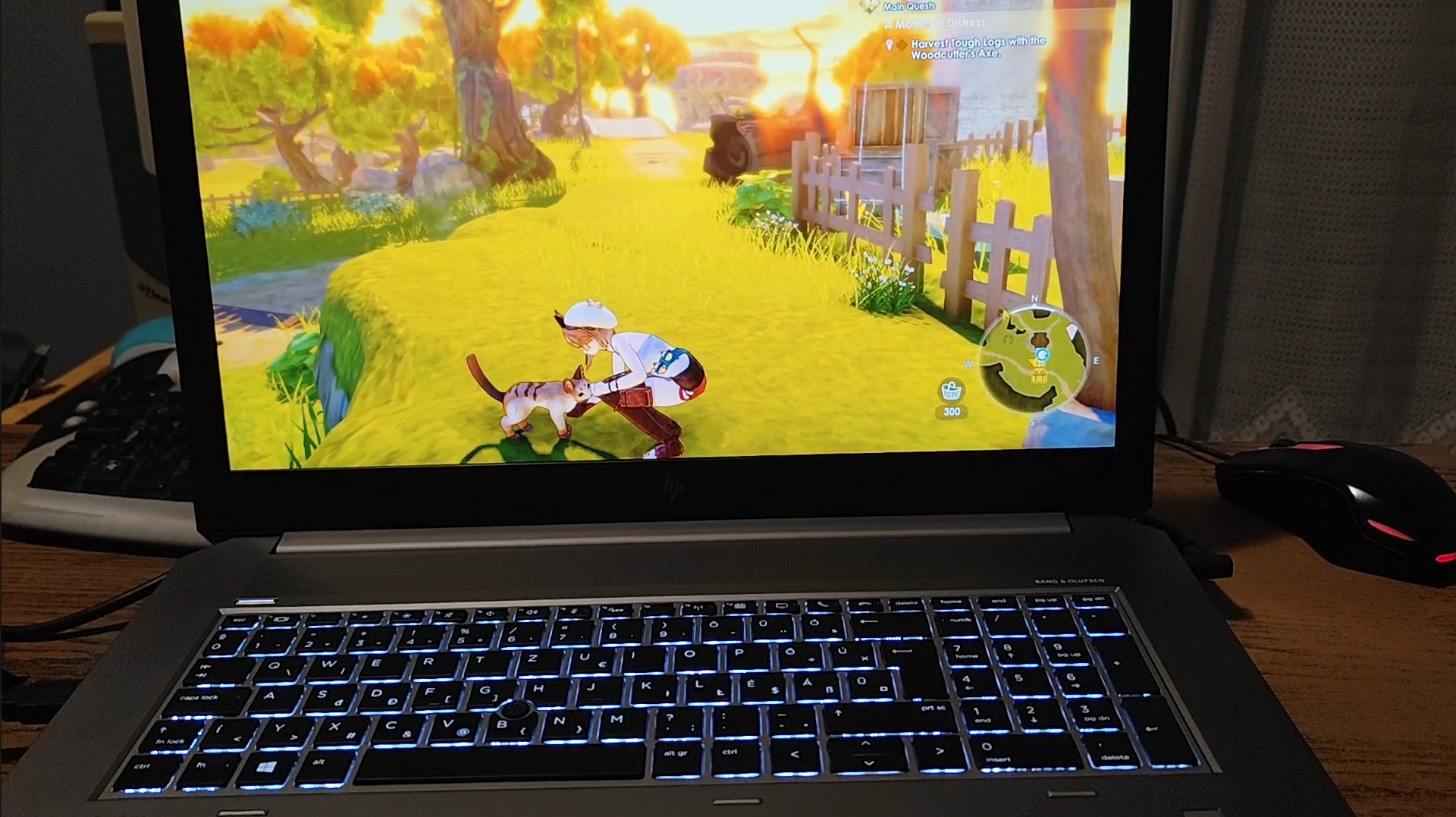
嬉しい!たくさん良いゲムがある。写真のに、Atelier Ryzaがある。
> Atelier Ryza そうなんだぁ~、いいゲームがたくさんあるんだぁ~~ Atelier Ryzaも調べてみます (・∀・)イイネ!!
たくさんすてきゲムがある。AAAゲムが悪いけど、SteamとITCHに100000+ゲム見つけられる。たとえば、Dragon Quest, Atelier series, Nobeta, Neptunia series, Legend of Heroes, Senran Kagura, Fairy Fencer, Mary Skelter, Scarlet Nexus, Dragon Star, Tales of Symphonia, Kandagawa Jet Girls, Touhou games, Little Witch Academia, Fairy Tail, Ys, Samurai Maiden, Monster Hunter, Mika and the Witch Mountain, Palworld...
本当にたくさんのゲームがあるねぇ~~ Steamでたくさんゲームを見つけれる時代になって、すごくうれしい! Legend of Heroes! Dragon Quest!! Little Witch Academia!!! Good ones!! I will also check other tiles you mentioned. 他のゲームもしらべてみます。 ありがとう!
RPGを好きか?
RPGはすきだよ。ドラゴン・クエスト、ファイナル・ファンタジー、ペルソナ、ロマンシング・サガとかがすき。でも、一番好きなのは、クロノトリガー!
クロノトリガーもクリアしました。この時に、たくさんクロノトリガ見たいなゲムがある。
(((o(*゚▽゚*)o))) (((o(*゚▽゚*)o)))
There's a lot to consider. But if it is for gaming, you really have to be miticulous when it comes to its specifications.
There is always a catch somewhere, unfortunately.
Useful information, friend. Will you write one article on desktop computers?
Thankyou. I have written one how to build an affordable HEDT desktop computer recently https://read.cash/@Geri/building-a-hedt-computer-944df66e however i have no plans writing a more wide guide on desktop computers at this moment.
Thank you for giving the link.