 @ClearSky
edited
@ClearSky
edited
Get BCH Node Info from Your Browser in Json Format Using Python (RPC API)

Exposing your node RPC to the internet is discouraged, however we still can use it locally when developing to make our life easier. In this tutorial I'll demonstrate how to get some information from a Bitcoin Cash node using Python and A minimal web framework called Cherrpy. Prerequisites Bitcoin Cash full node, (testnet4) can do ~40MB Python Pipenv This utorial assume you have Ubuntu Linux, though you can adapt it to your OS as it's only Python stuff. Preparing for Development Let us create a directory to host our project in and get inside it: mkdir blockchain_project && cd blockchain_project Creating a virtual environment Let us create a virtual environment using `pipenv` to make things cleaner and easier: pipenv shell Pipenv will create a new virtual environment that is isolated from other python stuff in our system so our work is contained in it. Installing Cherrypy Cherrypy is a minimal python web framework we install it by doing: pipenv install cherrypy Setting the full node If you don't have RPC already enabled you should enable it. Usually node settings resides in a file called `bitcoin.conf` ,The default location for configuration file is `~/.bitcoin/bitcoin.conf` in linux, for other systems check bitcoin wiki related section. https://en.bitcoin.it/wiki/Running_Bitcoin#Bitcoin.conf_Configuration_File It should contain something like: txindex=1 server=1 whitelist=127.0.0.1 rpcuser=localuser rpcpassword=your_rpc_password testnet4=1 rpcallowip=127.0.0.1/0 [test4] port=29333 rpcport=29332 Here we inform the node to: Enable indexing (optimal) Enable RPC server Set RPC user name Set RPC password Enable testnet 4 In test4 section we specify testnet4 RPC port Restart your full node software after modifying the configurations. Checking RPC RPC should be enabled for our program to work. We check that our node configuration file has RPC enabled and that is active using `curl` curl --silent --user localuser --data-binary '{"jsonrpc": "1.0", "id":"curltest", "method": "getblockchaininfo", "params": [] }' -H 'content-type: text/plain;' http://127.0.0.1:29332 | jq Should ask for your RPC password: Enter host password for user 'localuser': Then should show what looks like this: { "result": { "chain": "test4", "blocks": 112704, "headers": 112704, "bestblockhash": "0000000012b46b0383471ca3fbd2bd7a97293312d55e471f2e4dc5e728cfc1b3", "difficulty": 4.31893188237608, "mediantime": 1662957827, "verificationprogress": 0.9999998822062223, "initialblockdownload": false, "chainwork": "0000000000000000000000000000000000000000000000000161bd16c51e437a", "size_on_disk": 36726279, "pruned": false, "warnings": "" }, "error": null, "id": "curltest" } This seems like a successful which indicates that our RPC server is ready. Apparently here we used `localuser` as RPC user but you should change it to your RPC user and also should change RPC URL from `http://127.0.0.1:29332` to your own if you used a different configurations. Writing our App Now let us copy the following text and save it in a file called `blockchain_app.py` : import cherrypy # Imported the web framework import requests # Library to communicate with RPC import json # Library to parse and form Json # Variables to access RPC url = 'http://localhost:29332/' rpc_user='localuser' rpc_password='your_rpc_password' # Function to call RPC with a provided method # Example: If we provided `getblockchaininfo` it will request that method data # from the RPC. We can also request many other methods like `getbalance` or # others available in our RPC server def call_rpc(method): """ Function to call RPC with a provided method """ # Construct payload from provided method in json format payload = json.dumps({"method": method}) # have the method in # Headers to be provided in requests function query headers = {'content-type': 'application/json', 'cache-control': 'no-cache'} # log headers using cherrypy log, useful for debuging cherrypy.log(f'headers: {headers}') # Try to call RPC and show exceptions if there is an issue try: response = requests.request( "POST", url, data=payload, headers=headers, auth=(rpc_user, rpc_password) ) # The function will return the response of the request in json format return json.loads(response.text) # If there is an issue related to Request it will report request issue except requests.exceptions.RequestException as e: cherrypy.log(f"Request issue: {e}") # If there is an issue it will report it except Exception as e: cherrypy.log(f"Error: {e}") # Cherrpy App class class App(object): # Exposing index function to the web @cherrypy.expose # Set the index page function to be a json output page @cherrypy.tools.json_out() def index(self): # Run the call_rpc function with `getblockchaininfo` method return call_rpc('getblockchaininfo') # Run the App cherrypy.quickstart(App(), '/') Both sections should be in the same file, I put it separate to fix read.cash syntax highlighting issue. As you may notice the file contains comments that explain each part of the code. How the App Work We basically imported the needed modules like `cherrypy` and setup the variables that contains RPC stuff like url, username and password. import cherrypy # Imported the web framework import requests # Library to communicate with RPC import json # Library to parse and form Json # Variables to access RPC url = 'http://localhost:29332/' rpc_user='localuser' rpc_password='your_rpc_password' Then we created a function called `call_rpc` that will take the method required like `getblockchaininfo` and trying to deliver it to the RPC server while handling errors with python exceptions. def call_rpc(method): """ Function to call RPC with a provided method """ # Construct payload from provided method in json format payload = json.dumps({"method": method}) # have the method in # Headers to be provided in requests function query headers = {'content-type': 'application/json', 'cache-control': 'no-cache'} # log headers using cherrypy log, useful for debuging cherrypy.log(f'headers: {headers}') # Try to call RPC and show exceptions if there is an issue try: response = requests.request( "POST", url, data=payload, headers=headers, auth=(rpc_user, rpc_password) ) # The function will return the response of the request in json format return json.loads(response.text) # If there is an issue related to Request it will report request issue except requests.exceptions.RequestException as e: cherrypy.log(f"Request issue: {e}") # If there is an issue it will report it except Exception as e: cherrypy.log(f"Error: {e}") Then we have the Cherrpy section where we expose functions that call the `call_rpc` function to obtain some data and return it in Json format # Cherrpy App class class App(object): # Exposing index function to the web @cherrypy.expose # Set the index page function to be a json output page @cherrypy.tools.json_out() def index(self): # Run the call_rpc function with `getblockchaininfo` method return call_rpc('getblockchaininfo') # Run the App cherrypy.quickstart(App(), '/') That is it. Running the App Let us run it from the shell: python3 blockchain_app.py We should see output like this: [13/Sep/2022:11:39:32] ENGINE Listening for SIGTERM. [13/Sep/2022:11:39:32] ENGINE Listening for SIGHUP. [13/Sep/2022:11:39:32] ENGINE Listening for SIGUSR1. [13/Sep/2022:11:39:32] ENGINE Bus STARTING CherryPy Checker: The Application mounted at '' has an empty config. [13/Sep/2022:11:39:32] ENGINE Started monitor thread 'Autoreloader'. [13/Sep/2022:11:39:32] ENGINE Serving on http://127.0.0.1:8080 [13/Sep/2022:11:39:32] ENGINE Bus STARTED Where http://127.0.0.1:8080 is the address you can visit to get see our Web app from the browser on the same machine. If you open the link you may see something like this:
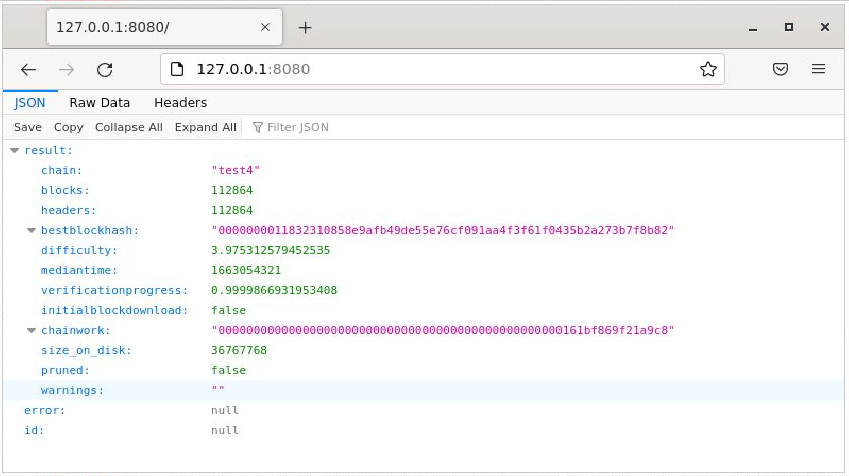
So we now exposed part of internal RPC to the web and things seems to work. More end points This was a minimal application. You can see more advanced version with other endpoints on the fly by just almost copy paste, for example you can add the following inside the **App** class: @cherrypy.expose @cherrypy.tools.json_out() def getblockchaininfo(self): return call_rpc('getblockchaininfo') @cherrypy.expose @cherrypy.tools.json_out() def listtransactions(self): return call_rpc('listtransactions') @cherrypy.expose @cherrypy.tools.json_out() def getbalance(self): return call_rpc('getbalance') @cherrypy.expose @cherrypy.tools.json_out() def getmininginfo(self): return call_rpc('getmininginfo') @cherrypy.expose @cherrypy.tools.json_out() def getpeerinfo(self): return call_rpc('getpeerinfo') @cherrypy.expose @cherrypy.tools.json_out() def getnewaddress(self): return call_rpc('getnewaddress') you can call it by visiting a URL with the function name like: http://127.0.0.1:8080/getpeerinfo http://127.0.0.1:8080/listtransactions You can find a list of RPC commands in Bitcoin Cash Node (BCHN) Documentations: https://docs.bitcoincashnode.org/doc/json-rpc/ Change Port or Allow Access on All Interfaces You can change the default port for the app from `8080` to `8081` by having: cherrypy.config.update({'server.socket_port': 8081}) Just before the `cherrypy.quickstart(App(), '/')` section. Also you can change the app to listen to request not just from `127.0.0.1` by having: cherrypy.server.socket_host = '192.168.1.250' Also above the `cherrpy.quickstart` section. You may set the IP to `0.0.0.0` to listen to all interfaces. Full App Code A snippet contains the full app code is on this Gitlab gist: https://gitlab.com/-/snippets/2407788 This Tutorial This tutorial is part of my work to fulfill my commitment to BCH community to write some Python guides in part of my Flipstarter pledge. https://gitlab.com/uak/flipstarter-transparency/-/issues/1 Appreciate the community support that allowed my after my creator blessing to do this.


No comments yet