 @vcckvvOnNoiseApp
more from that month
@vcckvvOnNoiseApp
more from that month
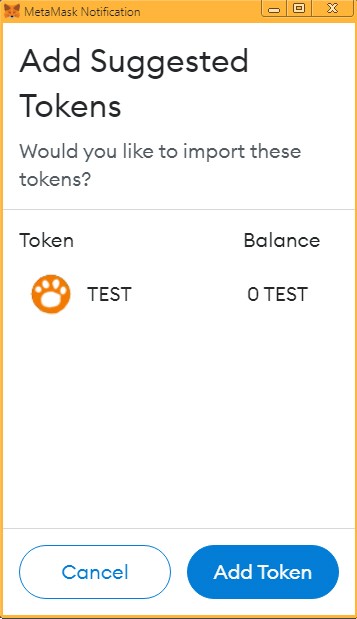
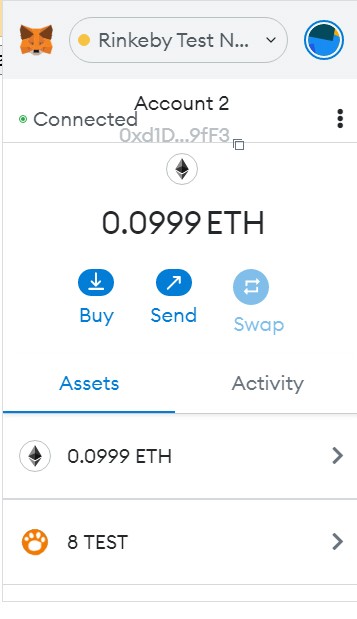
依照預告,這次要實作ERC20代幣的水龍頭網站,沒看過之前智能合約的介紹的話可以先去看一下之前的文章: (1) https://noise.cash/post/jgmg36rhn05wx (2) https://noise.cash/post/r6v7389f5k67z (3) https://noise.cash/post/66xr32vf23r65 首先實際操作一遍水龍頭網站看看: https://vcckvv.github.io/SmartContract/TestToken/ 和之前一樣,要安裝MetaMask的瀏覽器外掛才能運作,沒有goerli的代幣可以到那個goerli水龍頭網站連結領取:https://goerlifaucet.com/ 這次有加入切換成goerli鏈的功能,所以不用再先自行切換,MetaMask會自動跳出一個視窗要你切換到goerli鏈 連結帳戶、切換goerli鏈完成後,接下來就按下「新增TestToken代幣資料到MetaMask」的按鈕,MetaMask會自動跳出一個視窗要你新增一種新的ERC20代幣TestToken(如圖一),按下那個Add Token按鈕就可以看到Assets多了新的代幣TEST 接下來按下「獲得TestToken代幣」的按鈕,就會跳出一個視窗要求簽署交易,簽署完等待交易上鏈,就可以看到帳戶中代幣TEST多了8.00元(如圖二) 接下來讓我們來看一下網頁的完整程式碼: https://github.com/vcckvv/SmartContract/blob/gh-pages/TestToken/index.html --------------------------------------- <html> <head> <title>TestToken水龍頭</title> <meta http-equiv="Content-Type" content="text/html; charset=UTF-8" /> </head> <body> <input id="showAddress" readonly size="50" /><input id="showBalance" readonly /><br> <button onclick="onAddTokenBtn()">新增TestToken代幣資料到MetaMask</button><br> <button onclick="onGetTokenBtn()">獲得TestToken代幣</button><br> <a href="https://goerlifaucet.com/" target="_blank">goerli水龍頭網站</a> </body> <script src="https://cdn.ethers.io/lib/ethers-5.1.umd.min.js"></script> <script> // The Contract interface const abi = [{"constant":true,"inputs":[],"name":"name","outputs":[{"name":"","type":"string"}],"payable":false,"stateMutability":"view","type":"function"},{"constant":false,"inputs":[{"name":"spender","type":"address"},{"name":"value","type":"uint256"}],"name":"approve","outputs":[{"name":"","type":"bool"}],"payable":false,"stateMutability":"nonpayable","type":"function"},{"constant":false,"inputs":[],"name":"mint","outputs":[],"payable":false,"stateMutability":"nonpayable","type":"function"},{"constant":true,"inputs":[],"name":"totalSupply","outputs":[{"name":"","type":"uint256"}],"payable":false,"stateMutability":"view","type":"function"},{"constant":false,"inputs":[{"name":"from","type":"address"},{"name":"to","type":"address"},{"name":"value","type":"uint256"}],"name":"transferFrom","outputs":[{"name":"","type":"bool"}],"payable":false,"stateMutability":"nonpayable","type":"function"},{"constant":true,"inputs":[],"name":"INITIAL_SUPPLY","outputs":[{"name":"","type":"uint256"}],"payable":false,"stateMutability":"view","type":"function"},{"constant":true,"inputs":[],"name":"decimals","outputs":[{"name":"","type":"uint8"}],"payable":false,"stateMutability":"view","type":"function"},{"constant":false,"inputs":[{"name":"spender","type":"address"},{"name":"addedValue","type":"uint256"}],"name":"increaseAllowance","outputs":[{"name":"","type":"bool"}],"payable":false,"stateMutability":"nonpayable","type":"function"},{"constant":true,"inputs":[{"name":"owner","type":"address"}],"name":"balanceOf","outputs":[{"name":"","type":"uint256"}],"payable":false,"stateMutability":"view","type":"function"},{"constant":true,"inputs":[],"name":"symbol","outputs":[{"name":"","type":"string"}],"payable":false,"stateMutability":"view","type":"function"},{"constant":false,"inputs":[{"name":"spender","type":"address"},{"name":"subtractedValue","type":"uint256"}],"name":"decreaseAllowance","outputs":[{"name":"","type":"bool"}],"payable":false,"stateMutability":"nonpayable","type":"function"},{"constant":false,"inputs":[{"name":"to","type":"address"},{"name":"value","type":"uint256"}],"name":"transfer","outputs":[{"name":"","type":"bool"}],"payable":false,"stateMutability":"nonpayable","type":"function"},{"constant":true,"inputs":[{"name":"owner","type":"address"},{"name":"spender","type":"address"}],"name":"allowance","outputs":[{"name":"","type":"uint256"}],"payable":false,"stateMutability":"view","type":"function"},{"inputs":[],"payable":false,"stateMutability":"nonpayable","type":"constructor"},{"anonymous":false,"inputs":[{"indexed":true,"name":"from","type":"address"},{"indexed":true,"name":"to","type":"address"},{"indexed":false,"name":"value","type":"uint256"}],"name":"Transfer","type":"event"},{"anonymous":false,"inputs":[{"indexed":true,"name":"owner","type":"address"},{"indexed":true,"name":"spender","type":"address"},{"indexed":false,"name":"value","type":"uint256"}],"name":"Approval","type":"event"}]; const contractAddress = "0x63E1ddeB828eD1634B3165f56e2F31950b4d0B93"; let address = null; let provider = null; let contract = null; let contractWithSigner = null; async function init(){ try{ let response = await window.ethereum.request({method: 'eth_requestAccounts'}); address = response[0]; document.querySelector('#showAddress').value=address; //切換到goerli測試鏈 await window.ethereum.request({method: 'wallet_switchEthereumChain', params: [{ chainId: '0x5' }],}); provider = new ethers.providers.Web3Provider(window.ethereum); let balanceNum=await provider.getBalance(address); document.querySelector('#showBalance').value=ethers.utils.formatEther(balanceNum); contract = new ethers.Contract(contractAddress, abi, provider); contractWithSigner = contract.connect(provider.getSigner() ); }catch(err){ alert(err.message); } } init(); window.ethereum.on('accountsChanged', function (accounts) { init(); }); window.ethereum.on('chainChanged', async function(networkId){ if(networkId!=5){ alert("this only works on goerli"); await window.ethereum.request({method: 'wallet_switchEthereumChain', params: [{ chainId: '0x5' }],}); } }); async function onAddTokenBtn(){ try { const isAdded = await window.ethereum.request({ method: 'wallet_watchAsset', params: { type: 'ERC20', options: { address: contractAddress, symbol: "TEST", decimals: 2, image: "https://vcckvv.github.io/SmartContract/TestToken/icon.png", }, }, }); }catch(error){ alert(err.message); } } async function onGetTokenBtn(){ try{ let tx = await contractWithSigner.mint(); alert("https://goerli.etherscan.io/tx/" + tx.hash); }catch(err){ if(err.code==4001){//reject alert("User rejected tx."); } else{ alert(err.message); } } } </script> </html> --------------------------------------- 噪音顯示程式碼的空白縮排會有問題,所以上面的程式碼是用全形空白去顯示縮排,要複製程式碼請去網頁裡複製 另外因為噪音會自動把網址前面的https://去掉,所以我把程式碼中的網址的冒號: 都換成全形的冒號: --------------------------------------- let response = await window.ethereum.request({method: 'eth_requestAccounts'}); address = response[0]; document.querySelector('#showAddress').value=address; 上次沒特別提到,進行MetaMask帳戶連結後得到的response[0]就是這個帳戶的位址,這次用一個輸入框顯示出來 --------------------------------------- await window.ethereum.request({method: 'wallet_switchEthereumChain', params: [{ chainId: '0x5' }],}); 這次新增了切換到goerli測試鏈的功能,那個0x5就是goerli鏈的ID,如果是smartBCH鏈的話就要換成0x2710 --------------------------------------- let balanceNum=await provider.getBalance(address); document.querySelector('#showBalance').value=ethers.utils.formatEther(balanceNum); 這次也額外做了顯示帳戶擁有的原生代幣餘額,要注意provider.getBalance()取得的是沒有小數點的大數,所以還要使用ethers.utils.formatEther()轉換成有小數點的字串 --------------------------------------- window.ethereum.on('accountsChanged', function (accounts) { init(); }); 這個程式碼用來設定在使用者轉換帳號時要執行的函數,這裡只需要重新呼叫init()就好了 --------------------------------------- window.ethereum.on('chainChanged', async function(networkId){ if(networkId!=5){ alert("this only works on goerli"); await window.ethereum.request({method: 'wallet_switchEthereumChain', params: [{ chainId: '0x5' }],}); } }); 這個程式碼用來設定在使用者轉換區塊鏈時要執行的函數,如果不是goerli鏈就會要求切換回去 --------------------------------------- const isAdded = await window.ethereum.request({ method: 'wallet_watchAsset', params: { type: 'ERC20', options: { address: contractAddress, symbol: "TEST", decimals: 2, image: "https://vcckvv.github.io/SmartContract/TestToken/icon.png", }, }, }); 這一段程式碼就是在帳戶中新增ERC20代幣的資料,其中image參數是這個代幣的圖片網址,弄成像素值40X40的圖片大小就好 值得一提的是,MetaMask目前沒有提供函數來判斷帳戶Assets中有哪些ERC20代幣,而且即便已經新增過代幣,執行新增代幣的程式碼還是會跳出一個視窗,所以只能設成用按按鈕的形式來新增代幣 --------------------------------------- let tx = await contractWithSigner.mint(); 這次獲取代幣的方式就只是執行鑄造函數mint(),雖然也可以弄成把合約中的儲備代幣轉移過來,不過那涉及到怎麼把代幣轉移給合約的問題,那個我們預定下一篇再說,這一篇就先解說到這裡
2 comments
總之,複製貼上(X 我會了(大誤) 開玩笑的
其實蠻多項目的程式碼真的就只是複製貼上XD