 @vcckvvOnNoiseApp
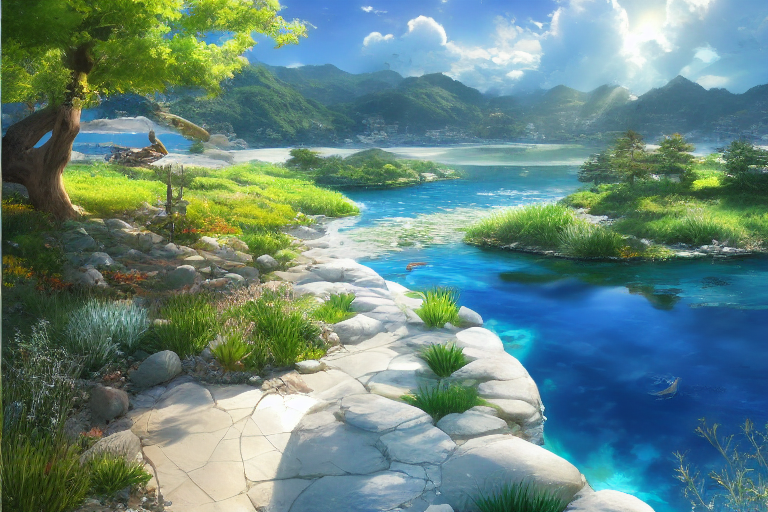
「aiArt」 之前原本想安裝一下AI繪畫Stable Diffusion來玩玩看,不過發現自己的老舊電腦好像有環境不相容的問題,只能玩玩線上的demo網頁,後來發現了有colab版的Stable Diffusion可以玩: colab.research.google.com/drive/1zAtGBys_2S21LSdoeKL-jyoD96W_K7qj#scrollTo=R-xAdMA5wxXd 基本上就是照著步驟點擊每個程式碼方塊左上角的執行按鈕,其中第2和第5步會產生警告訊息,不過不用管它 第8步只要下載其中一種ckpt檔,我個人比較喜歡使用萬用的sd-v1-4.ckpt,但是需要登入HuggingFace才能得到下載權限,這裡的程式碼沒辦法直接執行,所以我另外找了個方法下載:把程式碼改為 ! wget -P /content/stable-diffusion-webui/models/Stable-diffusion "帳號:密碼@huggingface.co/CompVis/stable-diffusion-v-1-4-original/resolve/main/sd-v1-4.ckpt" 其中帳號二字改成你登入HuggingFace的帳號名字,密碼二字改成你登入HuggingFace的密碼,這樣就能取得下載權限 接下來跑第9步後,會出現xxxx.gradio.app的網址,點進去輸入它預設的帳號密碼就可以開始玩了 因為是利用colab的資源來跑,所以會有資源限制,不過好在Stable Diffusion消耗的資源很少,短時間內跑幾十張圖也沒有問題 介面有時候會卡住,不過重整一下頁面就能繼續跑,可以觀察一下colab的頁面有沒有在跑就知道有沒有卡住 --------------------- 輸入的prompt和參數可以參考以下網頁: www.ptt.cc/bbs/C_Chat/M.1665817748.A.B35.html github.com/AUTOMATIC1111/stable-diffusion-webui/wiki/Features docs.qq.com/doc/DWHl3am5Zb05QbGVs 這次就簡單試一下來做一張風景畫 prompt: (extremely detailed CG unity 8k wallpaper),(((masterpiece))), (((best quality))), ((ultra-detailed)), (best illustration),(best shadow), ((an extremely delicate and beautiful)),dynamic angle,floating, fairyland,dynamic angle,sea of flowers,beautiful detailed garden,wind,classic,spring, (detailed light),feather, nature, (sunlight:1.5), river, forest,(((floating palace))),((the best building)),beautiful and delicate water,(painting),(sketch),(bloom),(sunshine),beautiful light and shadow,Makoto Shinkai negative prompt: cropped, worst quality, low quality, normal quality, jpeg artifacts, (blurry),vague 參數: Steps: 20, Sampler: DDIM, CFG scale: 6, Seed: 613636535, Size: 768x512, Model hash: 7460a6fa batch count=10 有很多功能和心得可以介紹,之後還會發幾篇文章來說說~ ------------ 另外跟有在看卜算板的噪友報告一下,因為最近開始忙起來了,所以之後不會再寫需要長時間準備的占卜算命相關的文章,發文的頻率也會盡量降低,可能就偶爾發一下自己做的圖



36 comments
通常花費多長時間生産一張圖?
10秒鐘,就是這麼短~
越來越簡單的感覺
快去嘗試一下畫個貓皇
該睡了
炒完大哥二哥了?
怎麼可能現在就努力看著就好
AI真的發展得很厲害~
好勵害哦
厲害的是AI,我只是調教一下XD
謝謝Vcckvv大大分享AI繪圖,超厲害👍👍👍
不會不會,照著步驟做大家都能做出來~
我有把玩NovelAI的模型,真的是滿魔性的 剛好現在顯卡不能挖礦了就通通拿去算老婆XDDD
可以發幾張老婆圖出來看看啊,NovelAI畫老婆圖好像蠻厲害的XD
這個真的很厲害耶,但我的電腦效能應該也跑不動
這個colab版不用用到自已電腦的資源,開網頁就能玩~
沒辦法編輯真麻煩~ 這篇當中的「"帳號:密碼@」應該改成 「"https://帳號:密碼@」,其中全形冒號:也要改成半形的冒號:
畢卡索看到會想哭😂
大師等級的繪師應該是不會被影響到,三流的繪師才有可能被淘汰掉
這4張圖讓我有買機票的衝動 好幾年沒出國玩了
受疫情影響真的很久沒出國了,可以好好計畫一下~
原來這叫做召喚術
沒錯XD 召喚之前都要唸咒文~
不懂的領域,不過我喜歡
純欣賞AI做的圖也是不錯的~
嗯嗯,感謝分享
你可以換一下BTC的地址 (看下我的文章) BTC鏈上轉帳費用太高了
抱歉,因為手機太老舊所以沒辦法裝wallet of satoshi的app,而且它的地址好像跟一般的閃電網路不太一樣 沒辦法收到就算了,感謝大大的提醒~
完了連載都不知道怎麼載,要先用GIT複製嗎
xxxx.gradio.app 這裡不太懂耶,沒看到什麼網站阿? 是要進去這個gradio.app網站嗎
不知道怎麼使用colab嗎,下載版的也可以使用: https://www.ptt.cc/bbs/C_Chat/M.1664714751.A.7FC.html reddit有資源整理,都看一看應該會有能用的: https://old.reddit.com/r/StableDiffusion/wiki/index
前面都跑完 第9步後,會出現xxxx.gradio.app的網址... 這個部分,沒看到什麼網址阿? 程式碼看半天 0.0 其他有空再看看
是不是出現什麼錯誤訊息,我這幾天用是都沒問題,有時改版也是短時間內沒辦法用,也可以用其他的colab看看: https://colab.research.google.com/drive/1PvNyEWIhDU_D-i15DzpPjqDQkbYv_6Hu#scrollTo=dtrNFeQiYDz- 真的再不行就用線上網頁玩玩就好,雖然有限制使用點數,但它點數會慢慢恢復: https://dreamlike.art/create
不知道有沒有辦法用本地端的資源來跑圖?
可以啊,一般玩都是用自己電腦去跑,有教學: https://www.ptt.cc/bbs/C_Chat/M.1664714751.A.7FC.html 我是因為自己電腦沒辦法跑,所以才跑去找colab版來玩
喔喔喔了解~