 @jehe
edited
@jehe
edited
Maximize Your Internet Promo: Homewatch

***Better evening to my fellow Filipinos here! Mabuhay tayong lahat!*** As promised in my previous articles entitled **"How to Choose Your Internet Promo Wisely**", I will now teach you how to maximize your chosen promo via installing a VPN in your android devices. Its so simple, even a grade schooler can understand this. You did not need a background in internet bypassing stuffs. Just use your intellect. https://read.cash/@jehe/online-class-how-to-choose-your-internet-promo-wisely-3b2c39a7

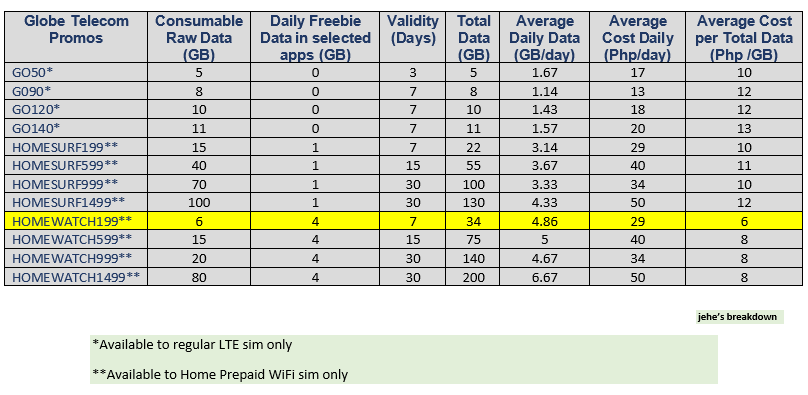
Take note that as stated in the said article that ***Homewatch199*** is my recommended promo due to the fact that it can give a consumer at least 4GB of Data Allocation to access internet at low cost. If you want to read the article linked above, just read it carefully and to those who have read it, I will drop again the table for your reference:
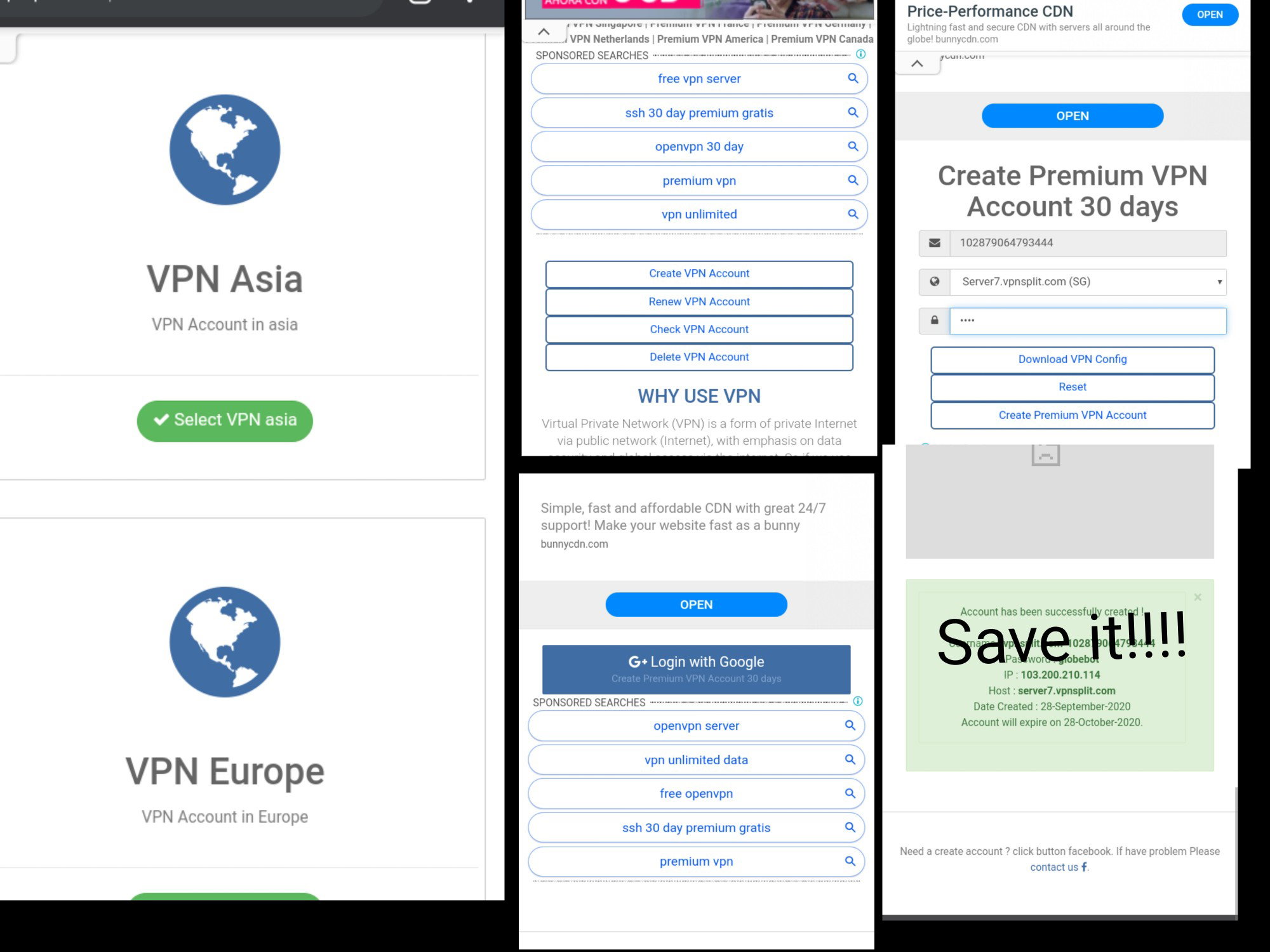
**Okay, let's get ready to rock and roll!** **Using OpenVPN Connect Application** First and foremost, you must already created an account in a public ssh site online: **vpnsplit.com**. The collage image below briefly explains how to create one. Just go to vpnsplit.com then **choose VPN Asia** because the nearer the country the lower the ping response. Next, scroll down until you see a "**Create VPN Account**" by clicking it. It will redirected you to "**Login with Google**". Don't bother, it will just a login. if you want to use another dummy gmail instead of your personal gmail account, its alright. Just be sure you know what are you doing. Last thing, the **page will be directed to " Create Premium VPN Account 30 days**". On the **server options, find** "**server7.vpnsplit.com**" and now type any password for the said server. Click create and download VPN config.
After creating you vpn account, open the downloaded config and follow the image below for the steps. Use xplore, or text editor app, or solid explorer, or any app just to edit the config. For the main ingredient, paste the custom header in the config: **http-proxy 103.200.210.114 8080** **http-proxy-option CUSTOM-HEADER CONNECT HTTP/1.0** **http-proxy-option CUSTOM-HEADER Host netflix.com** **http-proxy-option CUSTOM-HEADER X-Online-Host netflix.com** **http-proxy-option CUSTOM-HEADER X-Forward-Host netflix.com** **http-proxy-option CUSTOM-HEADER Connection Keep-Alive**
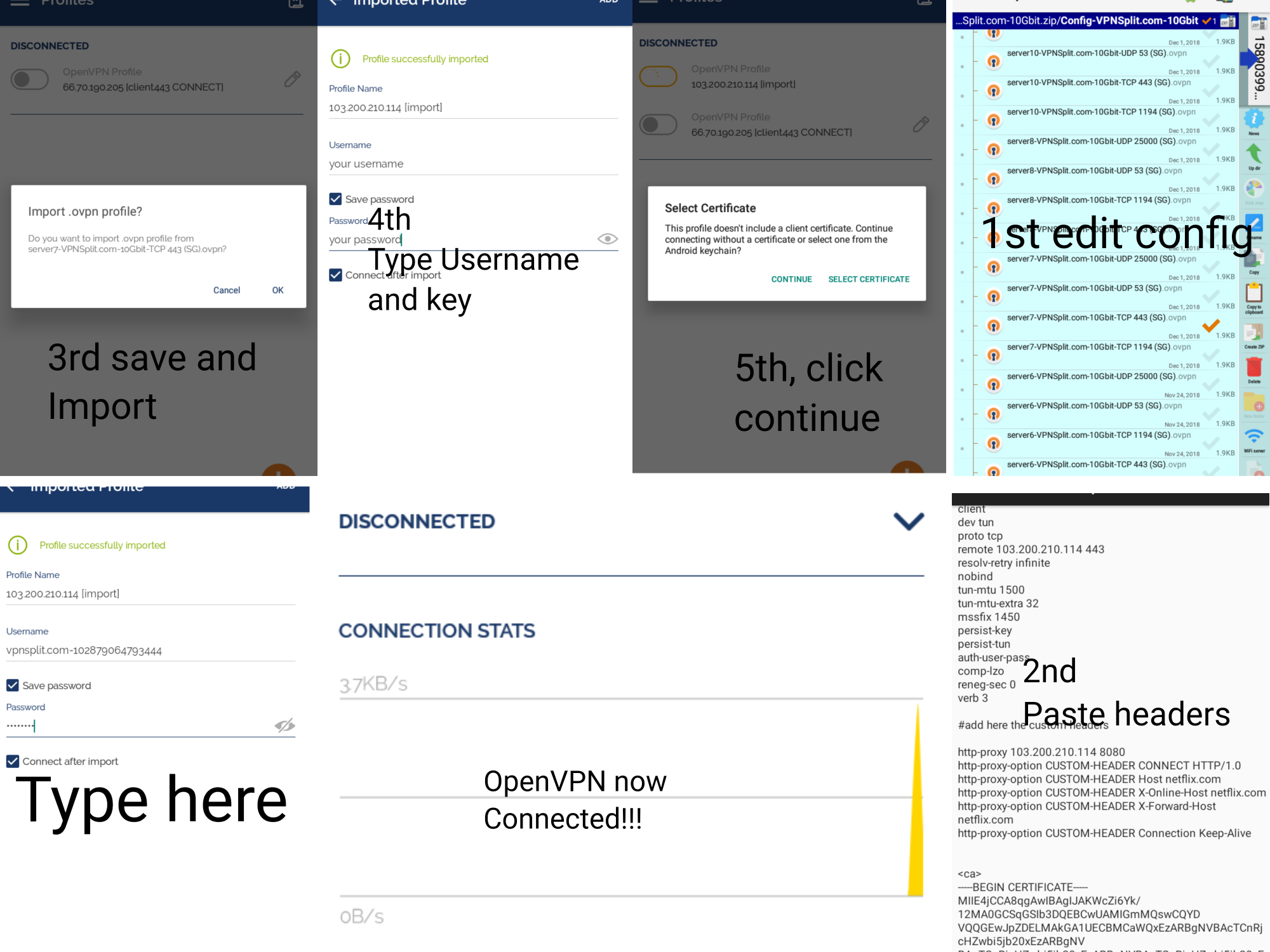
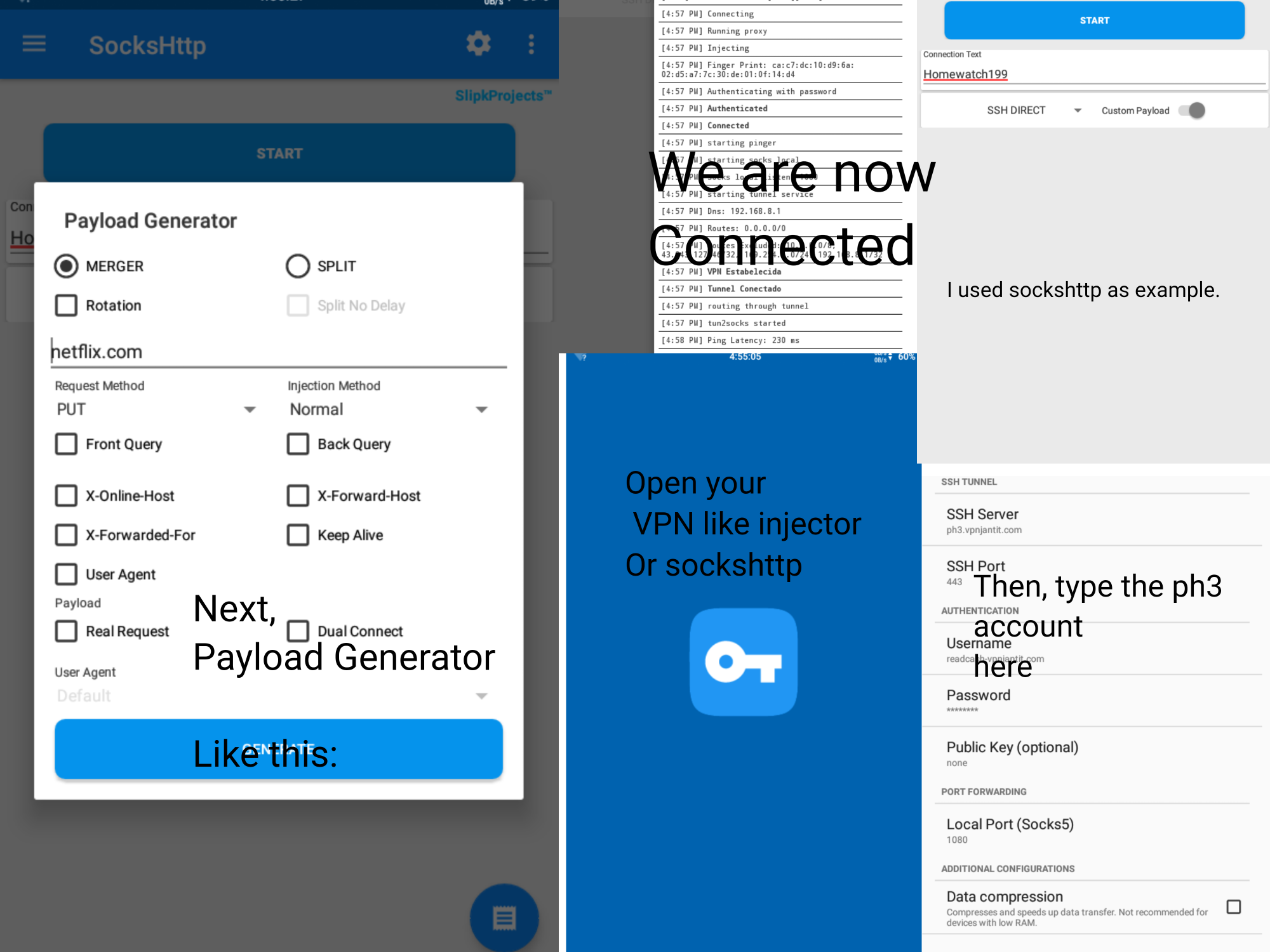
Import the save config and fill in the fields the username and password of your vpnsplit account. Then, connect! See it for yourself if working or not. **Using SSH application** Another application in order to connect the internet using ***Homewatch199*** or higher promo is **Http** **Injector (see below for reference)** or **KPN tunnel**. In my case, **I use sockshttp VPN.** Look in the playstore and install your preferred ssh VPN app. Go to **vpnjantit.com** and **choose SSH and pick Phillipine** server. Choose PH3 or PH6. Its your choice. Doesn't matter if 3 or 6 just don't forget the credentials. See image below for detailed steps.
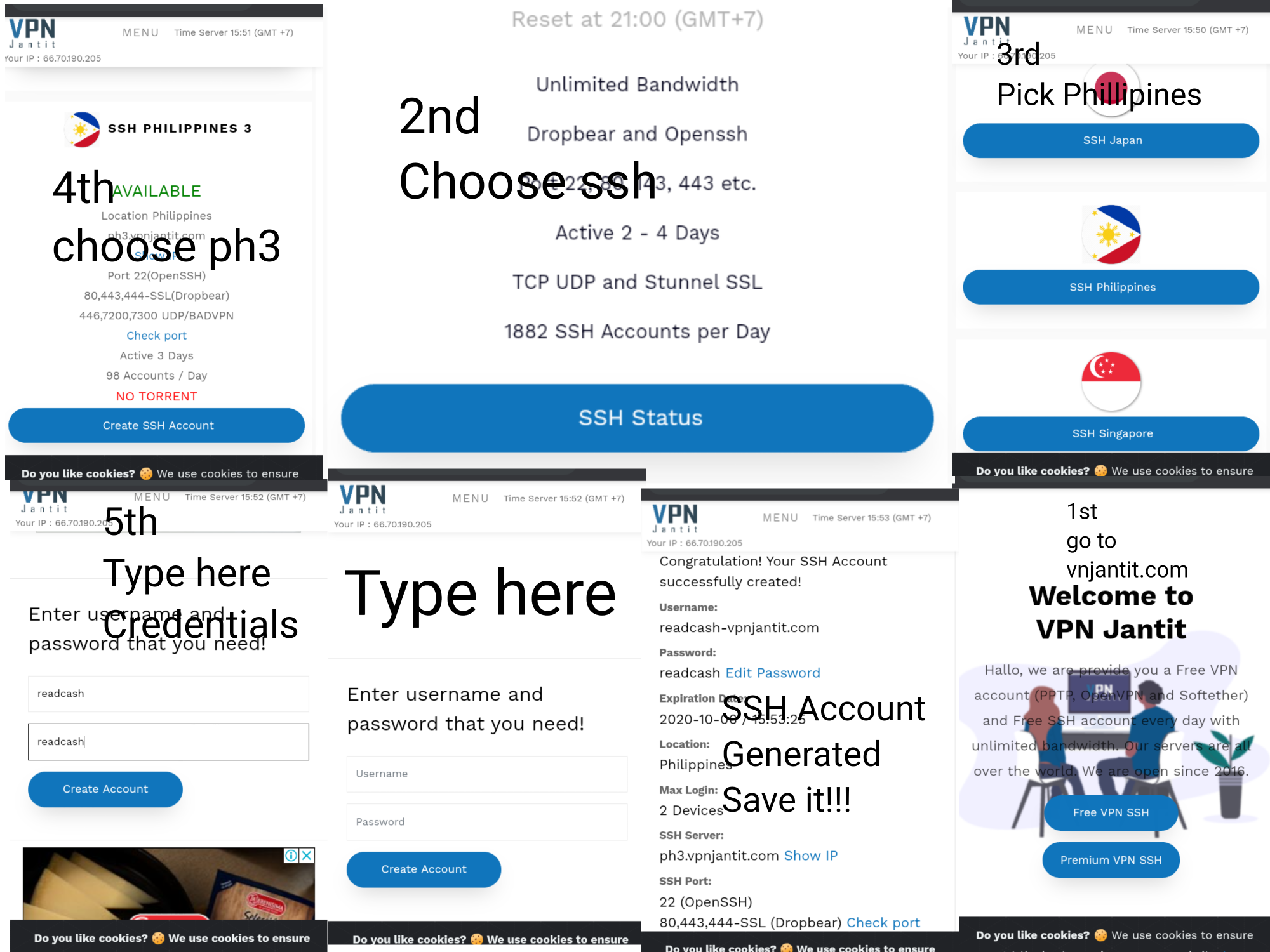
If already done, now **open your VPN app,**
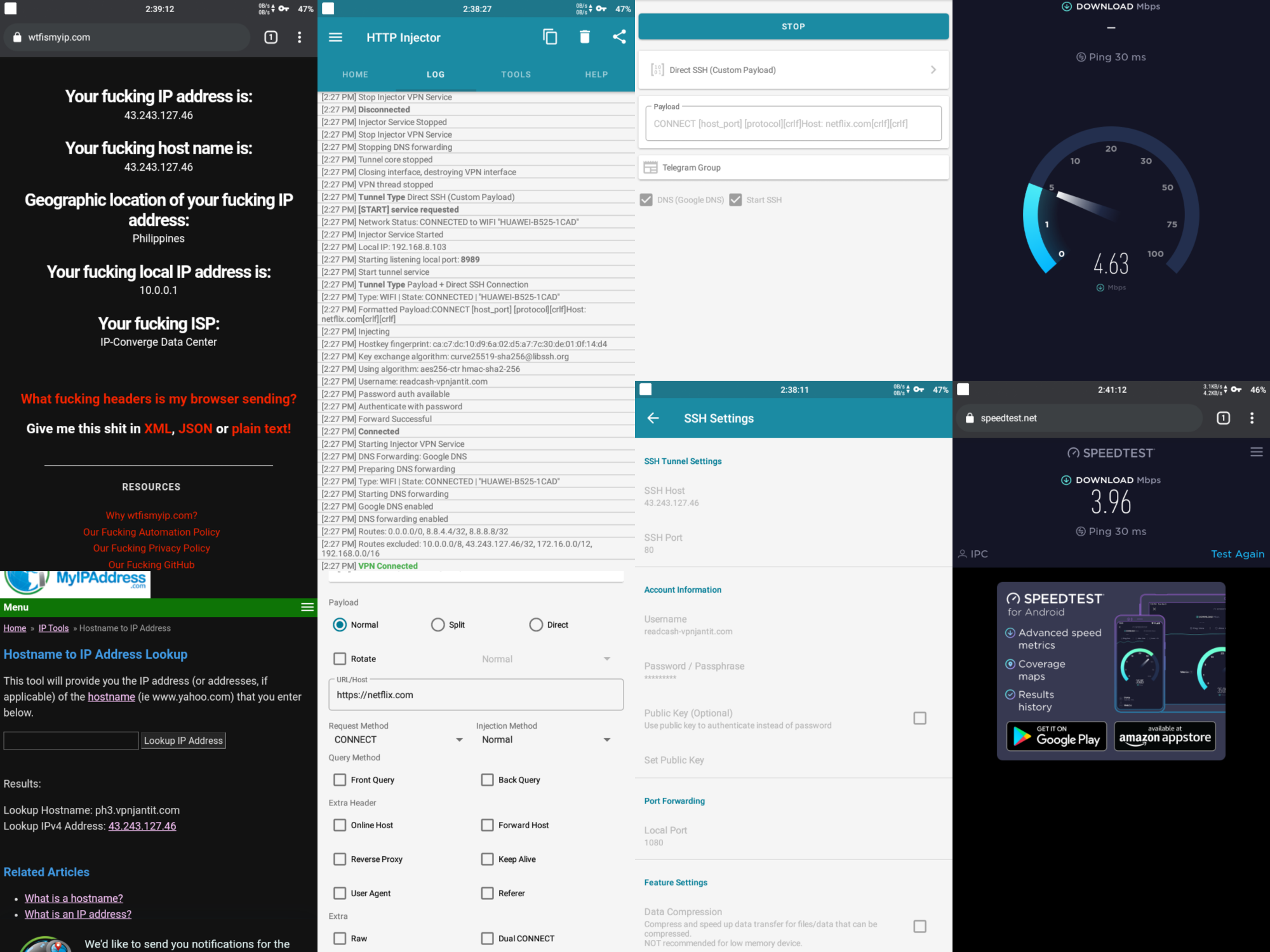
**and fill in the ssh credentials**. The main dish is by clicking **Payload Generator and type "netflix.com**" without quote. Request method is doesn't matter "CONNECT", "PUT", "GET" or etc. then click **GENERATE**. Now, click START! Wait for notification if connected! Note: if you can't connect, change the **ph3.vpnjantit.com** to its equivalent IP address like this: **43.243.127.46 and use ssh port of 80 or 443.**
That's it kababayan, may di pa nakakaalam neto kaya pinost ko lang. Pasukan na kasi sa Lunes baka makatulong ako haha. -jehe *Lead image courtesy Globe Official website.*
8 comments
Nice, bat kasi di yan pwd yan ano ee. Share mondin daoat to sa ibang site oara maalaman nila yang magandang promo na iyan
Shinare ko sa 2 forum yung kahapon na article, haha, Ewan, bat gusto pa nila homesurf haha
Dapat ang shinare mo sa kanila ay yong Article mo dito, para maganda.
sa isang forum nilink ko pero may maikling summary sa thread na yun. Para magawi sila sa link Haha,
Sa phcorner ba yan o sa beermoney, parang may nadaanan kasi ako nong nakaraan na jehe din ang name doon sa phc
Hindi parin gumagana sa akin. Using injector po
Sure? Try ko again today,
Yan, Lodi inayos ko article. Working naman.