 @ahmadmanga
more from that month
@ahmadmanga
more from that month
OneTab & Ktab: Bookmarking Sites While Saving Memory Space

*OneTab* is a Chrome extension I've been using for around 2 years now. The extension closes all the open tabs & puts all the links into One (easy-to-reach) Tab. https://chrome.google.com/webstore/detail/onetab/chphlpgkkbolifaimnlloiipkdnihall OneTab is mainly used to free RAM space while browsing websites. The extension is mainly used by internet surfers who constantly open new tabs to read later. *The ones who can't stand still like me~* OneTab claims to save up of %95 of memory. For someone who always have at least 10 Tabs open at once, it does help.
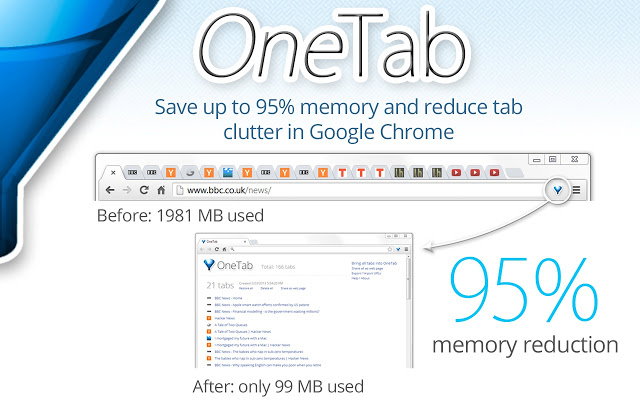
After using the extension for 2 years, I found that I was using it as a bookmarking tool more than I use it for it's actual use-case. It does help me reduce the amount of open tabs, but even with *OneTab* at my disposal, I usually leave 8-10 Tabs open. *OneTab* replaced my Bookmarks section of the browser. *Every link that I think I might return to stays there.* I clean the ones I stop needing every now and then, but I still have 790 links accumulated through-out the years.

It worked fine for me, but the problem comes when I need one of the older links: I have to scroll down for *several seconds!* Use the search shortcut: *Ctrl+F!* Force myself to remember a keyword from the link's title, and hope the *keyword is unique enough.* Such a hassle~ I needed a more robust Bookmarking Tool. I needed one that works like OneTab, but give me more control in filtering the links. I never knew such extension existed! ktab Browser Extension A few days ago, while I was looking up productivity tools, I stumbled on Ktab. It's mainly a Bookmarking tool, but features everything OneTab is known for. You can use KTab for any OneTab use-case, though OneTab might be the better extension if all you need is to save memory space in short-term. https://www.makeuseof.com/tag/bookmark-apps-organize-links-save-social-posts-read-later/ https://chrome.google.com/webstore/detail/ktab/mlibmgejgeafgacoflmnkekjigookhhl
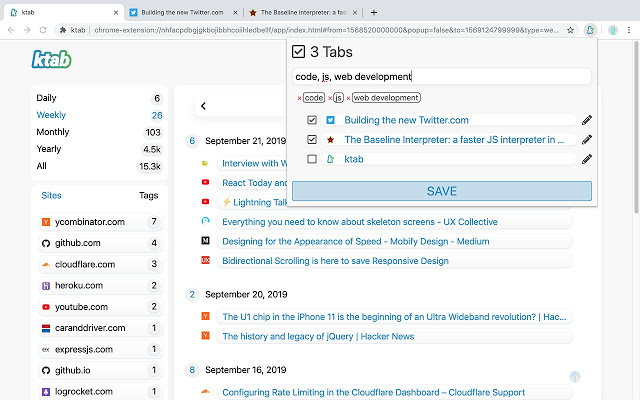
Ktab goes a step further by including a filtering system. You can filter by Site, by Tag & Date. There doesn't seem to be a limit on how many tags you can use for each site. At the time of writing, there doesn't seem to have a Search Feature, so I still need to use the *Ctrl+F method.* Ktab supports showing websites of multiple tags at once, but not multi-tag filtering that could be used for more specific searches. If it had these feature it would've been perfect. *While neither OneTab nor Ktab offer multi-device syncing. OneTab has Import/Export function while Ktab doesn't have one at the time of this writing. That might be a deal breaker for some.* What Do You Think? What applications/extensions do you use for productivity? Do you use the Bookmarking tool that comes with your browser? Put your thoughts in the comments section!
No comments yet