 @abraxas
more from that month
@abraxas
more from that month
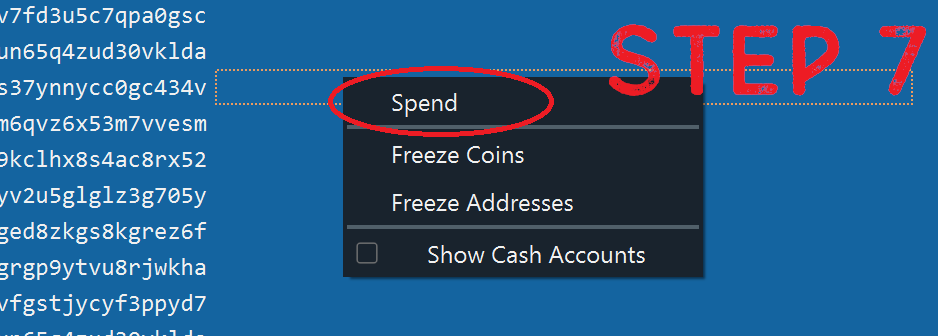
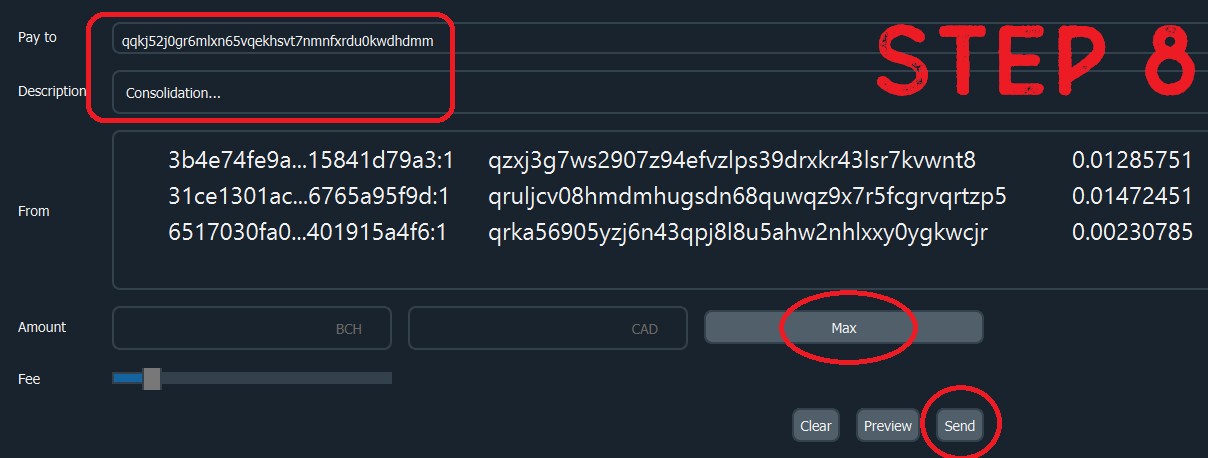
Have you consolidated your wallet? Prior to the recent update where we can select a minimum amount before Noise releases the money to our wallets, a lot of us were encountering issues where BCH was getting stuck, or was incredibly expensive to move. Every BCH "coin" you hold carries weight with it. 100 1c coins will cost you more to move than 1 $1.00 coin, thus, all the small tips over time had a tendency to kinda hurt you a bit. It should be made clear that this is an issue with BCH and is not a problem with Noise at all. In most use-cases for BCH it wouldn't even be an issue, but because we were dealing with lots of little bits of money, we faced a bit of a unique problem. The solution is fairly simple and involves consolidating your wallet. Through the following steps, I will try my best to guide you through the process. *Note: This kinda requires you to have a computer. I'm sure it can be done with mobile devices as well since the program is available there too, but I'm not sure how to do it 😅 Note, I use a hardware wallet, this is how I consolidate my BCH wallet. Other wallets may work a bit better and left out just send the whole thing back to itself, but in my case my wallet was jammed and I had to move it in smaller chunks... This is my process: == CONSOLIDATING YOUR WALLET == 1. Download Electron Cash Wallet: https://electroncash.org/ 2. Open your BCH Wallet through Electron Cash (Note: If you're using a hardware wallet you can probably interface it with Electron Cash so you don't have to provide your seed code or anything) 3. Go to the "Receive" tab and grab an address for your wallet (See screenshot #1) 4. Go to the "Coins" tab (See screenshot #2) 5. Sort by the "Amount" column so that the smallest numbers are at the bottom (See screenshot #2) 6. Select a good chunk (100 or so) transactions from the bottom-up (if this is your first try, maybe only select a small few in case you make a mistake. Note that your transaction will need to be confirmed on the blockchain before your consolidated "coins" show back up in your wallet) 7. Right-click and select "Spend" (See screenshot #3) 8. Paste the address you copied from step 3 to the "Pay To" box. You can add a description if you'd like - it might make it easier to see which coins are your consolidated ones. Click "Max" then click "Send". (See Screenshot #4) 9. You will then get a pop-up window that gives you a preview of your transaction including the total amount and the fees that you will pay. Click "Yes" on this pop-up to complete the transaction. Note that it may take a while to sign and send your transaction depending on how many small "coins" your transaction is made of. 10. Once completed, you will get a pop-up that notifies you that the payment has been sent, along with a link you can copy that will take you to the Blockchair website. 11. Repeat steps 3-9 until you only have a few "coins" left in your wallet. (If this is your first attempt, just wait for that transaction to come through before you repeat the steps and YOLO all your money away, only to realize you made a mistake somewhere). Note that the transactions will need to be properly confirmed on the blockchain before your "coins" show back up in your wallet, and this can sometimes take quite a while. If you added a description in your consolidations, you will see it in the "Coins" tab and the "History" tab. Don't select any of your consolidated coins in this process. Just keep going until you only have a few consolidated "coins" left.


No comments yet