 @MyHero
more from that month
@MyHero
more from that month
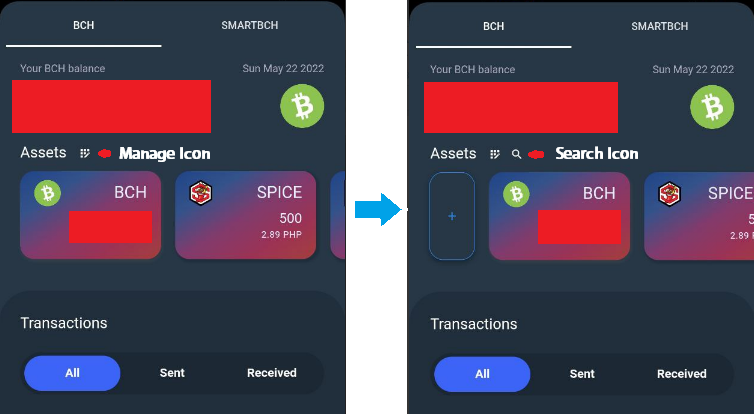
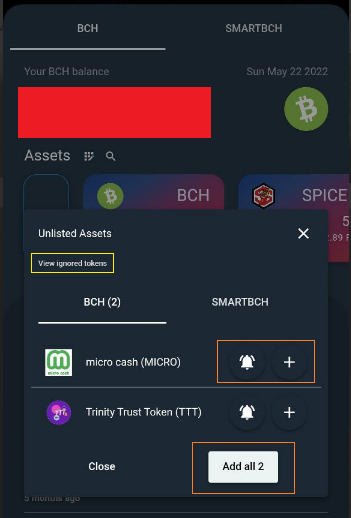
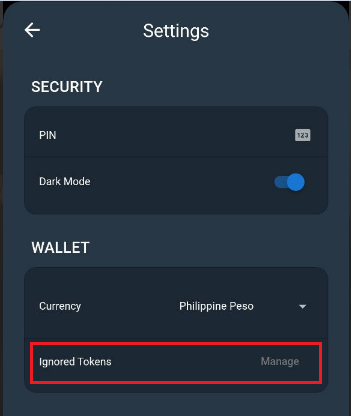
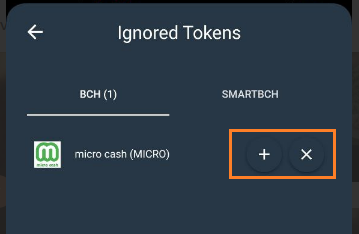
Paytaca Wallet v 0.7.4 Improvements: 1. Auto-detection of tokens sent to the wallet - It will detect and notify your wallet 2. Search button to trigger manual search of tokens sent to the wallet (Image 1) - Click the Manage icon beside "Asset" and it will show the search icon. - When you click search icon, it will display unlisted assets (Image 2) 3. Adding token to ignore list - Bell icon for adding token to ignore list while plus icon and adding all button for adding to main list tokens. (Image 2) - You can check by clicking "View ignored tokens" in the unlisted assets or Go to Application > Settings > Wallet > Ignored Tokens (Image 3) - Manage Ignored Tokens: Plus icon it will add to the main list tokens and remove icon it will go to the unlisted tokens. (Image 4)
4 comments
Donate na 😂
nakadonate na po :)
Good and detailed informations. Have a great time MyHero.
Daming Spice ah😁 di mo pa nabanggit na pde na mag swap from Spice to sbch?😊