 @MyHero
more from that month
@MyHero
more from that month
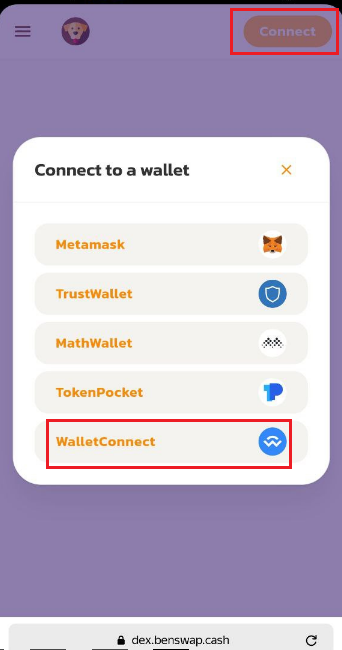
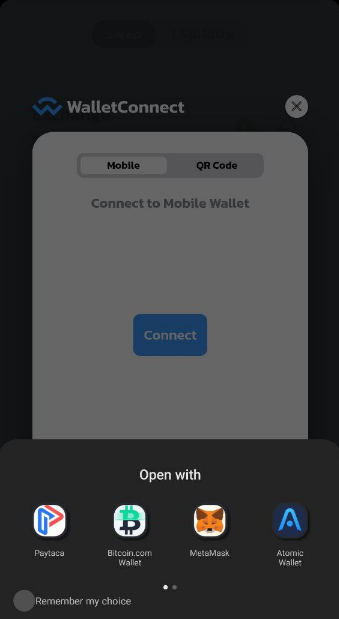
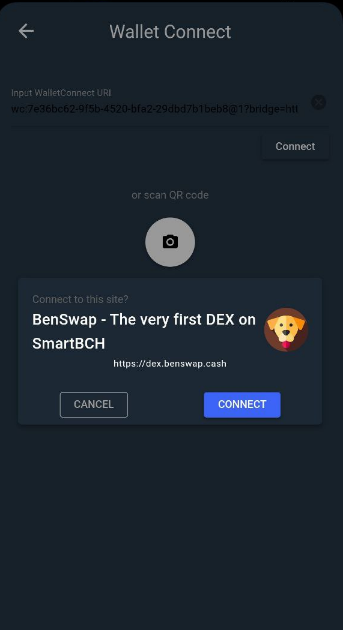
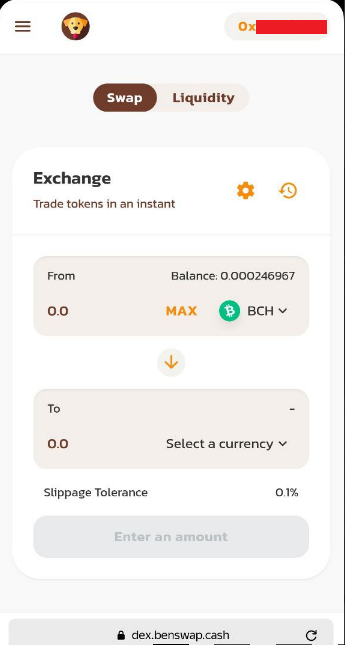
Paytaca's Wallet Connect Integration WalletConnect is an open-source tool that uses QR code scanning or deep linking to connect decentralized applications to mobile wallets. How to use Wallet Connect on Paytaca? 1. Install Paytaca Wallet from Google Play. 2. Go to the browser and load smartBCH DEX like benswap.cash - I got an error when connecting wallet connect in Tangoswap. 3. Click Connect and select Wallet Connect. (Image 1) 4. It will display Wallect Connect info. You have the option of selecting Mobile or QR Code. I choose Mobile (Image 1) 5. Click connect and select Paytaca (Image 2) 6. It will be redirected to Paytaca, and click connect button (Image 3) 7. Check your browser if you're wallet is connected to the DEX. (Image 4)
2 comments
Ay ang galeng pde pala yun, masubukan nga. Thanks sa info lods😁
Its a great info. Thanks for sharing..