 @MyHero
more from that month
@MyHero
more from that month
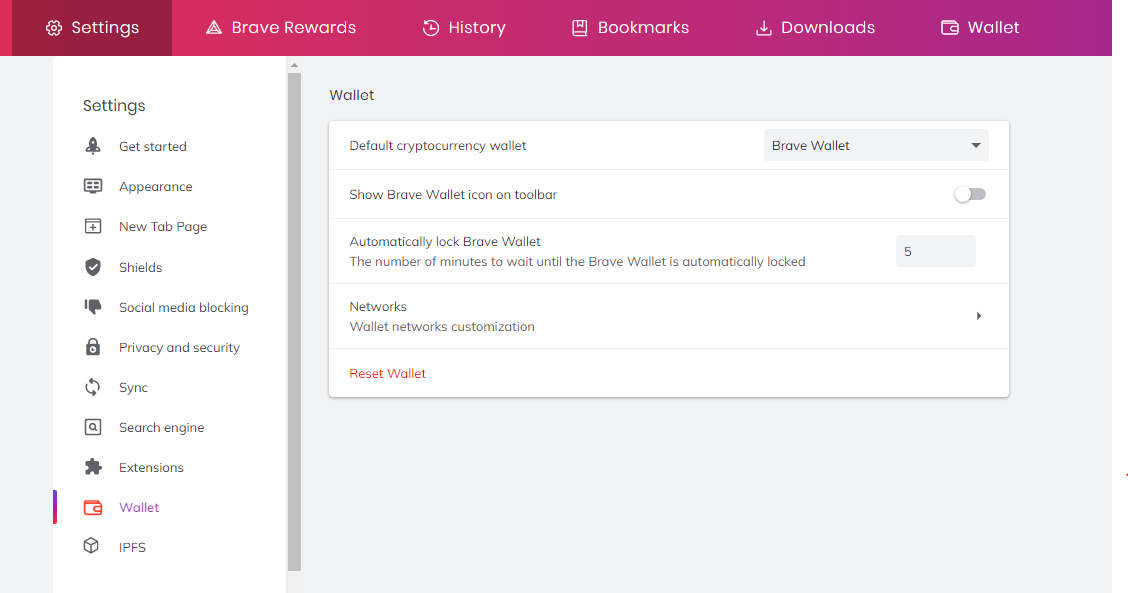
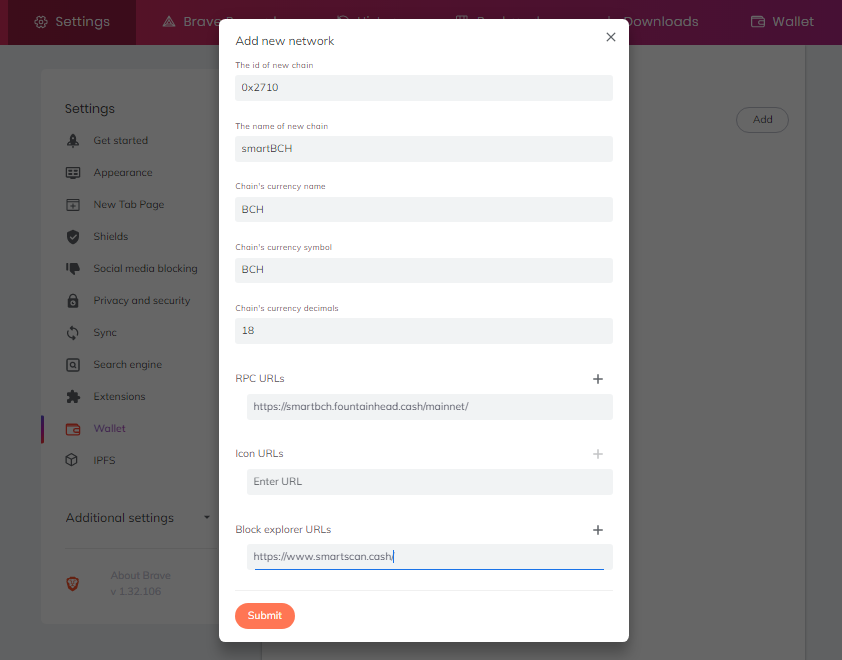
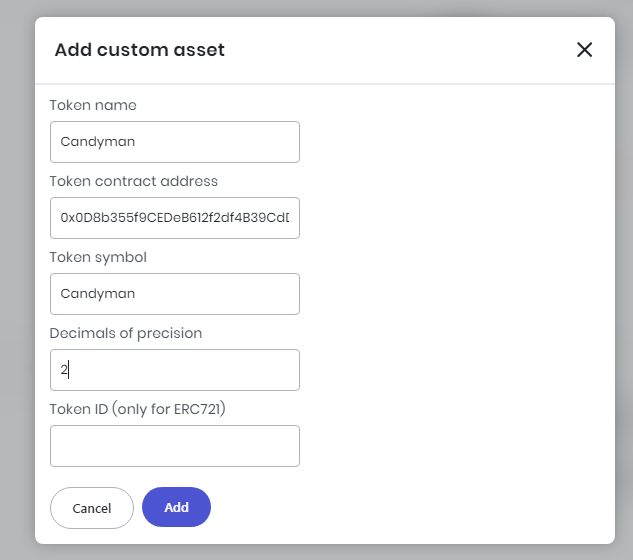
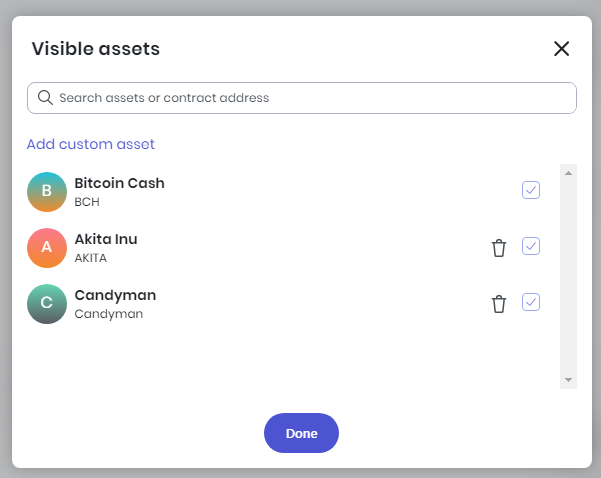
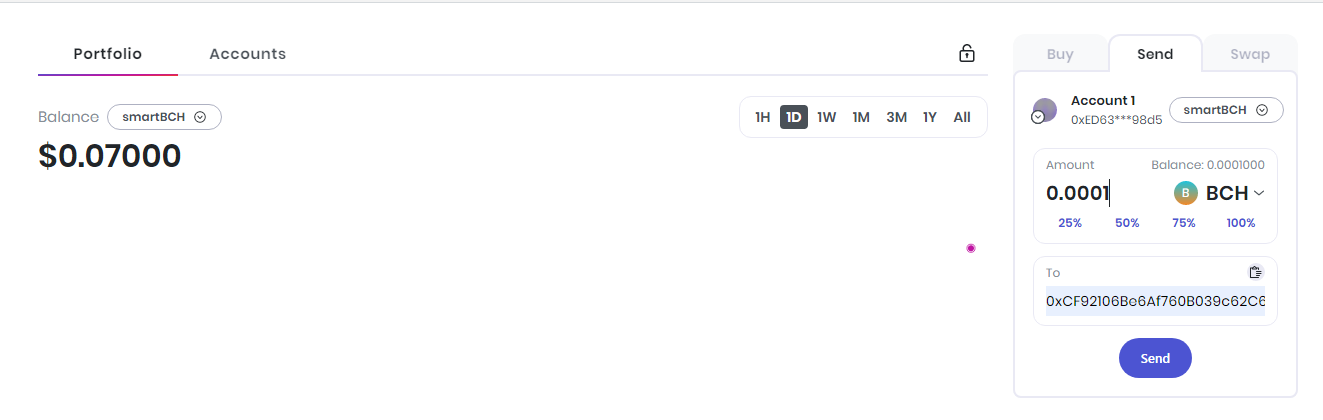
smartBCH in Brave Wallet Last night, I posted on how to create and import a wallet in Brave Wallet: https://noise.cash/post/lnwz3m6z Today let's discuss how to add and use smartBCH in Brave Wallet. How to add smartBCH Network in Brave Wallet 1. Create or Import a Wallet. check the link above how to do it 2. Go to the settings of the browser. Click the three dots and click Settings 3. On the left tab panel, click wallet, and select Networks (Image 1) 4. Click the Add button and It will pop up a network form. 5. Fill Up the form and if you've done click Submit button (Image 2) a. The ID of the new chain: 0x2710 b. The name of the new chain: smartBCH c. Chain's currency name: Bitcoin Cash d. Chain's currency symbol: BCH e. Chain's currency decimals: 18 f. RPC URLs: https://smartbch.fountainhead.cash/mainnet/ or https://smartbch.greyh.at (You may add multiple RPC Url, just click the + button) g. Icon URLs: https://www.smartscan.cash/assets/images/tokens/0x0000000000000000000000000000000000002711.png (You may leave it blank too) h. Block explorer URLs: https://www.smartscan.cash/ 6. Back to the wallet (click the wallet in the top panel) and select the network smartBCH How to Add Token 1. Click the Visible Assets button 2. It will pop up a form and click Add custom asset. 3. Fill up the form and if you've already done then click Add Button (Image 3) a. It will not add automatically; You need to add manually. The token's details can be found in the smartscan explorer. b. Token ID (only for ERC721): For NFT only 4. Back to your Wallet How to Hide and Remove Token (Image 4) 1. Click the Visible Assets button 2. Hide and Remove Token a. Hide: Uncheck the checkbox of the token b. Remove: Click the remove icon (trash can) of the token How to Send Tokens 1. Go to send Form (Right Tab Panel) 2. Fill up the form: Amount of BCH and the Address. Click the send button (Image 5) 3. It will display a transaction form. a. If you find the gas fees are too high, click the edit and set the gas price to 1.05 or 1.046739556 then click Save) b. I'm not sure if there is a minimum amount of BCH to send. I attempted to send 0.00005 BCH, but the value was automatically changed to 0.0001 BCH. c. The fee for sending tokens is always 0.000315 BCH, which is higher than the original fees in Metamask. 4. If the token was successfully sent, click the confirm button and double-check the history of the token. Additional Information 1. To reset your wallet, go to Settings and then Wallet in the left tab. Click the Reset Wallet link. 2. To change the Network, go to the wallet settings and select Network. Double-click on the network you want to edit. 3. Simply click the token in the token list to view its price value and graph.

1 comment
I downloaded again Brave and had to do all this stuff, so I know how "tricky" it is. Good for you to upload a help! Good morning!