 @MyHero
more from that month
@MyHero
more from that month
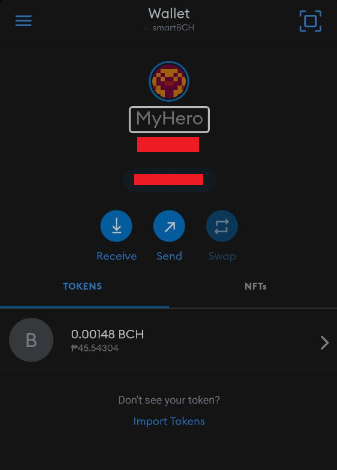
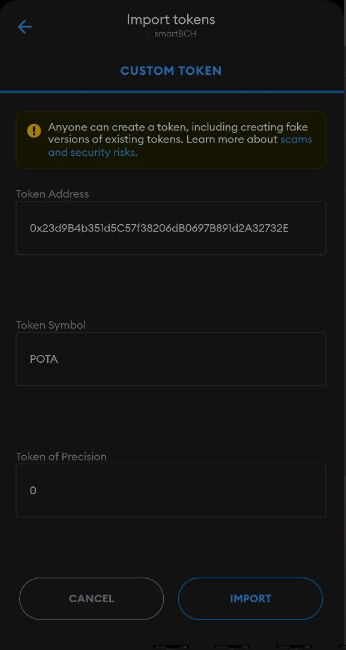
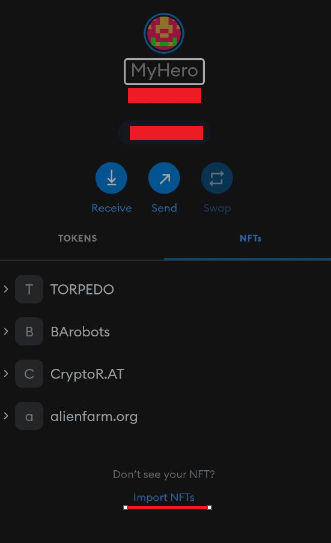
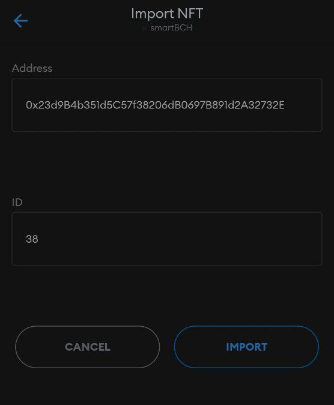
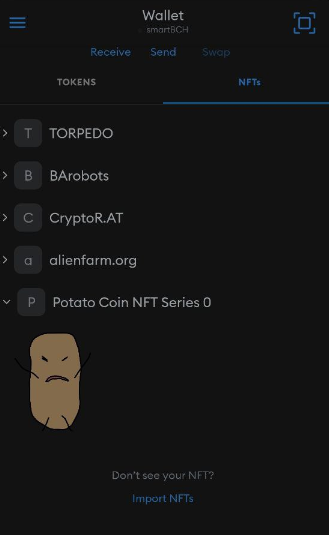
Non-Fungible Token (NFT) in Metamask An NFT is a digital asset (art, music, in-game items, and videos) that is verified and stored using blockchain If you want to know how to add or import NFT into Metamask, follow these steps. 1. Open your Metamask App. Don't use browser extension metamask because it's not supported the NFT Note: if you don't have metamask, download metamask and create a wallet 2. In the Tokens Tab, click "Import Tokens" below the Metamask wallet. It will redirect to the Custom token Form (Image 1) 3. Fill up the Form and Click Import (Image 2) a. Token Address: The Contract Address of the NFT b. Token Symbol: The name of NFT collection c. Token of Precision: 0 (If you successfully added the token, your tokens will be updated and added the new token.) 4. Go to NFT's Tab in the Metamask wallet and click Import NFTs. It will redirect to the Import NFT Form (Image 3) 5. Fill up the Form and Click Import (Image 4) a. Address: The Contract Address of the NFT (same as Number 3a) b. ID: The collectible ID (If you successfully added the NFT, your NFT's will be updated and shows the new NFT.) Note: You may ask the creator/dev of the NFT about the Token address and ID
2 comments
Detailed information about NFT, How to add on metamask wallet, And other things, very informative for those who need to know about NFT
That's quite informative