 @Musso
more from that month
@Musso
more from that month
How to download videos from YouTube
Good evening! Hey folks!How are you all?Today I'm going to tell you how you can download videos from YouTube without any extra app! YouTube is platform mainly for video sharing we all know that!We want to download videos that we like but sometimes we don't know how to do it and sometimes we install a lot of apps.Here I am going to tell you how you can download videos following a simple trick! Here are the steps: 1.Visit YouTube from your mobile browser (It can be chrome,Mozilla Firefox) 2.Click on your desired video that you are wanting to be downloaded 3.Then you will see a link in your browser!The link starts with m.youtube Now you have to erase m. and replace with ss so it will look like ssyoutube 4.Then another page will load and you will see save from net option
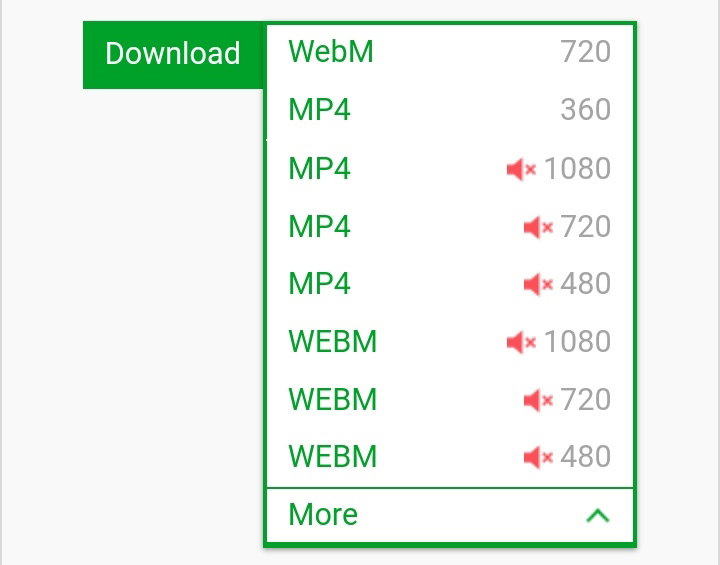
Several download options 6.Here you can choose your desired video format and boom your video is ready Only simple thing to follow no need to download any extra apps! So Do you like it?Tell me in the comments section below!Your appreciation is must. Thanks for reading! Best regards!
5 comments
Wow.. thank you for your great information. I didn't know can download videos from youtube, I always watch videos there everyday and honestly the ads are so annoying.
Hey dear it's very good to know that my post is helping you!Now no more annoying ads download your videos by following these steps and watch many times as you like without any interruption!Keep watching and enjoy!
Yes I will really try this, actually I screenshot your article maybe I will forget later. Big help for me because it's my habit to listen music from youtube while working but because of those ads I have to click skip everytime they pop out.
Yeah adds are very annoying especially when you are listening to music and in the middle of works it is also very annoying pressing skip button again and again!Here you get the solution!Hope it helps you and yes don't forget to tell experience after downloading music videos! See yeah! Regards!
You're right, again thank you and keep safe.