 @MoneyCanWorkForYou
more from that month
@MoneyCanWorkForYou
more from that month
Essential Reading For New Medium Writers: Part 2 Master the art of Writing
*Photo by Ron Lach on Pexels* Intro This is part two of a series of articles in which I share what I've learned from writing on Medium. I try to provide as much value as I can with no fluff. Hopefully, this is useful for you! If you just got here you can find part one of the series here: Essential Reading For New Medium Writers https://medium.com/seeds-for-the-future/essential-reading-for-new-medium-writers-c058a711f8a Now let's get to the point. Writing One thing you will have to do to become successful on Medium is to write. And the best way to go about this is to develop a routine. A habit of writing. Set a goal to write x amount of words every x amount of days, or even every day if you have the time to do so. Writing when a sudden burst of inspiration hits you is easy and you should use it. But inspiration is not constant. And to succeed as a writer you will need a certain level of consistency. Although there isn't a secret recipe for success, I can give you some tips that help me. **Take notes** I take notes on my phone whenever an idea pops up in my mind, sometimes I even write up an outline for a story while taking a walk. Take notes, and don't let inspiration slip away. You can't summon it at will. **Just sit down and write** The hardest thing about writing is getting started. Just sit down, and write something, you can always improve on it later. Don't judge what comes out at first. Ideas need to grow. And nothing can grow if you don't let it. The most important thing is to develop a habit of writing. Once you've got that down, you should start working on improving your writing. And one of the ways to do it is by using proper formatting. Formatting First things first, for someone to notice your article, it needs a good title. And on Medium sub-titles also matter a lot. Let's take a look at the title of this story as an example:
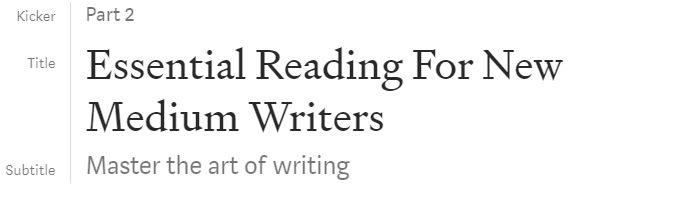
*screenshot by the author* The Title This should contain the main idea of what the article is about, and should preferably be formatted in Title Case, with all the words capitalized. You can use this tool to make it super easy. And use the Title format in Medium text editor. https://capitalizemytitle.com/ The subtitle The subtitle should explain in more detail what to expect from the article and should be directly below the title. To achieve the formatting you can see in my example you should type the subtitle directly below the title and use the subtitle format. Shown below:
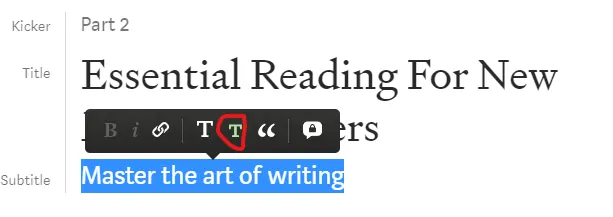
*screenshot by the author* The Kicker Not as often used, but can come in handy. I personally use it to show which part of the series a certain article is. But you can get creative. To achieve the kicker formatting simply write something above the main title and chose the Subtitle formatting option. Images You will also want to add images to your articles. First of all, you will need to find images to use. You can use images you have created yourself or stock images that are free to use. I use Pexels to find free-to-use stock images most of the time. All images on Pexels are free to use. If you go with another stock photo service make sure you are licensed to use the images. https://www.pexels.com/ https://www.pexels.com/license/ You should also always credit the image and show its source. Pexels makes this very easy. When you download an image, you can simply copy the text from Pexels. See below:
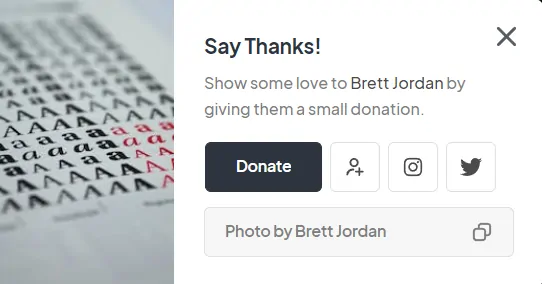
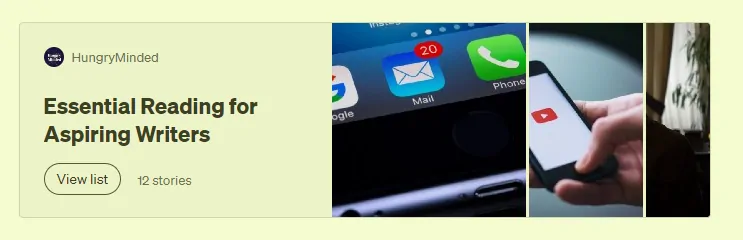
*screenshot by author* Even if you take a screenshot, you should let your readers know who has taken the screenshot like I just did above. You can also add alt text to your images. This is for the people who have vision problems, or devices that don't show images. Alt text is also important for SEO. Alt text should include a description of the image. You can add alt text to an image by clicking on it and then pressing alt text. Other formatting tricks You can add links to text like this. https://medium.com/@HungryMinded/list/essential-reading-for-aspiring-writers-3e7fc4586068

*screenshot by author*. Or you could add the same link like this. By simply pasting it in a new line and then hitting enter.
There are a couple of ways to display quotes: like this:
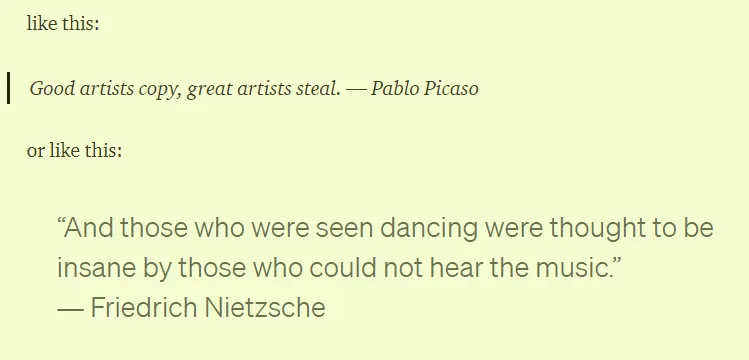
You can get both of these by selecting the text of the quote and using quote formatting. You can press the button once or twice and choose which option you prefer.

*Screenshot by the author* And of course, you can use *Itallic* or **Bold**. You can access these on the same menu, or by selecting the text and pressing ctrl + b for bold, and ctrl + I for Itallic. You can create bullet lists by typing * at the beginning of a line and hitting enter. Or numbered lists by typing 1. and hitting enter. Tools To be efficient with your writing here are some tools you can use: Capitalize my title. I already mentioned this one, and it does what the name says it does. https://capitalizemytitle.com/ Thesarus.com This one will help you find synonyms to make your writing more interesting. https://www.thesaurus.com/ Grammarly This tool will help you avoid silly grammar and spelling mistakes. This one is a must-have, and the free version is all you need. https://www.grammarly.com/browser/chrome Hemingway app This is a text editor that will help you make your stories easier to read. You can use it to get some suggestions. But don't take what it tells you as a rule. You are the writer, you chose your style https://hemingwayapp.com/ Pictory.AI (affiliate link) This will help you if you want to turn your articles into videos. I tried doing it myself. And then found this tool, and it could do it in a fraction of the time it took me. https://pictory.ai/?ref=tdwiz https://medium.com/p/f8520774b78a Medium chrome extensions 1.Fractions This lets me see how much I earned on Medium every day, and how much I have earned in total in a visually pleasing way. 2.TOC Medium This lets me easily create a table of contents for my articles. 3.Medium Distribution Info This lets me see which of my Medium stories got curated on Medium. I will cover curation in the next part of the series. 4.Any Author Stats This one lets me check on how other Medium writers are doing, how many e-mail subscribers they have, how read are their stories, etc. https://chrome.google.com/webstore/detail/fractions-medium-partner/fileepgfmlpabmkbocijoaggdmlhenbf https://chrome.google.com/webstore/detail/toc-medium/ppcdgggkanhfoghepgomkbbnkggbiecn https://chrome.google.com/webstore/detail/medium-distribution-info/ifjjhckanopchafmmiddkkiamjkcngca https://chrome.google.com/webstore/detail/medium-any-author-stats/ahepaemleacieeongldddhambknoomof To be continued In the next part, I will be covering these topics, stay tuned. Promotion Publications Curation One last thing If you enjoyed reading my work consider subscribing to get e-mails about my future writing on Medium - Sign up Here, or tipping me on Ko-Fi. https://medium.com/@HungryMinded/subscribe https://ko-fi.com/hungryminded
No comments yet