 @Laurenceuuu
more from that month
@Laurenceuuu
more from that month
Buy a $WAX in KuCoin with these simple steps! This year is filling up with a new trend that we called as **NFT or Non-fungible token.** We have different **Marketplace** where we can *buy, sell, and hold our NFT* and this article, we will discuss about ****Atomichub.**** However, **Atomichub** have this thing called **RAM**, *it looks like an energy*, and if you don't have it, **the use of your account is limited.** To be able to have a **RAM** you need to buy it using **$WAX** and some people are thinking how they can buy a ram **without using any credit cards or bank accounts.** They are also offering an exchanger but when I tried to buy a WAX using the exchanger, it says **“Pair inactive”.** Since some people are asking how to buy a ram, I did a research and found a solution using **KuCoin.** How to buy a WAX in Kucoin?

1. First things first, deposit the assets that you want to convert into WAX. Click the **Assets** tab and choose **Deposit.** KuCoin only support the pair **WAX/BTC and WAX/ETH** so you can deposit it ***[BTC or ETH]*** directly.
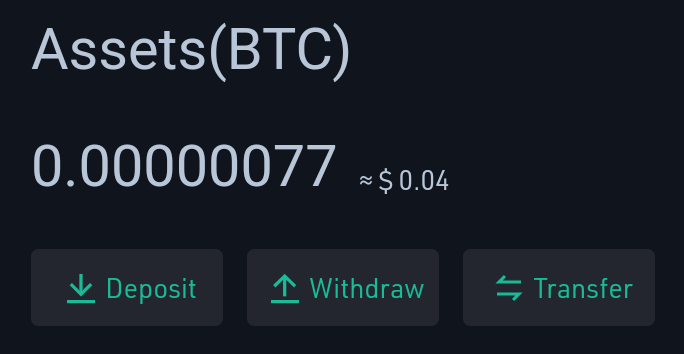
It's undeniable that the two famous coins is painful when it comes to transaction fees so I used Bitcoin Cash who have lower fees and fast transactions compared with the two mentioned coin. ***Note:*** *If you used BTC and ETH, you can skip the third and forth step.* 2. When your assets **confirmed all of the transactions,** you need to transfer it from your **Main account to your Trading account.**
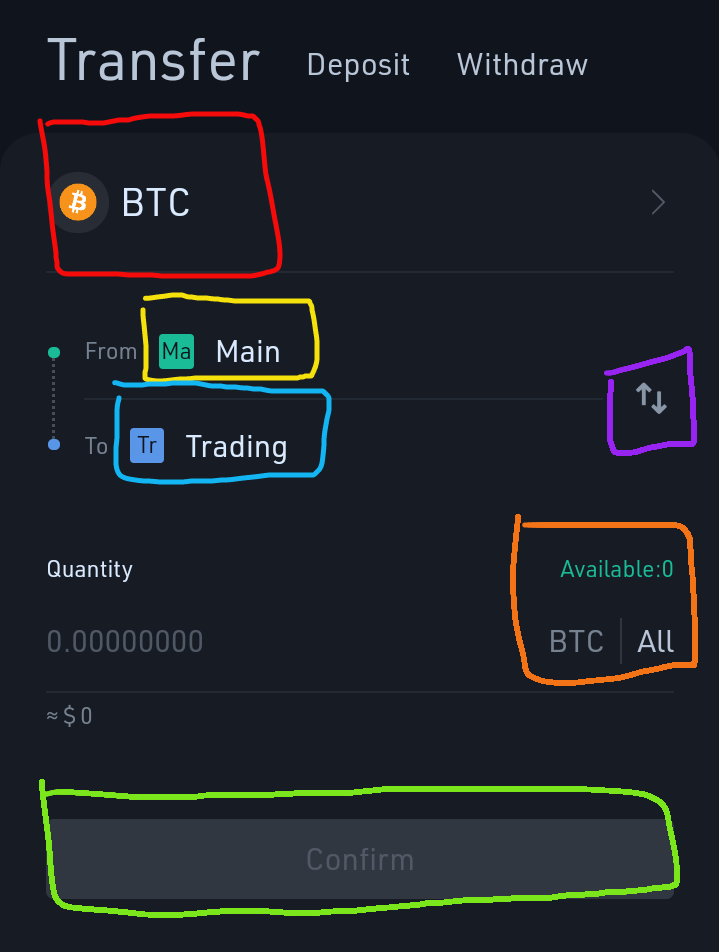
If you deposit other coin such as Bitcoin Cash, you need to **change** **the currency** depends on your chosen coin that you deposit. (Red box). The **yellow box** indicates that you are transferring your assets from your Main account to your trading account which has the blue box. You can also switch the accounts using the **(purple box)**. Once you are done, **click All (orange box)** to transfer all of your balance into Trading account. Then click **Confirm**.

https://www.publish0x.com/?a=Mvbmwqg3eY `Join in Publish0x and earn different tokens such as ETH, AMPL and iFARM! You can join by clicking the photo!` 3. Since I am using an Android, I find a solution so I used a bit tricky solution since I can't find the **Exchange** feature so I manually searched and type the link to exchange my BTC into WAX. If you are using WAX/BTC click this link: https://trade.kucoin.com/WAX-BTC If WAX/ETH click this link: https://trade.kucoin.com/WAX-ETH Now, since I deposit BCH, I need to change the pair into BCH/BTC first by manually replacing WAX from the link into BCH which results: https://trade.kucoin.com/BCH-BTC
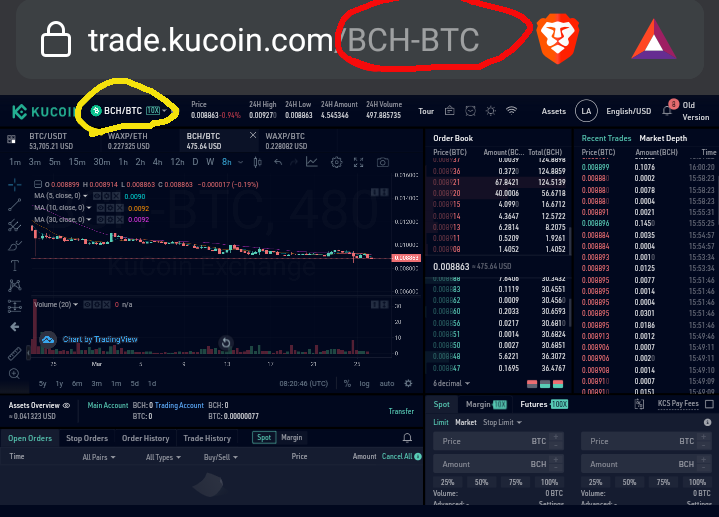
If you want, you can also search the pair that you want, just search it on the pair options (Yellow circle). 4. Once you setup those things, all you need to do is to **Trade** it so you can exchange your BTC into WAX. On the lower half of your screen you will see this.
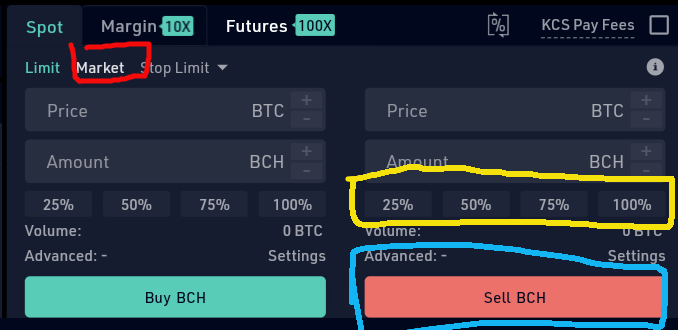
Click the **Market** (Red box on the left) so you can change it instantly then choose if you will exchange your BCH (or other coin) the 100%. Then click **Sell BCH.** 5. Once done, you need to setup your pair into WAX/BTC and **repeat the process.** https://trade.kucoin.com/WAX-BTC
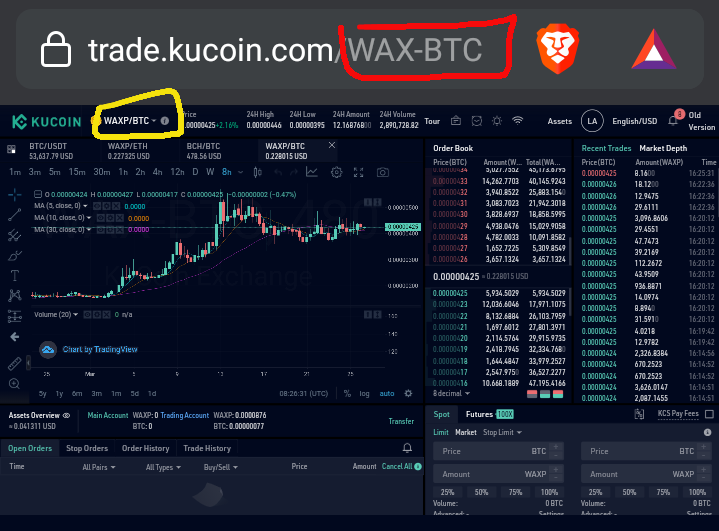
6. Go to the lower half corner of your screen again and **Buy WAX.**
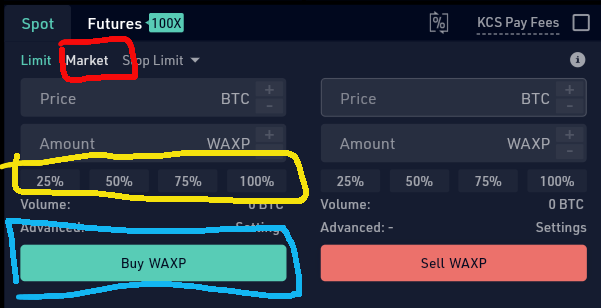
Don't forget to click the market so you can exchange it instantly. 7. Go to your account again. https://m.kucoin.com This time, you already have a WAX. All you need to do is to **Transfer** it from your **Trading account** to your **Main account** so you can withdraw it.
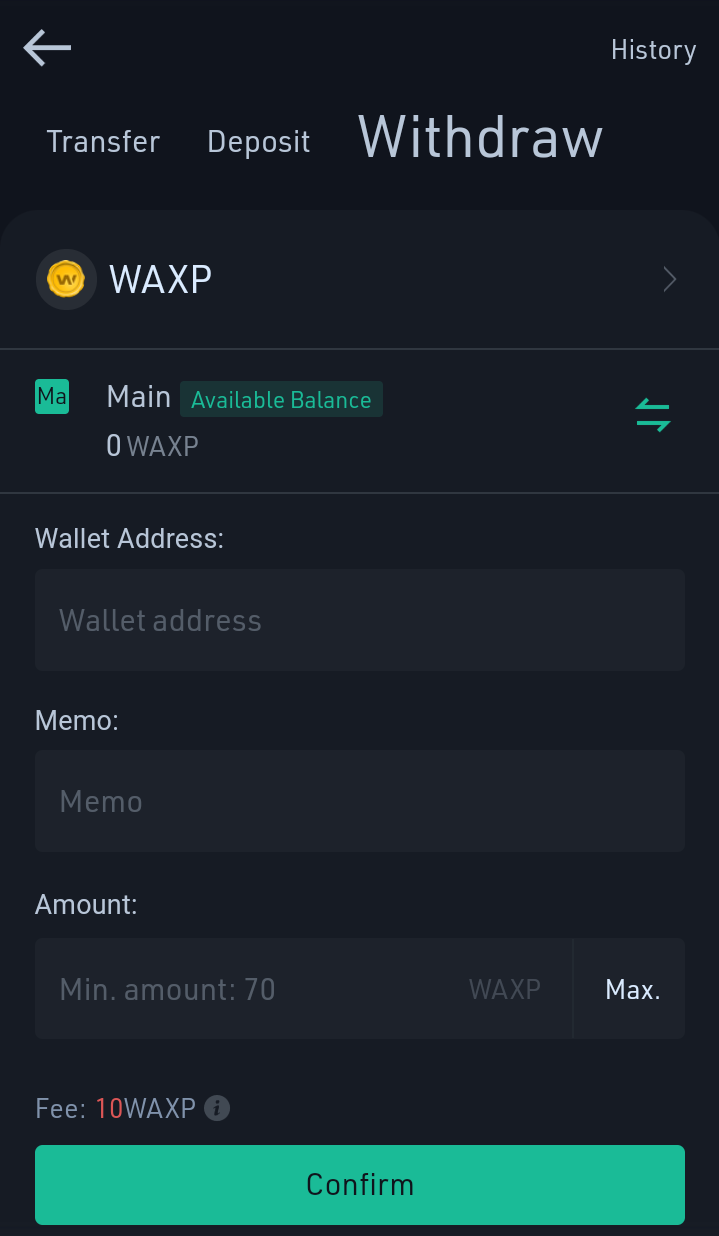
8. In withdrawing your account, you only need to click the **Withdraw** tab. You only need to provide your wallet address then put the amount that you want to withdraw. Remember that you need to pay 10 WAX for your transaction fee. It is better if you will buy more WAX as more as you can! **CLOSING THOUGHTS** This time, you can start your journey as a NFT artist by creating your own NFT and buy more RAM so you can make a lot of your master piece. As my review, it's good to use Kucoin in buying WAX especially you don't need any bank or credit card if you want to buy it. On the other hand, I can say that 10 WAX fee is quite expensive than my expectation. **EDITED and REPUBLISHED:** April 30, 2021




2 comments
It is not so hard to buy on the Kucoin exchange and the process is straightforward. A nice guide!
Thank you!