 @IgorBelykh
more from that month
@IgorBelykh
more from that month
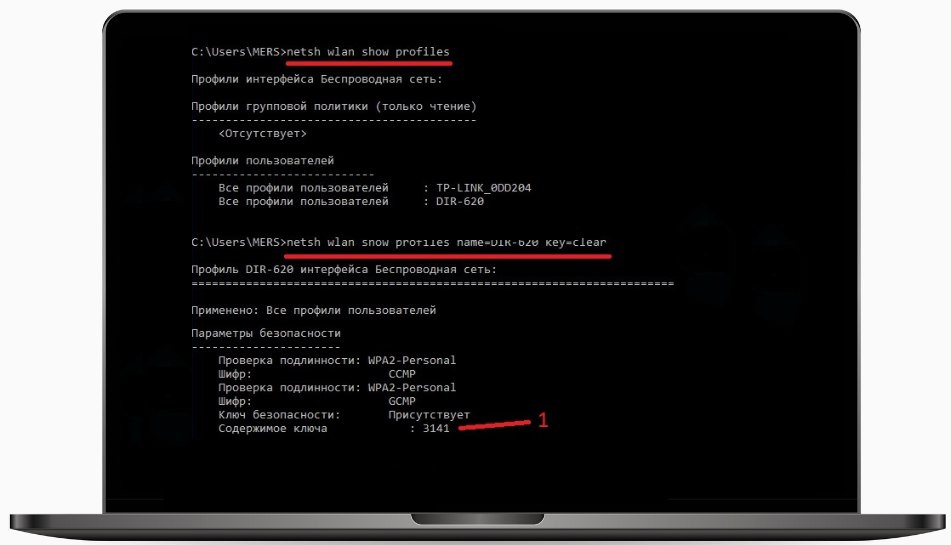
How to find out the password from the Wi-Fi network to which the computer was connected earlier If your computer works on a different network, but you need to find out the password from the network it worked on before, there is a life hack. This can be easily done using the command line. Without any applications and programs. How to do it: 1. To start the command line, enter the query "Command line" in the Windows search bar. In the search results, right-click on "Command Prompt" and select "Run as administrator". 2. In the "Command line" that opens, enter the command: netsh wlan show profiles and press "Enter". 3. The system will display information about all Wi-Fi networks to which it has previously connected. You need to find the SSID (name) of the required network. 4. Now we enter a new command, substituting your information into it. It might look like this: netsh wlan show profile name=BugNotFeature key=clear 5. Replace "BugNotFeature" with the name of your Wi-Fi network. In the issued information, we need the "Key Content" field. This is the correct password. © CryptoGuru
No comments yet