 @BitcoinBaby
more from that month
@BitcoinBaby
more from that month
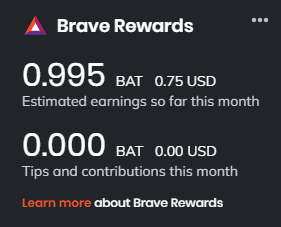
How to get more BAT out of Brave Forgive me, this post is technically not related to "crypto trading", but it is about how to better profit from crypto through the Brave browser: 1) On a new tab, click on the Brave symbol near the search bar. Click on "Rewards Settings". On Ads, click on "Ads Settings" (it is a button to the right). Set "Maximum number of ads displayed" to "5 ads per hour". 2) This one is not consistent. But sometimes it seems that if I do not touch my computer for around 90 seconds after receiving a pop-up ad, it is more likely for Brave to give me 0.025 BAT for it instead of 0.01. 3) Open a new tab. If you refresh the page 4 times, usually you will see an ad on the new tab page. You will be given 0.01 BAT for this ad. You can usually do this 4 times in a row (for a total of 16 refreshes and 0.04 BAT) before there is a "cool-down" period of various lengths of time (sometimes 1 hour; sometimes 8 hours). 4) When you step away from your computer, leave a Brave tab open. As soon as you come back, there is a good chance that you will immediately be given a pop-up ad, and you will be able to complete step 3. 5. Make sure to set the auto contribute in off. Otherwise a part of what you get goes to affiliate sites. Disclaimer: I have not been able to test all of them but I tried and saw my monthly BAT go up so it could not hurt to share these tips #CryptoTrading
5 comments
Now the main question is.. Is it’s really worth your time for such a small return?
Well it's more than faucets pay and some don't take time....like I did not know i could up the adds
👍👍👍👍
Hmm, yeah I have the feeling that number 4 is totally true; if I stay away for a few minutes and come back, most of the time one pops up. - For the others, especially with refresh I will give it a try, thanks for that.
I tried the refresh and it worked several times so and indeed noticed the #4 as well so it was worth a share