 @AyaMedel
more from that month
@AyaMedel
more from that month
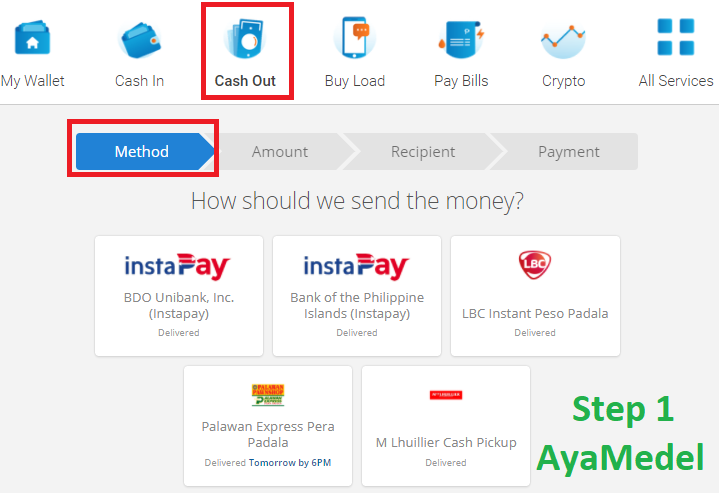
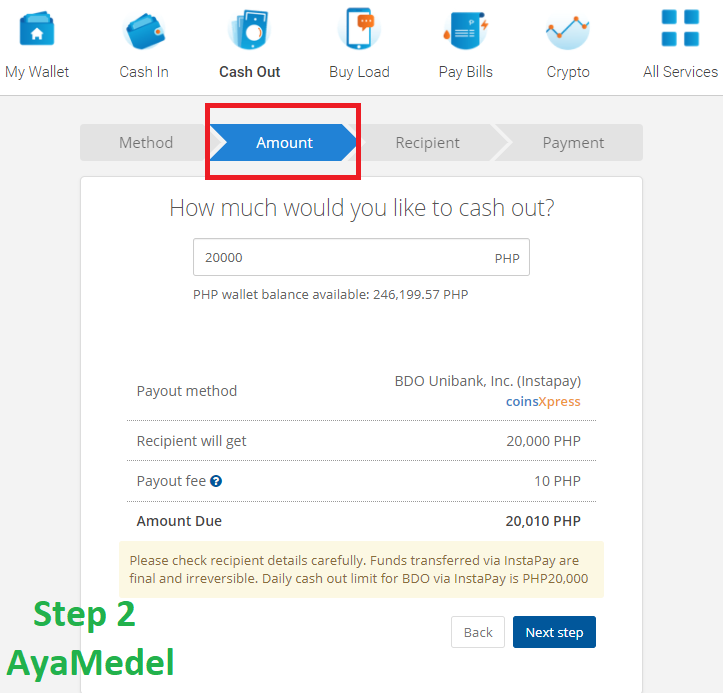
🤓TUTORIAL on how to Cashout at Coins.ph🤓 Now that you know how to create a Coins.ph account: https://noise.cash/post/lz5m6nm2 And you know already how to cash in: https://noise.cash/post/12vn2mkz I will try to give some simple steps on how to cash out. Here are 4 simple steps how to do it: STEP 1 👉Open you Coins.ph account using your phone/pc/laptop. Click on the "Cash Out" and select one option how or where you want to send the money. - Buksan ang inyong Coins.ph account gamit ang inyong phone/pc/laptop. I-click po ang "Cash Out" at pumili ng paraan paano at saan ipapadala ang pera. STEP 2 👉Once you have selected, you need to enter how much you wanted to send. I choose BDO Unibank and I entered 20,000 pesos since it is the maximum I can send. There are limits depending on the receiving bank or institution. - Kapag nakapili na, kelangan ilagay kung magkano ang isesend nyo. Pinili ko ang BDO Unibank at nilagay ko ang 20,000 pesos kasi un ang maximum na pede maisend. May mga limits depende sa bank or institution. STEP 3 and 4 👉Just follow and fill up the necessary details like receiver name, account number and phone number. - I-follow lang at punan ang mga kinakailangan na detalye gaya ng pangalan ng tatanggap, number ng account at numero ng inyong phone. Yun po, once naka successful cash out kayo, matatanggap nyo na po ung pera depende sa paraan na pinili nyo. 😊 For questions po, comment down below and I will try to answer po 😊
No comments yet